
Implementation of character based convolutional neural network

Overview

Character Based CNN

MIT contributions welcome Twitter Stars

This repo contains a PyTorch implementation of a character-level convolutional neural network for text classification.

The model architecture comes from this paper: https://arxiv.org/pdf/1509.01626.pdf

Network architecture

There are two variants: a large and a small. You can switch between the two by changing the configuration file.

This architecture has 6 convolutional layers:

Layer Large Feature Small Feature Kernel Pool
1 1024 256 7 3
2 1024 256 7 3
3 1024 256 3 N/A
4 1024 256 3 N/A
5 1024 256 3 N/A
6 1024 256 3 3

and 2 fully connected layers:

Layer Output Units Large Output Units Small
7 2048 1024
8 2048 1024
9 Depends on the problem Depends on the problem

Video tutorial

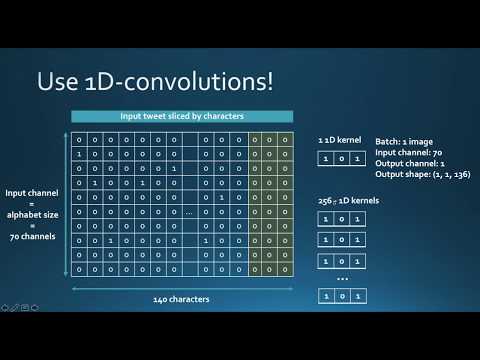
If you're interested in how character CNN work as well as in the demo of this project you can check my youtube video tutorial.
Why you should care about character level CNNs

They have very nice properties:

  • They are quite powerful in text classification (see paper's benchmark) even though they don't have any notion of semantics
  • You don't need to apply any text preprocessing (tokenization, lemmatization, stemming ...) while using them
  • They handle misspelled words and OOV (out-of-vocabulary) tokens
  • They are faster to train compared to recurrent neural networks
  • They are lightweight since they don't require storing a large word embedding matrix. Hence, you can deploy them in production easily

Training a sentiment classifier on french customer reviews

I have tested this model on a set of french labeled customer reviews (of over 3 millions rows). I reported the metrics in TensorboardX.

I got the following results

F1 score Accuracy
train 0.965 0.9366
test 0.945 0.915

Training metrics

Dependencies

  • numpy
  • pandas
  • sklearn
  • PyTorch 0.4.1
  • tensorboardX
  • Tensorflow (to be able to run TensorboardX)

Structure of the code

At the root of the project, you will have:

  • train.py: used for training a model
  • predict.py: used for the testing and inference
  • config.json: a configuration file for storing model parameters (number of filters, neurons)
  • src: a folder that contains:
    • cnn_model.py: the actual CNN model (model initialization and forward method)
    • data_loader.py: the script responsible of passing the data to the training after processing it
    • utils.py: a set of utility functions for text preprocessing (url/hashtag/user_mention removal)

How to use the code

Training

The code currently works only on binary labels (0/1)

Launch train.py with the following arguments:

  • data_path: path of the data. Data should be in csv format with at least a column for text and a column for the label
  • validation_split: the ratio of validation data. default to 0.2
  • label_column: column name of the labels
  • text_column: column name of the texts
  • max_rows: the maximum number of rows to load from the dataset. (I mainly use this for testing to go faster)
  • chunksize: size of the chunks when loading the data using pandas. default to 500000
  • encoding: default to utf-8
  • steps: text preprocessing steps to include on the text like hashtag or url removal
  • group_labels: whether or not to group labels. Default to None.
  • use_sampler: whether or not to use a weighted sampler to overcome class imbalance
  • alphabet: default to abcdefghijklmnopqrstuvwxyz0123456789,;.!?:'"/\|_@#$%^&*~`+-=<>()[]{} (normally you should not modify it)
  • number_of_characters: default 70
  • extra_characters: additional characters that you'd add to the alphabet. For example uppercase letters or accented characters
  • max_length: the maximum length to fix for all the documents. default to 150 but should be adapted to your data
  • epochs: number of epochs
  • batch_size: batch size, default to 128.
  • optimizer: adam or sgd, default to sgd
  • learning_rate: default to 0.01
  • class_weights: whether or not to use class weights in the cross entropy loss
  • focal_loss: whether or not to use the focal loss
  • gamma: gamma parameter of the focal loss. default to 2
  • alpha: alpha parameter of the focal loss. default to 0.25
  • schedule: number of epochs by which the learning rate decreases by half (learning rate scheduling works only for sgd), default to 3. set it to 0 to disable it
  • patience: maximum number of epochs to wait without improvement of the validation loss, default to 3
  • early_stopping: to choose whether or not to early stop the training. default to 0. set to 1 to enable it.
  • checkpoint: to choose to save the model on disk or not. default to 1, set to 0 to disable model checkpoint
  • workers: number of workers in PyTorch DataLoader, default to 1
  • log_path: path of tensorboard log file
  • output: path of the folder where models are saved
  • model_name: prefix name of saved models

Example usage:

python train.py --data_path=/data/tweets.csv --max_rows=200000

Plotting results to TensorboardX

Run this command at the root of the project:

tensorboard --logdir=./logs/ --port=6006

Then go to: http://localhost:6006 (or whatever host you're using)

Prediction

Launch predict.py with the following arguments:

  • model: path of the pre-trained model
  • text: input text
  • steps: list of preprocessing steps, default to lower
  • alphabet: default to 'abcdefghijklmnopqrstuvwxyz0123456789-,;.!?:'"\/|_@#$%^&*~`+-=<>()[]{}\n'
  • number_of_characters: default to 70
  • extra_characters: additional characters that you'd add to the alphabet. For example uppercase letters or accented characters
  • max_length: the maximum length to fix for all the documents. default to 150 but should be adapted to your data

Example usage:

python predict.py ./models/pretrained_model.pth --text="I love pizza !" --max_length=150

Download pretrained models

  • Sentiment analysis model on French customer reviews (3M documents): download link

    When using it:

    • set max_length to 300
    • use extra_characters="éàèùâêîôûçëïü" (accented letters)

Contributions - PR are welcome:

Here's a non-exhaustive list of potential future features to add:

  • Adapt the loss for multi-class classification
  • Log training and validation metrics for each epoch to a text file
  • Provide notebook tutorials

License

This project is licensed under the MIT License

Comments
  • Model trained on GPU is unable to predict on CPU

    Model trained on GPU is unable to predict on CPU

    I used some GPUs on the server to speed up training. But after downloading the trained model file to my PC (no GPU equipped) and run the predict.py script. It gives an error message related to cuda_is_available() , seems that the model trained on a GPU cannot predict on only-CPU machines? Is this an expected behavior? If not, any help will be appreciated! Thanks a lot!

    Error Message:

    (ml) C:\Users\lzy71\MyProject\character-based-cnn>python predict.py --model=./model/testmodel.pth --text="I love the pizza" > msg.txt
    C:\Users\lzy71\Anaconda3\envs\ml\lib\site-packages\torch\serialization.py:454: SourceChangeWarning: source code of class 'torch.nn.modules.container.ModuleList' has changed. you can retrieve the original source code by accessing the object's source attribute or set `torch.nn.Module.dump_patches = True` and use the patch tool to revert the changes.
      warnings.warn(msg, SourceChangeWarning)
    C:\Users\lzy71\Anaconda3\envs\ml\lib\site-packages\torch\serialization.py:454: SourceChangeWarning: source code of class 'torch.nn.modules.container.Sequential' has changed. you can retrieve the original source code by accessing the object's source attribute or set `torch.nn.Module.dump_patches = True` and use the patch tool to revert the changes.
      warnings.warn(msg, SourceChangeWarning)
    C:\Users\lzy71\Anaconda3\envs\ml\lib\site-packages\torch\serialization.py:454: SourceChangeWarning: source code of class 'torch.nn.modules.conv.Conv1d' has changed. you can retrieve the original source code by accessing the object's source attribute or set `torch.nn.Module.dump_patches = True` and use the patch tool to revert the changes.
      warnings.warn(msg, SourceChangeWarning)
    Traceback (most recent call last):
      File "predict.py", line 39, in <module>
        prediction = predict(args)
      File "predict.py", line 10, in predict
        model = torch.load(args.model)
      File "C:\Users\lzy71\Anaconda3\envs\ml\lib\site-packages\torch\serialization.py", line 387, in load
        return _load(f, map_location, pickle_module, **pickle_load_args)
      File "C:\Users\lzy71\Anaconda3\envs\ml\lib\site-packages\torch\serialization.py", line 574, in _load
        result = unpickler.load()
      File "C:\Users\lzy71\Anaconda3\envs\ml\lib\site-packages\torch\serialization.py", line 537, in persistent_load
        deserialized_objects[root_key] = restore_location(obj, location)
      File "C:\Users\lzy71\Anaconda3\envs\ml\lib\site-packages\torch\serialization.py", line 119, in default_restore_location
        result = fn(storage, location)
      File "C:\Users\lzy71\Anaconda3\envs\ml\lib\site-packages\torch\serialization.py", line 95, in _cuda_deserialize
        device = validate_cuda_device(location)
      File "C:\Users\lzy71\Anaconda3\envs\ml\lib\site-packages\torch\serialization.py", line 79, in validate_cuda_device
        raise RuntimeError('Attempting to deserialize object on a CUDA '
    RuntimeError: Attempting to deserialize object on a CUDA device but torch.cuda.is_available() is False. If you are running on a CPU-only machine, please use torch.load with map_location='cpu' to map your storages to the CPU.
    
    opened by desmondlzy 2
  • AttributeError: 'tuple' object has no attribute 'size'

    AttributeError: 'tuple' object has no attribute 'size'

    train is always falling even with such kind of file: """ SentimentText;Sentiment aaa;1 bbb;2 ccc;3 """ Params of running -- just data_path Packages installed: numpy==1.16.1 pandas==0.24.1 Pillow==5.4.1 protobuf==3.6.1 python-dateutil==2.8.0 pytz==2018.9 scikit-learn==0.20.2 scipy==1.2.1 six==1.12.0 sklearn==0.0 tensorboardX==1.6 torch==1.0.1.post2 torchvision==0.2.1 tqdm==4.31.1

    opened by 40min 2
  • Predict error

    Predict error

    Raw output on console.

    python3 predict.py --model=./models/model__epoch_9_maxlen_150_lr_0.00125_loss_0.6931_acc_0.5005_f1_0.4944.pth --text="thisisatest_______" --alphabet=abcdefghijklmnopqrstuvwxyzABCDEFGHIJKLMNOPQRSTUVWXYZ0123456789_ Traceback (most recent call last): File "/Users/ttran/Desktop/development/python/character-based-cnn/predict.py", line 48, in <module> prediction = predict(args) File "/Users/ttran/Desktop/development/python/character-based-cnn/predict.py", line 11, in predict model = CharacterLevelCNN(args, args.number_of_classes) File "/Users/ttran/Desktop/development/python/character-based-cnn/src/model.py", line 12, in __init__ self.dropout_input = nn.Dropout2d(args.dropout_input) AttributeError: 'Namespace' object has no attribute 'dropout_input'

    What is --number_of_classes argument? I don't have that set in the run command.

    opened by thyngontran 1
  • Data types of columns in the data (CSV)

    Data types of columns in the data (CSV)

    Can you describe how to encode the labels? I get only 1 class label, see output below. They are set as integers (either 0 or 1)

    See output below when I train my model.

    data loaded successfully with 9826 rows and 1 labels Distribution of the classes Counter({0: 9826})

    opened by rkmatousek 1
  • RuntimeError: expected scalar type Long but found Double

    RuntimeError: expected scalar type Long but found Double

    I'm using a dataset I scraped but same structure comments with rating 0-10, using the same commands as provided except group_labels=0

    Traceback (most recent call last):
      File "train.py", line 415, in <module>
        run(args)
      File "train.py", line 297, in run
        training_loss, training_accuracy, train_f1 = train(model,
      File "train.py", line 50, in train
        loss = criterion(predictions, labels)
      File "C:\ProgramData\Anaconda3\lib\site-packages\torch\nn\modules\module.py", line 532, in __call__
        result = self.forward(*input, **kwargs)
      File "C:\ProgramData\Anaconda3\lib\site-packages\torch\nn\modules\loss.py", line 915, in forward
        return F.cross_entropy(input, target, weight=self.weight,
      File "C:\ProgramData\Anaconda3\lib\site-packages\torch\nn\functional.py", line 2021, in cross_entropy
        return nll_loss(log_softmax(input, 1), target, weight, None, ignore_index, None, reduction)
      File "C:\ProgramData\Anaconda3\lib\site-packages\torch\nn\functional.py", line 1838, in nll_loss
        ret = torch._C._nn.nll_loss(input, target, weight, _Reduction.get_enum(reduction), ignore_index)
    RuntimeError: expected scalar type Long but found Double
    
    opened by RyanMills19 0
  • Data loader class issues while mapping

    Data loader class issues while mapping

    I am using my dataset having three labels 0,1,2. While loading the dataset in data_loader class it generates key error. I think the issue is of mapping please guide.

    Traceback (most recent call last):
      File "train.py", line 415, in <module>
        run(args)
      File "train.py", line 219, in run
        texts, labels, number_of_classes, sample_weights = load_data(args)
      File "/content/character-based-cnn/src/data_loader.py", line 55, in load_data
        map(lambda l: {1: 0, 2: 0, 4: 1, 5: 1, 7: 2, 8: 2}[l], labels))
      File "/content/character-based-cnn/src/data_loader.py", line 55, in <lambda>
        map(lambda l: {1: 0, 2: 0, 4: 1, 5: 1, 7: 2, 8: 2}[l], labels))
    KeyError: '1'
    
    opened by bilalbaloch1 1
  • ImportError: No module named cnn_model

    ImportError: No module named cnn_model

    Ubuntu 18.04.3 LTS Python 3.6.9

    Command: python3 predict.py --model "./models/pretrained_model.pth" --text "I love pizza !" --max_length 150

    Output: Traceback (most recent call last): File "predict.py", line 47, in prediction = predict(args) File "predict.py", line 14, in predict state = torch.load(args.model) File "/home/reda/.local/lib/python3.6/site-packages/torch/serialization.py", line 426, in load return _load(f, map_location, pickle_module, **pickle_load_args) File "/home/reda/.local/lib/python3.6/site-packages/torch/serialization.py", line 613, in _load result = unpickler.load() ModuleNotFoundError: No module named 'src.cnn_model'

    opened by redaaa99 0
Releases(model_en_tp_amazon)
Owner
Ahmed BESBES
Data Scientist, Deep learning practitioner, Blogger, Obsessed with neat design and automation
Ahmed BESBES
Rank 3 : Source code for OPPO 6G Data Generation Challenge

OPPO 6G Data Generation with an E2E Framework Homepage of OPPO 6G Data Generation Challenge Datasets H1_32T4R.mat H2_32T4R.mat Please put the original

Sen Pei 97 Jan 07, 2023
Datasets, Transforms and Models specific to Computer Vision

vision Datasets, Transforms and Models specific to Computer Vision Installation First install the nightly version of OneFlow python3 -m pip install on

OneFlow 68 Dec 07, 2022
Learning from Synthetic Humans, CVPR 2017

Learning from Synthetic Humans (SURREAL) Gül Varol, Javier Romero, Xavier Martin, Naureen Mahmood, Michael J. Black, Ivan Laptev and Cordelia Schmid,

Gul Varol 538 Dec 18, 2022
An example of Scatterbrain implementation (combining local attention and Performer)

An example of Scatterbrain implementation (combining local attention and Performer)

HazyResearch 97 Jan 02, 2023
PyTorch implementation of neural style transfer algorithm

neural-style-pt This is a PyTorch implementation of the paper A Neural Algorithm of Artistic Style by Leon A. Gatys, Alexander S. Ecker, and Matthias

770 Jan 02, 2023
FocusFace: Multi-task Contrastive Learning for Masked Face Recognition

FocusFace This is the official repository of "FocusFace: Multi-task Contrastive Learning for Masked Face Recognition" accepted at IEEE International C

Pedro Neto 21 Nov 17, 2022
Causal-BALD: Deep Bayesian Active Learning of Outcomes to Infer Treatment-Effects from Observational Data.

causal-bald | Abstract | Installation | Example | Citation | Reproducing Results DUE An implementation of the methods presented in Causal-BALD: Deep B

OATML 13 Oct 07, 2022
10th place solution for Google Smartphone Decimeter Challenge at kaggle.

Under refactoring 10th place solution for Google Smartphone Decimeter Challenge at kaggle. Google Smartphone Decimeter Challenge Global Navigation Sat

12 Oct 25, 2022
Source code for CVPR 2021 paper "Riggable 3D Face Reconstruction via In-Network Optimization"

Riggable 3D Face Reconstruction via In-Network Optimization Source code for CVPR 2021 paper "Riggable 3D Face Reconstruction via In-Network Optimizati

130 Jan 02, 2023
GeoMol: Torsional Geometric Generation of Molecular 3D Conformer Ensembles

GeoMol: Torsional Geometric Generation of Molecular 3D Conformer Ensembles This repository contains a method to generate 3D conformer ensembles direct

127 Dec 20, 2022
Using this codebase as a tool for my own research. Making some modifications to the original repo for my own purposes.

For SwapNet Create a list.txt file containing all the images to process. This can be done with the GNU find command: find path/to/input/folder -name '

Andrew Jong 2 Nov 10, 2021
Lux AI environment interface for RLlib multi-agents

Lux AI interface to RLlib MultiAgentsEnv For Lux AI Season 1 Kaggle competition. LuxAI repo RLlib-multiagents docs Kaggle environments repo Please let

Jaime 12 Nov 07, 2022
Unsupervised Foreground Extraction via Deep Region Competition

Unsupervised Foreground Extraction via Deep Region Competition [Paper] [Code] The official code repository for NeurIPS 2021 paper "Unsupervised Foregr

28 Nov 06, 2022
This repository contains the code for "Self-Diagnosis and Self-Debiasing: A Proposal for Reducing Corpus-Based Bias in NLP".

Self-Diagnosis and Self-Debiasing This repository contains the source code for Self-Diagnosis and Self-Debiasing: A Proposal for Reducing Corpus-Based

Timo Schick 62 Dec 12, 2022
Prometheus Exporter for data scraped from datenplattform.darmstadt.de

darmstadt-opendata-exporter Scrapes data from https://datenplattform.darmstadt.de and presents it in the Prometheus Exposition format. Pull requests w

Martin Weinelt 2 Apr 12, 2022
This is an early in-development version of training CLIP models with hivemind.

A transformer that does not hog your GPU memory This is an early in-development codebase: if you want a stable and documented hivemind codebase, look

<a href=[email protected]"> 4 Nov 06, 2022
code associated with ACL 2021 DExperts paper

DExperts Hi! This repository contains code for the paper DExperts: Decoding-Time Controlled Text Generation with Experts and Anti-Experts to appear at

Alisa Liu 68 Dec 15, 2022
Minecraft Hack Detection With Python

Minecraft Hack Detection An attempt to try and use crowd sourced replays to find

Kuleen Sasse 3 Mar 26, 2022
U-Net: Convolutional Networks for Biomedical Image Segmentation

Deep Learning Tutorial for Kaggle Ultrasound Nerve Segmentation competition, using Keras This tutorial shows how to use Keras library to build deep ne

Yihui He 401 Nov 21, 2022
Conceptual 12M is a dataset containing (image-URL, caption) pairs collected for vision-and-language pre-training.

Conceptual 12M We introduce the Conceptual 12M (CC12M), a dataset with ~12 million image-text pairs meant to be used for vision-and-language pre-train

Google Research Datasets 226 Dec 07, 2022