
Redial is a simple shell application that manages your SSH sessions on Unix terminal.

Overview

redial

Build Status License Version

redial is a simple shell application that manages your SSH sessions on Unix terminal.

redial

What's New

0.7 (19.12.2019)

  • Basic support for adding ssh keys to connections
  • Dynamic, Local and Remote port forwarding settings (only one of each can be defined for now)
  • UI state is restored at startup. Redial now remembers last selected connection and folder expanded/collapsed states

Installation

Requirements

Stable Version

Installing via pip

We recommend installing redial via pip:

pip3 install redial

Latest Version

Installing from Git

You can install the latest version from Git:

pip3 install git+https://github.com/taypo/redial.git

Docker

Dockerfile is provided.

Build Dockerfile:

docker build -t redial .

Run redial in Docker Container

docker run -it --rm redial:latest redial

Features

  • Manage your connections in folders/groups
  • Open a file manager to your remote host (Midnight Commander should be installed)
  • Edit/Move/Delete connection
  • Copy SSH Key to remote host

More features coming soon..

Connect to SSH Session (ENTER)

Press ENTER to connect a SSH session.
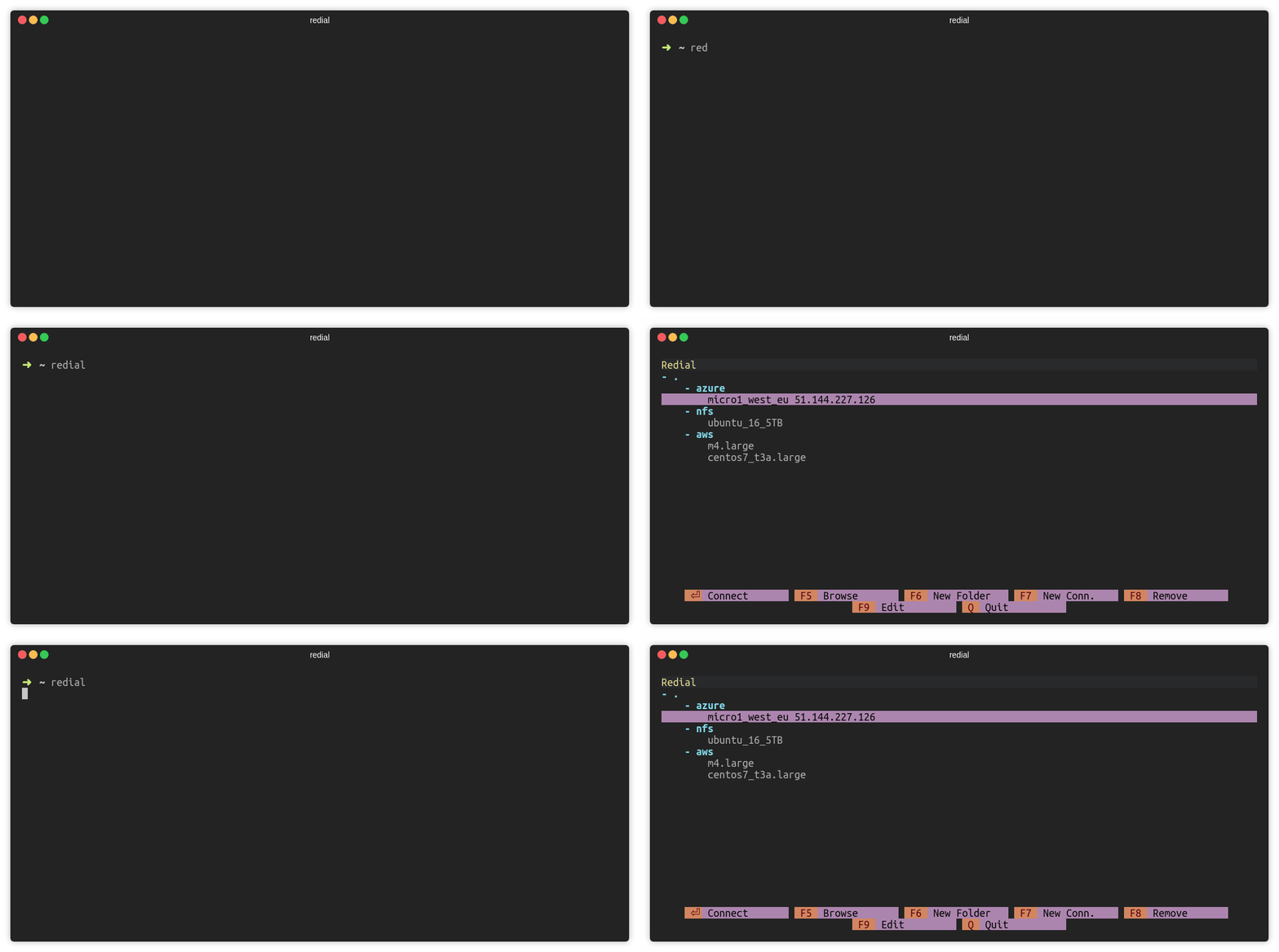
connect_gif

Add Folder (F6)

Press F6 or click F6 New Folder to add a folder. There must be at least one connection under the folder.
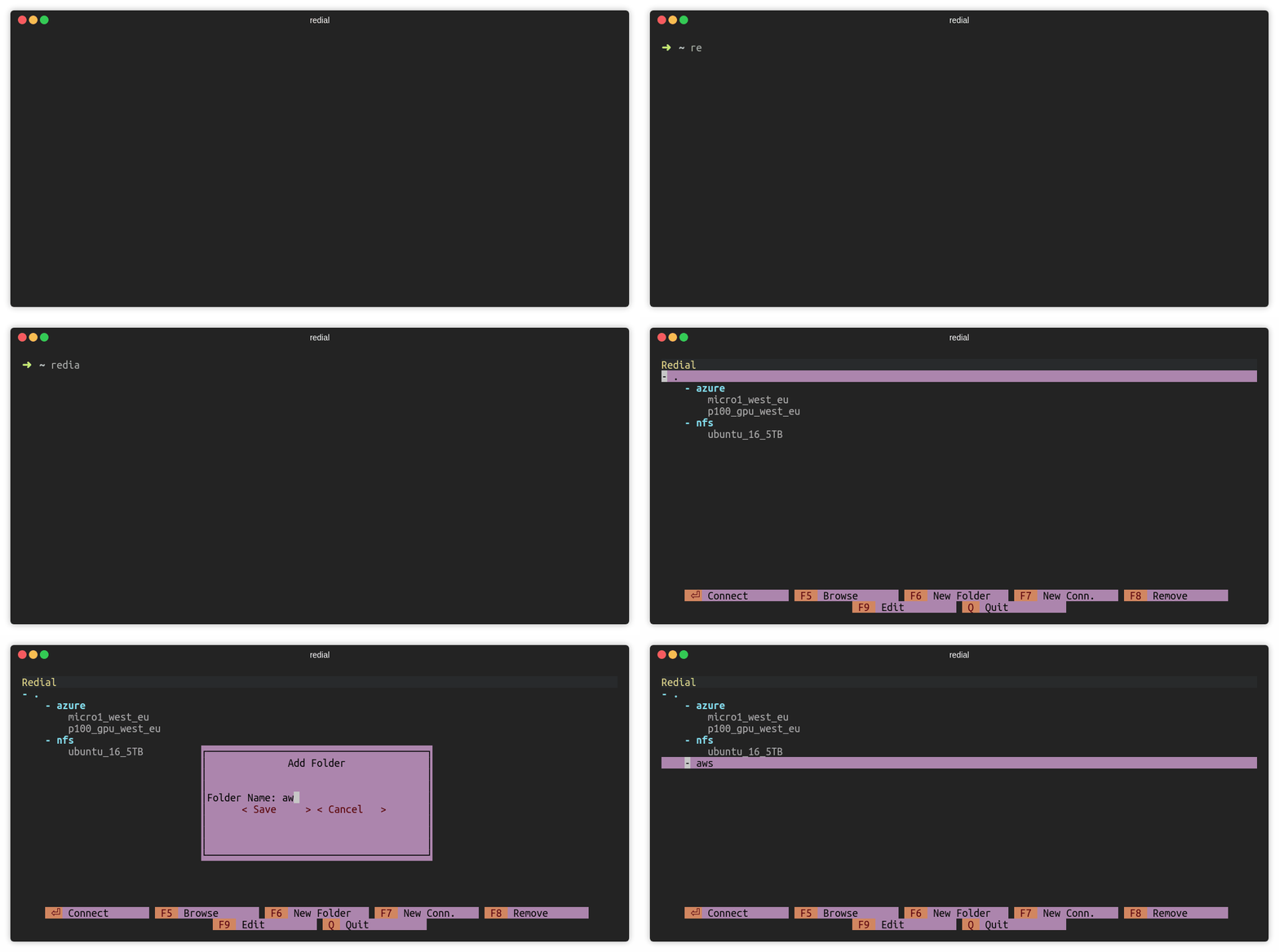
add_folder_gif

Add Connection (F7)

Press F7 or click F7 New Conn. to add a ssh connection.
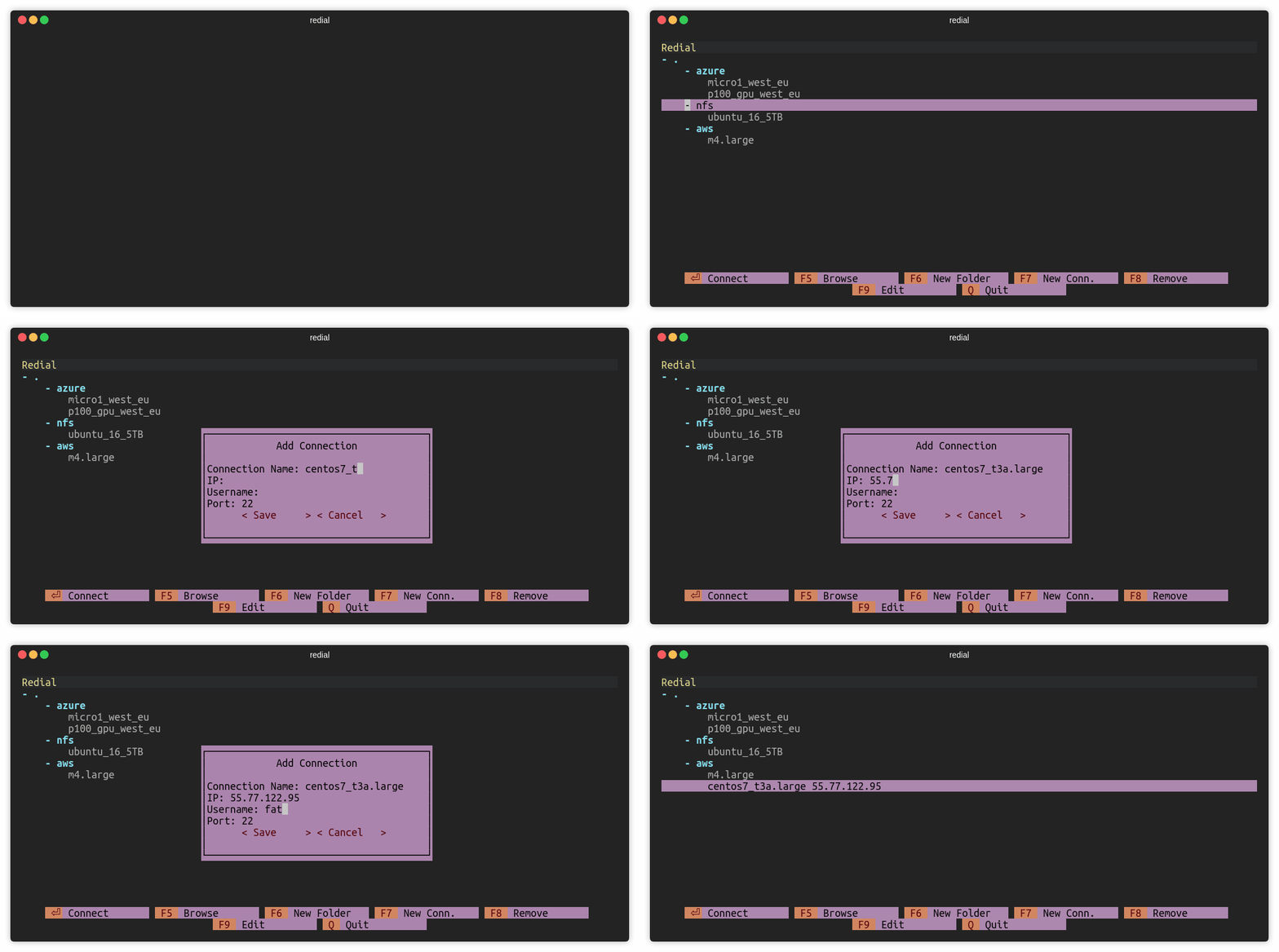
add_conn_gif

Browse over mc (F5)

Press F5 or click F5 Browse to open mc (Midnight Commander) session.
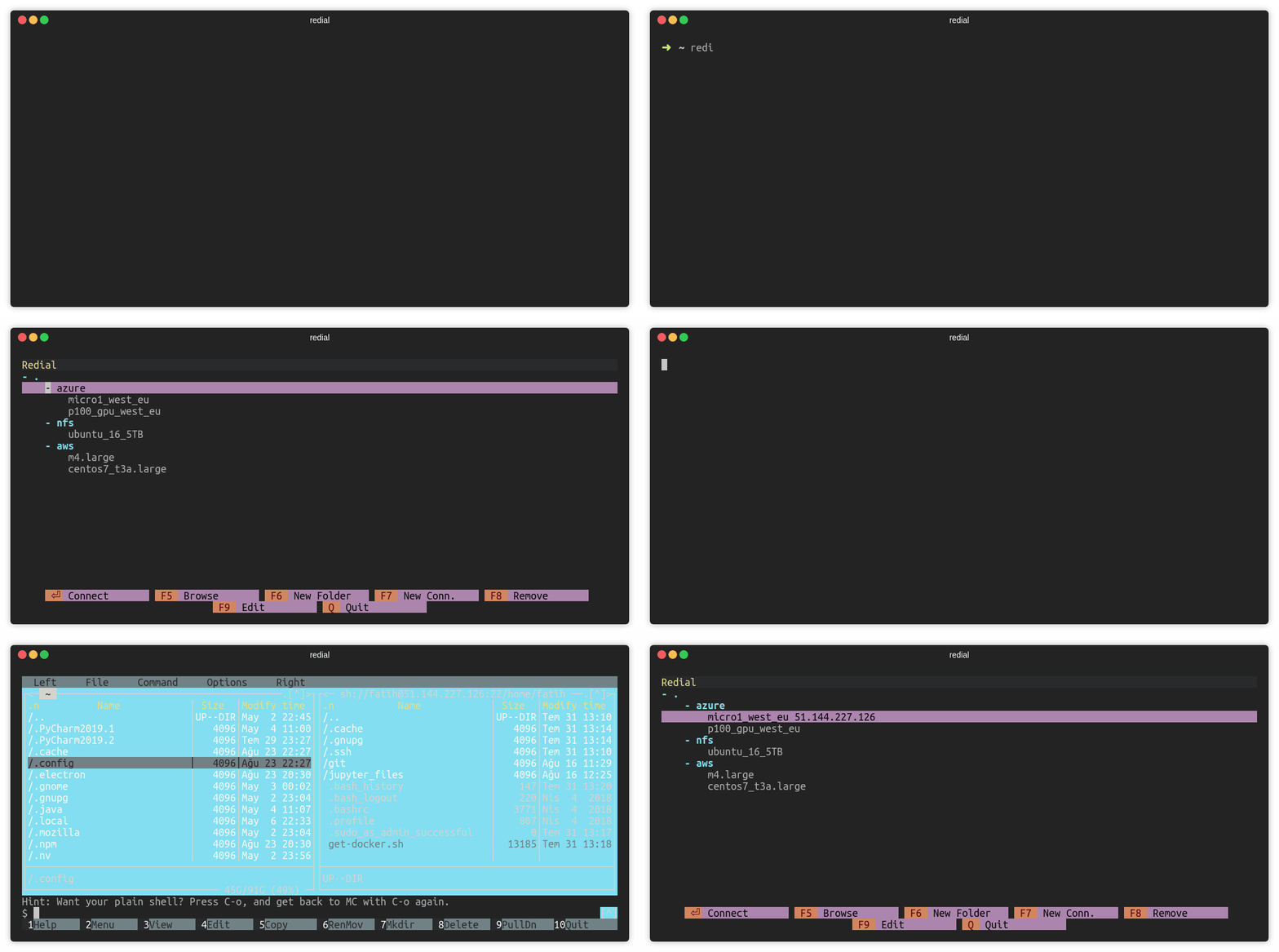
mc_gif

Remove Connection (F8)

Press F8 or click F8 Remove to remove a session.
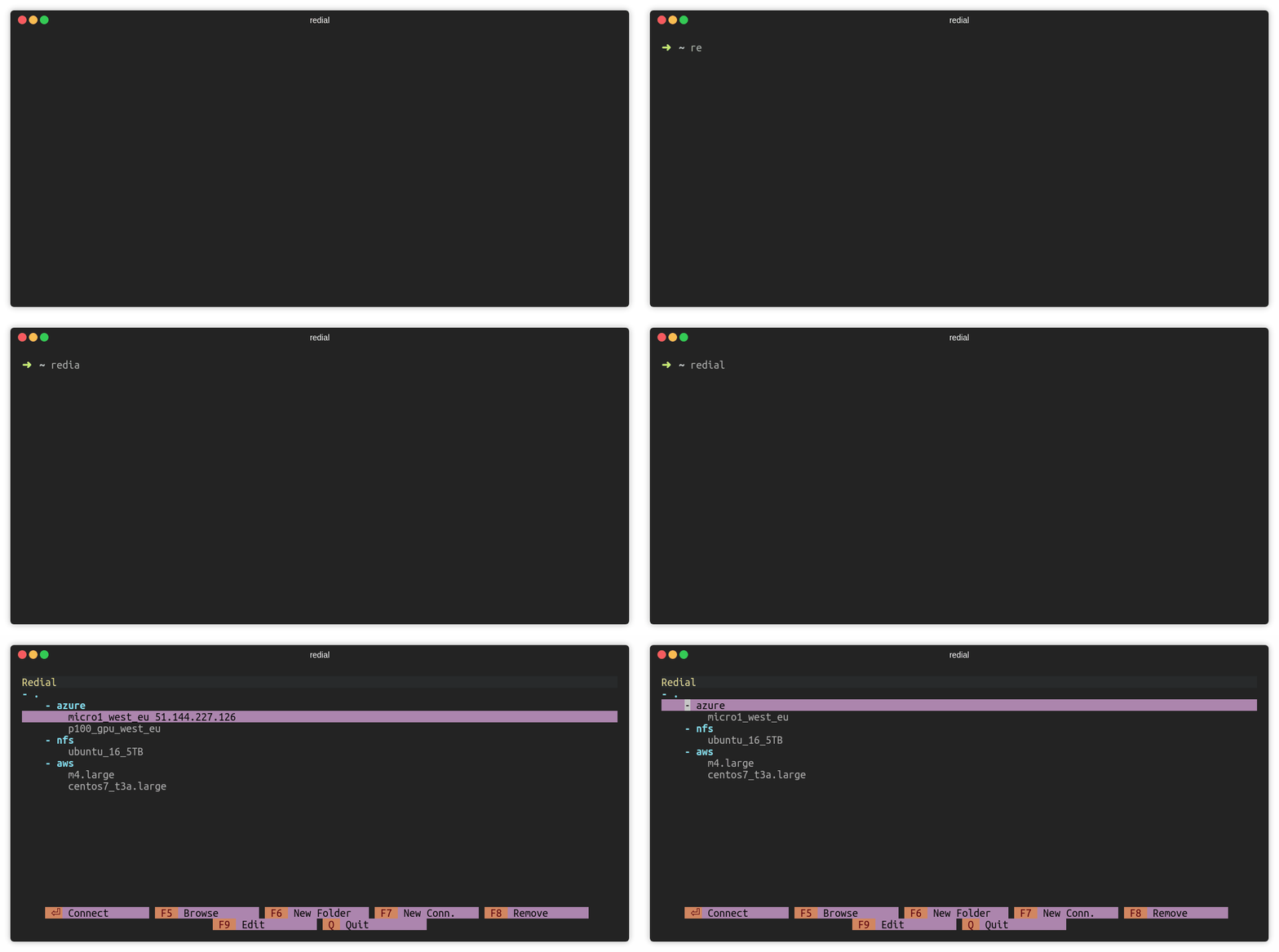
remove_gif

Edit Connection (F9)

Press F9 or click F9 Edit to edit a session.
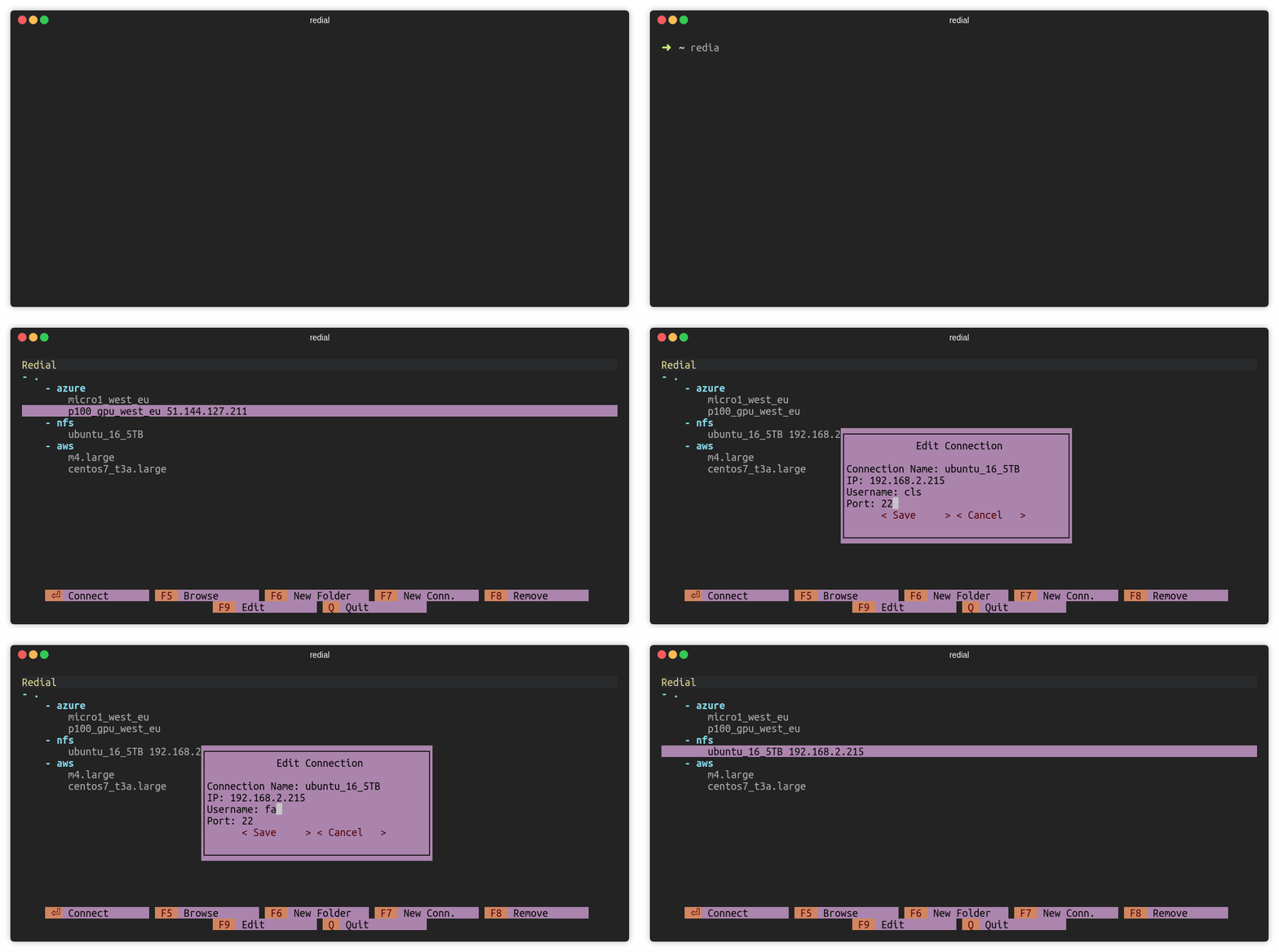
edit_gif

Move sessions and folders

Press CTRL and up/down keys to move session or folder. For macOS users: Use ALT and up/down keys.
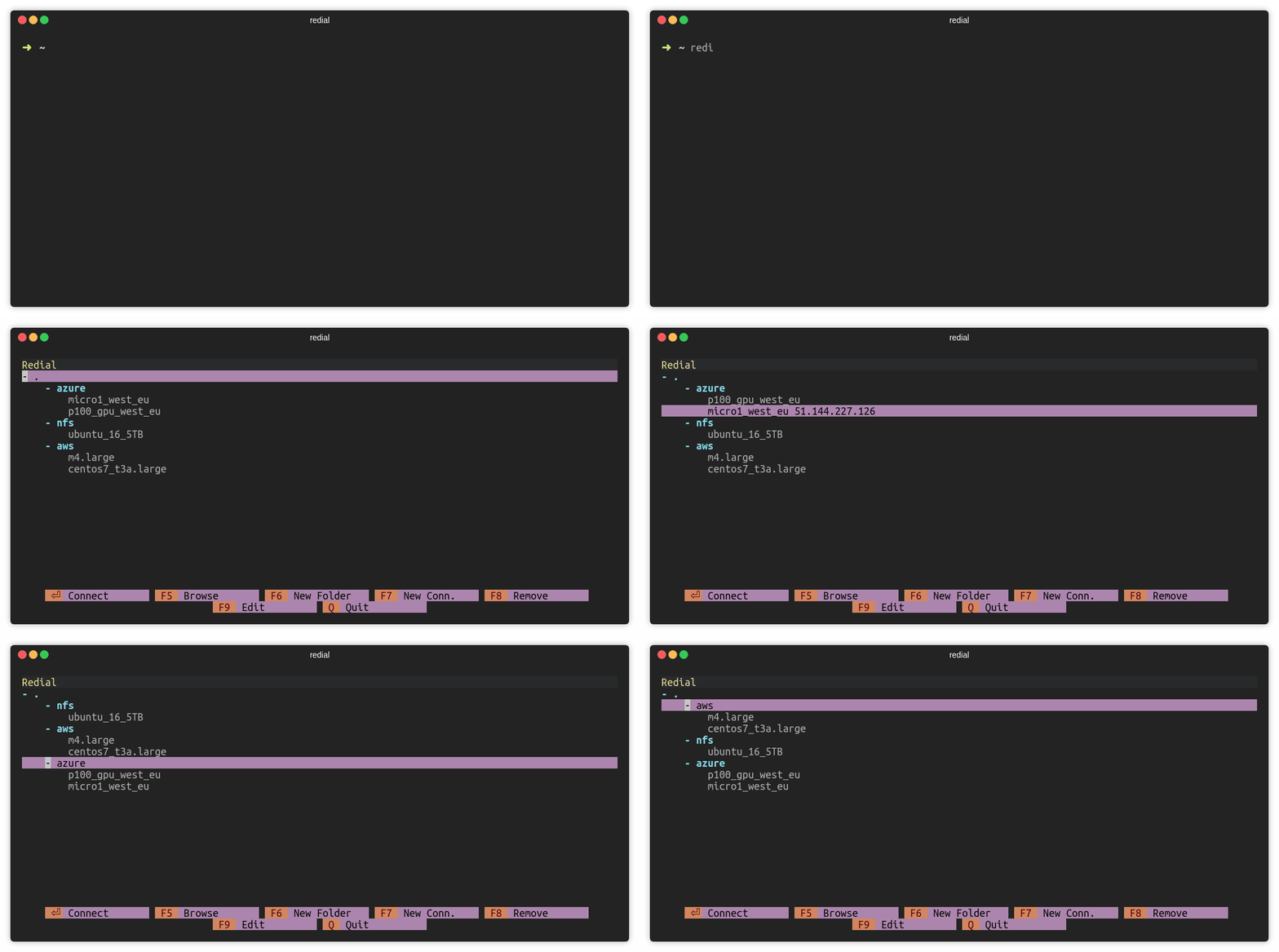
move_gif

Notes

Configuration file is stored in ~/.config/redial/sessions. File format is same as the SSH config file. Configuration file can be included in SSH config file with the following way (Make sure that ~/.ssh/config file exists):

sed -i -e '1iInclude ~/.config/redial/sessions' ~/.ssh/config

Platforms

  • Linux
  • macOS

Windows is currently not supported.

License

redial is licensed under the GNU General Public License v3.0.

Comments
  • NameError: name 'fcntl' is not defined When I run redial on windows 11

    NameError: name 'fcntl' is not defined When I run redial on windows 11

    Describe the bug PS C:\Users\realf> redial Traceback (most recent call last): File "c:\users\realf\appdata\local\programs\python\python38\lib\runpy.py", line 194, in _run_module_as_main return run_code(code, main_globals, None, File "c:\users\realf\appdata\local\programs\python\python38\lib\runpy.py", line 87, in run_code exec(code, run_globals) File "C:\Users\realf\AppData\Local\Programs\Python\Python38\Scripts\redial.exe_main.py", line 7, in File "c:\users\realf\appdata\local\programs\python\python38\lib\site-packages\redial_main.py", line 7, in main sys.exit(run()) File "c:\users\realf\appdata\local\programs\python\python38\lib\site-packages\redial\redial.py", line 153, in run app = RedialApplication() File "c:\users\realf\appdata\local\programs\python\python38\lib\site-packages\redial\redial.py", line 38, in init screen = urwid.raw_display.Screen() File "c:\users\realf\appdata\local\programs\python\python38\lib\site-packages\urwid\raw_display.py", line 92, in init fcntl.fcntl(self._resize_pipe_rd, fcntl.F_SETFL, os.O_NONBLOCK) NameError: name 'fcntl' is not defined PS C:\Users\realf> redial Traceback (most recent call last): File "c:\users\realf\appdata\local\programs\python\python38\lib\runpy.py", line 194, in _run_module_as_main return run_code(code, main_globals, None, File "c:\users\realf\appdata\local\programs\python\python38\lib\runpy.py", line 87, in run_code exec(code, run_globals) File "C:\Users\realf\AppData\Local\Programs\Python\Python38\Scripts\redial.exe_main.py", line 7, in File "c:\users\realf\appdata\local\programs\python\python38\lib\site-packages\redial_main.py", line 7, in main sys.exit(run()) File "c:\users\realf\appdata\local\programs\python\python38\lib\site-packages\redial\redial.py", line 153, in run app = RedialApplication() File "c:\users\realf\appdata\local\programs\python\python38\lib\site-packages\redial\redial.py", line 38, in init screen = urwid.raw_display.Screen() File "c:\users\realf\appdata\local\programs\python\python38\lib\site-packages\urwid\raw_display.py", line 92, in init fcntl.fcntl(self._resize_pipe_rd, fcntl.F_SETFL, os.O_NONBLOCK) NameError: name 'fcntl' is not defined

    To Reproduce Steps to reproduce the behavior:

    1. pip3 install redial
    2. run redial command in powershell

    Screenshots image

    Desktop (please complete the following information):

    • OS: Windows 11 latest version
    • python version: 3.8.10
    • redial version: 0.8
    • urwid version: 2.1.2
    opened by realWilliamChin 3
  • config standardı

    config standardı

    ilerde uygulamanın bazı konfigler tutması gerekirse kullanacağımız standart: https://specifications.freedesktop.org/basedir-spec/basedir-spec-latest.html

    default olarak ~/.config/redial dizini olacaktır.

    ilerde tutulabilecek konfigürasyonlara örnek:

    • son seçili bağlantının tekrar girince seçili gelmesi
    • eğer .ssh/config dosyasına bizim yazmamız sıkıntı yaratırsa kendi formatımızda ayrı tutabiliriz.

    bu madde todo'dan çok not gibi oldu. o yüzden issue olarak açıyorum.

    opened by taypo 2
  • Unable to find SSH Keys - WSL Ubuntu

    Unable to find SSH Keys - WSL Ubuntu

    Describe the bug Unable to locate SSH Keys

    To Reproduce SSH to a system that has a preconfigured SSH key pair using the standard id_rsa & id_rsa.pub OR Copy SSH key to server functionality

    Expected behavior SSH to a server using an SSH key with no credentials needed

    Screenshots Screenshot_1028

    Desktop (please complete the following information):

    • OS: WSL Ubuntu
    opened by AlistairHardy 1
  • Recording logs

    Recording logs

    I propose to implement a log of commands when we connect to ssh using asciinema

    Logs will be recorded in a separate directory accessible only to the superuser Administrators can watch what users do sequentially But as I understand it, logs of this kind will take up a lot of space, is it realistic to implement this?

    wontfix 
    opened by petqa 1
  • Arch linux bug with non-root user

    Arch linux bug with non-root user

    Good day! Cannot execute redial with non-root user

    Installed with pip3 install --user redial

    2019-10-03_15-44

    with sudo works fine, how can i debug this?

    Python 3.7.4 pip 19.0.3

    opened by petqa 1
  • IdentityFile support for SSH keys

    IdentityFile support for SSH keys

    Couldn't work out how to configure a remote with a key, added it manually in the config file as it claimed to be compatible with ssh config - however I can't connect to the remote host which is SSH key only.

    Is it possible to include this?

    enhancement 
    opened by danielloader 1
  • Bug fix and correction in 'setup.py'.

    Bug fix and correction in 'setup.py'.

    Bug fix and correction in 'setup.py'.

    Description

    In ssh sessions run with the 'os.system()' command, 'rk' differs according to the state of the last command in the session. If the last command executed or sent in session is 'CTRL C', it returns 'rk = 33280' instead of 'rk = 0'. This causes a logical error in the if block in redial.py to exit. The problem was fixed by changing the if block to continue at 'rk = 33280'.

    Motivation and Context

    Fixed bug in https://github.com/taypo/redial/issues/28. The enviroment in 'setup.py' has been changed to python3 due to default enviroments in some Linux distribution.

    How Has This Been Tested?

    Screenshots (if appropriate):

    Types of changes

    • [x] Bug fix (non-breaking change which fixes an issue)
    • [ ] New feature (non-breaking change which adds functionality)
    • [ ] Breaking change (fix or feature that would cause existing functionality to change)

    Checklist:

    • [x] My code follows the code style of this project.
    • [ ] My change requires a change to the documentation.
    • [ ] I have updated the documentation accordingly.
    • [x] I have read the CONTRIBUTING document.
    • [ ] I have added tests to cover my changes.
    • [ ] All new and existing tests passed.
    opened by Radar4000 0
  • **SSH key is copied successfully** message is shown even cancel button is pressed.

    **SSH key is copied successfully** message is shown even cancel button is pressed.

    Describe the bug

    SSH key is copied successfully message is shown even cancel button is pressed.

    To Reproduce Steps to reproduce the behavior:

    1. Open redial
    2. Press F3 on any session
    3. Press cancel
    4. Connect to session
    5. Exit from session
    6. SSH key is copied successfully is shown

    Expected behavior

    There should be no 6th step.

    bug 
    opened by fatihbaltaci 0
  • Feature/copy ssh key

    Feature/copy ssh key

    Description

    Motivation and Context

    How Has This Been Tested?

    Screenshots (if appropriate):

    Types of changes

    • [ ] Bug fix (non-breaking change which fixes an issue)
    • [ ] New feature (non-breaking change which adds functionality)
    • [ ] Breaking change (fix or feature that would cause existing functionality to change)

    Checklist:

    • [ ] My code follows the code style of this project.
    • [ ] My change requires a change to the documentation.
    • [ ] I have updated the documentation accordingly.
    • [ ] I have read the CONTRIBUTING document.
    • [ ] I have added tests to cover my changes.
    • [ ] All new and existing tests passed.
    opened by fatihbaltaci 0
  • Add (F7) gives error when saving with blank fields

    Add (F7) gives error when saving with blank fields

    Traceback (most recent call last):
      File "/home/fatih/.local/bin/redial", line 11, in <module>
        load_entry_point('redial', 'console_scripts', 'redial')()
      File "/home/fatih/Desktop/git/redial/src/redial/__main__.py", line 7, in main
        sys.exit(run())
      File "/home/fatih/Desktop/git/redial/src/redial/redial.py", line 206, in run
        State.config = Config()
      File "/home/fatih/Desktop/git/redial/src/redial/config.py", line 10, in __init__
        self.load_from_file()
      File "/home/fatih/Desktop/git/redial/src/redial/config.py", line 23, in load_from_file
        value = kv[1]
    IndexError: list index out of range
    
    
    opened by fatihbaltaci 0
  • ForwardAgent support

    ForwardAgent support

    Is your feature request related to a problem? Please describe. It would be nice if this application provided an easy way to manage ssh-agent forwarding as a config parameter. I have several distributed systems that I use redial to manage. Specifically for cloning private git repositories to those remote machines. Some of them I would like ssh-agent forwarding and some not.

    Describe the solution you'd like I would like a checkbox in the edit connection window that when checked will enable ssh-agent forwarding. Upon initiating the connection redial will verify that agent forwarding has worked properly, if not a warning will appear saying it has been disabled either by the client or the server.

    Describe alternatives you've considered

    • manually adding forwardAgent yes to ssh config file, but it seems redial manages its own config file in .config/redial/sessions
    • Adding -A to IP parameter in edit connection pane. This still requires you to manage ssh-agent load and unload.

    Additional context The reason I'm using ssh-agent forwarding is because github only allows a single deploy key to be in use per machine. So with the end of password-based authentication you can no longer simply clone multiple private repositories to a remote machine.

    opened by airfield20 0
  • Collapsible folders

    Collapsible folders

    Is your feature request related to a problem? Please describe. The problem is when you start scaling this out for large quantities of servers (if you look after Bamboo \ Jenkins infra, this can happen). It can get a bit silly with the amount of scrolling to do.

    Describe the solution you'd like To have it so the folders can be automatically collapsed on start, and using the right have arrow (or clicking on the folder) expand it.

    opened by AlistairHardy 0
  • ciphers and kexalgorithms parameters in sessions config files not working

    ciphers and kexalgorithms parameters in sessions config files not working

    Describe the bug ciphers and kexalgorithms ssh parameters specified in the sessions configuration file are not parsed and passed wen connecting to the profile host.

    To Reproduce Steps to reproduce the behavior:

    1. edit the .config/redial/sessions file
    2. add some ssh profile parameters like ciphers 3des-cbc kexalgorithms +diffie-hellman-group1-sha1
    3. save session file
    4. start redial, select the profile and press enter to start the ssh session

    Expected behavior ssh session to the host profile with the correct ssh parameters is started

    Result console output : Unable to negotiate with HOST port 22: no matching key exchange method found. Their offer: diffie-hellman-group1-sha1

    • OS: kali-linux

    After the redial edit action, the profile ssh parameters disappear on the session configuration file.

    thank you

    enhancement 
    opened by epopower 2
  • Return to redial after exit ssh session

    Return to redial after exit ssh session

    Would it be possible to have redial launch again after you have exited your ssh session? You already have a state file so it would be pretty nice to return to where you left last time. I think this is a pretty expected behaviour when you work at scale.

    Thanks :)

    opened by telefax 2
  • SSH Bastion Support

    SSH Bastion Support

    In my environment there are lots of servers behind a bastion hosts. It would be great if we could have a field where you supply bastion host information. Either on each connection or folder.

    Also, it would be good enough if you could supply raw ssh options anyway :)

    In more recent SSH version this is accomplished by using "-J" flag on ssh:

    -J destination Connect to the target host by first making a ssh connection to the jump host described by destination and then establishing a TCP forwarding to the ultimate destination from there. Multiple jump hops may be specified separated by comma characters. This is a shortcut to specify a ProxyJump configuration directive.

    Thanks!

    enhancement 
    opened by telefax 1
  • Custom .config/redial/sessions seems overwrite even valid ssh config statements

    Custom .config/redial/sessions seems overwrite even valid ssh config statements

    I use fish instead of bash on many servers and connect using ssh -t [email protected]_server fish -l

    I'm trying to achieve the same thing with redial to group my servers, but i't doesn't work. I tried adding next lines to .config/redial/sessions

    RequestTTY force
    RemoteCommand fish -l
    

    Althought it seems to clear my lines when i even enter F9(Edit) and press Cancel.

    Tried on different servers, terminals. When using standart ssh config file - I can successfully login with ssh host_in_ssh_config So I think that the problem place is redial

    enhancement 
    opened by ank-everstake 1
Releases(0.8)
Owner
Bahadır Yağan
Bahadır Yağan
Dead simple CLI tool to try Python packages - It's never been easier! :package:

try - It's never been easier to try Python packages try is an easy-to-use cli tool to try out Python packages. Features Install specific package versi

Timo Furrer 659 Dec 28, 2022
CLI Web-CAT interface for people who use VIM.

CLI Web-CAT CLI Web-CAT interface. Installation git clone https://github.com/phuang1024/cliwebcat cd cliwebcat python setup.py bdist_wheel sdist cd di

Patrick 4 Apr 11, 2022
A command line tool to publish ads on ebay-kleinanzeigen.de

kleinanzeigen-bot Feedback and high-quality pull requests are highly welcome! About Installation Usage Development Notes License About kleinanzeigen-b

83 Dec 26, 2022
gcp-doctor - Diagnostics for Google Cloud Platform

gcp-doctor is a command-line diagnostics tool for GCP customers. It finds and helps to fix common issues in Google Cloud Platform projects. It is used to test projects against a wide range of best-pr

Google Cloud Platform 185 Dec 20, 2022
An easy-to-bundle GTK terminal emulator.

EasyTerm An easy-to-bundle GTK terminal emulator. This project is meant to be used as a dependency for other

Bottles 4 May 15, 2022
Euporie is a text-based user interface for running and editing Jupyter notebooks

Euporie is a text-based user interface for running and editing Jupyter notebooks

781 Jan 01, 2023
pyNPS - A cli Linux and Windows Nopaystation client made with python 3 and wget

Currently, all the work is being done inside the refactoring branch. pyNPS - A cli Linux and Windows Nopaystation client made with python 3 and wget P

Everton Correia 45 Dec 11, 2022
Open a file in your locally running Visual Studio Code instance from arbitrary terminal connections.

code-connect Open a file in your locally running Visual Studio Code instance from arbitrary terminal connections. Motivation VS Code supports opening

Christian Volkmann 56 Nov 19, 2022
Command Line (CLI) Application to automate creation of tasks in Redmine, issues on Github and the sync process of them.

Task Manager Automation Tool (TMAT) CLI Command Line (CLI) Application to automate creation of tasks in Redmine, issues on Github and the sync process

Tiamat 5 Apr 12, 2022
jrnl is a simple journal application for the command line.

jrnl To get help, submit an issue on Github. jrnl is a simple journal application for the command line. You can use it to easily create, search, and v

jrnl 5.7k Dec 31, 2022
Command Line Manager + Interactive Shell for Python Projects

Manage Command Line Manager + Interactive Shell for Python Projects

Python Manage 123 Aug 28, 2022
Turdshovel is an interactive CLI tool that allows users to dump objects from .NET memory dumps

Turdshovel Description Turdshovel is an interactive CLI tool that allows users to dump objects from .NET memory dumps without having to fully understa

Leron Gray 41 Jul 27, 2022
CLI tool to view your VIT timetable from terminal anytime!

VITime CLI tool to view your timetable from terminal anytime! Table of contents Preview Installation PyPI Source code Updates Setting up Add timetable

16 Oct 04, 2022
A Python command-line utility for validating that the outputs of a given Declarative Form Azure Portal UI JSON template map to the input parameters of a given ARM Deployment Template JSON template

A Python command-line utility for validating that the outputs of a given Declarative Form Azure Portal UI JSON template map to the input parameters of a given ARM Deployment Template JSON template

Glenn Musa 1 Feb 03, 2022
Python codecs extension featuring CLI tools for encoding/decoding anything

CodExt Encode/decode anything. This library extends the native codecs library (namely for adding new custom encodings and character mappings) and prov

Alex 210 Dec 30, 2022
GDBIGtools: A command line tools for GDBIG varaints browser

GDBIGtools: A command line tools for GDBIG varaints browser Introduction Born in Guangzhou Cohort Study Genome Research Database is based on thousands

广州市出生队列基因组学研究(The genomics study of BIGCS) 7 Sep 14, 2022
Commandline Python app to Autodownload mediafire folders and files.

Commandline Python app to Autodownload mediafire folders and files.

Tharuk Renuja 3 May 12, 2022
py-image-dedup is a tool to sort out or remove duplicates within a photo library

py-image-dedup is a tool to sort out or remove duplicates within a photo library. Unlike most other solutions, py-image-dedup intentionally uses an approximate image comparison to also detect duplica

Markus Ressel 96 Jan 02, 2023
Play videos in the terminal.

Termvideo Play videos in the terminal (stdout). python main.py /path/to/video.mp4 Terminal size: -x output_width, -y output_height. Default autodetect

Patrick 11 Jun 13, 2022
cli simple python script to interact with iphone afc api based on python library( tidevice )

afcclient cli simple python script to interact with iphone afc api based on python library( tidevice ) installation pip3 install -U tidevice cp afccli

fyst_14 2 Jul 15, 2022