try - It's never been easier to try Python packages


try is an easy-to-use cli tool to try out Python packages.
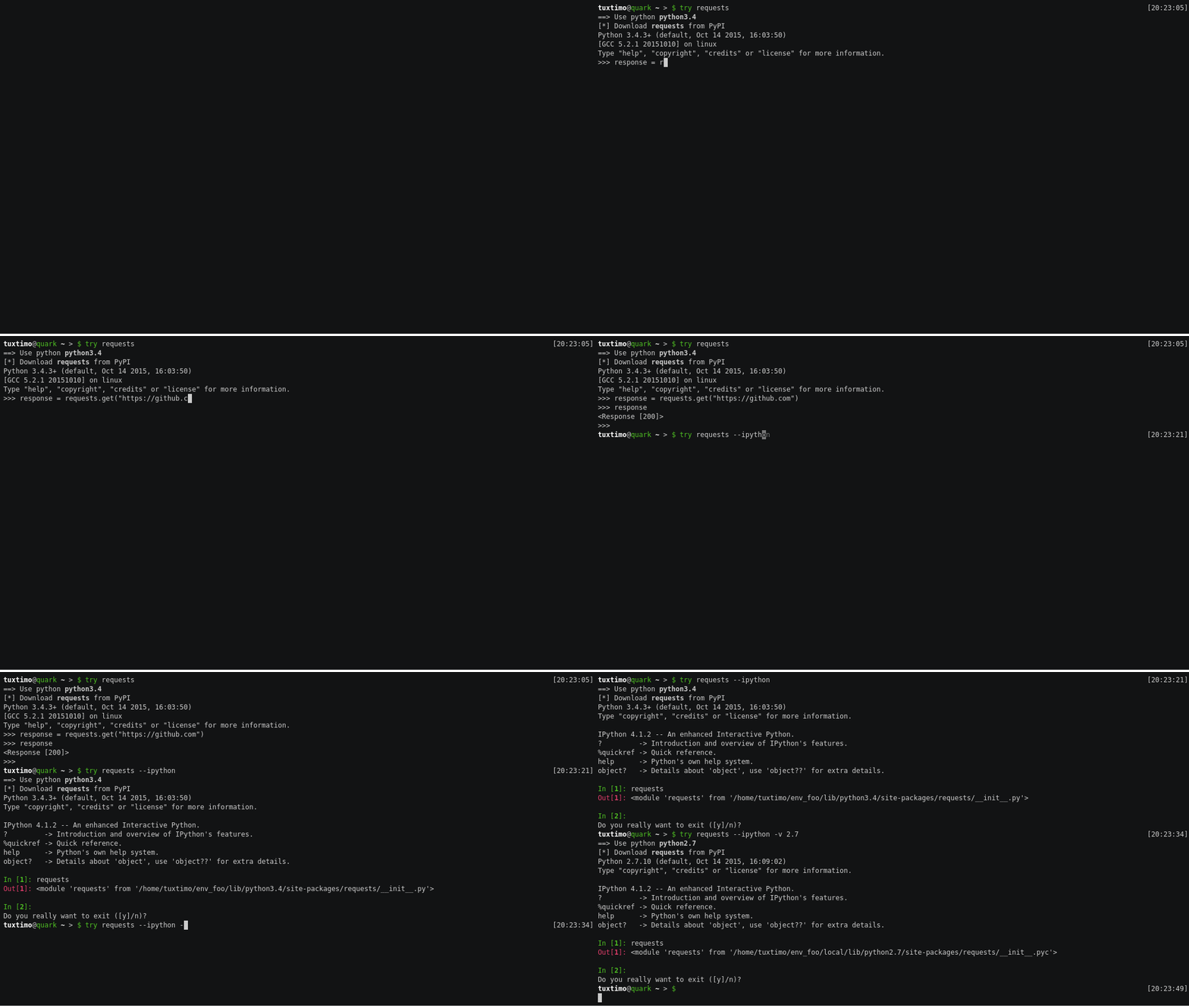
Features
- Install specific package version from PyPI
- Install package from GitHub
- Install in virtualenv using specific version of python
- Specify alternative python package import name
- Keep try environment after interactive session
- Launch interactive python console with already imported package
- Launch editor instead of interpreter
- Launch arbitrary python shell instead of default python shell
Usage
try requests
try requests --ipython
try requests --shell ptipython
try requests -p 3.5
try requests -p /usr/bin/python3.4.1
try requests==2.8.1
try kennethreitz/requests --ipython
try click-didyoumean:click_didyoumean  # if python package name is different then pip package name
try requests --editor
Usage examples
Note: most of the following cli options can also be configured in the configuration file!
Try single python package:
try requests
try flask
Try multiple python packages in one session:
try requests flask
Try specific version of a package:
try requests==2.8.1 # tries version 2.8.1 of requests instead of latest
Try package from GitHub repository:
try <user>/<repo>  # syntax example
try kennethreitz/requests  # installs master branch of Kenneth's requests package from GitHub
Try package but import with different name than package name:
try <package_name>:<import_name>  # syntax example
try click-didyoumean:click_didyoumean  # install click-didyoumean but import click_didyoumean
Try package in already existing virtualenv:
try requests --virtualenv ~/.try/sandbox # use virtualenv at ~/.try/sandbox
⇢ see virtualenv config value in env section in configuration file.
Try package with specific python version:
try requests --python 3.5  # use python3.5 in virtualenv
try requests -p 2.7  # use python2.7 in virtualenv
try requests -p ~/work/cpython/bin/python  # use python binary from specific location
⇢ see python config value in env section in configuration file.
Try package with specific shell/repl:
try requests --shell python  # use python repl (default value)
try requests --shell ipython  # use ipython
try requests --shell ptpython  # use ptpython
try requests --shell ptipython  # use ptipython
try requests --shell bpython  # use bpython
try requests --ipython  # use ipython - an alias for --shell ipython
⇢ see shell config value in env section in configuration file.
Try package writing a little script instead of opening shell:
try requests --editor # opens $EDITOR or editor instead of shell
⇢ see always_use_editor config value in env section in configuration file.
Keep virtualenv files after try run:
try requests --keep
⇢ see keep config value in env section in configuration file.
Use a specific location for the virtualenv files:
try requests --tmpdir ~/.try
⇢ see tmpdir config value in env section in configuration file.
Configuration
try can be configured to your preferences - like always use ipython as a shell or always use python3.5. The configuration file is located in your users application configuration directory in a file called config.ini. This location is OS dependent and is specified here: http://click.pocoo.org/5/api/#click.get_app_dir
The following config.ini file shows all available configuration options:
[env]
virtualenv=~/.try/sandbox
python=3.5
shell=ipython
keep=false
always_use_editor=false
tmpdir=~/.try
Installation
Use pip to install try:
pip3 install trypackage
Help
try comes with an awesome CLI interface thanks to click.
Usage: try [OPTIONS] [PACKAGES]...

  Easily try out python packages.

Options:
  --virtualenv TEXT  Use already existing virtualenv.
  -p, --python TEXT  The python version to use.
  --ipython          Use ipython instead of python.
  --shell TEXT       Specify the python shell to use. (This will override
                     --ipython
  -k, --keep         Keep try environment files.
  -e, --editor       Try with editor instead of interpreter.
  --tmpdir TEXT      Specify location for temporary directory.
  --version          Show the version and exit.
  --help             Show this message and exit.
try was inspired by https://github.com/VictorBjelkholm/trymodule.

 15 Feb 26, 2022
 11 Jun 13, 2022
 10 Dec 24, 2022
 32 Dec 10, 2022
 15 Apr 15, 2022
 3 Feb 14, 2022
 5 Dec 11, 2022
 222 Jan 03, 2023
 2k Jan 07, 2023
 53 Dec 12, 2022
 5 Dec 29, 2022
 2 Sep 06, 2022
 205 Jan 03, 2023
 798 Nov 21, 2022
 89 Dec 25, 2022
 41.4k Jan 03, 2023
 5 Jan 09, 2022
 146 Dec 07, 2022
 2 Apr 01, 2022
 2 Jul 05, 2022