sky-python-music-sheet-maker
This program lets you make visual music sheets for Sky: Children of the Light. It will ask you a few questions, and does not require previous knowledge of the command line to run.
More details at the Sky-Music website.
Table of contents
Usage
Installation
The program requires Python >= 3.6 and the following packages:
- PIL (preferably pillow)
- import_resources (for Python < 3.8)
- pyYaml
- mido (optional: for generating midi output)
- requests (optional: for generating a link to skymusic.herokuapp.com)
The program can be installed by simply unzipping the code on your computer, and running the main script file, or by installing it in your Python distribution with pip: pip install .
The program can be installed on a desktop computer, or a smartphone if a Python IDE is installed (such as Pythonista).
The program can also be installed in a virtualenv to mitigate possible dependency clashes with system site-packages.
git clone https://github.com/sky-music/sky-python-music-sheet-maker.git
cd sky-python-music-sheet-maker
python3 -m venv --clear venv
source venv/bin/activate
pip3 install -r requirements.txt
You can activate the virtual environment with source venv/bin/activate, to exit the virtual enviroment use the deactivate command. Note, it is possible some packages are distributed via bdist_wheel, hence the wheel package may be required.
See here for further details on how to download and install.
Plug-and-play versions
If you’re afraid of the command line, there is a website running this script. There is also a bot running an older version of the program, on thatskygame Discord server, that can be called by typing !song in a channel. Executable binaries are also available for download at https://sky-music.github.io.
Running the script
python

    /sky-python-music-sheet-maker/src/skymusic/command_line_player.py
If you have installed the program by pip, just type: skymusic instead.
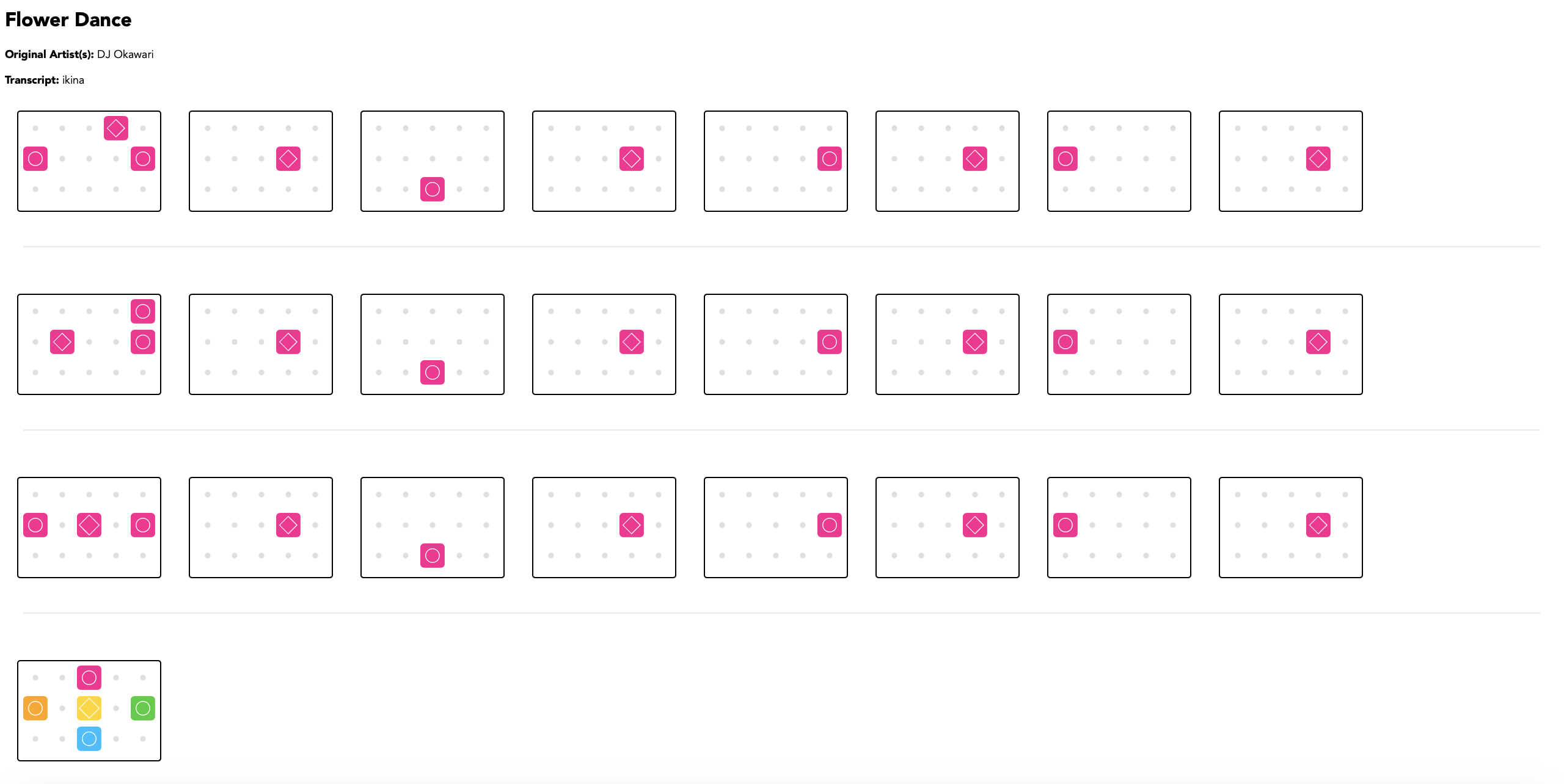
As well as using QWERT ASDFG ZXCVB keys on the keyboard (like a piano), there are other supported notations for the notes you provide:
- Sky column/row notation (A1 A2 A3 A4 A5, B1 B2 B3 B4 B5, C1 C2 C3 C4 C5)
- English notation, followed by an optional number for octaves (C1, D1, E1, F1, G1, A1, B1)
- Jianpu (1 2 3 4 5 6 7, followed by + or - for octaves)
- French do ré mi + octave number
- Japanese do ré mi + octave number
Note that for musical notations supporting octaves (such as English, Jianpu, and doremi), the starting octave is 1, by convention. Typing a note name without octave (e.g. F) implicitely assumes that it belongs to the starting octave (e.g. F1). However for notes belonging to the next octave (higher pitch), you will have to use the number 2 (C2, D2, E2, etc). So the full range of the piano write C1-C3. This convention is different from SkyStudio's which assumes that the instrument range is C4-C6 (this is true for the basic Sky piano, but not for other instruments such as the winter piano). If you're used to start the octave at 4 (C4, D4, E4...), then enter -3 when asked for an octave shift.
You can type these directly in the command line prompt, but you are strongly advised to save the notes first in a text file. Text files are looked for by the program in the 'test_songs' folder. if you installed the program with pip, this folder must be moved in the Documents folder of your user home directory.
The output will be HTML, SVG, or PNG, with small icons of the Sky keyboard. If you use Western notation or Jianpu notation, it will also convert to Sky notation (ABC1-5) in a text file.
After generating a sheet, you are encouraged to publish the file on https://sky-music.github.io
Configurations
Advanced usage
In contrast with the website or bot versions, the command-line version supports functions for faster processing of songs:
-
the default answer to any question can be put in the skymusic_preferences.yaml file. This way, you will no longer be asked this question (for instance the aspect ratio of the visual sheet). You can even put the notes in there!
-
songs can be processed in a batch by placing preference-like .yaml files in the batch_songs directory (see the example files in this folder to learn the right keywords) and passing the following flag to command_line_player.py:
-b/--batch_mode -
HTML visual sheets generated after July, 2020 1st can be read again by the program for further modification. These sheets can be recognized by the
field they contain.
Customized configurations for default directory are supported via command line flags, flags that are not passed or are not valid will reference their default fallback values defined in command_line_player.py:
-
input/output directories where the module will read from/write to can be defined by passing the following flag with the desired directory to command_line_player.py respectively:
--in_dir--out_dir -
a custom batch directory for storing preference .yaml files can be defined by passing the following flag with the desired directory to command_line_player.py:
--batch-dir -
the default preference .yaml file path where command_line_player.py reads from can be modified by passing the follow flag with the desired path:
-p/--pref_file -
by default, conversion of the song to a music recording using JSON format is disabled. A link to hear the song being played on https://sky-music.herokuapp.com can be generated, to enable it setting the following flag with the website API key (this key will be given to trusted players):
-u/--skyjson_url
Note that to minimize strain to the -u/--skyjson_url and
-b/--batch_mode flags are mutually exclusive, meaning that only either one of them can be passed to the module but not both. Further help can be invoked via the
-h/--help flag.
Note: json recording feature requires the requests library, which can be installed via the pip package manager by running:
pip install requests
Docker images
Since it might be a bit difficult to ensure that all client python3 installations are functional and reproducible, there is a Dockerfile and Compose file provided. The Dockerfile contains the instructions to assemble a base image to run skymusic, while the Compose file orchestrate the instructions to run the image.
The prebuilt containers have the base skymusic modules included. INPUT_DIR specifies where the container will look for song inputs. OUTPUT_DIR is where the container will output generated music sheets.
- Install Docker
- Install Docker Compose
- Run the skymusic module
INPUT_DIR=/path/to/dir/containing/test/songs \
OUTPUT_DIR=/path/to/output/dir/ \
docker-compose run skymusic
After running, the output will be placed in /tmp/output/, referring to the path inside the container. Your OUTPUT_DIR is bind mounted to /tmp/output.
The first time you execute the above command, Docker will pull the image from the Docker Registry and cache it. Any subsequent runs will utilize the cached image. Note this is a development image with all optional dependencies included.
Credits
Authors
Co-authors: Tracey L, jmmelko
Contributors
Assets:
SVG icons are thanks to madwurmz.
Codebase:
Various contributions from Specy-wot (html & js), Jurassimok (Setup.py), Skyventuree, heronwr (command-line arguments).
Docker images by heronwr aka lambdaw.
Re-use and branching:
This program is not being actively maintained by its original creator Tracey. Assistance is currently provided by jmmelko, but this may not last. Feel free to branch the code and build upon it.
Translators:
- skyventuree, a.k.a. こじめ (Vietnamese)
- jmmelko (French)
- Kai00 (simplified chinese)
- we are looking for a japanese translator
Info
License
MIT License

Copyright (c) 2020 Tracey

Permission is hereby granted, free of charge, to any person obtaining a copy
of this software and associated documentation files (the "Software"), to deal
in the Software without restriction, including without limitation the rights
to use, copy, modify, merge, publish, distribute, sublicense, and/or sell
copies of the Software, and to permit persons to whom the Software is
furnished to do so, subject to the following conditions:

The above copyright notice and this permission notice shall be included in all
copies or substantial portions of the Software.

THE SOFTWARE IS PROVIDED "AS IS", WITHOUT WARRANTY OF ANY KIND, EXPRESS OR
IMPLIED, INCLUDING BUT NOT LIMITED TO THE WARRANTIES OF MERCHANTABILITY,
FITNESS FOR A PARTICULAR PURPOSE AND NONINFRINGEMENT. IN NO EVENT SHALL THE
AUTHORS OR COPYRIGHT HOLDERS BE LIABLE FOR ANY CLAIM, DAMAGES OR OTHER
LIABILITY, WHETHER IN AN ACTION OF CONTRACT, TORT OR OTHERWISE, ARISING FROM,
OUT OF OR IN CONNECTION WITH THE SOFTWARE OR THE USE OR OTHER DEALINGS IN THE
SOFTWARE.
Code of conduct
We use an adapted version of the Contributor Covenant Code of Conduct, please see CODE_OF_CONDUCT.md for more details.
Contributing
There are several domain-specific guidelines for contributions, largely dealing with the previously established structure of the repo. Please see CONTRIBUTING.md for more details.

 14.1k Jan 03, 2023
 3.2k Jan 04, 2023
 1k Jan 01, 2023
 9 Apr 24, 2022
 1 Dec 27, 2021
 5 Nov 12, 2022
 30 Dec 10, 2022
 7 Jul 09, 2022
 9.2k Dec 30, 2022
 169 Dec 27, 2022
 251 Dec 19, 2022
 46 Dec 01, 2022
 1k Dec 09, 2022
 2 Dec 15, 2021
 17 Dec 18, 2022
 9 Aug 03, 2022
 0 Jul 09, 2022
 2 Oct 19, 2022
 505 Nov 27, 2022
 27 Jul 09, 2022