

阴阳师后台全平台(使用网易 MuMu 模拟器)辅助。支持御魂,觉醒,御灵,结界突破,秘闻副本,地域鬼王。

Overview

阴阳师后台全平台辅助

screen

  • Python 版本:Python 3.8.3
  • 模拟器:网易 MuMu雷电模拟器
  • 模拟器分辨率:1024*576
  • 显卡渲染模式:兼容(OpenGL)
  • 兼容 Windows 系统和 MacOS 系统

思路:

利用 adb 截图后,使用 opencv 找图找色,模拟点击。使用 adb 操作模拟器,相当于后台操作。

我主要为了刷勾玉,所以此工具更侧重地域鬼王,结界突破和秘闻副本,御魂是用来刷突破券的。

为了防止收到鬼使黑的来信,所以增加随机等待的时间比较多,每次随机等待 2-3 秒,导致整体运行速度稍微慢了一些。

此工具适合放在后台干其他工作的同学使用。也比较符合我个人的使用。


地域鬼王需要先把姑获鸟,以津真天和山童收藏。
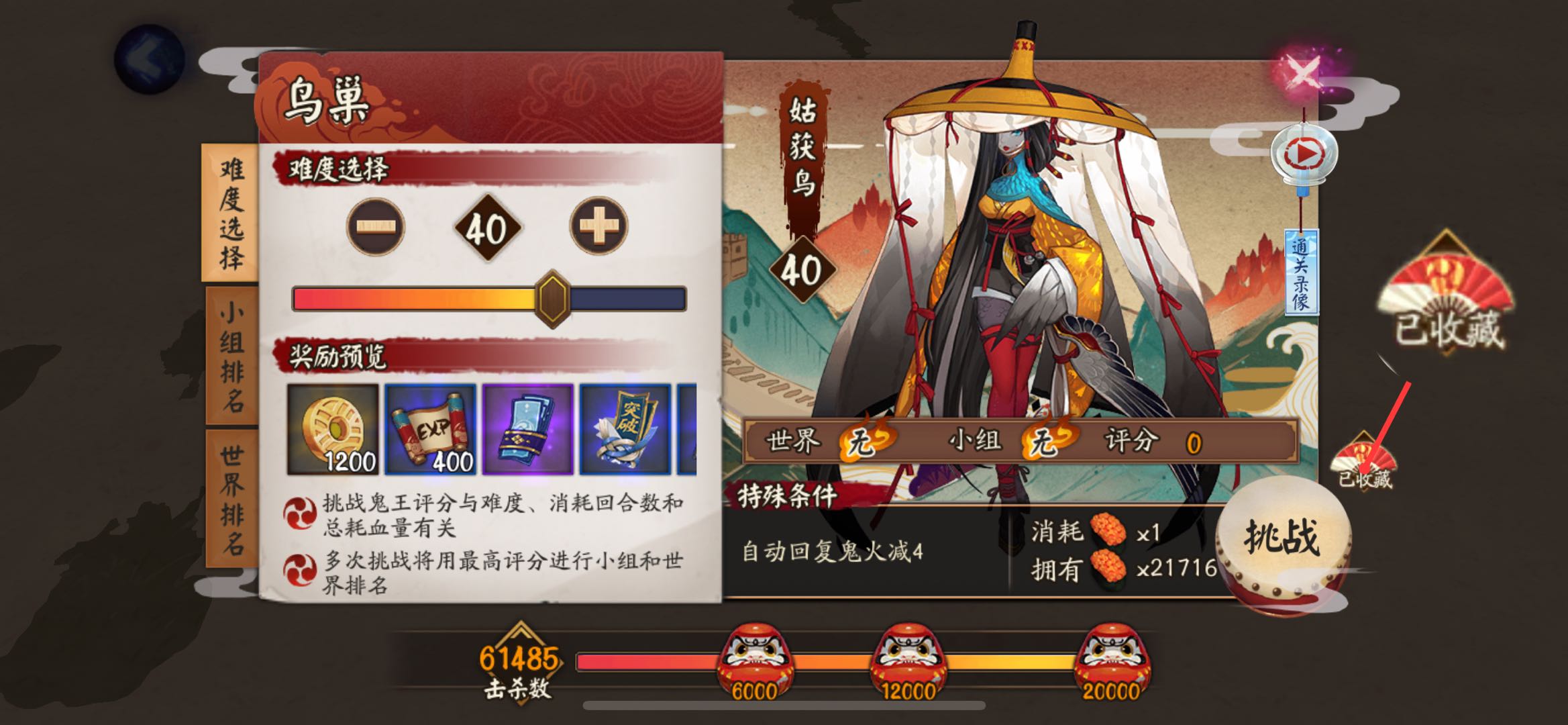
收藏

结界突破主要是把九宫格的坐标保存到列表,使用 shuffle 方法随机打乱,然后循环执行。

第一次进入突破会主动失败一次,失败的话难度不会增加,方便刷排名和勾玉使用。

每突破三次会领取一次奖励,等待九次全部完成后,会把右上角突破剩余数量截图上传到腾讯 OCR 识别接口,如果剩余次数大于等于九次,递归执行,否则停止执行。

腾讯 OCR 每月有一千次免费次数。如果只是识别结界券使用,应该是够用了,如果不够用可以按需付费或者自建字典识别。

突破剩余数量

这一步需要申请 腾讯云文字识别 OCR 的 secretId 和 secretKey。

然后新建文件 tencentcloudKeys.py,写入:

secretId = "AKI***********************aYHDtmaOw"
secretKey = "Sg**************************QdZ7X"

模拟器版

部分操作参考 网易 MuMu 开发者必备说明书【雷神命令】常用adb命令整理贴

建议直接看雷神模拟器社区的命令整理,比较详细。

运行阴阳师

如果不清楚应用的启动命令,可以先手动运行该程序,然后使用命令:

adb shell dumpsys window | findstr mCurrentFocus

查找正在运行的应用。

启动阴阳师的命令为:

adb shell am start -n com.netease.onmyoji.netease_simulator/com.netease.onmyoji.Client

因为我是 iOS,只能扫码登录,所以启动命令对我来说并不实用。

模拟点击

例如我们需要点击 500, 266 这个坐标:

adb shell input tap 500 266

模拟滑动

0, 0 滑动到 200, 200,耗时 0.5 秒:

adb shell input swipe 0 0 200 200 500

截图

需要先运行此命令:

adb shell screencap /data/screen.png

再将截图推送到电脑:

adb pull /data/screen.png .

注意:示例中的命令将图片保存到当前路径下。

找图

这里借助 opencv 库实现。

import cv2

def p():
    capture_img = ""  # 程序运行时的截图
    temp_img = ""  # 已经保存好的图片
    
    img1 = cv2.imread(capture_img)
    img2 = cv2.imread(temp_img)
    result = cv2.matchTemplate(img1, img2, cv2.TM_CCOEFF_NORMED)
    
    if result.max() > 0.9:
        return True

找色

如何在截图中获取某坐标的像素值?

import cv2

def p(x, y):
    capture_img = ""
    _img = cv2.imread(capture_img)
    img = cv2.cvtColor(_img, cv2.COLOR_BGR2RGB)
    r, g, b = img[y, x]  # 注意这里的坐标是相反的
    return r, g, b

裁剪图片

我们截图完成以后,如何从截图中获取剩余结界突破数量?

import cv2

capture_img = ""
img = cv2.imread(capture_img)
cv2.imwrite("new.png", img[12:30, 705:750])  # 裁剪坐标为 [y0:y1, x0:x1]

需要注意的是坐标都是 y, x。

双开应用切换

由于多开改版后(2.2.2x86/x64 版本之后)所有的多开应用和原应用都是同一个包名,所以需要通过 UserId 来控制多开的应用。

这里以网易云游戏为例,多开后分别获取包名,使用命令:

adb shell dumpsys window | findstr mCurrentFocus

全部都是 com.netease.android.cloudgame/com.netease.android.cloudgame.MainActivity

所以需要通过切换 UserId 来切换应用。

通过包名来获取对应 UserId:

adb shell ps|findstr com.netease.android.cloudgame

返回如下内容:

对应用户ID

可以看到原端应用的进程 id 是 u0_a36 ,看 _ 前面的 u0 就行,即 UserId=0; 在 MuMu 上一般原端的 UserId=0,多开端 #N1 的 UserId=10,如此类推 #N2 的 UserId=11,#N3 的 UserId=12,#N4 的 UserId=13

所以多开操作分为两步:

  1. 切换 UserId
  2. 打开应用

根据上边的截图,UserId 分别是 0 和 10,如果要在两个应用之间切换可以使用:

# 切换原应用
adb shell am start-user 0
adb shell am start --user 0 com.netease.android.cloudgame/com.netease.android.cloudgame.MainActivity

# 切换多开应用
adb shell am start-user 10
adb shell am start --user 10 com.netease.android.cloudgame/com.netease.android.cloudgame.MainActivity

切换之后就可以继续操作了。

赞赏
Owner
简讯
简讯
Open-source demos hosted on Dash Gallery

Dash Sample Apps This repository hosts the code for over 100 open-source Dash apps written in Python or R. They can serve as a starting point for your

Plotly 2.7k Jan 07, 2023
Leyna's Visualizing Data With Python

Leyna's Visualizing Data Below is information on the number of bilingual students in three school districts in Massachusetts. You will also find infor

11 Oct 28, 2021
A Python library for plotting hockey rinks with Matplotlib.

Hockey Rink A Python library for plotting hockey rinks with Matplotlib. Installation pip install hockey_rink Current Rinks The following shows the cus

24 Jan 02, 2023
LinkedIn connections analyzer

LinkedIn Connections Analyzer 🔗 https://linkedin-analzyer.herokuapp.com Hey hey 👋 , welcome to my LinkedIn connections analyzer. I recently found ou

Okkar Min 5 Sep 13, 2022
YOPO is an interactive dashboard which generates various standard plots.

YOPO is an interactive dashboard which generates various standard plots.you can create various graphs and charts with a click of a button. This tool uses Dash and Flask in backend.

ADARSH C 38 Dec 20, 2022
Boltzmann visualization - Visualize the Boltzmann distribution for simple quantum models of molecular motion

Boltzmann visualization - Visualize the Boltzmann distribution for simple quantum models of molecular motion

1 Jan 22, 2022
Focus on Algorithm Design, Not on Data Wrangling

The dataTap Python library is the primary interface for using dataTap's rich data management tools. Create datasets, stream annotations, and analyze model performance all with one library.

Zensors 37 Nov 25, 2022
Multi-class confusion matrix library in Python

Table of contents Overview Installation Usage Document Try PyCM in Your Browser Issues & Bug Reports Todo Outputs Dependencies Contribution References

Sepand Haghighi 1.3k Dec 31, 2022
HiPlot makes understanding high dimensional data easy

HiPlot - High dimensional Interactive Plotting HiPlot is a lightweight interactive visualization tool to help AI researchers discover correlations and

Facebook Research 2.4k Jan 04, 2023
Compute and visualise incidence (reworking of the original incidence package)

incidence2 incidence2 is an R package that implements functions and classes to compute, handle and visualise incidence from linelist data. It refocuss

15 Nov 22, 2022
Using SQLite within Python to create database and analyze Starcraft 2 units data (Pandas also used)

SQLite python Starcraft 2 English This project shows the usage of SQLite with python. To create, modify and communicate with the SQLite database from

1 Dec 30, 2021
Data science project for exploratory analysis on the kcse grades dataset (Kamilimu Data Science Track)

Kcse-Data-Analysis Data science project for exploratory analysis on the kcse grades dataset (Kamilimu Data Science Track) Findings The performance of

MUGO BRIAN 1 Feb 23, 2022
Here I plotted data for the average test scores across schools and class sizes across school districts.

HW_02 Here I plotted data for the average test scores across schools and class sizes across school districts. Average Test Score by Race This graph re

7 Oct 27, 2021
Some problems of SSLC ( High School ) before outputs and after outputs

Some problems of SSLC ( High School ) before outputs and after outputs 1] A Python program and its output (output1) while running the program is given

Fayas Noushad 3 Dec 01, 2021
Tandem Mass Spectrum Prediction with Graph Transformers

MassFormer This is the original implementation of MassFormer, a graph transformer for small molecule MS/MS prediction. Check out the preprint on arxiv

Röst Lab 13 Oct 27, 2022
Manim is an animation engine for explanatory math videos.

A community-maintained Python framework for creating mathematical animations.

12.4k Dec 30, 2022
Create Badges with stats of Scratch User, Project and Studio. Use those badges in Github readmes, etc.

Scratch-Stats-Badge Create customized Badges with stats of Scratch User, Studio or Project. Use those badges in Github readmes, etc. Examples Document

Siddhesh Chavan 5 Aug 28, 2022
A toolkit to generate MR sequence diagrams

mrsd: a toolkit to generate MR sequence diagrams mrsd is a Python toolkit to generate MR sequence diagrams, as shown below for the basic FLASH sequenc

Julien Lamy 3 Dec 25, 2021
Extensible, parallel implementations of t-SNE

openTSNE openTSNE is a modular Python implementation of t-Distributed Stochasitc Neighbor Embedding (t-SNE) [1], a popular dimensionality-reduction al

Pavlin Poličar 1.1k Jan 03, 2023
Parse Robinhood 1099 Tax Document from PDF into CSV

Robinhood 1099 Parser This project converts Robinhood Securities 1099 tax document from PDF to CSV file. This tool will be helpful for those who need

Keun Tae (Kevin) Park 52 Jun 10, 2022