HiPlot makes understanding high dimensional data easy

Overview

HiPlot - High dimensional Interactive Plotting CircleCI

Logo

License: MIT PyPI download month PyPI version docs Open In Colab

HiPlot is a lightweight interactive visualization tool to help AI researchers discover correlations and patterns in high-dimensional data using parallel plots and other graphical ways to represent information.

Try a demo now with sweep data or upload your CSV or Open In Colab

There are several modes to HiPlot:

  • As a web-server (if your data is a CSV for instance)
  • In a jupyter notebook (to visualize python data), or in Streamlit apps
  • In CLI to render standalone HTML
pip install -U hiplot  # Or for conda users: conda install -c conda-forge hiplot

If you have a jupyter notebook, you can get started with something as simple as:

import hiplot as hip
data = [{'dropout':0.1, 'lr': 0.001, 'loss': 10.0, 'optimizer': 'SGD'},
        {'dropout':0.15, 'lr': 0.01, 'loss': 3.5, 'optimizer': 'Adam'},
        {'dropout':0.3, 'lr': 0.1, 'loss': 4.5, 'optimizer': 'Adam'}]
hip.Experiment.from_iterable(data).display()

See the live result
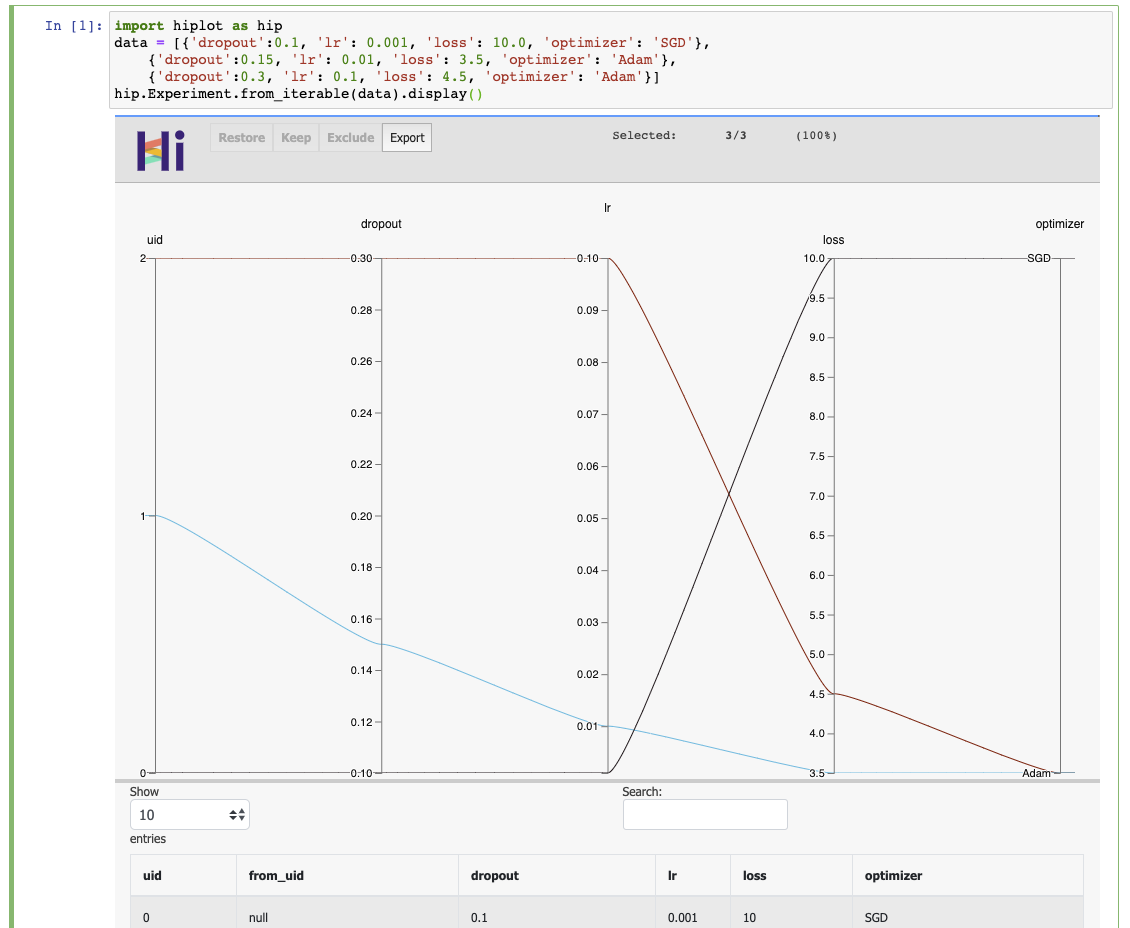
Result

Links

Citing

@misc{hiplot,
    author = {Haziza, D. and Rapin, J. and Synnaeve, G.},
    title = {{Hiplot, interactive high-dimensionality plots}},
    year = {2020},
    publisher = {GitHub},
    journal = {GitHub repository},
    howpublished = {\url{https://github.com/facebookresearch/hiplot}},
}

Credits

Inspired by and based on code from Kai Chang, Mike Bostock and Jason Davies.

External contributors (please add your name when you submit your first pull request):

License

HiPlot is MIT licensed, as found in the LICENSE file.

Comments
  • It's now possible to install via conda. Update README

    It's now possible to install via conda. Update README

    I created a conda-forge recipe and my PR is merged so you can install this package with conda link using

    conda install -c conda-forge hiplot
    

    You might consider to update the README accordingly.

    opened by rpanai 21
  • Displaying a lot of rows in Streamlit / Wasteful use of bandwidth

    Displaying a lot of rows in Streamlit / Wasteful use of bandwidth

    Streamlit currently has a hard limit of 50Mb for a single component. I have dataset that is only 16Mb of data as a .csv, but as HiPlot transfers that as JSON suddenly the data is over 200Mb. Transferring the data like that, every datapoint containsing all column names seems a rather wasteful use of bandwidth.

    Not only does it affect the Streamlit component, but also considerably slows down loading large datasets in the standalone HiPlot-application (assuming the data there is transferred the same way).

    My suggestion would be to transfer the column names as an array and the datapoints as arrays as well. On the client they then can be matched by position in the array.

    enhancement streamlit 
    opened by F1nnM 15
  • Allow users to hide 'uid' and 'from_uid' from the table

    Allow users to hide 'uid' and 'from_uid' from the table

    Hi @danthe3rd,

    Thanks for the nice library. Very lightweight, very useful :slightly_smiling_face:

    Background When I have a lot of axes on the parallel plot I always drop uid and from_uid axes, because they add some unnecessary clutter to the chart. I still want to keep these two axes in the table. In my case I have other axes than encode runs.

    Request Add an option (maybe to the display function) to not display uid and from_uid axes on the chart.

    Best, Kamil

    enhancement 
    opened by kamil-kaczmarek 15
  • [Windows] UnicodeDecodeError

    [Windows] UnicodeDecodeError

    Hello, i want to try the demo but i got this issue, i try to change render.py with encoding but it not works.

    i use

    • Python 3.7.4
    • conda 4.7.12

    `import hiplot as hip

    data = [{'dropout':0.1, 'lr': 0.001, 'loss': 10.0, 'optimizer': 'SGD'}, {'dropout':0.15, 'lr': 0.01, 'loss': 3.5, 'optimizer': 'Adam'}, {'dropout':0.3, 'lr': 0.1, 'loss': 4.5, 'optimizer': 'Adam'}] hip.Experiment.from_iterable(data).display()`

    UnicodeDecodeError: 'charmap' codec can't decode byte 0x9e in position 122350: character maps to <undefined>

    opened by yemregundogmus 13
  • Displaying

    Displaying "a lot of" columns in HiPlot.

    Hi,

    I have a datatset with 80 columns. Is there any way to configure HiPlot such that I get a horizontal scrollbar in order to go through all columns. Right now, the depiction tries to show all columns within the screensize, which makes the app unusable.

    Thank you, Martin

    enhancement 
    opened by MartinPyka 10
  • hiplot command not working on windows

    hiplot command not working on windows

    Hi,

    I installed hiplot on windows machine using poetry. I am not able to run the hiplot from command line in my python virtual environment.

    C:\Users\sarat.chinni\Codes_sequencing\hiplot>hiplot
    'hiplot' is not recognized as an internal or external command,
    operable program or batch file.
    

    I have added .py extension to hiplot function in my virtual environment Scripts folder then I got the following error:

    C:\Users\sarat.chinni\Codes_sequencing\hiplot>hiplot
    Traceback (most recent call last):
      File "C:\Users\sarat.chinni\Codes_sequencing\biobench\sandbox\Sarat\supervised_sequencing\.venv\Scripts\hiplot.py", line 6, in <module>
        sys.exit(hip.run_server_main())
    AttributeError: module 'hiplot' has no attribute 'run_server_main'
    

    How can I solve this issue on windows? (I am able to install and hiplot in my linux machine and it worked properly)

    Thank you

    bug windows 
    opened by saratbhargava 10
  • Support multi-objective study for `from_optuna`

    Support multi-objective study for `from_optuna`

    Hi, thank you for introducing the Optuna integration by #215!

    I suppose the current implementation does not support study whose objective function returns multiple objective values. More concretely, the following code:

    import optuna
    import hiplot as hip
    
    def objective(trial: "optuna.trial.Trial") -> float:
        x = trial.suggest_float("x", -1, 1)
        y = trial.suggest_float("y", -1, 1)    
    
        return x ** 2, y
    
    study = optuna.create_study(directions=["minimize"]*2)
    study.optimize(objective, n_trials=3)
    
    xp = hip.Experiment.from_optuna(study)
    

    The error message is as follows.

    RuntimeError                              Traceback (most recent call last)
    /var/folders/n3/7_7r1yrx6jsc_0780bvg02lr0000gn/T/ipykernel_82314/3836556673.py in <module>
          2 study.optimize(objective, n_trials=3)
          3 
    ----> 4 xp = hip.Experiment.from_optuna(study)
    
    ~/Documents/hiplot/hiplot/experiment.py in from_optuna(study)
        519         hyper_opt_data = []
        520         for each_trial in study.trials:
    --> 521             trial_params = {}
        522             trial_params["value"] = each_trial.value # name = value, as it could be RMSE / accuracy, or any value that the user selects for tuning
        523             trial_params["uid"] = each_trial.number
    
    /opt/homebrew/Caskroom/miniconda/base/envs/optuna39/lib/python3.9/site-packages/optuna/trial/_frozen.py in value(self)
        389         if self._values is not None:
        390             if len(self._values) > 1:
    --> 391                 raise RuntimeError(
        392                     "This attribute is not available during multi-objective optimization."
        393                 )
    
    RuntimeError: This attribute is not available during multi-objective optimization.
    

    Dependencies:

    • Optuna: 2.10.0
    • hiplot: https://github.com/facebookresearch/hiplot/tree/79b3d52a6842d6ba12f0a544e27a444562a486df

    To clarify it in the documentation, this PR mentions the supported study.

    By the way, to access the objective values of either single and multi-objective, we can use tiral.values that contains retuned value by the objective function of Optuna as list.

    CLA Signed 
    opened by nzw0301 8
  • NaN values don't show in categorical column

    NaN values don't show in categorical column

    Hi,

    I've come across a weird bug with the parallel plot: One of my float columns/axis contains NaN-values. When plotted with Hiplot only sometimes the entry "nan/inf/null" appears on the axis; more exactly it only appears if there are at least 6 unique values other than NaN in that column. For example, if all entries in that column contain only the values [nan 3. 5. 7. 9. 15. 30. ] the "nan/inf/null" entry shows correctly. If however I replace all 30's with 15's without changing anything else, the entry doesn't show up.

    Is that a bug, or am I overseeing something on my side?

    bug 
    opened by F1nnM 8
  • Streamlit: Export Button doesn't work

    Streamlit: Export Button doesn't work

    I use the Hiplot-Component in Streamlit. When I click the Export button nothing happens. No download starts, no error in the console, no log on the server.

    opened by F1nnM 7
  • Can't access off-screen columns in table when force_full_width=True

    Can't access off-screen columns in table when force_full_width=True

    When there are too many columns to display on the screen, there's no way to access the missing ones in the table. It would be helpful if displayed columns could be toggled off or resized, or if reordering the plot columns reordered the table.

    bug 
    opened by currivan 7
  • Streamlit component causes resets of entire page

    Streamlit component causes resets of entire page

    Hi again, I work with a large dataset in the Streamlit-component of HiPlot. Whenever I select something in the plot it turns gray, as it's waiting for Streamlit to run, which takes a couple of seconds due to the large dataset. When I repeatedly click around in the plot (firing updates), while it's still loading, at one point Streamlit resets the entire page and all inputs/selections are lost. That might happen after just three clicks or after 20, but it happens. It also happens when the plot is loading and I change other Streamlit inputs, so it might be a Streamlit issue, but I can't say that for sure and I was asked to also open this issue here.

    Streamlit issue: https://github.com/streamlit/streamlit/issues/2695

    streamlit 
    opened by F1nnM 6
  • Bump json5 from 2.1.3 to 2.2.2

    Bump json5 from 2.1.3 to 2.2.2

    Bumps json5 from 2.1.3 to 2.2.2.

    Release notes

    Sourced from json5's releases.

    v2.2.2

    • Fix: Properties with the name __proto__ are added to objects and arrays. (#199) This also fixes a prototype pollution vulnerability reported by Jonathan Gregson! (#295).

    v2.2.1

    • Fix: Removed dependence on minimist to patch CVE-2021-44906. (#266)

    v2.2.0

    • New: Accurate and documented TypeScript declarations are now included. There is no need to install @types/json5. (#236, #244)
    Changelog

    Sourced from json5's changelog.

    v2.2.2 [code, diff]

    • Fix: Properties with the name __proto__ are added to objects and arrays. (#199) This also fixes a prototype pollution vulnerability reported by Jonathan Gregson! (#295).

    v2.2.1 [code, diff]

    • Fix: Removed dependence on minimist to patch CVE-2021-44906. (#266)

    v2.2.0 [code, diff]

    • New: Accurate and documented TypeScript declarations are now included. There is no need to install @types/json5. (#236, #244)
    Commits
    • 14f8cb1 2.2.2
    • 10cc7ca docs: update CHANGELOG for v2.2.2
    • 7774c10 fix: add proto to objects and arrays
    • edde30a Readme: slight tweak to intro
    • 97286f8 Improve example in readme
    • d720b4f Improve readme (e.g. explain JSON5 better!) (#291)
    • 910ce25 docs: fix spelling of Aseem
    • 2aab4dd test: require tap as t in cli tests
    • 6d42686 test: remove mocha syntax from tests
    • 4798b9d docs: update installation and usage for modules
    • Additional commits viewable in compare view

    Dependabot compatibility score

    Dependabot will resolve any conflicts with this PR as long as you don't alter it yourself. You can also trigger a rebase manually by commenting @dependabot rebase.


    Dependabot commands and options

    You can trigger Dependabot actions by commenting on this PR:

    • @dependabot rebase will rebase this PR
    • @dependabot recreate will recreate this PR, overwriting any edits that have been made to it
    • @dependabot merge will merge this PR after your CI passes on it
    • @dependabot squash and merge will squash and merge this PR after your CI passes on it
    • @dependabot cancel merge will cancel a previously requested merge and block automerging
    • @dependabot reopen will reopen this PR if it is closed
    • @dependabot close will close this PR and stop Dependabot recreating it. You can achieve the same result by closing it manually
    • @dependabot ignore this major version will close this PR and stop Dependabot creating any more for this major version (unless you reopen the PR or upgrade to it yourself)
    • @dependabot ignore this minor version will close this PR and stop Dependabot creating any more for this minor version (unless you reopen the PR or upgrade to it yourself)
    • @dependabot ignore this dependency will close this PR and stop Dependabot creating any more for this dependency (unless you reopen the PR or upgrade to it yourself)
    • @dependabot use these labels will set the current labels as the default for future PRs for this repo and language
    • @dependabot use these reviewers will set the current reviewers as the default for future PRs for this repo and language
    • @dependabot use these assignees will set the current assignees as the default for future PRs for this repo and language
    • @dependabot use this milestone will set the current milestone as the default for future PRs for this repo and language

    You can disable automated security fix PRs for this repo from the Security Alerts page.

    CLA Signed dependencies javascript 
    opened by dependabot[bot] 0
  • Axis not displayed when loading CSV

    Axis not displayed when loading CSV

    When I upload the attached CSV onto the hosted version of HiPlot some axes of the CSV do not appear in the parallel plot, whereas they correctly appear in the table below. If I right-click on the table's headers I'm not offered to restore these axes onto the plot. These axes are "Ratio" and "Log(ratio)".

    Untitled spreadsheet - Sheet5.csv

    enhancement 
    opened by lw 4
  • Auto-ranking of most explicative features

    Auto-ranking of most explicative features

    Scenario: I have a grid-search on parameters A, B and C. For each sample, I have an associated loss which I try to minimize.

    I want to know which parameter (A, B or C) has the most influence on the loss automatically.

    In python: This can be done by learning a simple RandomForestRegressor (or Classifier depending on the target value type), and then calling permutation_importance to get an importance score for each parameter. For this to be embedded in HiPlot, it would need to be done in JS (for example with this library?)

    https://scikit-learn.org/stable/modules/generated/sklearn.ensemble.RandomForestRegressor.html https://scikit-learn.org/stable/modules/permutation_importance.html

    UI: This could be triggered by right-clicking a column. The result could be displayed by ordering the column by relative importance. Need a way to select which columns to include/exclude from the calculation, and to display the correlation score

    enhancement 
    opened by danthe3rd 0
  • Display bugs with rotated labels

    Display bugs with rotated labels

    Original change in https://github.com/facebookresearch/hiplot/pull/213 Workaround: Use version <= 0.1.28

    hi there. I've tried to track down which recent changes to hiplot resulted in my plots getting significantly harder to read, and narrowed it down to 0.1.28 -> 0.1.29 and believe this is the PR responsible.

    This perfectly readable and stacked display: Screen Shot 2021-10-24 at 12 56 37 PM turned into Screen Shot 2021-10-24 at 12 57 35 PM which cuts off the final column name if I make the window any more narrow and causes a weird spacing issue on the right-side.


    I very much support improving the visual interface of hiplot but I believe this hurt the overall experience. Would you be open to discussing some of the changes made here and perhaps a partial revert? Or am I best served maintaining a separate fork of the project? (I am not a front-end developer but am trying very hard to use hiplot in a tool I am building).

    The above screenshots were in Opera (I've noticed Safari has had existing trouble with dragging columns). I also noticed that on Safari, this same change resulted in "ghosting" of the headers upon scrolling (and did not fix the aforementioned problem): Screen Shot 2021-10-24 at 1 01 39 PM

    Screen Shot 2021-10-24 at 1 03 20 PM

    (that's the "rearranging" problem in safari I mentioned, the annotation divorces from the column)

    (original report in https://github.com/facebookresearch/hiplot/pull/214 from @mathematicalmichael )

    enhancement 
    opened by danthe3rd 11
  • Dash App

    Dash App

    This is an extremely cool pacakge, many research units that I have been working at are slowly switching from jupyter notebooks to dash type web-apps, would there be a way to get this into plolty dash? That would be an extremely exciting development.

    enhancement 
    opened by firmai 7
Releases(0.1.32)
Missing data visualization module for Python.

missingno Messy datasets? Missing values? missingno provides a small toolset of flexible and easy-to-use missing data visualizations and utilities tha

Aleksey Bilogur 3.4k Dec 29, 2022
Automatically Visualize any dataset, any size with a single line of code. Created by Ram Seshadri. Collaborators Welcome. Permission Granted upon Request.

AutoViz Automatically Visualize any dataset, any size with a single line of code. AutoViz performs automatic visualization of any dataset with one lin

AutoViz and Auto_ViML 1k Jan 02, 2023
A D3.js plugin that produces flame graphs from hierarchical data.

d3-flame-graph A D3.js plugin that produces flame graphs from hierarchical data. If you don't know what flame graphs are, check Brendan Gregg's post.

Martin Spier 740 Dec 29, 2022
Simple plotting for Python. Python wrapper for D3xter - render charts in the browser with simple Python syntax.

PyDexter Simple plotting for Python. Python wrapper for D3xter - render charts in the browser with simple Python syntax. Setup $ pip install PyDexter

D3xter 31 Mar 06, 2021
Personal IMDB Graphs with Bokeh

Personal IMDB Graphs with Bokeh Do you like watching movies and also rate all of them in IMDB? Would you like to look at your IMDB stats based on your

2 Dec 15, 2021
An application that allows you to design and test your own stock trading algorithms in an attempt to beat the market.

StockBot is a Python application for designing and testing your own daily stock trading algorithms. Installation Use the

Ryan Cullen 280 Dec 19, 2022
This is a Boids Simulation, written in Python with Pygame.

PyNBoids A Python Boids Simulation This is a Boids simulation, written in Python3, with Pygame2 and NumPy. To use: Save the pynboids_sp.py file (and n

Nik 17 Dec 18, 2022
A small timeseries transformation API built on Flask and Pandas

#Mcflyin ###A timeseries transformation API built on Pandas and Flask This is a small demo of an API to do timeseries transformations built on Flask a

Rob Story 84 Mar 25, 2022
Python wrapper for Synoptic Data API. Retrieve data from thousands of mesonet stations and networks. Returns JSON from Synoptic as Pandas DataFrame

☁ Synoptic API for Python (unofficial) The Synoptic Mesonet API (formerly MesoWest) gives you access to real-time and historical surface-based weather

Brian Blaylock 23 Jan 06, 2023
A research of IT labor market based especially on hh.ru. Salaries, rate of technologies and etc.

hh_ru_research Проект реализован в учебных целях анализа рынка труда, в особенности по hh.ru Input data В качестве входных данных используются сериали

3 Sep 07, 2022
Interactive Dashboard for Visualizing OSM Data Change

Dashboard and intuitive data downloader for more interactive experience with interpreting osm change data.

1 Feb 20, 2022
Matplotlib tutorial for beginner

matplotlib is probably the single most used Python package for 2D-graphics. It provides both a very quick way to visualize data from Python and publication-quality figures in many formats. We are goi

Nicolas P. Rougier 2.6k Dec 28, 2022
A python visualization of the A* path finding algorithm

A python visualization of the A* path finding algorithm. It allows you to pick your start, end location and make obstacles and then view the process of finding the shortest path. You can also choose

Kimeon 4 Aug 02, 2022
🎨 Python3 binding for `@AntV/G2Plot` Plotting Library .

PyG2Plot 🎨 Python3 binding for @AntV/G2Plot which an interactive and responsive charting library. Based on the grammar of graphics, you can easily ma

hustcc 990 Jan 05, 2023
Squidpy is a tool for the analysis and visualization of spatial molecular data.

Squidpy is a tool for the analysis and visualization of spatial molecular data. It builds on top of scanpy and anndata, from which it inherits modularity and scalability. It provides analysis tools t

Theis Lab 251 Dec 19, 2022
The Metabolomics Integrator (MINT) is a post-processing tool for liquid chromatography-mass spectrometry (LCMS) based metabolomics.

MINT (Metabolomics Integrator) The Metabolomics Integrator (MINT) is a post-processing tool for liquid chromatography-mass spectrometry (LCMS) based m

Sören Wacker 0 May 04, 2022
📊 Charts with pure python

A zero-dependency python package that prints basic charts to a Jupyter output Charts supported: Bar graphs Scatter plots Histograms 🍑 📊 👏 Examples

Max Humber 54 Oct 04, 2022
This is Pygrr PolyArt, a program used for drawing custom Polygon models for your Pygrr project!

This is Pygrr PolyArt, a program used for drawing custom Polygon models for your Pygrr project!

Isaac 4 Dec 14, 2021
Dimensionality reduction in very large datasets using Siamese Networks

ivis Implementation of the ivis algorithm as described in the paper Structure-preserving visualisation of high dimensional single-cell datasets. Ivis

beringresearch 284 Jan 01, 2023
Generate "Jupiter" plots for circular genomes

jupiter Generate "Jupiter" plots for circular genomes Description Python scripts to generate plots from ViennaRNA output. Written in "pidgin" python w

Robert Edgar 2 Nov 29, 2021