Python Quick Logging | QLogging
Beautifully colored, quick and simple Python logging. This logger is based on Python logging package




Screenshots:
Terminal/CMD
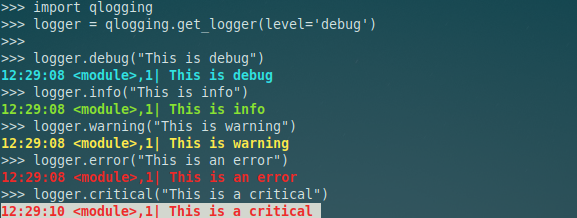
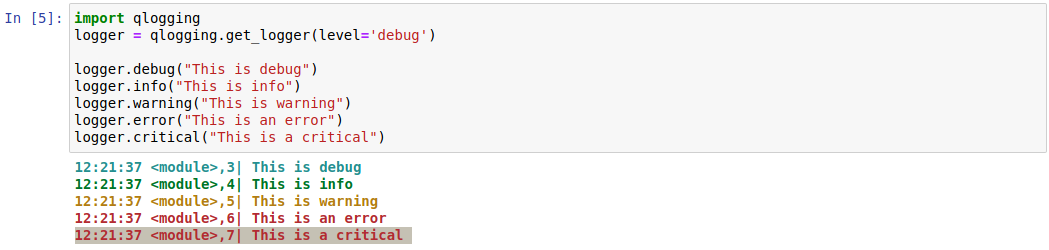
Notebooks:
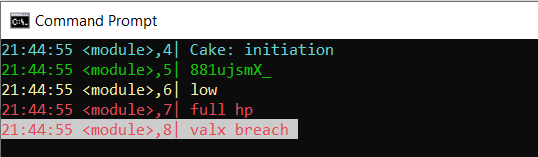
Windows:
Features
- Color logging in Terminal and CMD
- Color logging in Jupyter Notebook and Jupyter Lab
- Color logging in Kaggle Notebook
- Color logging in Google Colab Notebook
- Know which function the logger was called from
- Know while line number the logger was called from
- Support logging to a file
- Simple and clean one-liner
- Customizable
Installation
$ pip install qlogging
Examples
Logging only to console/notebook:
import qlogging
logger = qlogging.get_logger(level='debug')

logger.debug("This is debug")
logger.info("This is info")
logger.warning("This is warning")
logger.error("This is an error")
logger.critical("This is a critical")
Output (output format: ):
12:21:37 foo(),3| This is debug
12:21:37 foo(),4| This is info
12:21:37 foo(),5| This is warning
12:21:37 foo(),6| This is an error
12:21:37 foo(),7| This is a critical
Logging to console/terminal and a log file (append if log file exists):
import qlogging
logger = qlogging.get_logger(level='debug', logfile='my_log.log')
Logging to console/terminal and a log file (overwrite if log file exists):
import qlogging
logger = qlogging.get_logger(level='debug', logfile='my_log.log', logfilemode='w')
Logging with loggingmode='long' (default is loggingmode='short'):
import qlogging
logger = qlogging.get_logger(level='debug', loggingmode='long')

logger.debug("This is debug")
Output (output format:
):
2021-05-18 12:38:22 |

     |

     ,4 | This is debug
Easy Customization
Customize your logger based on the following get_logger() function parameters
def get_logger(
    level="info",
    logfile=None,
    logfilemode="a",
    loggingmode="short",
    format_str=None,
    file_format_str=None,
    format_date=None,
    colors=None,
    logger_config=None,
):
    """
    returns Python logging based logger formatted with colors

    :param level: (DEFAULT='info') str of logging level, each str option is mapped to Python logging levels, str options:
                        'info': logging.INFO,
                        'debug': logging.DEBUG,
                        'warning': logging.WARNING,
                        'error': logging.ERROR,
                        'critical': logging.CRITICAL,
                        'notset': logging.NOTSET
    :param logfile: (DEFAULT=None) str path where to save log file, example: '/tmp/my_log.log'
    :param logfilemode: (DEFAULT='a') str of log file writing mode, same as the ones documented at Python logging package. options:
                        'a': appends to logfile
                        'w': overwrites logfile
    :param loggingmode: (DEFAULT='short') str logging mode to be selected. options:
                        'short': will use short str format ('%(asctime)s %(funcName)s,%(lineno)s| %(message)s') and short date format ('%H:%M:%S')
                        'medium': will use long str format ('%(asctime)s | %(filename)s | %(funcName)s,%(lineno)s | %(message)s') and long date format ('%Y-%m-%d %H:%M:%S')
                        'manual': you need to set :param format_str: and :param format_date: yourself
    :param format_str: (DEFAULT=None) str of format logging string for console, only set this if you selected :param loggingmode: as 'manual'. example (the style is always '%', see python logging module for more info):
                        '%(asctime)s | %(filename)s | %(funcName)s,%(lineno)s | %(message)s'
    :param file_format_str: (DEFAULT=None) str of format logging string for logfile (if you keep it None, we will use what you passed in :param format_str:), only set this if you selected :param loggingmode: as 'manual'. example (the style is always '%', see python logging module for more info):
                        '%(asctime)s | %(filename)s | %(funcName)s,%(lineno)s | %(message)s'
    :param date_str: (DEFAULT=None) str of date logging string, only set this if you selected :param loggingmode: as 'manual'. example:
                        '%Y-%m-%d %H:%M:%S'
    :param colors: (DEFAULT=None) dict of color settings, only set this if you selected :param loggingmode: as 'manual'. example:
                        {
                            'DEBUG': Fore.CYAN + Style.BRIGHT,
                            'INFO': Fore.GREEN + Style.BRIGHT,
                            'WARNING': Fore.YELLOW + Style.BRIGHT,
                            'ERROR': Fore.RED + Style.BRIGHT,
                            'CRITICAL': Fore.RED + Back.WHITE + Style.BRIGHT,
                        }
    :param logger_config: (DEFAULT=None) dict python logger config if you want to fully overwrite configs. example:
                        {
                            "version": 1,
                            "disable_existing_loggers": False,
                            "formatters": {
                                "qlog": {
                                    "()": "qlogging.qlogging.ColoredFormatter",
                                    "colors":  {
                                        'DEBUG': Fore.CYAN + Style.BRIGHT,
                                        'INFO': Fore.GREEN + Style.BRIGHT,
                                        'WARNING': Fore.YELLOW + Style.BRIGHT,
                                        'ERROR': Fore.RED + Style.BRIGHT,
                                        'CRITICAL': Fore.RED + Back.WHITE + Style.BRIGHT,
                                    },
                                    "format": "%(asctime)s [%(levelname)s] %(name)s: %(message)s",
                                    "datefmt":'%H:%M:%S'
                                },
                            },
                            "handlers": {
                                "console": {
                                    "level": "DEBUG",
                                    "formatter": "qlog",
                                    "class": "logging.StreamHandler",
                                    "stream": "ext://sys.stdout",
                                },
                            },
                            "loggers": {
                                "": {
                                    "handlers": ["console"],
                                    "level": "DEBUG",
                                    "propagate": True,
                                },
                            },
                        }
    :return: formated Python logging instance
    """
Alternatives
- coloredlogs 15.0: does not support coloring in notebooks.
- colorlog 5.0.1: does not support coloring in notebooks.
Credit:
License
MIT License Copyright (c) 2021 Github Account SinkingTitanic Owner
Permission is hereby granted, free of charge, to any person obtaining a copy of this software and associated documentation files (the "Software"), to deal in the Software without restriction, including without limitation the rights to use, copy, modify, merge, publish, distribute, sublicense, and/or sell copies of the Software, and to permit persons to whom the Software is furnished to do so, subject to the following conditions:
The above copyright notice and this permission notice shall be included in all copies or substantial portions of the Software.
THE SOFTWARE IS PROVIDED "AS IS", WITHOUT WARRANTY OF ANY KIND, EXPRESS OR IMPLIED, INCLUDING BUT NOT LIMITED TO THE WARRANTIES OF MERCHANTABILITY, FITNESS FOR A PARTICULAR PURPOSE AND NONINFRINGEMENT. IN NO EVENT SHALL THE AUTHORS OR COPYRIGHT HOLDERS BE LIABLE FOR ANY CLAIM, DAMAGES OR OTHER LIABILITY, WHETHER IN AN ACTION OF CONTRACT, TORT OR OTHERWISE, ARISING FROM, OUT OF OR IN CONNECTION WITH THE SOFTWARE OR THE USE OR OTHER DEALINGS IN THE SOFTWARE.
 1 Nov 10, 2021
 2 Jan 5, 2022
 15 Dec 29, 2022

 69 Nov 1, 2022
 1 Jan 10, 2022
![Heart[BOT]](https://avatars.githubusercontent.com/u/43449017?v=4&s=60) 0 Nov 20, 2022
0 Nov 20, 2022

 23 Oct 4, 2021
 56 Jan 3, 2023
 2 Nov 25, 2021


 12 Aug 18, 2022
 2 Nov 03, 2022
 2 Jan 06, 2022
 2.3k Jan 05, 2023
 2 Jul 06, 2022
 23.7k Jan 01, 2023
 1 Apr 24, 2022
 1 Jan 28, 2022
 39 Aug 26, 2022
 2 Mar 05, 2022
 2 Dec 04, 2021
 0 Mar 28, 2022
 1 Nov 15, 2021
 1 Feb 12, 2022
 13.7k Jan 02, 2023
 5 Apr 01, 2022
 2 Nov 05, 2021
 1 Jan 19, 2022