📊 Extensions for Matplotlib

Overview

matplotx

Some useful extensions for Matplotlib.


PyPi Version PyPI pyversions GitHub stars Downloads

gh-actions codecov LGTM Code style: black

Install with

pip install matplotx

and use in Python with

import matplotx

See below for what matplotx can do.

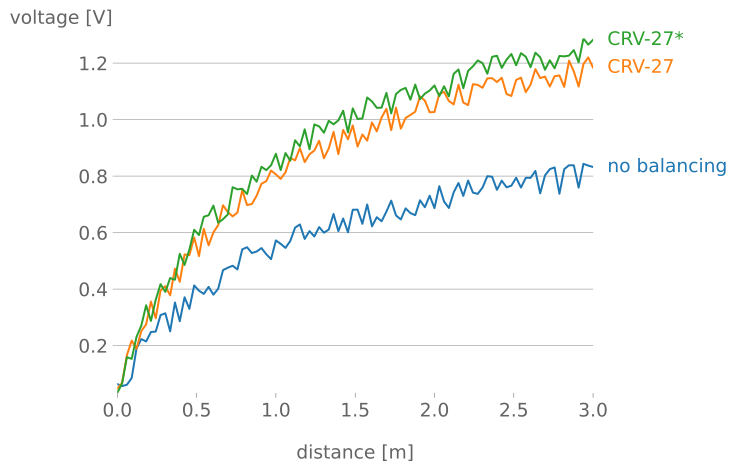
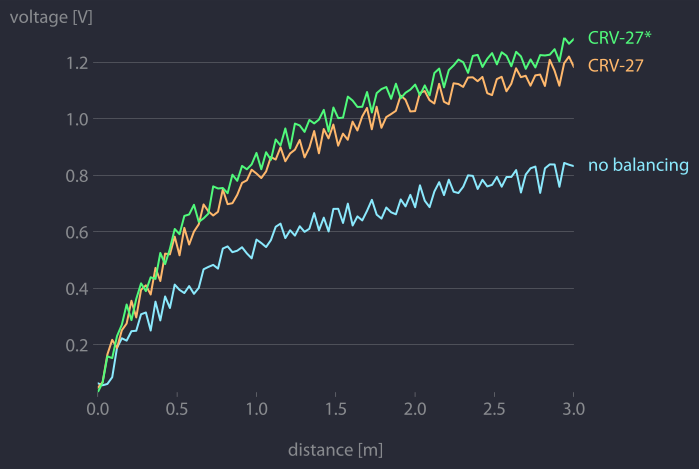
Clean line plots (dufte)
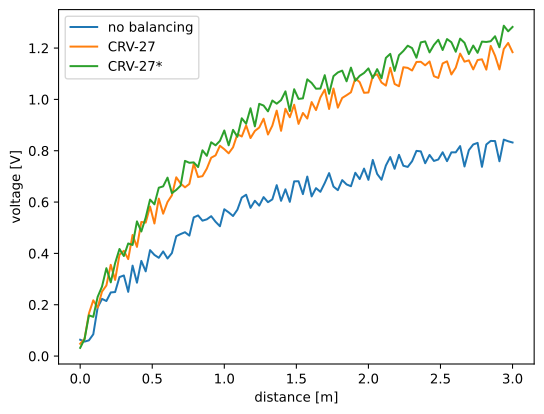
matplotlib matplotx.styles.dufte, matplotx.ylabel_top, matplotx.line_labels matplotx.styles.dracula | matplotx.styles.dufte

The middle plot is created with

import matplotlib.pyplot as plt
import matplotx
import numpy as np

# create data
rng = np.random.default_rng(0)
offsets = [1.0, 1.50, 1.60]
labels = ["no balancing", "CRV-27", "CRV-27*"]
x0 = np.linspace(0.0, 3.0, 100)
y = [offset * x0 / (x0 + 1) + 0.1 * rng.random(len(x0)) for offset in offsets]

# plot
with plt.style.context(matplotx.styles.dufte):
    for yy, label in zip(y, labels):
        plt.plot(x0, yy, label=label)
    plt.xlabel("distance [m]")
    matplotx.ylabel_top("voltage [V]")  # move ylabel to the top, rotate
    matplotx.line_labels()  # line labels to the right
    plt.show()

The three matplotx ingredients are:

  • matplotx.styles.dufte: A minimalistic style
  • matplotx.ylabel_top: Rotate and move the the y-label
  • matplotx.line_labels: Show line labels to the right, with the line color

You can also combine dufte with any other style (see below) with

plt.style.use(matplotx.styles.dracula | matplotx.styles.dufte)

(This uses the Python 3.10 dict merge operator |. If you're using an older Python version, you have to use, e.g., {**x, **y}.)

Further reading and other styles:
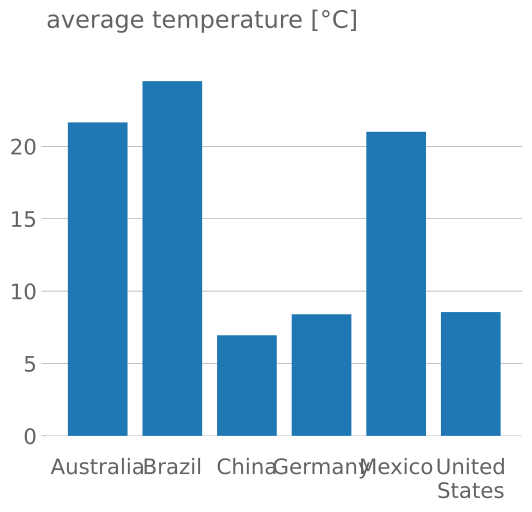
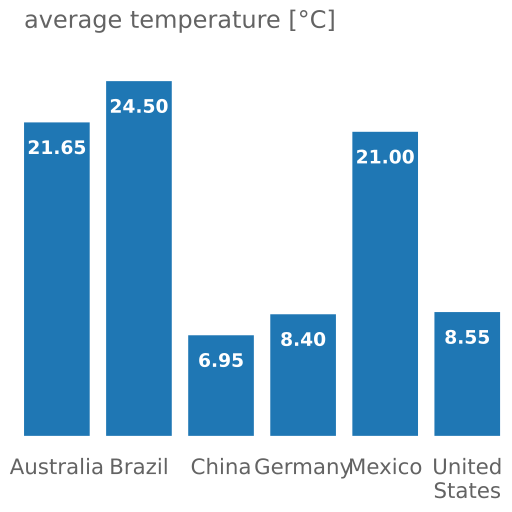
Clean bar plots
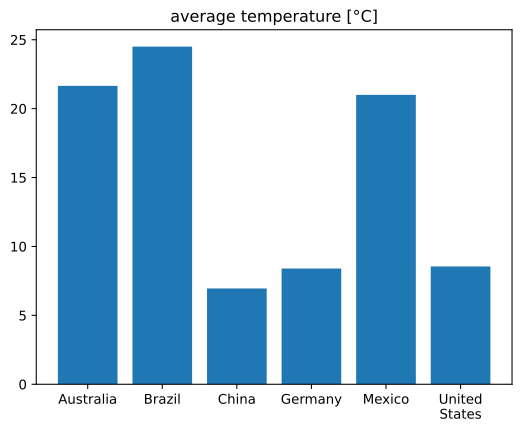
matplotlib dufte dufte with matplotx.show_bar_values()

The right plot is created with

import matplotlib.pyplot as plt
import matplotx

labels = ["Australia", "Brazil", "China", "Germany", "Mexico", "United\nStates"]
vals = [21.65, 24.5, 6.95, 8.40, 21.00, 8.55]
xpos = range(len(vals))

with plt.style.context(matplotx.styles.dufte_bar):
    plt.bar(xpos, vals)
    plt.xticks(xpos, labels)
    matplotx.show_bar_values("{:.2f}")
    plt.title("average temperature [°C]")
    plt.show()

The two matplotx ingredients are:

  • matplotx.styles.dufte_bar: A minimalistic style for bar plots
  • matplotx.show_bar_values: Show bar values directly at the bars

Extra styles

matplotx contains numerous extra color schemes, e.g., Dracula, Nord, gruvbox, and Solarized, the revised Tableau colors.

import matplotlib.pyplot as plt
import matplotx

# use everywhere:
plt.style.use(matplotx.styles.dracula)

# use with context:
with plt.style.context(matplotx.styles.dracula):
    pass

Other styles:

Contour plots for functions with discontinuities
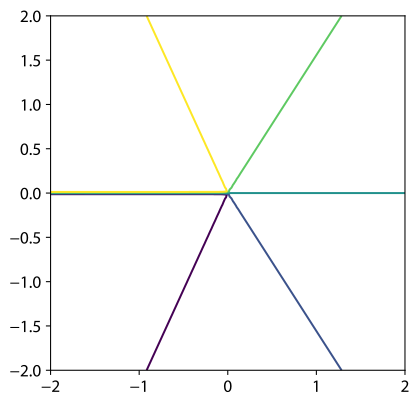
plt.contour matplotx.contour(max_jump=1.0)

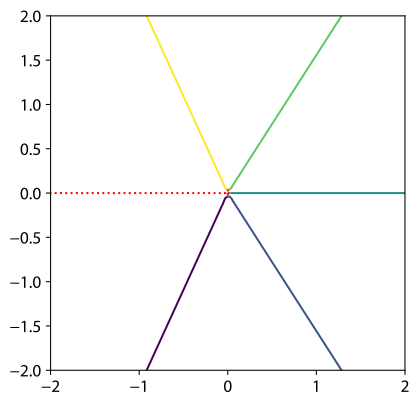
Matplotlib has problems with contour plots of functions that have discontinuities. The software has no way to tell discontinuities and very sharp, but continuous cliffs apart, and contour lines will be drawn along the discontinuity.

matplotx improves upon this by adding the parameter max_jump. If the difference between two function values in the grid is larger than max_jump, a discontinuity is assumed and no line is drawn. Similarly, min_jump can be used to highlight the discontinuity.

As an example, take the function imag(log(Z)) for complex values Z. Matplotlib's contour lines along the negative real axis are wrong.

import matplotlib.pyplot as plt
import numpy as np

import matplotx

x = np.linspace(-2.0, 2.0, 100)
y = np.linspace(-2.0, 2.0, 100)

X, Y = np.meshgrid(x, y)
Z = X + 1j * Y

vals = np.imag(np.log(Z))

# plt.contour(X, Y, vals, levels=[-2.0, -1.0, 0.0, 1.0, 2.0])  # draws wrong lines

matplotx.contour(X, Y, vals, levels=[-2.0, -1.0, 0.0, 1.0, 2.0], max_jump=1.0)
matplotx.discontour(X, Y, vals, min_jump=1.0, linestyle=":", color="r")

plt.gca().set_aspect("equal")
plt.show()

Relevant discussions:

License

This software is published under the MIT license.

Comments
  • Remove some typing hint to support older numpy ?

    Remove some typing hint to support older numpy ?

    Hello, I got an error ModuleNotFoundError: No module named 'numpy.typing' due to the typing hint from numpy.typing import ArrayLike.

    Would you mind remove this hint to support older numpy version like 1.19.* ? It seems no performance issue after remove it.

    opened by ProV1denCEX 5
  • Support for horizontal barchart

    Support for horizontal barchart

    This PR solves #30 by adding an alignment argument to show_bar_values defaulting to "vertical".

    I couldn't think of a robust way of determining the alignment automatically. Checking if the width of the bar is greater or lower than its height seemed a bit dodgy in some cases... I don't know. What do you think @nschloe ?

    Usage (adapted from README demo):

    import matplotlib.pyplot as plt
    import matplotx
    
    labels = ["Australia", "Brazil", "China", "Germany", "Mexico", "United\nStates"]
    vals = [21.65, 24.5, 6.95, 8.40, 21.00, 8.55]
    ypos = range(len(vals))
    
    
    with plt.style.context(matplotx.styles.dufte_bar):
        plt.barh(ypos, vals)
        plt.yticks(ypos, labels)
        matplotx.show_bar_values("{:.2f}", alignment="horizontal")
        plt.title("average temperature [°C]")
        plt.tight_layout()
        plt.show()
    

    Produces: Figure_1

    opened by RemDelaporteMathurin 3
  • Support for horizontal barchart

    Support for horizontal barchart

    matplotx.show_bar_values works perfectly with vertical bar charts but not with horizontal bar charts.

    These are often used with long text labels.

    import matplotlib.pyplot as plt
    import matplotx
    
    labels = ["Australia", "Brazil", "China", "Germany", "Mexico", "United\nStates"]
    vals = [21.65, 24.5, 6.95, 8.40, 21.00, 8.55]
    ypos = range(len(vals))
    
    with plt.style.context(matplotx.styles.dufte_bar):
        plt.barh(ypos, vals)
        plt.yticks(ypos, labels)
        matplotx.show_bar_values("{:.2f}")
        plt.title("average temperature [°C]")
        plt.tight_layout()
        plt.show()


    Produces: image

    I can write a PR and add a show_hbar_values() function that works with horizontal bar charts and produces: image

    Or it can also be an argument of matplotx.show_bar_value defaulting to "vertical" like show_bar_value(alignement="horizontal")

    What do you think @nschloe ?

    opened by RemDelaporteMathurin 2
  • Citation

    Citation

    Great package! Thank you so much it really helps!

    I will surely use this in my next paper/talk. How can I cite this package?

    Do you plan on adding a Zenodo DOI?

    Cheers Remi

    opened by RemDelaporteMathurin 2
  • Some styles are broken

    Some styles are broken

    Using the code example in the readme:

    import matplotlib.pyplot as plt
    import matplotx
    plt.style.use(matplotx.styles.ayu)
    

    I get this error:

    File ~/.conda/envs/.../lib/python3.10/site-packages/matplotlib/style/core.py:117, in use(style)
        115 for style in styles:
        116     if not isinstance(style, (str, Path)):
    --> 117         _apply_style(style)
        118     elif style == 'default':
        119         # Deprecation warnings were already handled when creating
        120         # rcParamsDefault, no need to reemit them here.
        121         with _api.suppress_matplotlib_deprecation_warning():
    
    File ~/.conda/envs/.../lib/python3.10/site-packages/matplotlib/style/core.py:62, in _apply_style(d, warn)
         61 def _apply_style(d, warn=True):
    ---> 62     mpl.rcParams.update(_remove_blacklisted_style_params(d, warn=warn))
    
    File ~/.conda/envs/.../lib/python3.10/_collections_abc.py:994, in MutableMapping.update(self, other, **kwds)
        992 if isinstance(other, Mapping):
        993     for key in other:
    --> 994         self[key] = other[key]
        995 elif hasattr(other, "keys"):
        996     for key in other.keys():
    
    File ~/.conda/envs/.../lib/python3.10/site-packages/matplotlib/__init__.py:649, in RcParams.__setitem__(self, key, val)
        647     dict.__setitem__(self, key, cval)
        648 except KeyError as err:
    --> 649     raise KeyError(
        650         f"{key} is not a valid rc parameter (see rcParams.keys() for "
        651         f"a list of valid parameters)") from err
    
    KeyError: 'dark is not a valid rc parameter (see rcParams.keys() for a list of valid parameters)'
    

    Lib versions:

    matplotlib-base           3.5.2           py310h5701ce4_1    conda-forge
    matplotx                  0.3.7                    pypi_0    pypi
    

    This happens with aura, ayu, github, gruvbox and others.

    Some of the themes working are: challenger_deep, dracula, dufte, nord, tab10

    opened by floringogianu 1
  • Support for subplots

    Support for subplots

    Related to the issue I opened. It seems that small changes already go quite a long way towards support for subplots. This does not yet work for the style.

    For the original code, everything was correctly calculated with the axes in mind, but then it was applied to plt instead of ax, even if an ax parameter was supplied for line_labels, it was still applied to plt.

    The code changes should have no effect when there are no subplots. When there are subplots, the code now offers better support.

    import matplotlib.pyplot as plt
    import matplotx
    import numpy as np
    
    # create data
    rng = np.random.default_rng(0)
    offsets = [1.0, 1.50, 1.60]
    labels = ["no balancing", "CRV-27", "CRV-27*"]
    names = ["Plot left", "Plot right"]
    x0 = np.linspace(0.0, 3.0, 100)
    y = [offset * x0 / (x0 + 1) + 0.1 * rng.random(len(x0)) for offset in offsets]
    
    fig, axes = plt.subplots(2,1)                                           
    
    for ax, name in zip(axes, names):                                                         
        with plt.style.context(matplotx.styles.dufte):
            for yy, label in zip(y, labels):
                ax.plot(x0, yy, label=label)                                
            ax.set_xlabel("distance [m]")                                   
        matplotx.ylabel_top(name)    
        matplotx.line_labels(ax=ax)
    

    Original code

    image

    New code

    image

    opened by mitchellvanzuijlen 1
  • dufte.legend allow plt.text kwargs

    dufte.legend allow plt.text kwargs

    To draw the legend dufte uses plt.text() https://github.com/nschloe/dufte/blob/main/src/dufte/main.py#L196

    plt.text() allows for additional kwargs to customize the text https://matplotlib.org/stable/api/_as_gen/matplotlib.pyplot.text.html

    If possible, could you loop through the additional text kwargs to allow for a higher customizable legend?

    opened by exc4l 0
  • Improper ylabel_top placement

    Improper ylabel_top placement

    I've been using matplotx.ylabel_top and just noticed an issue with the label placement after setting the y tick labels explicitly. A working example is below.

    import numpy as np
    from seaborn import scatterplot
    import matplotx
    
    rng = np.random.default_rng(42)
    x = rng.random(100)
    y = -2*x + rng.normal(0, 0.5, 100)
    ax = scatterplot(
        x=x,
        y=y
    )
    ax.set_yticks([0, -1, -2])
    matplotx.ylabel_top('Example\nLabel')
    

    example

    i'm using

    numpy==1.23.4
    seaborn==0.12.1
    matplotx==0.3.10
    
    opened by markmbaum 0
  • First example images not properly clickable in readme

    First example images not properly clickable in readme

    I just came across this project, looks really neat. Especially the smooth contourf got me curious.

    I've noticed in the readme that (at least on firefox) if I click any of the three images, the link that opens (even with the "open image in new tab" context menu option) is https://github.com/nschloe/matplotx/blob/main/tests/dufte_comparison.py. In contrast, the contourf images open just fine, for instance.

    I assume the reason for this is the enclosing a tag for the first example: https://github.com/nschloe/matplotx/blob/c767b08ea91492b1db9626b8b2c8786b4bc99458/README.md?plain=1#L39

    In case this is not just a firefox thing, I would recommend trying to make the first three images clickable on their own right.

    opened by adeak 0
  • Adapt `line_labels` for `PolyCollections`

    Adapt `line_labels` for `PolyCollections`

    I'm keen on making a PR to adapt line_labels to make it work with fill_between objects (PolyCollection)

    This would be the usage and output:

    import matplotlib.pyplot as plt
    import matplotx
    import numpy as np
    
    x = np.linspace(0, 1)
    y1 = np.linspace(1, 2)
    y2 = np.linspace(2, 4)
    
    plt.fill_between(x, y1, label="label1")
    plt.fill_between(x, y1, y2, label="label1")
    
    matplotx.label_fillbetween()
    plt.show()
    

    image

    @nschloe would you be interested in this feature?

    opened by RemDelaporteMathurin 0
  • Support for subplots

    Support for subplots

    Perhaps this is already implemented and I'm just unable to find it. I think this package in general is great; very easy to use and very beautiful. Thank you for your time making it.

    I'm unable to get matplotx working properly when using subplots. Adapting the Clean line plots (dufte) example to include two subplots (side-by-side, or one-below-the-other) appears not to work.

    import matplotlib.pyplot as plt
    import matplotx
    import numpy as np
    
    # create data
    rng = np.random.default_rng(0)
    offsets = [1.0, 1.50, 1.60]
    labels = ["no balancing", "CRV-27", "CRV-27*"]
    x0 = np.linspace(0.0, 3.0, 100)
    y = [offset * x0 / (x0 + 1) + 0.1 * rng.random(len(x0)) for offset in offsets]
    
    fig, axes = plt.subplots(2,1)                                           # add subplots
    
    for ax in axes:                                                         # Let's make two identical subplots
        with plt.style.context(matplotx.styles.dufte):
            for yy, label in zip(y, labels):
                ax.plot(x0, yy, label=label)                                # changed plt. to ax.
            ax.set_xlabel("distance [m]")                                   # changed plt. to ax.
            matplotx.ylabel_top("voltage [V]")                              # move ylabel to the top, rotate
            matplotx.line_labels()                                          # line labels to the right
            #plt.show()                                                     # Including this adds the 'pretty axis' below the subplots.                             
    

    image

    opened by mitchellvanzuijlen 2
Releases(v0.3.10)
Owner
Nico Schlömer
Mathematics, numerical analysis, scientific computing, Python. Always interested in new problems.
Nico Schlömer
This is a Web scraping project using BeautifulSoup and Python to scrape basic information of all the Test matches played till Jan 2022.

Scraping-test-matches-data This is a Web scraping project using BeautifulSoup and Python to scrape basic information of all the Test matches played ti

Souradeep Banerjee 4 Oct 10, 2022
Analytical Web Apps for Python, R, Julia, and Jupyter. No JavaScript Required.

Dash Dash is the most downloaded, trusted Python framework for building ML & data science web apps. Built on top of Plotly.js, React and Flask, Dash t

Plotly 17.9k Dec 31, 2022
This is my favourite function - the Rastrigin function.

This is my favourite function - the Rastrigin function. What sparked my curiosity and interest in the function was its complexity in terms of many local optimum points, which makes it particularly in

1 Dec 27, 2021
VDLdraw - Batch plot the log files exported from VisualDL using Matplotlib

VDLdraw Batch plot the log files exported from VisualDL using Matplotlib. At pre

Yizhou Chen 5 Sep 26, 2022
Pebble is a stat's visualization tool, this will provide a skeleton to develop a monitoring tool.

Pebble is a stat's visualization tool, this will provide a skeleton to develop a monitoring tool.

Aravind Kumar G 2 Nov 17, 2021
Dimensionality reduction in very large datasets using Siamese Networks

ivis Implementation of the ivis algorithm as described in the paper Structure-preserving visualisation of high dimensional single-cell datasets. Ivis

beringresearch 284 Jan 01, 2023
Multi-class confusion matrix library in Python

Table of contents Overview Installation Usage Document Try PyCM in Your Browser Issues & Bug Reports Todo Outputs Dependencies Contribution References

Sepand Haghighi 1.3k Dec 31, 2022
Visualize tensors in a plain Python REPL using Sparklines

Visualize tensors in a plain Python REPL using Sparklines

Shawn Presser 43 Sep 03, 2022
Simple spectra visualization tool for astronomers

SpecViewer A simple visualization tool for astronomers. Dependencies Python = 3.7.4 PyQt5 = 5.15.4 pyqtgraph == 0.10.0 numpy = 1.19.4 How to use py

5 Oct 07, 2021
A way of looking at COVID-19 data that I haven't seen before.

Visualizing Omicron: COVID-19 Deaths vs. Cases Click here for other countries. Data is from Our World in Data/Johns Hopkins University. About this pro

1 Jan 10, 2022
Extensible, parallel implementations of t-SNE

openTSNE openTSNE is a modular Python implementation of t-Distributed Stochasitc Neighbor Embedding (t-SNE) [1], a popular dimensionality-reduction al

Pavlin Poličar 1.1k Jan 03, 2023
A little logger for machine learning research

Blinker Blinker provides a fast dispatching system that allows any number of interested parties to subscribe to events, or "signals". Signal receivers

Reinforcement Learning Working Group 27 Dec 03, 2022
erdantic is a simple tool for drawing entity relationship diagrams (ERDs) for Python data model classes

erdantic is a simple tool for drawing entity relationship diagrams (ERDs) for Python data model classes. Diagrams are rendered using the venerable Graphviz library.

DrivenData 129 Jan 04, 2023
A python visualization of the A* path finding algorithm

A python visualization of the A* path finding algorithm. It allows you to pick your start, end location and make obstacles and then view the process of finding the shortest path. You can also choose

Kimeon 4 Aug 02, 2022
Eulera Dashboard is an easy and intuitive way to get a quick feel of what’s happening on the world’s market.

an easy and intuitive way to get a quick feel of what’s happening on the world’s market ! Eulera dashboard is a tool allows you to monitor historical

Salah Eddine LABIAD 4 Nov 25, 2022
Create Badges with stats of Scratch User, Project and Studio. Use those badges in Github readmes, etc.

Scratch-Stats-Badge Create customized Badges with stats of Scratch User, Studio or Project. Use those badges in Github readmes, etc. Examples Document

Siddhesh Chavan 5 Aug 28, 2022
A command line tool for visualizing CSV/spreadsheet-like data

PerfPlotter Read data from CSV files using pandas and generate interactive plots using bokeh, which can then be embedded into HTML pages and served by

Gino Mempin 0 Jun 25, 2022
A central task in drug discovery is searching, screening, and organizing large chemical databases

A central task in drug discovery is searching, screening, and organizing large chemical databases. Here, we implement clustering on molecular similarity. We support multiple methods to provide a inte

NVIDIA Corporation 124 Jan 07, 2023
Lime: Explaining the predictions of any machine learning classifier

lime This project is about explaining what machine learning classifiers (or models) are doing. At the moment, we support explaining individual predict

Marco Tulio Correia Ribeiro 10.3k Dec 29, 2022