View part of your screen in grayscale or simulated color vision deficiency.

Overview

monolens

View part of your screen in grayscale or filtered to simulate color vision deficiency.

Watch the demo on YouTube.
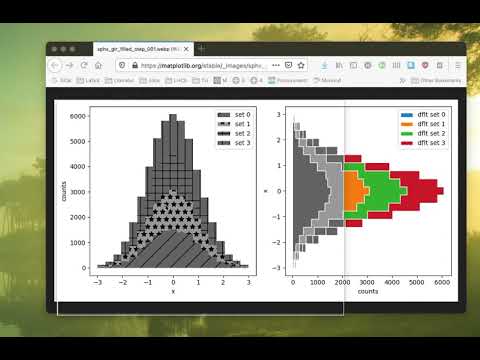
Install with pip install monolens and then run monolens in a terminal or do it in one command with pipx run monolens.

Monolens was featured on Twitter by Matthew Feickert and Matplotlib, and picked up in this episode of Python Bytes. Thanks, guys!

Usage

  • Drag the lens around by holding a Mouse button down inside the window
  • Press Escape, Q, or double click on the lens to quit
  • Press up, down, left, right to resize the lens
  • Press Tab to switch between greyscale and different forms of simulated colorblindness
  • Press I to switch view label on/off
  • Press M to move the lens to another screen

On OSX, you need to give Monolens permission to make screenshots, which is safe.

Known limitations

  • The app is tested on OSX and Linux. It may flicker when you move the lens (less so on OSX). If you know how to fix this, please help. :)
  • Pulling the lens to another screen is currently not supported. See usage on how to switch screens instead.
  • The lens actually uses a static screenshot which is updated as you move the lens around. This trick is necessary, because an app cannot read the pixels under its own window. Because of this, the pixels under the app are only updated when you move the lens away first and then back. This is also the reason why the lens only works for static images.
  • On OSX, an ordinary app is not allowed to read pixels outside of its window for security reasons, which is why this app needs special permissions. Giving permissions is safe; Monolens contains no networking code and will neither store nor send your pixels anywhere.

Future plans

  • Support gestures to rescale the lens (pinch etc)
Comments
  • GitHub Action to lint Python code

    GitHub Action to lint Python code

    Output: https://github.com/cclauss/monolens/actions

    Future PRs should remove || true from:

    • [ ] isort --check-only --profile black . || true
    • [ ] pytest . || true
    opened by cclauss 1
  • Monolens sees through open application windows

    Monolens sees through open application windows

    When I open monolens on OSX 10.15.7 (Catalina) the viewer window always appears to peer through any of the application windows I have open and show only the desktop. For example, in the screenshot below I have a PDF document open in Preview but the monolens window views through it to the desktop image (which I have as the default OSX Catalina one):

    image

    or here when I call it using pipx:

    image

    I am not sure if this is in any way related to the permissions setup described in the project README,

    On OSX, you need to give Monolens permission to make screenshots, which is safe.

    I am unsure how to actively give those permissions.

    Any ideas?

    opened by dantrim 1
  • Using published package on pypi doesn't work because readme is not found

    Using published package on pypi doesn't work because readme is not found

    ❯ monolens
    Traceback (most recent call last):
      File "/home/maxnoe/.local/bin/monolens", line 8, in <module>
        sys.exit(main())
      File "/home/maxnoe/.local/lib/python3.9/site-packages/monolens/__init__.py", line 25, in main
        intro = Intro()
      File "/home/maxnoe/.local/lib/python3.9/site-packages/monolens/intro.py", line 17, in __init__
        with open(Path(__file__).parent / ".." / "README.md") as f:
    FileNotFoundError: [Errno 2] No such file or directory: '/home/maxnoe/.local/lib/python3.9/site-packages/monolens/../README.md'
    
    opened by maxnoe 1
  • Fix wrong method name in enterEvent

    Fix wrong method name in enterEvent

    Fixes this error:

    Traceback (most recent call last):
      File "/home/maxnoe/.local/lib/python3.9/site-packages/monolens/widget.py", line 48, in enterEvent
        super(Widget, self).eventEvent(event)
    AttributeError: 'super' object has no attribute 'eventEvent'
    

    When entering with the mouse.

    opened by maxnoe 1
  • [pre-commit.ci] pre-commit autoupdate

    [pre-commit.ci] pre-commit autoupdate

    opened by pre-commit-ci[bot] 0
  • Missing wayland support

    Missing wayland support

    I tried monolens under wayland with the sway window manager via pipx and it crashed with

    On OSX, you need to give Monolens permission to make screenshots, which is safe.
    Traceback (most recent call last):
      File "/home/michael/.local/pipx/.cache/ec49a1adcc18bdc/bin/monolens", line 8, in <module>
        sys.exit(main())
      File "/home/michael/.local/pipx/.cache/ec49a1adcc18bdc/lib/python3.9/site-packages/monolens/__init__.py", line 46, in main
        lens = Lens()
      File "/home/michael/.local/pipx/.cache/ec49a1adcc18bdc/lib/python3.9/site-packages/monolens/lens.py", line 35, in __init__
        self._updateScreenshot(self.screen())
      File "/home/michael/.local/pipx/.cache/ec49a1adcc18bdc/lib/python3.9/site-packages/monolens/lens.py", line 187, in _updateScreenshot
        self._updateConverted()
      File "/home/michael/.local/pipx/.cache/ec49a1adcc18bdc/lib/python3.9/site-packages/monolens/lens.py", line 191, in _updateConverted
        util.grayscale(self._converted, self._screenshot)
      File "/home/michael/.local/pipx/.cache/ec49a1adcc18bdc/lib/python3.9/site-packages/monolens/util.py", line 66, in grayscale
        s = qimage_array_view(source)
      File "/home/michael/.local/pipx/.cache/ec49a1adcc18bdc/lib/python3.9/site-packages/monolens/util.py", line 45, in qimage_array_view
        assert format == QtGui.QImage.Format_RGB32
    AssertionError
    

    I'm not entirely surprise, since screenshotting utilities etc. are different under wayland. But from the stacktrace it's not obvious why exactly it crashed and in theory, Qt should be able to handle wayland, or shouldn't it?

    Anyway, would be cool if someone else could try it and if they can reproduce it, add it to the limitations in the readme, after all wayland is slowly becoming more mainstream. But maybe just something with my system configuration is broken :man_shrugging:

    opened by meliache 3
Owner
Hans Dembinski
Particle physicist, C++ and Python expert, statistician. Author of boost::histogram.
Hans Dembinski
Some useful extensions for Matplotlib.

mplx Some useful extensions for Matplotlib. Contour plots for functions with discontinuities plt.contour mplx.contour(max_jump=1.0) Matplotlib has pro

Nico Schlömer 519 Dec 30, 2022
Productivity Tools for Plotly + Pandas

Cufflinks This library binds the power of plotly with the flexibility of pandas for easy plotting. This library is available on https://github.com/san

Jorge Santos 2.7k Dec 30, 2022
Collection of data visualizing projects through Tableau, Data Wrapper, and Power BI

Data-Visualization-Projects Collection of data visualizing projects through Tableau, Data Wrapper, and Power BI Indigenous-Brands-Social-Movements Pyt

Jinwoo(Roy) Yoon 1 Feb 05, 2022
A library for bridging Python and HTML/Javascript (via Svelte) for creating interactive visualizations

A library for bridging Python and HTML/Javascript (via Svelte) for creating interactive visualizations

Anthropic 98 Dec 27, 2022
These data visualizations were created as homework for my CS40 class. I hope you enjoy!

Data Visualizations These data visualizations were created as homework for my CS40 class. I hope you enjoy! Nobel Laureates by their Country of Birth

9 Sep 02, 2022
This GitHub Repository contains Data Analysis projects that I have completed so far! While most of th project are focused on Data Analysis, some of them are also put here to show off other skills that I have learned.

Welcome to my Data Analysis projects page! This GitHub Repository contains Data Analysis projects that I have completed so far! While most of th proje

Kyle Dini 1 Jan 31, 2022
Political elections, appointment, analysis and visualization in Python

Political elections, appointment, analysis and visualization in Python poli-sci-kit is a Python package for political science appointment and election

Andrew Tavis McAllister 9 Dec 01, 2022
Cryptocurrency Centralized Exchange Visualization

This is a simple one that uses Grafina to visualize cryptocurrency from the Bitkub exchange. This service will make a request to the Bitkub API from your wallet and save the response to Postgresql. G

Popboon Mahachanawong 1 Nov 24, 2021
Streamlit dashboard examples - Twitter cashtags, StockTwits, WSB, Charts, SQL Pattern Scanner

streamlit-dashboards Streamlit dashboard examples - Twitter cashtags, StockTwits, WSB, Charts, SQL Pattern Scanner Tutorial Video https://ww

122 Dec 21, 2022
Browse Dash docsets inside emacs

Helm Dash What's it This package uses Dash docsets inside emacs to browse documentation. Here's an article explaining the basic usage of it. It doesn'

504 Dec 15, 2022
Mattia Ficarelli 2 Mar 29, 2022
🐍PyNode Next allows you to easily create beautiful graph visualisations and animations

PyNode Next A complete rewrite of PyNode for the modern era. Up to five times faster than the original PyNode. PyNode Next allows you to easily create

ehne 3 Feb 12, 2022
HM02: Visualizing Interesting Datasets

HM02: Visualizing Interesting Datasets This is a homework assignment for CSCI 40 class at Claremont McKenna College. Go to the project page to learn m

Qiaoling Chen 11 Oct 26, 2021
2021 grafana arbitrary file read

2021_grafana_arbitrary_file_read base on pocsuite3 try 40 default plugins of grafana alertlist annolist barchart cloudwatch dashlist elasticsearch gra

ATpiu 5 Nov 09, 2022
JSNAPY example: Validate NAT policies

JSNAPY example: Validate NAT policies Overview This example will show how to use JSNAPy to make sure the expected NAT policy matches are taking place.

Calvin Remsburg 1 Jan 07, 2022
🗾 Streamlit Component for rendering kepler.gl maps

streamlit-keplergl 🗾 Streamlit Component for rendering kepler.gl maps in a streamlit app. 🎈 Live Demo 🎈 Installation pip install streamlit-keplergl

Christoph Rieke 39 Dec 14, 2022
Python module for drawing and rendering beautiful atoms and molecules using Blender.

Batoms is a Python package for editing and rendering atoms and molecules objects using blender. A Python interface that allows for automating workflows.

Xing Wang 1 Jul 06, 2022
DrawBot lets you draw images taken from the internet on Skribbl.io, Gartic Phone and Paint

DrawBot You don't speak french? No worries, english translation is over here. C'est quoi ? DrawBot est un logiciel codé par V2F qui va prendre possess

V2F 205 Jan 01, 2023
GitHubPoster - Make everything a GitHub svg poster

GitHubPoster Make everything a GitHub svg poster 支持 Strava 开心词场 扇贝 Nintendo Switch GPX 多邻国 Issue

yihong 1.3k Jan 02, 2023
LabGraph is a a Python-first framework used to build sophisticated research systems with real-time streaming, graph API, and parallelism.

LabGraph is a a Python-first framework used to build sophisticated research systems with real-time streaming, graph API, and parallelism.

MLH Fellowship 7 Oct 05, 2022