Raspberry Pi Pico as a Rubber Ducky

Overview

Raspberry-Pi-Pico-as-a-Rubber-Ducky

2022-02-09-16-58-32_Trim

Kurulum

  1. Raspberry Pi Pico cihazınız için CircuitPython'u indirin.
  2. Boot düğmesine basılı tutarken cihazı bir USB bağlantı noktasına takın ve cihazı taktıktan sonra boot tuşundan elinizi çekin. Bunun sonucunda "RPI-RP2" adlı çıkarılabilir bir medya aygıtı karşınıza çıkacaktır.
  3. İndirdiğiniz .uf2 dosyasını Pico'nun (RPI-RP2) ana dizinine kopyalayın. Bir süre sonra cihaz yeniden başlayacak ve 1-2 saniye sonra CIRCUITPY adında çıkarılabilir bir medya aygıtı olarak karşınıza çıkacaktır.
  4. Ardından adafruit-circuitpython-bundle-7.x-mpy-YYYYMMDD.zip dosyasını indirin ve cihazın dışına çıkarın.
  5. adafruit-circuitpython-bundle-7.x-mpy-YYYYMMDD klasörü altındaki "lib" klasörüne gidin ve "adafruit_hid'i" Raspberry Pi Pico'nuzdaki lib klasörüne kopyalayın.
  6. Buradaki sayfaya giderek CTRL + S tuşlarına basın ve dosyayı Pico'nun içerisinde bulunan code.py dosyasının üzerine yazarak Raspberry Pi Pico'nun ana dizinine "code.py" olarak kaydedin.
  7. Buradaki linkten bir script bulun veya kendi Rubber Ducky scriptinizi oluşturun ve "payload.dd" olarak kaydedin.
  8. Dikkat edin, son işlemden sonra cihaz yeniden başlatılacak ve yarım saniye sonra komut dosyası (payload.dd) çalışacaktır.

USB Etkinleştirme/Devre Dışı Bırakma

Pico'nun gizlilik amacıyla bir USB depolama aygıtı gibi görünmemesine istiyorsanız;

  1. Cihazı USB bağlantı noktasına takın.
  2. "boot.py" dosyasını Pico'nun (RPI-RP2) ana dizinine kopyalayın.
  3. payload.dd dosyanızı da Pico'ya (RPI-RP2) kopyalayın.
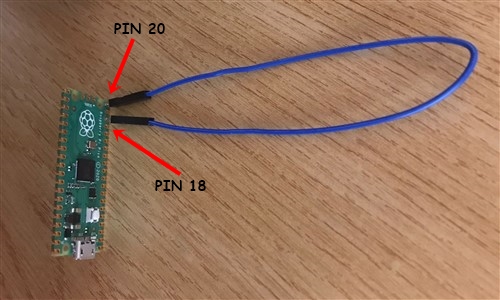
  4. Pico'yu bilgisayarınızdan çıkarın. Pin 18 ve pin 20 arasına bir jumper kablosu bağlayın. Bu durum Pico üzerinde bir kısa devre yaratacaktır ve hedef bilgisayara takıldığında Pico'nun bir USB sürücüsü olarak görünmesini engelleyecek.
  5. Tekrar programlamak için (Payload'ınızı güncellemek için) jumper kabloyu çıkarın ve PC'nize yeniden bağlayın. Varsayılan modda, USB depolama aygıtı aktif durumda olacaktır.
1

Klavye Düzenlerini Değiştirme

Varsayılan modda klavye düzeni İngilizce'dir. Bunu değiştirmek isterseniz;

  1. https://kbdlayout.info/ sayfasından istediğiniz klavye düzenini bularak üzerine tıklayın ve linki kopyalayıp https://www.neradoc.me/layouts/ sayfasındaki kutucuğa yapıştırın. Ardından "Make Zip Bundle Links" butonuna tıklayın.
  2. Ardından "Download the zip file (.py)" butonuna tıklayın.
  3. İndirilen dosyanın içerisinden kendize uygun olan klavye düzeninin dosyalarını Pico'nuzun içerisindeki lib klasörü altına kopyalayın (ben Türkçe Q klavye düzenini tercih ediyorum);
  • keyboard_layout.mpy
  • keyboard_layout_win_tuq.mpy
  • keycode_win_tuq.mpy

2

Dil Dosyanızı Kullanmak için Pico Kodunuzu Değiştirin

Pico içerisindeki "code.py" dosyasını açın ve içerisindeki şu kodu;

from adafruit_hid.keyboard_layout_us import KeyboardLayoutUS as KeyboardLayout
from adafruit_hid.keycode import Keycode

aşağıdaki kod ile değiştirin;

from keyboard_layout_win_tuq import KeyboardLayout
from keycode_win_tuq import Keycode
Owner
Furkan Enes POLATOĞLU
Cyber Security Researcher, SOC Analyst, CENG, YnVsbGV0cHJvb2Y=
Furkan Enes POLATOĞLU
An arduino/ESP project that can play back G-Force data previously recorded

An arduino/ESP project that can play back G-Force data previously recorded

7 Apr 12, 2022
Micropython automatic watering

micropython-automatic-watering micropython automatic watering his code was developed to be used with nodemcu esp8266, but can be modified to work with

1 Nov 24, 2021
OctoPrint is the snappy web interface for your 3D printer!

OctoPrint OctoPrint provides a snappy web interface for controlling consumer 3D printers. It is Free Software and released under the GNU Affero Genera

OctoPrint 7.1k Jan 03, 2023
Terkin is a flexible data logger application for MicroPython and CPython environments.

Terkin Data logging for humans, written in MicroPython. Documentation: https://terkin.org/ Source Code: https://github.com/hiveeyes/terkin-datalogger

hiveeyes 45 Dec 15, 2022
Segger Embedded Studio project for building & debugging Flipper Zero firmware.

Segger Embedded Studio project for Flipper Zero firmware Установка Добавить данный репозиторий в качестве сабмодуля в корень локальной копии репозитор

25 Dec 28, 2022
This is a Virtual Keyboard which is simple yet effective to use.

Virtual-Keyboard This is a Virtual KeyBoard which can track finger movements and lets you type anywhere ranging from notepad to even web browsers. It

Jehan Patel 3 Oct 01, 2021
DIY split-flap display

The goal is to make a low-cost display that's easy to fabricate at home in small/single quantities (e.g. custom materials can be ordered from Ponoko or similar, and other hardware is generally availa

Scott Bezek 2.5k Jan 05, 2023
Home Assistant custom integration to fetch data from Powerpal

Powerpal custom component for Home Assistant Component to integrate with powerpal. This repository and integration is not affiliated with Powerpal. Th

Lawrence 32 Jan 07, 2023
The PicoEMP is a low-cost Electromagnetic Fault Injection (EMFI) tool,

ChipSHOUTER-PicoEMP The PicoEMP is a low-cost Electromagnetic Fault Injection (EMFI) tool, designed specifically for self-study and hobbiest research.

NewAE Technology Inc. 312 Jan 07, 2023
Rasberry Pie GPIO memory game. Press the corresponding key to the lit LED.

RPie-keyboard-game Rasberry Pie GPIO memory game. Press the corresponding key to the lit LED. Randem LED (general output) is lit up on rasberrypi rand

Shawn Dowling 1 Oct 24, 2021
For use with an 8-bit parallel TFT touchscreen using micropython

ILI9341-parallel-TFT-driver-for-micropython For use with an 8-bit parallel TFT touchscreen using micropython. Many thanks to prenticedavid and his MCU

3 Aug 02, 2022
This tool emulates an EMV-CAP device, to illustrate the article "Banque en ligne : à la decouverte d'EMV-CAP" published in MISC

About This tool emulates an EMV-CAP device, to illustrate the article "Banque en ligne : à la decouverte d'EMV-CAP" published in MISC, issue #56 and f

Philippe Teuwen 28 Nov 21, 2022
HA-Edge-Connector - HA Edge Connector For Python

HA-Edge-Connector 1. Required a. Smartthings Hub & Homeassistant must be in same

chals 21 Dec 29, 2022
Windhager myComfort custom component for Home Assistant

Windhager myComfort custom component for Home Assistant

5 Apr 27, 2022
Pinion — Nice-looking interactive diagrams for KiCAD PCBs

Pinion — Nice-looking interactive diagrams for KiCAD PCBs Pinion is a simple tool that allows you to make a nice-looking pinout diagrams for your PCBs

Jan Mrázek 297 Jan 06, 2023
A versatile program that uses the raspberry pi camera and provides it as a service

PiCameleon Is a daemon program meant to provide the RaspberryPi Camera as a service while running according to a configuration.

André Esser 52 Oct 16, 2022
Control the lights of Alienware computers under GNU/Linux systems.

Before requesting support please consider that this software is not actively developed. I created it in 2014 for managing my Alienware M14X-R1 (where

rsm 111 Dec 05, 2022
A python file which I wrote to allow the Dorna Robots API to draw an Image on a 3D plane

Dorna-Robotics-Internship Code In the directory "Code" is a python file which I wrote to allow the Dorna Robots API to draw an Image on a 3D plane. I

Stephen Otto 2 Dec 06, 2021
This repo uses a stereo camera and gray-code-based structured light to realize dense 3D reconstruction.

Structured-light-stereo This repo uses a stereo camera and gray-code-based structured light to realize dense 3D reconstruction. . How to use: STEP 1:

FEI 20 Dec 31, 2022
DOS-like OS for RP2040 basic microcontroller boards

Micropython DOS-like OS for RP2040 microcontroller boards. Check out the demo video at https://www.youtube.com/watch?v=Az_oiq8GE4Y To start the OS typ

RetiredWizard 58 Dec 27, 2022