A blender import/export system for Defold

Overview

defold-blender-export

A Blender export system for the Defold game engine.

Setup Notes

There are no exhaustive documents for this tool yet. Its just not complete, so everything is very much 'in flux'.

Note: The Sync Tool is now a Blender Only addon. This makes building Defold resource collections much simpler.

To use the tool follow the guide below.

  1. Copy the blender/addons/sync_tool folder to the blender addons folder. See blender docs for this.
  2. Or.. you can copy the blender/addons/sync_tool/* files into the folder where your blender source file is, and the scripts should work from there.
  3. Open the blender file you want to work in (or open the test.blend to see an example already setup)
  4. Open the text editor in blender and loadin in the script "defoldSynUI.py"
  5. Run this file. You should see "bpy.ops.text.run_script()" in the Info Window in blender.
  6. Open the 3D layout window in blender and ensure you are in "Object Mode".
  7. Examine the Tools menu on the right side of the Layout 3D View (see below) alt text
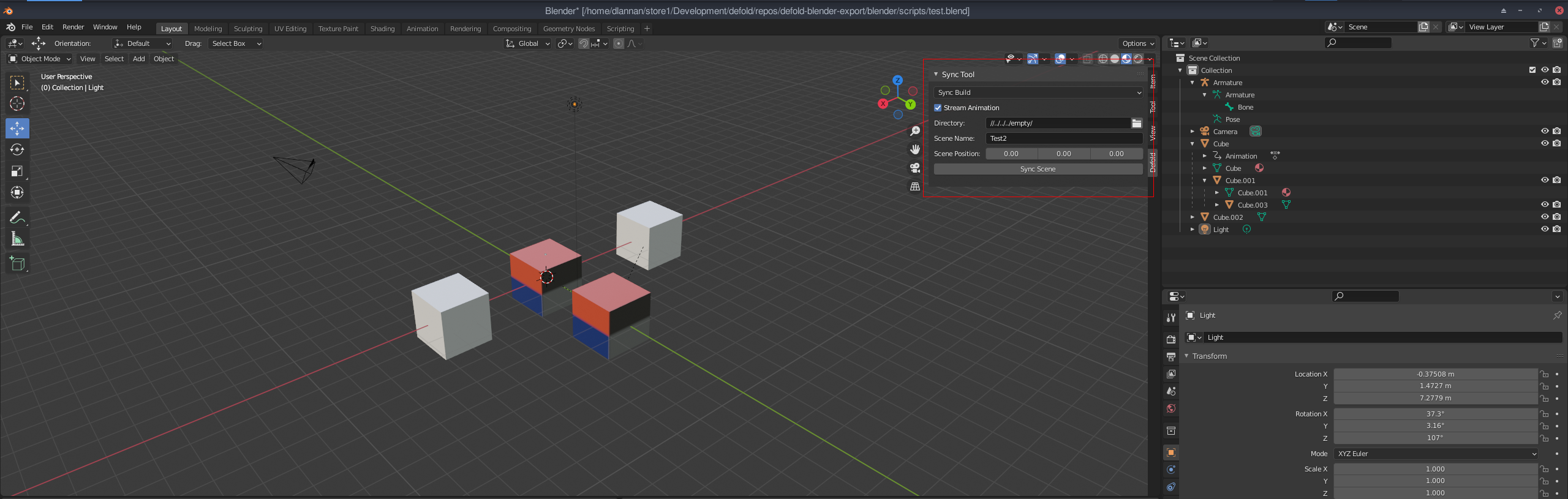
  8. Enter the appropriate properties for Scene Name and Directory (project directory to save into).
  9. Select "Sync Build" for the scene mode and press the "Sync Scene" button when ready.

A folder will be created in the target project directory with all the resources needed to load the scene into Defold.

At a minimum you should see a collection file and some gameobjects (in the gameobjects folder). You can open this project and open the collection. While the "Sync" tickbox is enabled, data will be written to the collection file - do not save new objects into it while Sync is on - they will be overwritten. Sync can be unticked at any time and the data will stop pushing to the collection.

Once this is setup you can add/edit the blender scene as you need and any Sync's you do, will update the meshes, textures and object positions in Defold.

Issues

There are a number of odd issues using this system. It is early days, so they will be ironed out. Some limitations on what Blender can stream:

  • Only single texture for each object is used (this is a Defold thing).
  • Object materials only use model materials at the moment. This might change to PBR materials.
  • Lights and Camera are added in Defold, but they are not yet setup to operate correctly (TBD)
  • Many features are only partially functional. Tread carefully :)
Comments
  • The addon just don't work

    The addon just don't work

    I properly set up everything, gave admin permission to both blender and the interpreter, but still, when I click to sync it doesnt do anything. Thats my scene: image

    opened by Caue-Aron 3
  • Support multiple UV coords

    Support multiple UV coords

    Based on discussion here with Ivan_Lytkin: https://forum.defold.com/t/building-a-sync-tool-for-blender-to-defold/69920

    Potentially add a new stream for texcoord1 in the buffer files. This could allow multiple coord access in the material.

    To be tested.

    opened by dlannan 2
  • Alpha channel in Blender BSDF mapped to Albedo texture

    Alpha channel in Blender BSDF mapped to Albedo texture

    Now that tools are available to merge texture channels together to minimise the number of samplers in the Simple PBR shader, it is planned to add the Alpha channel in blender bsdf material into the output Albedo alpha channel. This will produce more consistent alpha sync results without the need for render script changes.

    enhancement 
    opened by dlannan 1
  • Add error reporting and logging

    Add error reporting and logging

    Due to requirements for correct scene and material construction to have a successful export, I need to add some logging and reporting so users can determine what issues there might be. image

    This has been added. Included this issue so that I can track specific enhancements.

    enhancement 
    opened by dlannan 0
  • Remove root rotation for Defold world space transform.

    Remove root rotation for Defold world space transform.

    The current sync tool adds a root node with a rotational transform to get the Blender world space into the Defold world space.

    The problem with applying a complete transform is animations and some object hierarchies. I need to spend some time make a suitable solution (preferably in the lua side of things) to do this vertex + object + anim transform correctly.

    The current system is not ideal because images may come out flipped on a surface (due to the rotation).

    enhancement 
    opened by dlannan 0
  • Simple PBR lighting

    Simple PBR lighting

    The lighting in Simple PBR is essentially the same as the Defold default model lighting - very rudimentary. It is intended that up to 4 dynamic lights are supported. With possibly Point, Spot and Directional types supported.

    This issue is to research some of this and maintain documentation on the process. The solving of this feature will be needed before shadows and some GI solutions are attempted.

    enhancement 
    opened by dlannan 1
  • Split animations into per action dae's with no meshes.

    Split animations into per action dae's with no meshes.

    The current animation export is messy and can be difficult to get right with multiple animations within a scene. The goal is:

    • Output meshes individually. And identify animated meshes. These will be tagged as "Defold models" but still use a mesh buffer.
    • Detect all animation actions and save them out as animation only dae files containing only the skeletons and the skins. No meshes.
    • Export script info (into the meta data table) that allows easy access to available animations, and how to play them (maybe with correct timing and configs too).

    Once complete, it should allow multiple animations in a scene to be easily exported to Defold and easily run in Defold.

    enhancement 
    opened by dlannan 1
Releases(v1.3.1)
  • v1.3.1(Nov 2, 2022)

  • v1.3.0(Oct 29, 2022)

    A sizable upgrade. Including new LightMapping capabilities.

    Features:

    • LightMapper support (with modifications)
    • General Blender LightMap support.
    • New PBR Lightmap material for Defold.
    • Lightmap and Simple material support in the same scene

    Details on the forum about the new features.

    Source code(tar.gz)
    Source code(zip)
    defender.zip(1.58 MB)
  • v1.2.0(Sep 20, 2022)

    Thanks to Aronimo and Makaber for all the testing and digging a Windows issue has finally been resolved (hence 1.2)

    • Windows utf8 to wide char support in file paths.
    • Some cleanup in the code.

    OSX and Linux have not been heavily tested with this release. Debian 11 seems ok so far (need to add some auto tests).

    Source code(tar.gz)
    Source code(zip)
    defender.zip(1.53 MB)
  • v1.1.1(Sep 3, 2022)

    Added new logging system which begins to provide feedback to the user about scene related issues. Currently supports:

    • Material type checking
    • Collection checking (for existence)
    • Luajit permissions levels (reports where file cannot be executed from).
    • Outputs log report that can be sent to me.

    The main aim of the logging is to catch more and more anomalies that are unsupported in Blender when converting to Defold.

    Source code(tar.gz)
    Source code(zip)
    defender.zip(1.49 MB)
  • v1.1.0(Aug 28, 2022)

    Release supporting incoming changes to Defold for support with gltf and glb mesh and animation data.

    • Added selection for gltf and glb
    • Added updates to export gltf and glb
    • Minor bug fixes for mesh construction
    • Change to new name Defender
    Source code(tar.gz)
    Source code(zip)
    defender.zip(1.49 MB)
  • v1.0.8(Apr 13, 2022)

  • v1.0.6(Mar 16, 2022)

    New fixes for Windows platforms.

    • Pathing was broken on both the blender python side and lua export side.
    • Fixed a number of issues with catching script errors.

    Working on OSX and animation action naming (multiple daes per model - 1 for each action).

    Source code(tar.gz)
    Source code(zip)
    sync_tool.zip(1.36 MB)
  • v1.0.5(Feb 28, 2022)

    Added a new automatic creation of an alpha channel from the Blender Alpha channel in Principled BSDF materials. Important notes of this new feature:

    • If the base color has an alpha channel, and you want to use that, set the Alpha channel to 1.0 value.
    • If you use an Alpha of anything other than 1.0 without a texture then the whole alpha for the material will use that value.
    • To set an alpha mask, simply add it as a texture to the material Alpha channel.

    Alpha textures must be greyscale or all the rgba channels are the same. When merged with the base color, the alpha is merged into a single 8 bit channel for Defold.

    Source code(tar.gz)
    Source code(zip)
    sync_tool.zip(1.34 MB)
  • v1.0.4(Feb 26, 2022)

    Release notes:

    • New ao + metallic + roughness map (as per Khronos GLTF PBR)
    • Fixes to pbr simple material params
    • Bug fixes
    • New png texture merging tools. This will allow alpha merge from alpha channel into the Albedo + Alpha texture (TBD)
    Source code(tar.gz)
    Source code(zip)
    sync_tool.zip(1.34 MB)
  • v1.0.3(Feb 23, 2022)

  • v1.0.2(Feb 22, 2022)

  • v1.0.1(Feb 22, 2022)

  • v1.0.0(Feb 22, 2022)

    Release 1.0 Initial module release for Blender 2.8 and above. Follow install guide on github. Main features:

    • Sync static meshes with hierarchy
    • Sync directly to a Defold project folder
    • Support Animation
    • Lights and Camera - early support
    • Meta Data supported
    • Builtin model material
    • Custom Simple PBR material

    Note: Uses luajit to execute scripts. See install guide.

    Source code(tar.gz)
    Source code(zip)
    sync_tool.zip(1.16 MB)
Owner
David Lannan
David Lannan
A Python wrapper of Neighbor Retrieval Visualizer (NeRV)

PyNeRV A Python wrapper of the dimensionality reduction algorithm Neighbor Retrieval Visualizer (NeRV) Compile Set up the paths in Makefile then make.

2 Aug 29, 2021
Type-safe YAML parser and validator.

StrictYAML StrictYAML is a type-safe YAML parser that parses and validates a restricted subset of the YAML specification. Priorities: Beautiful API Re

Colm O'Connor 1.2k Jan 04, 2023
Realtime Viewer Mandelbrot set with Python and Taichi (cpu, opengl, cuda, vulkan, metal)

Mandelbrot-set-Realtime-Viewer- Realtime Viewer Mandelbrot set with Python and Taichi (cpu, opengl, cuda, vulkan, metal) Control: "WASD" - movement, "

22 Oct 31, 2022
Import, visualize, and analyze SpiderFoot OSINT data in Neo4j, a graph database

SpiderFoot Neo4j Tools Import, visualize, and analyze SpiderFoot OSINT data in Neo4j, a graph database Step 1: Installation NOTE: This installs the sf

Black Lantern Security 42 Dec 26, 2022
📊📈 Serves up Pandas dataframes via the Django REST Framework for use in client-side (i.e. d3.js) visualizations and offline analysis (e.g. Excel)

📊📈 Serves up Pandas dataframes via the Django REST Framework for use in client-side (i.e. d3.js) visualizations and offline analysis (e.g. Excel)

wq framework 1.2k Jan 01, 2023
Simple Inkscape Scripting

Simple Inkscape Scripting Description In the Inkscape vector-drawing program, how would you go about drawing 100 diamonds, each with a random color an

Scott Pakin 140 Dec 27, 2022
IPython/Jupyter notebook module for Vega and Vega-Lite

IPython Vega IPython/Jupyter notebook module for Vega 5, and Vega-Lite 4. Notebooks with embedded visualizations can be viewed on GitHub and nbviewer.

Vega 335 Nov 29, 2022
termplotlib is a Python library for all your terminal plotting needs.

termplotlib termplotlib is a Python library for all your terminal plotting needs. It aims to work like matplotlib. Line plots For line plots, termplot

Nico Schlömer 553 Dec 30, 2022
The Spectral Diagram (SD) is a new tool for the comparison of time series in the frequency domain

The Spectral Diagram (SD) is a new tool for the comparison of time series in the frequency domain. The SD provides a novel way to display the coherence function, power, amplitude, phase, and skill sc

Mabel 3 Oct 10, 2022
Script to create an animated data visualisation for categorical timeseries data - GIF choropleth map with annotations.

choropleth_ldn Simple script to create a chloropleth map of London with categorical timeseries data. The script in main.py creates a gif of the most f

1 Oct 07, 2021
Declarative statistical visualization library for Python

Altair http://altair-viz.github.io Altair is a declarative statistical visualization library for Python. With Altair, you can spend more time understa

Altair 8k Jan 05, 2023
PanGraphViewer -- show panenome graph in an easy way

PanGraphViewer -- show panenome graph in an easy way Table of Contents Versions and dependences Desktop-based panGraphViewer Library installation for

16 Dec 17, 2022
Piglet-shaders - PoC of custom shaders for Piglet

Piglet custom shader PoC This is a PoC for compiling Piglet fragment shaders usi

6 Mar 10, 2022
Lightweight, extensible data validation library for Python

Cerberus Cerberus is a lightweight and extensible data validation library for Python. v = Validator({'name': {'type': 'string'}}) v.validate({

eve 2.9k Dec 27, 2022
Function Plotter: a simple application with GUI to plot mathematical functions

Function-Plotter Function Plotter is a simple application with GUI to plot mathe

Mohamed Nabawe 4 Jan 03, 2022
股票行情实时数据接口-A股,完全免费的沪深证券股票数据-中国股市,python最简封装的API接口

股票行情实时数据接口-A股,完全免费的沪深证券股票数据-中国股市,python最简封装的API接口,包含日线,历史K线,分时线,分钟线,全部实时采集,系统包括新浪腾讯双数据核心采集获取,自动故障切换,STOCK数据格式成DataFrame格式,可用来查询研究量化分析,股票程序自动化交易系统.为量化研究者在数据获取方面极大地减轻工作量,更加专注于策略和模型的研究与实现。

dev 572 Jan 08, 2023
A simple script that displays pixel-based animation on GitHub Activity

GitHub Activity Animator This project contains a simple Javascript snippet that produces an animation on your GitHub activity tracker. The project als

16 Nov 15, 2021
2021 grafana arbitrary file read

2021_grafana_arbitrary_file_read base on pocsuite3 try 40 default plugins of grafana alertlist annolist barchart cloudwatch dashlist elasticsearch gra

ATpiu 5 Nov 09, 2022
Tidy data structures, summaries, and visualisations for missing data

naniar naniar provides principled, tidy ways to summarise, visualise, and manipulate missing data with minimal deviations from the workflows in ggplot

Nicholas Tierney 611 Dec 22, 2022
Implement the Perspective open source code in preparation for data visualization

Task Overview | Installation Instructions | Link to Module 2 Introduction Experience Technology at JP Morgan Chase Try out what real work is like in t

Abdulazeez Jimoh 1 Jan 23, 2022