visualize_ML
visualize_ML is a python package made to visualize some of the steps involved while dealing with a Machine Learning problem. It is build on libraries like matplotlib for visualization and sklean,scipy for statistical computations.

Table of content:
Requirement
- python 2.x or python 3.x
Install
Install dependencies needed for matplotlib
sudo apt-get build-dep python-matplotlib
Install it using pip
pip install visualize_ML
Let's Code
While dealing with a Machine Learning problem some of the initial steps involved are data exploration,analysis followed by feature selection.Below are the modules for these tasks.
1) Data Exploration
At this stage, we explore variables one by one using Uni-variate Analysis which depends on whether the variable type is categorical or continuous .To deal with this we have the explore module.
>>> explore module
visualize_ML.explore.plot(data_input,categorical_name=[],drop=[],PLOT_COLUMNS_SIZE=4,bin_size=20,
bar_width=0.2,wspace=0.5,hspace=0.8)
Continuous Variables : In case of continous variables it plots the Histogram for every variable and gives descriptive statistics for them.
Categorical Variables : In case on categorical variables with 2 or more classes it plots the Bar chart for every variable and gives descriptive statistics for them.
| Parameters | Type | Description |
|---|---|---|
| data_input | Dataframe | This is the input Dataframe with all data.(Right now the input can be only be a dataframe input.) |
| categorical_name | list (default=[ ]) | Names of all categorical variable columns with more than 2 classes, to distinguish them with the continuous variablesEmply list implies that there are no categorical features with more than 2 classes. |
| drop | list default=[ ] | Names of columns to be dropped. |
| PLOT_COLUMNS_SIZE | int (default=4) | Number of plots to display vertically in the display window.The row size is adjusted accordingly. |
| bin_size | int (default="auto") | Number of bins for the histogram displayed in the categorical vs categorical category. |
| wspace | float32 (default = 0.5) | Horizontal padding between subplot on the display window. |
| hspace | float32 (default = 0.8) | Vertical padding between subplot on the display window. |
Code Snippet
/* The data set is taken from famous Titanic data(Kaggle)*/

import pandas as pd
from visualize_ML import explore
df = pd.read_csv("dataset/train.csv")
explore.plot(df,["Survived","Pclass","Sex","SibSp","Ticket","Embarked"],drop=["PassengerId","Name"])
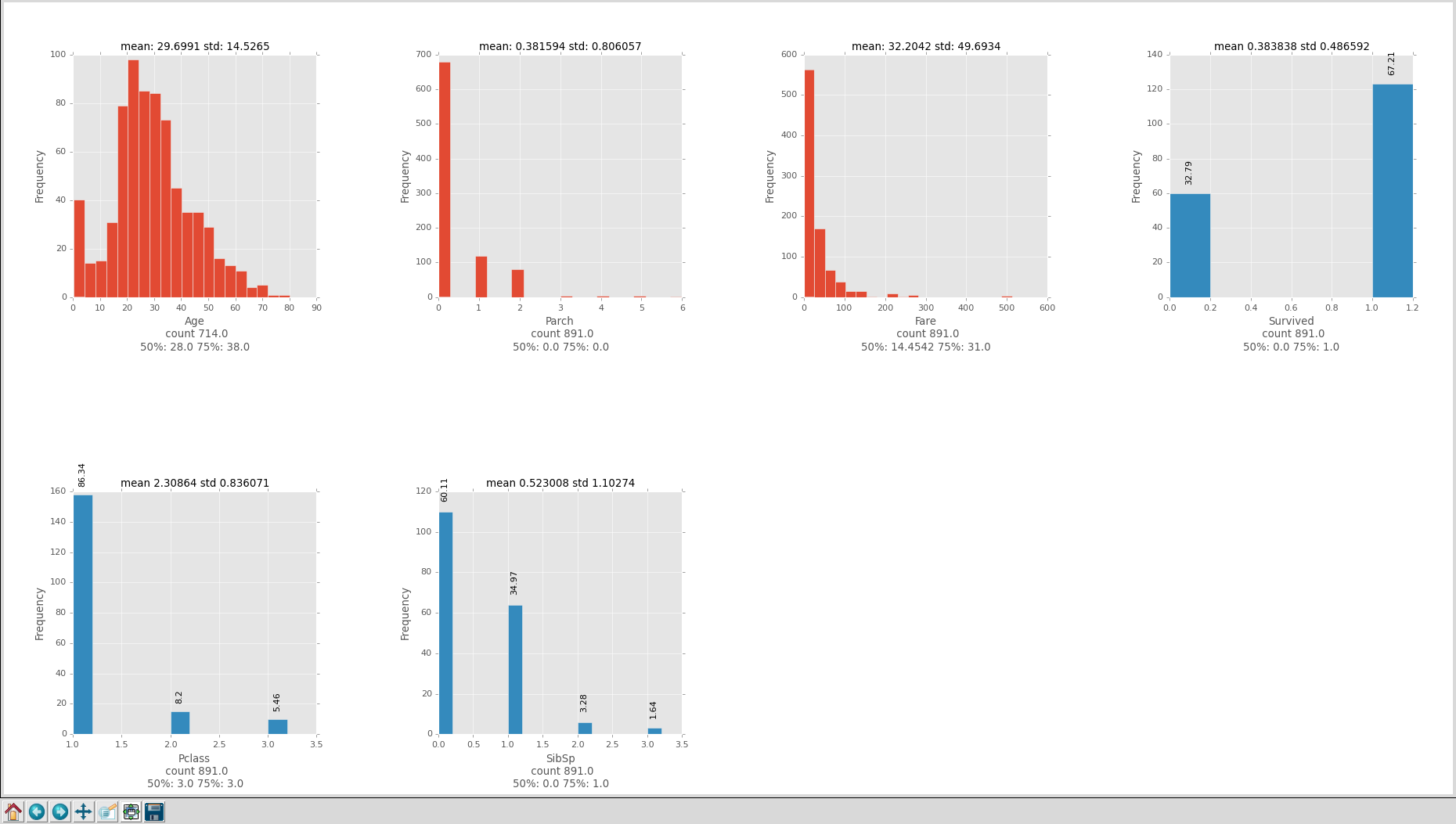
see the dataset
Note: While plotting all the rows with NaN values and columns with Character values are removed(except if values are True and False ),only numeric data is plotted.
2) Feature Selection
This is one of the challenging task to deal with for a ML task.Here we have to do Bi-variate Analysis to find out the relationship between two variables. Here, we look for association and disassociation between variables at a pre-defined significance level.
relation module helps in visualizing the analysis done on various combination of variables and see relation between them.
>>> relation module
visualize_ML.relation.plot(data_input,target_name="",categorical_name=[],drop=[],bin_size=10)
Continuous vs Continuous variables: To do the Bi-variate analysis scatter plots are made as their pattern indicates the relationship between variables. To indicates the strength of relationship amongst them we use Correlation between them.
The graph displays the correlation coefficient along with other information.
Correlation = Covariance(X,Y) / SQRT( Var(X)*Var(Y))
- -1: perfect negative linear correlation
- +1:perfect positive linear correlation and
- 0: No correlation
Categorical vs Categorical variables: Stacked Column Charts are made to visualize the relation.Chi square test is used to derive the statistical significance of relationship between the variables. It returns probability for the computed chi-square distribution with the degree of freedom. For more information on Chi Test see this
Probability of 0: It indicates that both categorical variable are dependent
Probability of 1: It shows that both variables are independent.
The graph displays the p_value along with other information. If it is leass than 0.05 it states that the variables are dependent.
Categorical vs Continuous variables: To explore the relation between categorical and continuous variables,box plots re drawn at each level of categorical variables. If levels are small in number, it will not show the statistical significance. ANOVA test is used to derive the statistical significance of relationship between the variables.
The graph displays the p_value along with other information. If it is leass than 0.05 it states that the variables are dependent.
For more information on ANOVA test see this
| Parameters | Type | Description |
|---|---|---|
| data_input | Dataframe | This is the input Dataframe with all data.(Right now the input can be only be a dataframe input.) |
| target_name | String | The name of the target column. |
| categorical_name | list (default=[ ]) | Names of all categorical variable columns with more than 2 classes, to distinguish them with the continuous variablesEmply list implies that there are no categorical features with more than 2 classes. |
| drop | list default=[ ] | Names of columns to be dropped. |
| PLOT_COLUMNS_SIZE | int (default=4) | Number of plots to display vertically in the display window.The row size is adjusted accordingly. |
| bin_size | int (default="auto") | Number of bins for the histogram displayed in the categorical vs categorical category. |
| wspace | float32 (default = 0.5) | Horizontal padding between subplot on the display window. |
| hspace | float32 (default = 0.8) | Vertical padding between subplot on the display window. |
Code Snippet
/* The data set is taken from famous Titanic data(Kaggle)*/
import pandas as pd
from visualize_ML import relation
df = pd.read_csv("dataset/train.csv")
relation.plot(df,"Survived",["Survived","Pclass","Sex","SibSp","Ticket","Embarked"],drop=["PassengerId","Name"],bin_size=10)
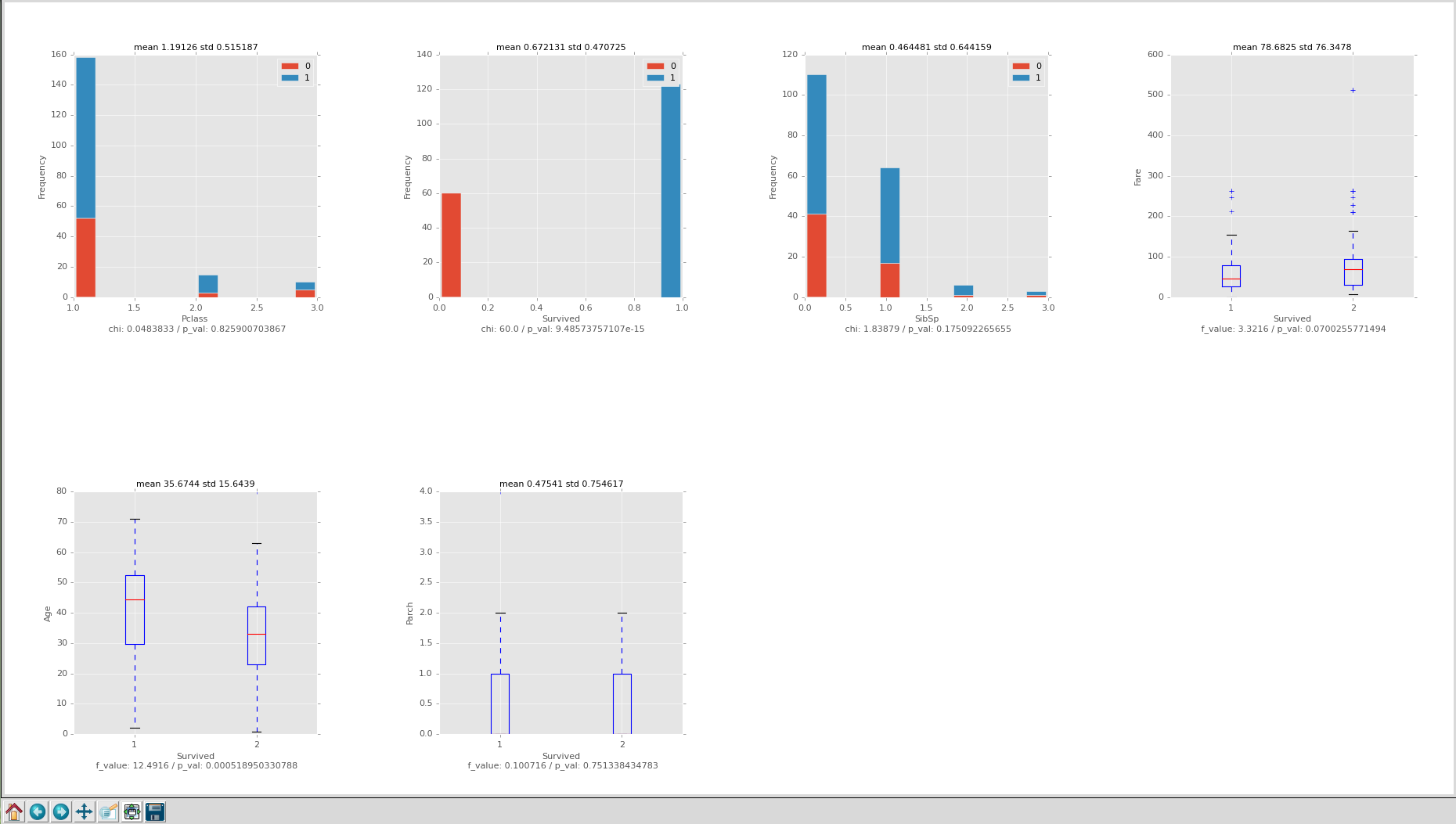
see the dataset
Note: While plotting all the rows with NaN values and columns with Non numeric values are removed only numeric data is plotted.Only categorical taget variable with string values are allowed.
Contribute
If you want to contribute and add new feature feel free to send Pull request here
This project is still under development so to report any bugs or request new features, head over to the Issues page
Tasks To Do
-
Make input compatible with other formats like Numpy.
-
Visualize best fit lines and decision boundaries for various models to make Parameter Tuning task easy.
and many others!
Licence
Licensed under The MIT License (MIT).
Copyright
ayush1997(c) 2016

 42 Dec 26, 2022

 56 Nov 17, 2022

 16 Nov 26, 2022
 4 Aug 4, 2022

 7 Feb 23, 2022
 2 Apr 13, 2022
 14.1k Jan 3, 2023

 1 Jun 26, 2022

 190 Dec 13, 2022


 46 Sep 18, 2022
 4 Apr 04, 2022
 2.4k Jan 04, 2023
 9 Nov 03, 2022
 2 Nov 21, 2021
 13 Oct 27, 2022
 2 Oct 30, 2022
 11 Dec 25, 2022
 2 Nov 07, 2021
 8k Jan 05, 2023
 336 Dec 20, 2022
 11 Dec 14, 2022
 4 Apr 14, 2022
 1.3k Dec 26, 2022
 2.7k Jan 07, 2023
 1.1k Jan 05, 2023
 3.3k Jan 01, 2023
 1 Feb 10, 2022
 0 Sep 12, 2021
 105 Dec 15, 2022