An Inverse Kinematics library aiming performance and modularity

Overview

IKPy

PyPI

demo

IKPy on the bacter robot

Demo

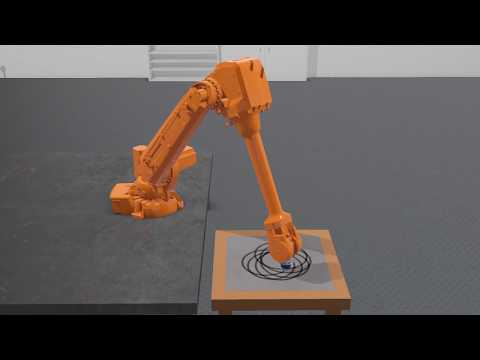
Live demos of what IKPy can do (click on the image below to see the video):

Also, a presentation of IKPy: Presentation.

Features

With IKPy, you can:

  • Compute the Inverse Kinematics of every existing robot.
  • Compute the Inverse Kinematics in position, orientation, or both
  • Define your kinematic chain using arbitrary representations: DH (Denavit–Hartenberg), URDF, custom...
  • Automaticly import a kinematic chain from a URDF file.
  • Support for arbitrary joint types: revolute, prismatic and more to come in the future
  • Use pre-configured robots, such as baxter or the poppy-torso
  • IKPy is precise (up to 7 digits): the only limitation being your underlying model's precision, and fast: from 7 ms to 50 ms (depending on your precision) for a complete IK computation.
  • Plot your kinematic chain: no need to use a real robot (or a simulator) to test your algorithms!
  • Define your own Inverse Kinematics methods.
  • Utils to parse and analyze URDF files:

Moreover, IKPy is a pure-Python library: the install is a matter of seconds, and no compiling is required.

Installation

You have three options:

  1. From PyPI (recommended) - simply run:

    pip install ikpy

    If you intend to plot your robot, you can install the plotting dependencies (mainly matplotlib):

    pip install 'ikpy[plot]'
  2. From source - first download and extract the archive, then run:

    pip install ./

    NB: You must have the proper rights to execute this command

Quickstart

Follow this IPython notebook.

Guides and Tutorials

Go to the wiki. It should introduce you to the basic concepts of IKPy.

API Documentation

An extensive documentation of the API can be found here.

Dependencies and compatibility

Starting with IKPy v3.1, only Python 3 is supported. For versions before v3.1, the library can work with both versions of Python (2.7 and 3.x).

In terms of dependencies, it requires numpy and scipy.

sympy is highly recommended, for fast hybrid computations, that's why it is installed by default.

matplotlib is optional: it is used to plot your models (in 3D).

Contributing

IKPy is designed to be easily customisable: you can add your own IK methods or robot representations (such as DH-Parameters) using a dedicated developer API.

Contributions are welcome: if you have an awesome patented (but also open-source!) IK method, don't hesitate to propose adding it to the library!

Links

  • If performance is your main concern, aversive++ has an inverse kinematics module written in C++, which works the same way IKPy does.
Comments
  • why

    why "forward_kinematics" is true,but "inverse_kinematics_frame" is error

    I input a joint1 to "forward_kinematics" function ,and return a position, then I input the position to "inverse_kinematics_frame", then return another joint2,but joint1 is not euqal to joint2. I use moveit in ros and verified, the result of ikpy "forward_kinematics" is true,but the result of ikpy "inverse_kinematics_frame" is error.

    wontfix 
    opened by DreamLFairy 16
  • Add blender importer

    Add blender importer

    This PR adds a blender importer (that was first intended to be used with Aversive++). The PR makes #22 outdated and useless (so that I should close it if this one is accepted).

    opened by astralien3000 15
  • Not position but Orientation for IK solver

    Not position but Orientation for IK solver

    I tested your library, pretty decent by selecting active joints. However your library minimize its IK solver error by position not by its Orientation. In other words it solves for the Position of the Homo. Transformation Matrix and after that it checks orientation.

    How I can solve for orientation as priority?

    As I see in the code:

        def optimize_target(x):
            # y = np.append(starting_nodes_angles[:chain.first_active_joint], x)
            y = chain.active_to_full(x, starting_nodes_angles)
            squared_distance = np.linalg.norm(chain.forward_kinematics(y)[:3, -1] - target)
            return squared_distance
    

    This section is specified for target which is position. Any suggestion for Orientation?

    opened by AhmetMericOzcan 13
  • Need help to create a chain from global placements

    Need help to create a chain from global placements

    Hi, I'm trying to use ikpy with FreeCAD and can't find how to create a chain from object placements.

    Placements are global coordinates and decomposable in Base (translation from origin) and Rotation (quaternion). I think I get a link origin_translation by subtraction of its Base by the last link Base but can't figure how to get the origin_rotation.

    Thanks !

    opened by FlachyJoe 9
  • When will the Prismatic Joint added?

    When will the Prismatic Joint added?

    I really like to use a prismatic joint solution in my project. Could you please tell me a date for primsatic joint support? Or could you please tell me how it can be done?

    If you can explain it I would like to do it by myself. Looking for your reply

    pinned 
    opened by AhmetMericOzcan 9
  • Changing the optimization algorithm

    Changing the optimization algorithm

    Is it possible to change the optimization algorithm with a function call, or is it only possible to statically change line 134 in inverse_kinematics.py? With L-BFGS-B and joint boundaries I noticed a jumpy behavior in the end effector positions of the kinematic model, so I changed it to SLSQP.

    The models, where this problems come up, can be found here: quadruped model

    enhancement 
    opened by ger01d 8
  • Value Error inverse_kinematics

    Value Error inverse_kinematics

    Following the getting started i got an issue with Setting the position of your chain (aka Inverse Kinematics, aka IK).

    File "C:\Users\Jonas\untitled1.py", line 46, in frame_target[:3,:3] = target_position

    ValueError: cannot copy sequence with size 4 to array axis with dimension 3

    After changing the line to "frame_target = target_position" the error is gone and the presented results appear in the console. Am i just a noob or is this broken?

    opened by HaffmannGG 8
  • Creating chain from URDF

    Creating chain from URDF

    Hi, I am trying to create a chain from URDF file of Baxter and is facing following error. I can't figure out why? What is wrong in this declaration? Any help please

    my_chain = ikpy.chain.Chain.from_urdf_file("../baxter_common/baxter_description/urdf/baxter.urdf",
        base_elements=["right_upper_shoulder", "right_lower_shoulder", "right_upper_elbow", "right_lower_elbow", 
                       "right_upper_forearm", "right_lower_forearm", "right_wrist", "right_hand"], 
        last_link_vector=[0.0, 0.0, 0.025], 
        active_links_mask=[False, True, True, True, True, True, True,True])
    

    I am using this file: Baxter URDF

    And get this error!!!

    raise ValueError("Your active links mask length of {} is different from the number of your links, which is {}".format(len(active_links_mask), len(self.links)))
    ValueError: Your active links mask length of 8 is different from the number of your links, which is 2
    
    wontfix URDF 
    opened by mjm522 8
  • Tutorial Error

    Tutorial Error

    Hi, my name is koki. I got an error like that. I use anaconda3-5.3.1 and Python 3.5.6. I want to know why was it error happened?

    `

    import ikpy my_chain = ikpy.chain.Chain.from_urdf_file("model.urdf") Traceback (most recent call last): File "", line 1, in AttributeError: module 'ikpy' has no attribute 'chain' `

    documentation 
    opened by MADONOKOUKI 7
  • Exception

    Exception "RuntimeError: generator raised StopIteration" with Python3.7

    Python 3.7 has change the behavior of generators : when they reach the end now they emit a RuntimeError exception... In the file URDF_utils.py there are two occurences of next(...) that can raise RuntimeError exception, lines 91 and 103.

    Line 103 "chain = list(next(it) for it in itertools.cycle(iters))" can be replaced by:

    chain = []
        for it in itertools.cycle(iters):
            try:
                item = next(it)
            except:
                break
            chain.append(item)
    
    opened by cjlux 7
  • error trying to import forward_kinematics

    error trying to import forward_kinematics

    Hello! I was trying to run the Quickstart tutorial for poppy-humanoid, and it's throwing an import error looking for the forward_kinematics file, which (after some digging) i found was deleted in this commit 164a5ba680191172f0177e9c59edc5939ce1d114

    Should it still be around, or should that import be removed? It looked like it wasn't just a stray import because fk functions are used throughout the code, should the forward kinematics file be re-added or should all the references be removed?

    thanks!

    opened by studywolf 7
  • Supporting ik interpolation between two positions

    Supporting ik interpolation between two positions

    First off, this project is fantastic, it seriously helps with DIY arm development! I'm mostly asking if this is something within the purview of this library, but how do y'all feel about supporting interpolated values between two points, your current, and target position? I'm working on a pick and place (of a sort) robot, and a large part of the job is picking up items from one or several places, and placing it into a narrow, deep container. I know fora fact when I first got my homemade ik model off the ground, the arm would like, "swing" into position, and the only way around it was instead of one movement, many shorter segments of movements that shortened the amount the arm could "swing" (I'm sure theres a technical term I'm butchering, sorry).

    I'm imagining an option in inverse_kinematics() that takes some sort of a parameter for tokenizing the movement into a list of movements. Maybe the value is a numSegments integer, or the default length unit, like millimeters per segment. Taking the concept to the nth degree so it doesnt feel like for loop syntactic sugar, I'm envisioning that target could be a list of values, so the model could be animated at a higher level, maybe even supporting velocity ~~suggestions~~ calculations given a max velocity value, maybe even per axis?

    If thats outside of this libraries mission, I totally get it, just wanted to know if you guys were open to those sort of features as pull requests.

    enhancement 
    opened by DoWhileGeek 2
  • how to get pose?

    how to get pose?

    now i have a human 3d keypoints file. how can i get the pose euler rotation angle or quaternion with parent-child relationship like smpl pose, i want to use it to drive skeleton in blender or UE4. i have tested to make bvh file to use it in blender, but i want to run it in real time, so ineed to change the method. can you give me some adviences?

    opened by luoww1992 0
  • Option to output as Quaternions/Euler angles/Vectors

    Option to output as Quaternions/Euler angles/Vectors

    The current output is homogeneous coordinates. For generalized use of this software, it would make sense to have an option for the outputs to be in the context of 3D engines like Blender and Unity. Cartesian coordinates.

    enhancement pinned 
    opened by Toxic-Cookie 5
  • Niryo robot - Calculation of inverse kinematis

    Niryo robot - Calculation of inverse kinematis

    Hi, I try to conduct to draw a straight line by calculating inverse kinematics with niryo one robot.

    input position (x : 0.073, y : 0.001, z : 0.168) input orientation (roll : 0.029, yaw: 1.407, pitch: 0.204) Answer of joints 1 ~ 6 axis : [ -0.007, 0.129, -1.360, 0.189, -0.183, -0.360]

    I use blow's model.urdf code. Then, calculate inverse kinematics using these code lines.

    Do you know any solution to solve this problem?

    from ikpy.chain import Chain
    my_chain = Chain.from_urdf_file("model.urdf")
    print(my_chain)
    ik = my_chain.inverse_kinematics(target_position=[0.083, 0.001, 0.168], target_orientation=[0.029, 1.407, 0.203],orientation_mode="all")
    print(ik)
    print(my_chain.forward_kinematics(ik)[:3, 3])
    print(my_chain.forward_kinematics(ik))
    

    I think the calculation of inverse kinematics is bad. The first line is correct, although the second line is wrong.

    print(my_chain.forward_kinematics([0, 0.030, 0.152, -1.334, -0.184, -0.029, -0.030, 0])[:3, 3])
    print(my_chain.inverse_kinematics(target_position=my_chain.forward_kinematics([0, 0.030, 0.152, -1.334, -0.184, -0.029, -0.030, 0])[:3, 3]))
    
    <?xml version="1.0" ?>
    <!-- =================================================================================== -->
    <!-- |    This document was autogenerated by xacro from niryo_one.urdf.xacro           | -->
    <!-- |    EDITING THIS FILE BY HAND IS NOT RECOMMENDED                                 | -->
    <!-- =================================================================================== -->
    <!--
        niryo_one.urdf.xacro
        Copyright (C) 2017 Niryo
        All rights reserved.
    
        This program is free software: you can redistribute it and/or modify
        it under the terms of the GNU General Public License as published by
        the Free Software Foundation, either version 3 of the License, or
        (at your option) any later version.
    
        This program is distributed in the hope that it will be useful,
        but WITHOUT ANY WARRANTY; without even the implied warranty of
        MERCHANTABILITY or FITNESS FOR A PARTICULAR PURPOSE.  See the
        GNU General Public License for more details.
    
        You should have received a copy of the GNU General Public License
        along with this program.  If not, see <http://www.gnu.org/licenses/>.
    -->
    <robot name="niryo_one" xmlns:xacro="http://www.ros.org/wiki/xacro">
      <!-- Properties -->
      <!-- Links -->
      <link name="world"/>
      <link name="base_link">
        <visual>
          <origin rpy="0 0 0" xyz="0 0 0"/>
          <geometry>
            <mesh filename="package://niryo_one_description/meshes/v2/collada/base_link.dae"/>
          </geometry>
        </visual>
        <collision>
          <origin rpy="0 0 0" xyz="0 0 0"/>
          <geometry>
            <mesh filename="package://niryo_one_description/meshes/v2/stl/base_link.stl"/>
          </geometry>
        </collision>
      </link>
      <link name="shoulder_link">
        <visual>
          <origin rpy="0 0 0" xyz="0 0 0"/>
          <geometry>
            <mesh filename="package://niryo_one_description/meshes/v2/collada/shoulder_link.dae"/>
          </geometry>
        </visual>
        <collision>
          <origin rpy="0 0 0" xyz="0 0 0"/>
          <geometry>
            <mesh filename="package://niryo_one_description/meshes/v2/stl/shoulder_link.stl"/>
          </geometry>
        </collision>
      </link>
      <link name="arm_link">
        <visual>
          <origin rpy="0 0 0" xyz="0 0 0"/>
          <geometry>
            <mesh filename="package://niryo_one_description/meshes/v2/collada/arm_link.dae"/>
          </geometry>
        </visual>
        <collision>
          <origin rpy="0 0 0" xyz="0 0 0"/>
          <geometry>
            <mesh filename="package://niryo_one_description/meshes/v2/stl/arm_link.stl"/>
          </geometry>
        </collision>
      </link>
      <link name="elbow_link">
        <visual>
          <origin rpy="0 0 0" xyz="0 0 0"/>
          <geometry>
            <mesh filename="package://niryo_one_description/meshes/v2/collada/elbow_link.dae"/>
          </geometry>
        </visual>
        <collision>
          <origin rpy="0 0 0" xyz="0 0 0"/>
          <geometry>
            <mesh filename="package://niryo_one_description/meshes/v2/stl/elbow_link.stl"/>
          </geometry>
        </collision>
      </link>
      <link name="forearm_link">
        <visual>
          <origin rpy="0 0 0" xyz="0 0 0"/>
          <geometry>
            <mesh filename="package://niryo_one_description/meshes/v2/collada/forearm_link.dae"/>
          </geometry>
        </visual>
        <collision>
          <origin rpy="0 0 0" xyz="0 0 0"/>
          <geometry>
            <mesh filename="package://niryo_one_description/meshes/v2/stl/forearm_link.stl"/>
          </geometry>
        </collision>
      </link>
      <link name="wrist_link">
        <visual>
          <origin rpy="0 0 0" xyz="0 0 0"/>
          <geometry>
            <mesh filename="package://niryo_one_description/meshes/v2/collada/wrist_link.dae"/>
          </geometry>
        </visual>
        <collision>
          <origin rpy="0 0 0" xyz="0 0 0"/>
          <geometry>
            <mesh filename="package://niryo_one_description/meshes/v2/stl/wrist_link.stl"/>
          </geometry>
        </collision>
      </link>
      <link name="hand_link">
        <visual>
          <origin rpy="0 0 0" xyz="0 0 0"/>
          <geometry>
            <mesh filename="package://niryo_one_description/meshes/v2/collada/hand_link.dae"/>
          </geometry>
        </visual>
        <collision>
          <origin rpy="0 0 0" xyz="0 0 0"/>
          <geometry>
            <mesh filename="package://niryo_one_description/meshes/v2/stl/hand_link.stl"/>
          </geometry>
        </collision>
      </link>
      <link name="tool_link">
    	</link>
      <!--Joints -->
      <joint name="joint_world" type="fixed">
        <parent link="world"/>
        <child link="base_link"/>
        <origin rpy="0 0 0" xyz="0 0 0"/>
      </joint>
      <joint name="joint_1" type="revolute">
        <parent link="base_link"/>
        <child link="shoulder_link"/>
        <origin rpy="0 0 0" xyz="0 0 0.103"/>
        <axis xyz="0 0 1"/>
        <limit effort="1" lower="-3.05433" upper="3.05433" velocity="1.0"/>
      </joint>
      <joint name="joint_2" type="revolute">
        <parent link="shoulder_link"/>
        <child link="arm_link"/>
        <origin rpy="1.5707963268 -1.5707963268 0" xyz="0 0 0.08"/>
        <limit effort="1" lower="-1.5708" upper="0.640187" velocity="1.0"/>
        <axis xyz="0 0 1"/>
      </joint>
      <joint name="joint_3" type="revolute">
        <parent link="arm_link"/>
        <child link="elbow_link"/>
        <origin rpy="0 0 -1.5707963268" xyz="0.21 0.0 0"/>
        <limit effort="1" lower="-1.397485" upper="1.5707963268" velocity="1.0"/>
        <axis xyz="0 0 1"/>
      </joint>
      <joint name="joint_4" type="revolute">
        <parent link="elbow_link"/>
        <child link="forearm_link"/>
        <origin rpy="0 1.5707963268 0" xyz="0.0415 0.03 0"/>
        <limit effort="1" lower="-3.05433" upper="3.05433" velocity="1.0"/>
        <axis xyz="0 0 1"/>
      </joint>
      <joint name="joint_5" type="revolute">
        <parent link="forearm_link"/>
        <child link="wrist_link"/>
        <origin rpy="0 -1.5707963268 0" xyz="0 0 0.18"/>
        <limit effort="1" lower="-1.74533" upper="1.91986" velocity="1.0"/>
        <axis xyz="0 0 1"/>
      </joint>
      <joint name="joint_6" type="revolute">
        <parent link="wrist_link"/>
        <child link="hand_link"/>
        <origin rpy="0 1.5707963268 0" xyz="0.0164 -0.0055 0"/>
        <limit effort="1" lower="-2.57436" upper="2.57436" velocity="1.0"/>
        <axis xyz="0 0 1"/>
      </joint>
      <joint name="hand_tool_joint" type="fixed">
        <parent link="hand_link"/>
        <child link="tool_link"/>
        <origin rpy="-1.5707963268 -1.5707963268 0" xyz="0 0 0.0073"/>
      </joint>
    </robot>
    
    
    pinned robot-related 
    opened by MADONOKOUKI 2
  • Numba/CUDA compatible?

    Numba/CUDA compatible?

    Hi,

    I'm interested in running say 1000 independent IK queries on a gpu. In the readme you mention that this is a pure python library which means it theory it should work with numba relatively easily. Are there any caveats or thing I should be aware of if I'm going to try this?

    Something similar to this: https://ipython-books.github.io/58-writing-massively-parallel-code-for-nvidia-graphics-cards-gpus-with-cuda/

    Thanks

    pinned 
    opened by blooop 3
Releases(v3.3.3)
  • v3.3.3(May 15, 2022)

  • v3.3.2(May 15, 2022)

  • v3.3.1(Apr 26, 2022)

  • v3.3(Feb 19, 2022)

    Release v3.3

    The IKPy IK function now uses a new optimizer that improves the performances:

    • Less computation time
    • More precise computations
    Source code(tar.gz)
    Source code(zip)
  • v3.2(Jul 10, 2021)

    Add full support for prismatic joints

    • type="prismatic" in URDF
    • forward kinematics
    • bounds
    • prismatic joints axes are plotted in dotted lines, where revolute joints are plotted in solid lines

    Fixes #96 Fixes #104

    Ex on URDF provided by https://github.com/AhmetMericOzcan. The prismatic joint is the dotted one:

    Figure 6(1)

    When sliding the prismatic joint, we see it moving: Figure 5(1)

    Additional features

    • Support for arbitrary joint types in the URDF
    • Fixed a bug in URDF parsing where fixed joints could be considered as revolute
    • Support for customizable optimization algorithms. Fixes #108

    Thanks to https://github.com/Klausstaler and https://github.com/AhmetMericOzcan for the support and resources!

    Source code(tar.gz)
    Source code(zip)
  • v3.1(Dec 6, 2020)

  • v3.0.1(May 27, 2020)

  • v3.0(May 2, 2020)

  • v2.3(Mar 17, 2019)

  • v2.0(May 3, 2016)

Owner
Pierre Manceron
Artificial Intelligence Engineer
Pierre Manceron
Mini-hmc-jax - A simple implementation of Hamiltonian Monte Carlo in JAX

mini-hmc-jax This is a simple implementation of Hamiltonian Monte Carlo in JAX t

Martin Marek 6 Mar 03, 2022
The source code of the ICCV2021 paper "PIRenderer: Controllable Portrait Image Generation via Semantic Neural Rendering"

The source code of the ICCV2021 paper "PIRenderer: Controllable Portrait Image Generation via Semantic Neural Rendering"

Ren Yurui 261 Jan 09, 2023
Style transfer, deep learning, feature transform

FastPhotoStyle License Copyright (C) 2018 NVIDIA Corporation. All rights reserved. Licensed under the CC BY-NC-SA 4.0 license (https://creativecommons

NVIDIA Corporation 10.9k Jan 02, 2023
Code for the ICCV 2021 paper "Pixel Difference Networks for Efficient Edge Detection" (Oral).

Microsoft365_devicePhish Abusing Microsoft 365 OAuth Authorization Flow for Phishing Attack This is a simple proof-of-concept script that allows an at

Alex 236 Dec 21, 2022
Github for the conference paper GLOD-Gaussian Likelihood OOD detector

FOOD - Fast OOD Detector Pytorch implamentation of the confernce peper FOOD arxiv link. Abstract Deep neural networks (DNNs) perform well at classifyi

17 Jun 19, 2022
Method for facial emotion recognition compitition of Xunfei and Datawhale .

人脸情绪识别挑战赛-第3名-W03KFgNOc-源代码、模型以及说明文档 队名:W03KFgNOc 排名:3 正确率: 0.75564 队员:yyMoming,xkwang,RichardoMu。 比赛链接:人脸情绪识别挑战赛 文章地址:link emotion 该项目分别训练八个模型并生成csv文

6 Oct 17, 2022
Code for "Learning Canonical Representations for Scene Graph to Image Generation", Herzig & Bar et al., ECCV2020

Learning Canonical Representations for Scene Graph to Image Generation (ECCV 2020) Roei Herzig*, Amir Bar*, Huijuan Xu, Gal Chechik, Trevor Darrell, A

roei_herzig 24 Jul 07, 2022
List of content farm sites like g.penzai.com.

内容农场网站清单 Google 中文搜索结果包含了相当一部分的内容农场式条目,比如「小 X 知识网」「小 X 百科网」。此种链接常会 302 重定向其主站,页面内容为自动生成,大量堆叠关键字,揉杂一些爬取到的内容,完全不具可读性和参考价值。 尤为过分的是,该类网站可能有成千上万个分身域名被 Goog

WDMPA 541 Jan 03, 2023
Code for the paper "Attention Approximates Sparse Distributed Memory"

Attention Approximates Sparse Distributed Memory - Codebase This is all of the code used to run analyses in the paper "Attention Approximates Sparse D

Trenton Bricken 14 Dec 05, 2022
[ICLR'19] Trellis Networks for Sequence Modeling

TrellisNet for Sequence Modeling This repository contains the experiments done in paper Trellis Networks for Sequence Modeling by Shaojie Bai, J. Zico

CMU Locus Lab 460 Oct 13, 2022
Pretrained Cost Model for Distributed Constraint Optimization Problems

Pretrained Cost Model for Distributed Constraint Optimization Problems Requirements PyTorch 1.9.0 PyTorch Geometric 1.7.1 Directory structure baseline

2 Aug 28, 2022
Implementation for Simple Spectral Graph Convolution in ICLR 2021

Simple Spectral Graph Convolutional Overview This repo contains an example implementation of the Simple Spectral Graph Convolutional (S^2GC) model. Th

allenhaozhu 64 Dec 31, 2022
Learning Super-Features for Image Retrieval

Learning Super-Features for Image Retrieval This repository contains the code for running our FIRe model presented in our ICLR'22 paper: @inproceeding

NAVER 101 Dec 28, 2022
Scalable Optical Flow-based Image Montaging and Alignment

SOFIMA SOFIMA (Scalable Optical Flow-based Image Montaging and Alignment) is a tool for stitching, aligning and warping large 2d, 3d and 4d microscopy

Google Research 16 Dec 21, 2022
Adversarial Texture Optimization from RGB-D Scans (CVPR 2020).

AdversarialTexture Adversarial Texture Optimization from RGB-D Scans (CVPR 2020). Scanning Data Download Please refer to data directory for details. B

Jingwei Huang 153 Nov 28, 2022
Code for "Diffusion is All You Need for Learning on Surfaces"

Source code for "Diffusion is All You Need for Learning on Surfaces", by Nicholas Sharp Souhaib Attaiki Keenan Crane Maks Ovsjanikov NOTE: the linked

Nick Sharp 247 Dec 28, 2022
PyTorchMemTracer - Depict GPU memory footprint during DNN training of PyTorch

A Memory Tracer For PyTorch OOM is a nightmare for PyTorch users. However, most

Jiarui Fang 9 Nov 14, 2022
source code for 'Finding Valid Adjustments under Non-ignorability with Minimal DAG Knowledge' by A. Shah, K. Shanmugam, K. Ahuja

Source code for "Finding Valid Adjustments under Non-ignorability with Minimal DAG Knowledge" Reference: Abhin Shah, Karthikeyan Shanmugam, Kartik Ahu

Abhin Shah 1 Jun 03, 2022
Learning Features with Parameter-Free Layers (ICLR 2022)

Learning Features with Parameter-Free Layers (ICLR 2022) Dongyoon Han, YoungJoon Yoo, Beomyoung Kim, Byeongho Heo | Paper NAVER AI Lab, NAVER CLOVA Up

NAVER AI 65 Dec 07, 2022
Libraries, tools and tasks created and used at DeepMind Robotics.

Libraries, tools and tasks created and used at DeepMind Robotics.

DeepMind 270 Nov 30, 2022