db.py
What is it?
db.py is an easier way to interact with your databases. It makes it easier to explore tables, columns, views, etc. It puts the emphasis on user interaction, information display, and providing easy to use helper functions.
db.py uses pandas to manage data, so if you're already using pandas, db.py should feel pretty natural. It's also fully compatible with the IPython Notebook, so not only is db.py extremely functional, it's also pretty.
Databases Supported
- PostgreSQL
- MySQL
- SQLite
- Redshift
- MS SQL Server
- Oracle
db.py let's you...
Execute queries
>>> db.query_from_file("myscript.sql")
       _id                    datetime           user_id  n
0  1290000  10/Jun/2014:18:21:27 +0000  0000015b37cd0964  1
1  9120009  23/Jun/2014:02:11:21 +0000  00006e01a6419822  1
2  1683874  23/Jun/2014:02:11:48 +0000  00006e01a6419822  2
3  2562153  23/Jun/2014:02:12:57 +0000  00006e01a6419822  3
4   393019  14/Jun/2014:16:05:18 +0000  000099d569e3a216  1
5  3542568  14/Jun/2014:16:06:02 +0000  000099d569e3a216  2
Fully compatible with predictive type
>>> db.tables.
db.tables.Album          db.tables.Customer       db.tables.Genre          db.tables.InvoiceLine    db.tables.Playlist       db.tables.Track
db.tables.Artist         db.tables.Employee       db.tables.Invoice        db.tables.MediaType      db.tables.PlaylistTrack  db.tables.tables
Friendly displays
>>> db.tables.Track
+-------------------------------------------------------------+
|                            Album                            |
+----------+---------------+-----------------+----------------+
| Column   | Type          | Foreign Keys    | Reference Keys |
+----------+---------------+-----------------+----------------+
| AlbumId  | INTEGER       |                 | Track.AlbumId  |
| Title    | NVARCHAR(160) |                 |                |
| ArtistId | INTEGER       | Artist.ArtistId |                |
+----------+---------------+-----------------+----------------+
Directly integrated with pandas
>>> db.tables.Track.head()
   TrackId                                     Name  AlbumId  MediaTypeId  \
0        1  For Those About To Rock (We Salute You)        1            1
1        2                        Balls to the Wall        2            2
2        3                          Fast As a Shark        3            2
3        4                        Restless and Wild        3            2
4        5                     Princess of the Dawn        3            2
5        6                    Put The Finger On You        1            1

   GenreId                                           Composer  Milliseconds  \
0        1          Angus Young, Malcolm Young, Brian Johnson        343719
1        1                                               None        342562
2        1  F. Baltes, S. Kaufman, U. Dirkscneider & W. Ho...        230619
3        1  F. Baltes, R.A. Smith-Diesel, S. Kaufman, U. D...        252051
4        1                         Deaffy & R.A. Smith-Diesel        375418
5        1          Angus Young, Malcolm Young, Brian Johnson        205662

      Bytes  UnitPrice
0  11170334       0.99
1   5510424       0.99
2   3990994       0.99
3   4331779       0.99
4   6290521       0.99
5   6713451       0.99
Create queries using Handlebars style templates
q = """
SELECT
    '{{ name }}' as table_name, sum(1) as cnt
FROM
    {{ name }}
GROUP BY
    table_name
"""
data = [
  {"name": "Album"},
  {"name": "Artist"},
  {"name": "Track"}
]
db.query(q, data=data)
  table_name   cnt
0      Album   347
1     Artist   275
2      Track  3503
Search your schema
>>> db.find_column("*Id*")
+---------------+---------------+---------+
| Table         |  Column Name  | Type    |
+---------------+---------------+---------+
| Album         |    AlbumId    | INTEGER |
| Album         |    ArtistId   | INTEGER |
| Artist        |    ArtistId   | INTEGER |
| Customer      |  SupportRepId | INTEGER |
| Customer      |   CustomerId  | INTEGER |
| Employee      |   EmployeeId  | INTEGER |
| Genre         |    GenreId    | INTEGER |
| Invoice       |   InvoiceId   | INTEGER |
| Invoice       |   CustomerId  | INTEGER |
| InvoiceLine   |   InvoiceId   | INTEGER |
| InvoiceLine   |    TrackId    | INTEGER |
| InvoiceLine   | InvoiceLineId | INTEGER |
| MediaType     |  MediaTypeId  | INTEGER |
| Playlist      |   PlaylistId  | INTEGER |
| PlaylistTrack |    TrackId    | INTEGER |
| PlaylistTrack |   PlaylistId  | INTEGER |
| Track         |  MediaTypeId  | INTEGER |
| Track         |    TrackId    | INTEGER |
| Track         |    AlbumId    | INTEGER |
| Track         |    GenreId    | INTEGER |
+---------------+---------------+---------+
IPython Notebook friendly 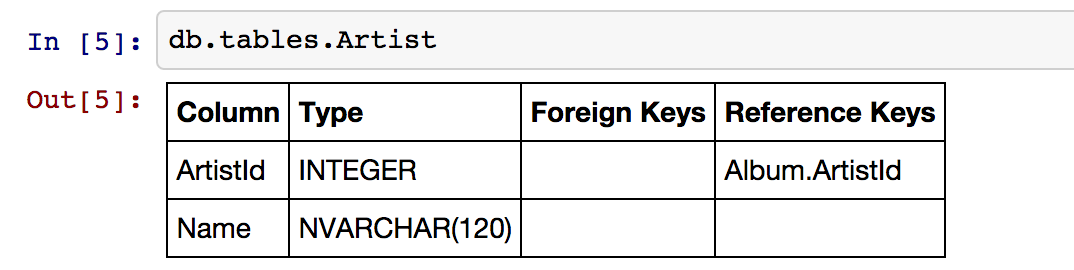
Quickstart
Installation
db.py is on PyPi.
$ pip install db.py
The database libraries being used under the hood are optional dependencies (if you use mysql, you probably don't care about installing psycopg2). Based on the databases you're using, you'll need one (or many) of the following:
- PostgreSQL: psycopg2. Windows
- Redshift: psycopg2. Redshift is a flavor of PostgreSQL.
- MySQL: MySQLdb
- SQLite: sqlite3. Should be installed already.
- MS SQL: TBD. Suggestions welcome! https://github.com/yhat/db.py/issues
Demo
>>> from db import DemoDB # or connect to your own using DB. see below
>>> db = DemoDB() # comes from: http://chinookdatabase.codeplex.com/
>>> db.tables
+---------------+----------------------------------------------------------------------------------+
| Table         | Columns                                                                          |
+---------------+----------------------------------------------------------------------------------+
| Album         | AlbumId, Title, ArtistId                                                         |
| Artist        | ArtistId, Name                                                                   |
| Customer      | CustomerId, FirstName, LastName, Company, Address, City, State, Country, PostalC |
|               | ode, Phone, Fax, Email, SupportRepId                                             |
| Employee      | EmployeeId, LastName, FirstName, Title, ReportsTo, BirthDate, HireDate, Address, |
|               |  City, State, Country, PostalCode, Phone, Fax, Email                             |
| Genre         | GenreId, Name                                                                    |
| Invoice       | InvoiceId, CustomerId, InvoiceDate, BillingAddress, BillingCity, BillingState, B |
|               | illingCountry, BillingPostalCode, Total                                          |
| InvoiceLine   | InvoiceLineId, InvoiceId, TrackId, UnitPrice, Quantity                           |
| MediaType     | MediaTypeId, Name                                                                |
| Playlist      | PlaylistId, Name                                                                 |
| PlaylistTrack | PlaylistId, TrackId                                                              |
| Track         | TrackId, Name, AlbumId, MediaTypeId, GenreId, Composer, Milliseconds, Bytes, Uni |
|               | tPrice                                                                           |
+---------------+----------------------------------------------------------------------------------+
>>> db.tables.Customer
+------------------------------------------------------------------------+
|                                Customer                                |
+--------------+--------------+---------------------+--------------------+
| Column       | Type         | Foreign Keys        | Reference Keys     |
+--------------+--------------+---------------------+--------------------+
| CustomerId   | INTEGER      |                     | Invoice.CustomerId |
| FirstName    | NVARCHAR(40) |                     |                    |
| LastName     | NVARCHAR(20) |                     |                    |
| Company      | NVARCHAR(80) |                     |                    |
| Address      | NVARCHAR(70) |                     |                    |
| City         | NVARCHAR(40) |                     |                    |
| State        | NVARCHAR(40) |                     |                    |
| Country      | NVARCHAR(40) |                     |                    |
| PostalCode   | NVARCHAR(10) |                     |                    |
| Phone        | NVARCHAR(24) |                     |                    |
| Fax          | NVARCHAR(24) |                     |                    |
| Email        | NVARCHAR(60) |                     |                    |
| SupportRepId | INTEGER      | Employee.EmployeeId |                    |
+--------------+--------------+---------------------+--------------------+
>>> db.tables.Customer.sample()
   CustomerId  FirstName    LastName  \
0           4      Bjørn      Hansen
1          26    Richard  Cunningham
2           1       Luís   Gonçalves
3          21      Kathy       Chase
4           6     Helena        Holý
5          14       Mark     Philips
6          49  Stanisław      Wójcik
7          19        Tim       Goyer
8          45   Ladislav      Kovács
9           8       Daan     Peeters

                                            Company  \
0                                              None
1                                              None
2  Embraer - Empresa Brasileira de Aeronáutica S.A.
3                                              None
4                                              None
5                                             Telus
6                                              None
7                                        Apple Inc.
8                                              None
9                                              None

                           Address                 City State         Country  \
0                 Ullevålsveien 14                 Oslo  None          Norway
1              2211 W Berry Street           Fort Worth    TX             USA
2  Av. Brigadeiro Faria Lima, 2170  São José dos Campos    SP          Brazil
3                 801 W 4th Street                 Reno    NV             USA
4                    Rilská 3174/6               Prague  None  Czech Republic
5                   8210 111 ST NW             Edmonton    AB          Canada
6                     Ordynacka 10               Warsaw  None          Poland
7                  1 Infinite Loop            Cupertino    CA             USA
8                Erzsébet krt. 58.             Budapest  None         Hungary
9                  Grétrystraat 63             Brussels  None         Belgium

  PostalCode               Phone                 Fax  \
0       0171     +47 22 44 22 22                None
1      76110   +1 (817) 924-7272                None
2  12227-000  +55 (12) 3923-5555  +55 (12) 3923-5566
3      89503   +1 (775) 223-7665                None
4      14300    +420 2 4177 0449                None
5    T6G 2C7   +1 (780) 434-4554   +1 (780) 434-5565
6     00-358    +48 22 828 37 39                None
7      95014   +1 (408) 996-1010   +1 (408) 996-1011
8     H-1073                None                None
9       1000    +32 02 219 03 03                None

                      Email  SupportRepId
0     bjorn.hansen@yahoo.no             4
1  ricunningham@hotmail.com             4
2      luisg@embraer.com.br             3
3       kachase@hotmail.com             5
4           hholy@gmail.com             5
5        mphilips12@shaw.ca             5
6    stanisław.wójcik@wp.pl             4
7          tgoyer@apple.com             3
8  ladislav_kovacs@apple.hu             3
9     daan_peeters@apple.be             4
>>> db.find_column("*Name*")
+-----------+-------------+---------------+
| Table     | Column Name | Type          |
+-----------+-------------+---------------+
| Artist    |     Name    | NVARCHAR(120) |
| Customer  |  FirstName  | NVARCHAR(40)  |
| Customer  |   LastName  | NVARCHAR(20)  |
| Employee  |  FirstName  | NVARCHAR(20)  |
| Employee  |   LastName  | NVARCHAR(20)  |
| Genre     |     Name    | NVARCHAR(120) |
| MediaType |     Name    | NVARCHAR(120) |
| Playlist  |     Name    | NVARCHAR(120) |
| Track     |     Name    | NVARCHAR(200) |
+-----------+-------------+---------------+
>>> db.find_table("A*")
+--------+--------------------------+
| Table  | Columns                  |
+--------+--------------------------+
| Album  | AlbumId, Title, ArtistId |
| Artist | ArtistId, Name           |
+--------+--------------------------+
>>> db.query("select * from Artist limit 10;")
   ArtistId                  Name
0         1                 AC/DC
1         2                Accept
2         3             Aerosmith
3         4     Alanis Morissette
4         5       Alice In Chains
5         6  Antônio Carlos Jobim
6         7          Apocalyptica
7         8            Audioslave
8         9              BackBeat
9        10          Billy Cobham
How To
Connecting to a Database
The DB() object
Arguments
- username: your username
- password: your password
- hostname: hostname of the database (i.e.
localhost,dw.mardukas.com,ec2-54-191-289-254.us-west-2.compute.amazonaws.com) - port: port the database is running on (i.e. 5432)
- dbname: name of the database (i.e.
hanksdb) - filename: path to sqlite database (i.e.
baseball-archive-2012.sqlite,employees.db) - dbtype: type of database you're connecting to (postgres, mysql, sqlite, redshift)
- profile: name of the profile you want to use to connect. using this negates the need to specify any other arguments
- exclude_system_tables: whether or not to load schema information for internal tables. for example, postgres has a bunch of tables prefixed with
pg_that you probably don't actually care about. on the other had if you're administrating a database, you might want to query these tables - limit: default number of records to return in a query. This is used by the DB.query method. You can override it by adding limit={X} to the
querymethod, or by passing an argument toDB(). None indicates that there will be no limit (That's right, you'll be limitless. Bradley Cooper style.)
>>> from db import DB
>>> db = DB(username="greg", password="secret", hostname="localhost",
            dbtype="postgres")
Saving a profile
>>> from db import DB
>>> db = DB(username="greg", password="secret", hostname="localhost",
            dbtype="postgres")
>>> db.save_credentials() # this will save to "default"
>>> db.save_credentials(profile="local_pg")
Connecting from a profile
>>> from db import DB
>>> db = DB() # this loads "default" profile
>>> db = DB(profile="local_pg")
List your profiles
>>> from db import list_profiles
>>> list_profiles()
{'demo': {u'dbname': None,
  u'dbtype': u'sqlite',
  u'filename': u'/Users/glamp/repos/yhat/opensource/db.py/db/data/chinook.sqlite',
  u'hostname': u'localhost',
  u'password': None,
  u'port': 5432,
  u'username': None},
 'muppets': {u'dbname': u'muppetdb',
  u'dbtype': u'postgres',
  u'filename': None,
  u'hostname': u'muppets.yhathq.com',
  u'password': None,
  u'port': 5432,
  u'username': u'kermit'}}
Remove a profile
>>> remove_profile('demo')
Executing Queries
From a string
>>> df1 = db.query("select * from Artist;")
>>> df2 = db.query("select * from Album;")
From a file
>>> db.query_from_file("myscript.sql")
>>> df = db.query_from_file("myscript.sql")
Searching for Tables and Columns
Tables
>>> db.find_table("A*")
+--------+--------------------------+
| Table  | Columns                  |
+--------+--------------------------+
| Album  | AlbumId, Title, ArtistId |
| Artist | ArtistId, Name           |
+--------+--------------------------+
>>> results = db.find_table("tmp*") # returns all tables prefixed w/ tmp
>>> results = db.find_table("prod_*") # returns all tables prefixed w/ prod_
>>> results = db.find_table("*Invoice*") # returns all tables containing trans
>>> results = db.find_table("*") # returns everything
Columns
>>> db.find_column("Name") # returns all columns named "Name"
+-----------+-------------+---------------+
| Table     | Column Name | Type          |
+-----------+-------------+---------------+
| Artist    |     Name    | NVARCHAR(120) |
| Genre     |     Name    | NVARCHAR(120) |
| MediaType |     Name    | NVARCHAR(120) |
| Playlist  |     Name    | NVARCHAR(120) |
| Track     |     Name    | NVARCHAR(200) |
+-----------+-------------+---------------+
>>> db.find_column("*Id") # returns all columns ending w/ Id
+---------------+---------------+---------+
| Table         |  Column Name  | Type    |
+---------------+---------------+---------+
| Album         |    AlbumId    | INTEGER |
| Album         |    ArtistId   | INTEGER |
| Artist        |    ArtistId   | INTEGER |
| Customer      |  SupportRepId | INTEGER |
| Customer      |   CustomerId  | INTEGER |
| Employee      |   EmployeeId  | INTEGER |
| Genre         |    GenreId    | INTEGER |
| Invoice       |   InvoiceId   | INTEGER |
| Invoice       |   CustomerId  | INTEGER |
| InvoiceLine   |   InvoiceId   | INTEGER |
| InvoiceLine   |    TrackId    | INTEGER |
| InvoiceLine   | InvoiceLineId | INTEGER |
| MediaType     |  MediaTypeId  | INTEGER |
| Playlist      |   PlaylistId  | INTEGER |
| PlaylistTrack |    TrackId    | INTEGER |
| PlaylistTrack |   PlaylistId  | INTEGER |
| Track         |  MediaTypeId  | INTEGER |
| Track         |    TrackId    | INTEGER |
| Track         |    AlbumId    | INTEGER |
| Track         |    GenreId    | INTEGER |
+---------------+---------------+---------+
>>> db.find_column("*Address*") # returns all columns containing Address
+----------+----------------+--------------+
| Table    |  Column Name   | Type         |
+----------+----------------+--------------+
| Customer |    Address     | NVARCHAR(70) |
| Employee |    Address     | NVARCHAR(70) |
| Invoice  | BillingAddress | NVARCHAR(70) |
+----------+----------------+--------------+
# returns all columns containing Address that are varchars
>>> db.find_column("*Address*", data_type="NVARCHAR(70)")
# returns all columns have an "e" and are NVARCHAR/INTEGERS
>>> db.find_column("*e*", data_type=["NVARCHAR(70)", "INTEGER"])
Tests
To run individual tests:
$ python -m unittest test_module.TestClass.test_method
To run all the tests:
$ python -m unittest discover <path_to_tests_folder> -v
Contributing
See either the TODO below or Adding a Database.
TODO
- Switch to newer version of pandas sql api
- Add database support
- postgres
- sqlite
- redshift
- mysql
- mssql (going to be a little trickier since i don't have one)
- publish examples to nbviewer
- improve documentation and readme
- add sample database to distrobution
- push to Redshift
- "joins to" for columns
- postgres
- sqlite
- redshift
- mysql
- mssql
- intelligent display of number/size returned in query
- patsy formulas
- profile w/ limit

 10 Dec 22, 2022
 9.7k Dec 30, 2022
 993 Jan 03, 2023
 853 Dec 30, 2022
 185 Jan 01, 2023
 404 Dec 03, 2022
 10 Dec 07, 2022
 1.3k Jan 01, 2023
 11 Aug 03, 2022
 1 Jan 05, 2022
 97 Sep 05, 2022
 5.1k Jan 08, 2023
 5.5k Jan 08, 2023
 159 Dec 27, 2022
 880 Jan 08, 2023
 11 May 23, 2022
 7 Aug 21, 2022
 2.3k Jan 06, 2023
 17 Oct 10, 2021
 162 Dec 19, 2022