PowerApps-docstring is a console based, pipeline ready application that automatically generates user and technical documentation for Power Apps.

Overview

powerapps-docstring

PowerApps-docstring is a console based, pipeline ready application that automatically generates user and technical documentation for PowerApps.

A first version of a Power Apps Documentation Guideline is available here: Power Apps Documentation Guideline

Purpose of this application

Documentation of Microsoft Power Apps is an important building block in the software lifecycle. As in the traditional software development process, the developed Power App should also be documented propperly to ensure further development/support and maintenance as well as onboarding of new developers.

Unfortunately, it is currently not possible to automatically create documentation for a Power App "out of the box" based on the App (code) itself. Resolving in either hours of manual documentation work or a lack of propper documentation at all.

This application shall solve this problem by providing a way to:

  • create Power Apps documentation based on the code and docstrings provided inside the app development process itself
  • integrate the documentation creation process into the ci/cd pipeline aswell as
  • create documentation based on an exported app

Example

The example [Meeting Capture Demo-doc.md](example/Meeting Capture Demo-doc.md) is based on the template "Meeting Capture App" provided by Microsoft. The app has not been modified except docstrings have been added within the OnVisible propperties of each screen as well as OnStart. The source files are also available in the example folder.

PowerApps_Docstring_demo

Getting started

Windows based GUI

Download the pa-docstring.exe file from dist folder or release page and run it to start the GUI. You have to provide:

  • source path (absolute or relative) to the source folder
  • output path where the documentation shall be stored
  • config file is optional if no file is provided, a standard file will be used
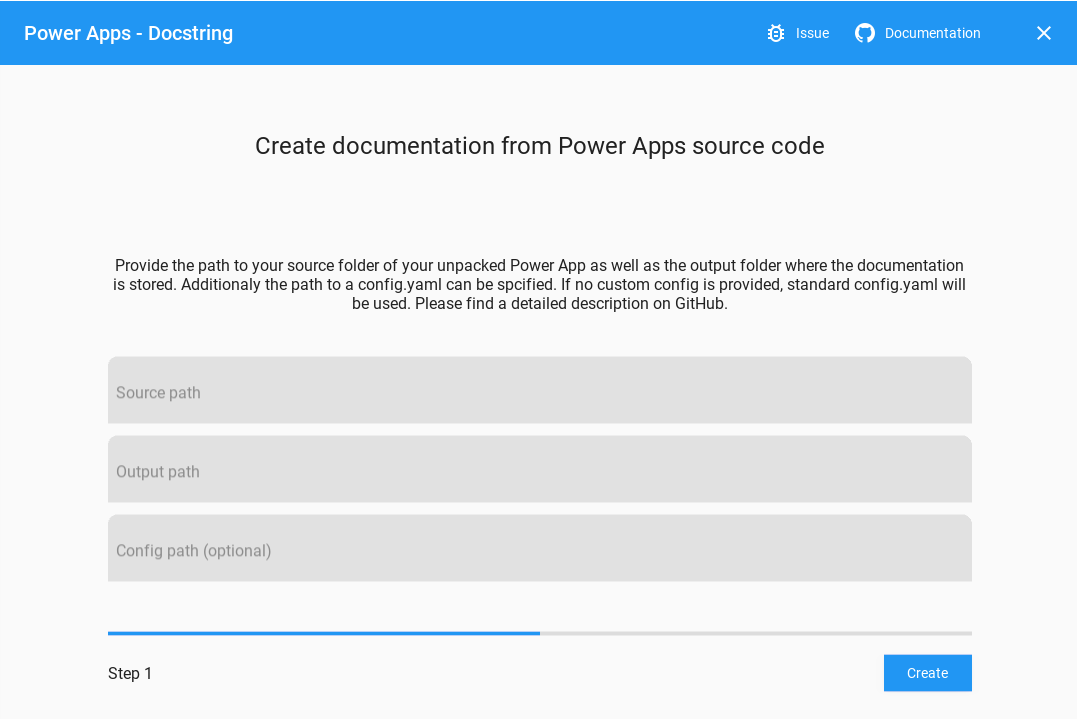
GUI

Windows based CLI

The .exe file can also be used as a CLI. In this case you need to provide at leas the parameter -s and -o (see python CLI) pa-docstring.exe -s example\src\meetingcapturedemo -o example

Working with python based CLI or integration into CI

  1. clone repository git clone https://github.com/sebastian-muthwill/powerapps-docstring.git and change into directory cd powerapps-docstring
  2. install requirements with pip install -r requirements.txt
  3. run with python3 main.py --source example\src\meetingcapturedemo\ --output example\

Once the application finished successfully the documentation file is created in the specified folder in markdown format.

Known issues / optimizations

  • mermaid graph looks wierd whe to many screens and is not displayed in github since github currently does not support mermaid
  • currently not tested with modell driven apps

Feature ideas

If you would like to submit your idea, feel free to create an issue.

  • screen descriptions from comments
  • screenflow from navigations
  • used functions (configurable)
  • used connections
  • output
    • user and technical documentation
    • markdown
    • html
    • pdf
  • handle following formats:
    • zip
    • mssap
    • src
  • usable via Azure DevOps CI-CD pipeline

Follow this topic

Get in touch with me on: Twitter

#powerapps_docstring #PowerAtelier #CloudCouchRocks

Comments
  • UnboundLocalError: local variable 'canvas_manifest' referenced before assignment

    UnboundLocalError: local variable 'canvas_manifest' referenced before assignment

    An issue in the pipeline step in Azure DevOps: Config:

    image

    YAML Config of the above configuration:

    #Your build pipeline references an undefined variable named ‘BuildStagingDirectory’. Create or edit the build pipeline for this YAML file, define the variable on the Variables tab. See https://go.microsoft.com/fwlink/?linkid=865972 #Your build pipeline references an undefined variable named ‘SolutionName’. Create or edit the build pipeline for this YAML file, define the variable on the Variables tab. See https://go.microsoft.com/fwlink/?linkid=865972 #Your build pipeline references an undefined variable named ‘BuildStagingDirectory’. Create or edit the build pipeline for this YAML file, define the variable on the Variables tab. See https://go.microsoft.com/fwlink/?linkid=865972 #Your build pipeline references an undefined variable named ‘SolutionName’. Create or edit the build pipeline for this YAML file, define the variable on the Variables tab. See https://go.microsoft.com/fwlink/?linkid=865972

    steps:

    • task: [email protected] displayName: 'powerapps-docstring' inputs: scriptPath: 'powerapps-docstring/main.py' arguments: '--source $(BuildStagingDirectory)$(SolutionName)\managed\ --output $(BuildStagingDirectory)$(SolutionName)\managed\ --config powerapps-docstring\config.yaml' continueOnError: true

    OUTPUT:

    2021-11-07T16:05:32.8040424Z ##[section]Starting: powerapps-docstring 2021-11-07T16:05:32.8327632Z ============================================================================== 2021-11-07T16:05:32.8327960Z Task : Python script 2021-11-07T16:05:32.8328195Z Description : Run a Python file or inline script 2021-11-07T16:05:32.8328433Z Version : 0.182.0 2021-11-07T16:05:32.8328748Z Author : Microsoft Corporation 2021-11-07T16:05:32.8329065Z Help : https://docs.microsoft.com/azure/devops/pipelines/tasks/utility/python-script 2021-11-07T16:05:32.8329462Z ============================================================================== 2021-11-07T16:05:33.1525497Z [command]C:\hostedtoolcache\windows\Python\3.9.7\x64\python.exe D:\a\1\s\powerapps-docstring\main.py --source build\SolutionDemo\managed\ --output build\SolutionDemo\managed\ --config config.yaml 2021-11-07T16:05:33.2411939Z build\SolutionDemo\managed/ 2021-11-07T16:05:33.2412839Z Traceback (most recent call last): 2021-11-07T16:05:33.2413325Z File "D:\a\1\s\powerapps-docstring\main.py", line 86, in 2021-11-07T16:05:33.2413942Z main(sys.argv[1:]) 2021-11-07T16:05:33.2414362Z File "D:\a\1\s\powerapps-docstring\main.py", line 79, in main 2021-11-07T16:05:33.2414816Z docstring = Docstring(pa_src_path, output_path, config) 2021-11-07T16:05:33.2415299Z File "D:\a\1\s\powerapps-docstring\powerapps_docstring\documentation.py", line 15, in init 2021-11-07T16:05:33.2415796Z self.manifest_file = self.parser.get_canvas_manifest() 2021-11-07T16:05:33.2416293Z File "D:\a\1\s\powerapps-docstring\powerapps_docstring\parser.py", line 44, in get_canvas_manifest 2021-11-07T16:05:33.2416744Z return canvas_manifest 2021-11-07T16:05:33.2417163Z UnboundLocalError: local variable 'canvas_manifest' referenced before assignment 2021-11-07T16:05:33.2524300Z ##[error]The process 'C:\hostedtoolcache\windows\Python\3.9.7\x64\python.exe' failed with exit code 1 2021-11-07T16:05:33.2731262Z ##[section]Finishing: powerapps-docstring

    question 
    opened by frederikbisback 5
  • Azure DevOps pipeline - ModuleNotFoundError: No module named 'yaml'

    Azure DevOps pipeline - ModuleNotFoundError: No module named 'yaml'

    Dear,

    I am adding the Python script to the Azure DevOps pipeline. I cannot install the YAML module; see the message. ModuleNotFoundError: No module named 'yaml'

    image

    Thanks for the feedback.

    Frederik

    question 
    opened by frederikbisback 3
  • Add StartScreen to AppInfo

    Add StartScreen to AppInfo

    As the StartScreen app variable is now available it should be documented.

    In the attached documentation.py I have added the following;

    start_screen = app_screen[1]["App As appinfo"].get("StartScreen")
    

    at line 172 and the following in the # write app info block

      if start_screen != None:
                appinfo = self._extract_parts_from_propperty(start_screen)
                if appinfo[1] != None:
                    self.md_file.new_paragraph(appinfo[1])
                self.md_file.new_line("")
                self.md_file.new_header(level=2, title="StartScreen")
                self.md_file.insert_code(appinfo[2],language='typescript')
                self.md_file.new_line("")
    

    This also has some updates to Mermaid to work OOTB with Docusaurus, namely ==> becomes --> and screen names cannot have spaces, well I haven't worked out how to yet. Working on Datasources and Tests next :)

    documentation - Copy.txt

    fixed 
    opened by P3N-101 2
  • Screenflow optimization needed

    Screenflow optimization needed

    The screenflow visualization is currently overloaded, when there are to many navigations from one screen to another e.g. nested in If-statements etc. Screenflow_example

    • [ ] A possible solution could be to filter out multiple (same) navigations an reduce them to one.

    Also Back() navigations are currently not tracked at all.

    opened by sebastian-muthwill 2
  • Introduce early alpha version

    Introduce early alpha version

    The early alpha should at least include:

    • basic programm structure
    • basic documentation output
    • running on the src folder

    This shall be considered as a prof of concept version.

    • needs to be checked within a pipeline
    opened by sebastian-muthwill 1
  • Mermaid prefix differes depending on implementation

    Mermaid prefix differes depending on implementation

    The prefix/suffix differes depending on implementation.

    In Azure DevOps ::: is used. In chrome extension for github ``` is used.

    This needs to be reflected via customizable prefix/suffix via config.

    opened by sebastian-muthwill 0
  • Code Fails in case of commeted Set Function with European structure

    Code Fails in case of commeted Set Function with European structure

    If I have an element with a Set function which is commented aside the script runs into an error. OnSelect = Back() //Set(varNav;true) This is hardly avoidable if you are working with a German Browser.

    bug 
    opened by PowerDoc365 0
  • Add file/path picker to gui

    Add file/path picker to gui

    Currently the file path needs to be copied into the fields.

    For the fileds:

    • [ ] Source path
    • [ ] Output path
    • [ ] Config file

    a file picker needs to be implemented, so the user can select the path/file instead of copy pasting it.

    GUI 
    opened by sebastian-muthwill 0
  • Possibility to add additional information to documentation

    Possibility to add additional information to documentation

    Since a proper documentation should contain more information that can't be extracted from the source code, this needs to be provided separately. This could be achieved by providing this content on separated MD files that will be pulled into the documentation file.

    opened by sebastian-muthwill 1
Releases(v0.4.1)
  • v0.4.1(Nov 15, 2021)

    What's Changed

    Features

    • add global variable handling by @sebastian-muthwill in https://github.com/sebastian-muthwill/powerapps-docstring/pull/53
    • adds support for different mermaid implementations #54 by @sebastian-muthwill in https://github.com/sebastian-muthwill/powerapps-docstring/pull/55

    Fixes

    • #patch adds workflows for CI by @sebastian-muthwill in https://github.com/sebastian-muthwill/powerapps-docstring/pull/56
    • add workflow and some enhancements by @sebastian-muthwill in https://github.com/sebastian-muthwill/powerapps-docstring/pull/57
    • change workflows to yml by @sebastian-muthwill in https://github.com/sebastian-muthwill/powerapps-docstring/pull/58
    • change workflow path to workflows by @sebastian-muthwill in https://github.com/sebastian-muthwill/powerapps-docstring/pull/59
    • add pytest to requirements by @sebastian-muthwill in https://github.com/sebastian-muthwill/powerapps-docstring/pull/60
    • fix bug with test on ubuntu by @sebastian-muthwill in https://github.com/sebastian-muthwill/powerapps-docstring/pull/61
    • change name of workflow by @sebastian-muthwill in https://github.com/sebastian-muthwill/powerapps-docstring/pull/62
    • removes alpha tag from releases

    Full Changelog: https://github.com/sebastian-muthwill/powerapps-docstring/compare/v0.4.0-alpha...v0.4.1

    Source code(tar.gz)
    Source code(zip)
  • v0.4.0-alpha(Nov 10, 2021)

    What's Changed

    New Features

    • add StartScreen support #47
    • check if CanvasManifest.json is in source folder and give hint for path in cli #46
    • remove exe file from dist folder to reduce repository size
    • guideline extended

    Fixes

    • small fixes for path handling in gui and cli by @sebastian-muthwill in https://github.com/sebastian-muthwill/powerapps-docstring/pull/39
    • fix: catch exception on GUI close
    • fix mermaid to conform with mermaid syntax #47
    • adds sys.exit and console log for cli #45

    Full Changelog: https://github.com/sebastian-muthwill/powerapps-docstring/compare/v0.3.0-alpha...v0.4.0-alpha

    Source code(tar.gz)
    Source code(zip)
    pa-docstring.exe(35.80 MB)
  • v0.3.0-alpha(Nov 4, 2021)

    This release introduces a GUI on Windows as well as some small features and fixes.

    What's Changed

    • First version of GUI by @sebastian-muthwill in https://github.com/sebastian-muthwill/powerapps-docstring/pull/37
    • Customization options for output file based on config. (The order of chapters can be arranged) #7
    • Some small fixes

    Full Changelog: https://github.com/sebastian-muthwill/powerapps-docstring/compare/v0.2.3-alpha...v0.3.0-alpha

    Source code(tar.gz)
    Source code(zip)
    pa-docstring.exe(35.80 MB)
  • v0.2.3-alpha(Oct 27, 2021)

    Fixes issues with blank screens and screen names containing blanks.

    What's Changed

    • handling screen names with blanks by @sebastian-muthwill in https://github.com/sebastian-muthwill/powerapps-docstring/pull/30
    • fix: ads handling for empty screens #31 by @sebastian-muthwill in https://github.com/sebastian-muthwill/powerapps-docstring/pull/32

    Full Changelog: https://github.com/sebastian-muthwill/powerapps-docstring/compare/v0.2.2-alpha...v0.2.3-alpha

    Source code(tar.gz)
    Source code(zip)
  • v0.2.2-alpha(Oct 18, 2021)

    Features

    Adds some minor improvements with screen flows:

    • the screen order is now arranged based on the order in studio (from CanvasManifest file)

    • screens can now be excluded from screen flow via config file

    • multiple lines are removed from screen flow

    • adds test cases for parser

    Known issues

    • currently not tested with model driven apps
    Source code(tar.gz)
    Source code(zip)
  • v0.2.1-alpha(Oct 13, 2021)

    Features

    • create documentation based on Power Apps source files
    • create used connections
    • add screen descriptions from docstrings
    • create screenflow from navigations
    • content of the documentation output is customizable via config file

    Known issues / optimizations

    • screens are not in the order as in Power Apps Studio see: #10
    • mermaid graph looks wierd when to many screens and is not displayed in github since github currently does not support mermaid
    • currently not tested with modell driven apps
    Source code(tar.gz)
    Source code(zip)
  • v0.2.0-alpha(Oct 13, 2021)

  • v0.1.0-alpha(Oct 12, 2021)

    This is the alpha version for powerapps-docstring.

    Features

    • generates a basic documentation output based on a source folder "src" run with:
    python main.py -s src/appname -o /example/output/folder
    
    • output can be customized via config.yaml

    Known limitations

    • .msapp needs to be unpacked bevore (currently no handling for this)
    • only tested on canvas apps
    Source code(tar.gz)
    Source code(zip)
Owner
Sebastian Muthwill
Sebastian Muthwill
A Python library that simplifies the extraction of datasets from XML content.

xmldataset: simple xml parsing 🗃️ XML Dataset: simple xml parsing Documentation: https://xmldataset.readthedocs.io A Python library that simplifies t

James Spurin 75 Dec 30, 2022
NoVmpy - NoVmpy with python

git clone -b dev-1 https://github.com/wallds/VTIL-Python.git cd VTIL-Python py s

263 Dec 23, 2022
Mkdocs obsidian publish - Publish your obsidian vault through a python script

Mkdocs Obsidian Mkdocs Obsidian is an association between a python script and a

Mara 49 Jan 09, 2023
A course-planning, course-map rendering and GPA-calculation web service, designed for the SFU (Simon Fraser University) student.

SFU Course Planner What is the overall goal of the project (i.e. what does it do, or what problem is it solving)? As the title suggests, this project

Ash Peng 1 Oct 21, 2021
Test utility for validating OpenAPI documentation

DRF OpenAPI Tester This is a test utility to validate DRF Test Responses against OpenAPI 2 and 3 schema. It has built-in support for: OpenAPI 2/3 yaml

snok 106 Jan 05, 2023
An MkDocs plugin to export content pages as PDF files

MkDocs PDF Export Plugin An MkDocs plugin to export content pages as PDF files The pdf-export plugin will export all markdown pages in your MkDocs rep

Terry Zhao 266 Dec 13, 2022
A system for Python that generates static type annotations by collecting runtime types

MonkeyType MonkeyType collects runtime types of function arguments and return values, and can automatically generate stub files or even add draft type

Instagram 4.1k Jan 07, 2023
Type hints support for the Sphinx autodoc extension

sphinx-autodoc-typehints This extension allows you to use Python 3 annotations for documenting acceptable argument types and return value types of fun

Alex Grönholm 462 Dec 29, 2022
✨ Real-life Data Analysis and Model Training Workshop by Global AI Hub.

🎓 Data Analysis and Model Training Course by Global AI Hub Syllabus: Day 1 What is Data? Multimedia Structured and Unstructured Data Data Types Data

Global AI Hub 71 Oct 28, 2022
A collection of lecture notes, drawings, flash cards, mind maps, scripts

Neuroanatomy A collection of lecture notes, drawings, flash cards, mind maps, scripts and other helpful resources for the course "Functional Organizat

Georg Reich 3 Sep 21, 2022
Gtech μLearn Sample_bot

Ser_bot Gtech μLearn Sample_bot Do Greet a newly joined member in a channel (random message) While adding a reaction to a message send a message to a

Jerin Paul 1 Jan 19, 2022
Manage your WordPress installation directly from SublimeText SideBar and Command Palette.

WordpressPluginManager Manage your WordPress installation directly from SublimeText SideBar and Command Palette. Installation Dependencies You will ne

Art-i desenvolvimento 1 Dec 14, 2021
A fast time mocking alternative to freezegun that wraps libfaketime.

python-libfaketime: fast date/time mocking python-libfaketime is a wrapper of libfaketime for python. Some brief details: Linux and OS X, Pythons 3.5

Simon Weber 68 Jun 10, 2022
Example Python code for running the mango-explorer marketmaker

🥭 Mango Explorer 📖 Introduction This guide will show you how to load and run a customisable marketmaker that runs on Mango Markets using the mango-e

Blockworks Foundation 2 Apr 11, 2022
This contains timezone mapping information for when preprocessed from the geonames data

when-data This contains timezone mapping information for when preprocessed from the geonames data. It exists in a separate repository so that one does

Armin Ronacher 2 Dec 07, 2021
Python code for working with NFL play by play data.

nfl_data_py nfl_data_py is a Python library for interacting with NFL data sourced from nflfastR, nfldata, dynastyprocess, and Draft Scout. Includes im

82 Jan 05, 2023
Generate modern Python clients from OpenAPI

openapi-python-client Generate modern Python clients from OpenAPI 3.x documents. This generator does not support OpenAPI 2.x FKA Swagger. If you need

555 Jan 02, 2023
Demonstration that AWS IAM policy evaluation docs are incorrect

The flowchart from the AWS IAM policy evaluation documentation page, as of 2021-09-12, and dating back to at least 2018-12-27, is the following: The f

Ben Kehoe 15 Oct 21, 2022
Poetry plugin to export the dependencies to various formats

Poetry export plugin This package is a plugin that allows the export of locked packages to various formats. Note: For now, only the requirements.txt f

Poetry 90 Jan 05, 2023
🐱‍🏍 A curated list of awesome things related to Hugo themes.

awesome-hugo-themes Automated deployment @ 2021-10-12 06:24:07 Asia/Shanghai &sorted=updated Theme Author License GitHub Stars Updated Blonde wamo MIT

13 Dec 12, 2022