FastAPI Project Template
The base to start an openapi project featuring: SQLModel, Typer, FastAPI, JWT Token Auth, Interactive Shell, Management Commands.
See also
- Python-Project-Template for a lean, low dependency Python app.
- Flask-Project-Template for a full feature Flask project including database, API, admin interface, etc.
HOW TO USE THIS TEMPLATE
DO NOT FORK this is meant to be used from Use this template feature.
- Click on Use this template
- Give a name to your project
(e.g.my_awesome_projectrecommendation is to use all lowercase and underscores separation for repo names.) - Wait until the first run of CI finishes
(Github Actions will process the template and commit to your new repo) - If you want codecov Reports and Automatic Release to PyPI
On the new repositorysettings->secretsadd yourPIPY_API_TOKENandCODECOV_TOKEN(get the tokens on respective websites) - Read the file CONTRIBUTING.md
- Then clone your new project and happy coding!
NOTE: WAIT until first CI run on github actions before cloning your new project.
What is included on this template?
-
🖼️ The base to start an openapi project featuring: SQLModel, Typer, FastAPI, VueJS. -
📦 A basic setup.py file to provide installation, packaging and distribution for your project.
Template uses setuptools because it's the de-facto standard for Python packages, you can runmake switch-to-poetrylater if you want. -
🤖 A Makefile with the most useful commands to install, test, lint, format and release your project. -
📃 Documentation structure using mkdocs -
💬 Auto generation of change log using gitchangelog to keep a HISTORY.md file automatically based on your commit history on every release. -
🐋 A simple Containerfile to build a container image for your project.
Containerfileis a more open standard for building container images than Dockerfile, you can use buildah or docker with this file. -
🧪 Testing structure using pytest -
✅ Code linting using flake8 -
📊 Code coverage reports using codecov -
🛳️ Automatic release to PyPI using twine and github actions. -
🎯 Entry points to execute your program usingpython -mor$ project_namewith basic CLI argument parsing. -
🔄 Continuous integration using Github Actions with jobs to lint, test and release your project on Linux, Mac and Windows environments.
Curious about architectural decisions on this template? read ABOUT_THIS_TEMPLATE.md
If you want to contribute to this template please open an issue or fork and send a PULL REQUEST.
project_name


project_description
Install
from source
git clone https://github.com/author_name/project_urlname project_name
cd project_name
make install
from pypi
pip install project_name
Executing
$ project_name run --port 8080
or
python -m project_name run --port 8080
or
$ uvicorn project_name:app
CLI
❯ project_name --help
Usage: project_name [OPTIONS] COMMAND [ARGS]...

Options:
  --install-completion [bash|zsh|fish|powershell|pwsh]
                                  Install completion for the specified shell.
  --show-completion [bash|zsh|fish|powershell|pwsh]
                                  Show completion for the specified shell, to
                                  copy it or customize the installation.
  --help                          Show this message and exit.

Commands:
  create-user  Create user
  run          Run the API server.
  shell        Opens an interactive shell with objects auto imported
Creating a user
❯ project_name create-user --help
Usage: project_name create-user [OPTIONS] USERNAME PASSWORD

  Create user

Arguments:
  USERNAME  [required]
  PASSWORD  [required]

Options:
  --superuser / --no-superuser  [default: no-superuser]
  --help
IMPORTANT To create an admin user on the first run:
project_name create-user admin admin --superuser
The Shell
You can enter an interactive shell with all the objects imported.
❯ project_name shell
Auto imports: ['app', 'settings', 'User', 'engine', 'cli', 'create_user', 'select', 'session', 'Content']

In [1]: session.query(Content).all()
Out[1]: [Content(text='string', title='string', created_time='2021-09-14T19:25:00.050441', user_id=1, slug='string', id=1, published=False, tags='string')]

In [2]: user = session.get(User, 1)

In [3]: user.contents
Out[3]: [Content(text='string', title='string', created_time='2021-09-14T19:25:00.050441', user_id=1, slug='string', id=1, published=False, tags='string')]
API
Run with project_name run and access http://127.0.0.1:8000/docs
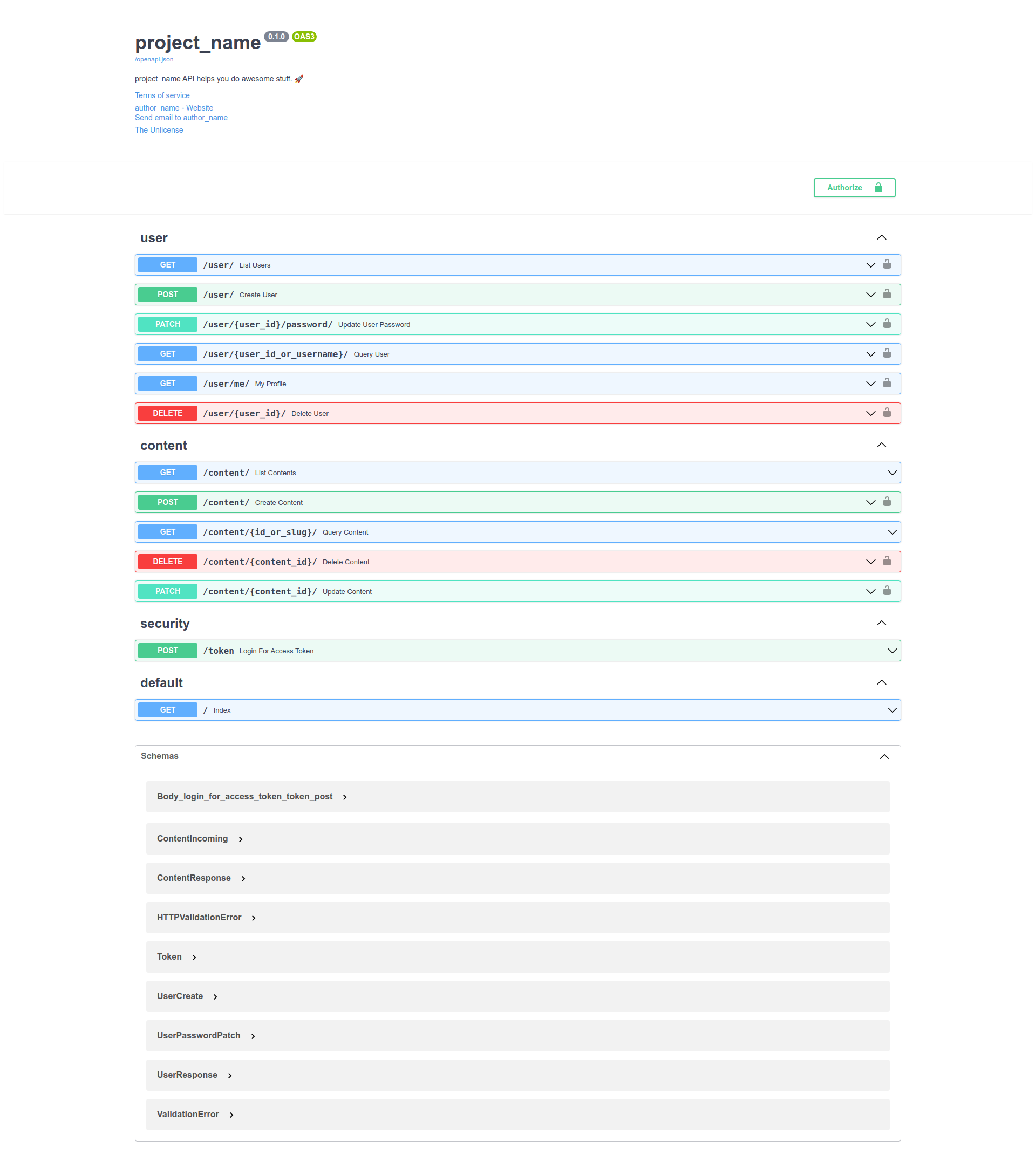
For some api calls you must authenticate using the user created with project_name create-user.
Testing
❯ make test
Black All done! ✨ 🍰 ✨
13 files would be left unchanged.
Isort All done! ✨ 🍰 ✨
6 files would be left unchanged.
Success: no issues found in 13 source files
================================ test session starts ===========================
platform linux -- Python 3.9.6, pytest-6.2.5, py-1.10.0, pluggy-1.0.0 --
/fastapi-project-template/.venv/bin/python3
cachedir: .pytest_cache
rootdir: /fastapi-project-template
plugins: cov-2.12.1
collected 10 items

tests/test_app.py::test_using_testing_db PASSED                           [ 10%]
tests/test_app.py::test_index PASSED                                      [ 20%]
tests/test_cli.py::test_help PASSED                                       [ 30%]
tests/test_cli.py::test_cmds_help[run-args0---port] PASSED                [ 40%]
tests/test_cli.py::test_cmds_help[create-user-args1-create-user] PASSED   [ 50%]
tests/test_cli.py::test_cmds[create-user-args0-created admin2 user] PASSED[ 60%]
tests/test_content_api.py::test_content_create PASSED                     [ 70%]
tests/test_content_api.py::test_content_list PASSED                       [ 80%]
tests/test_user_api.py::test_user_list PASSED                             [ 90%]
tests/test_user_api.py::test_user_create PASSED                           [100%]

----------- coverage: platform linux, python 3.9.6-final-0 -----------
Name                              Stmts   Miss  Cover
-----------------------------------------------------
project_name/__init__.py              4      0   100%
project_name/app.py                  16      1    94%
project_name/cli.py                  21      0   100%
project_name/config.py                5      0   100%
project_name/db.py                   10      0   100%
project_name/models/__init__.py       0      0   100%
project_name/models/content.py       47      1    98%
project_name/routes/__init__.py      11      0   100%
project_name/routes/content.py       52     25    52%
project_name/routes/security.py      15      1    93%
project_name/routes/user.py          52     26    50%
project_name/security.py            103     12    88%
-----------------------------------------------------
TOTAL                               336     66    80%


========================== 10 passed in 2.34s ==================================
Linting and Formatting
make lint  # checks for linting errors
make fmt   # formats the code
Configuration
This project uses Dynaconf to manage configuration.
from project_name.config import settings
Acessing variables
settings.get("SECRET_KEY", default="sdnfjbnfsdf")
settings["SECRET_KEY"]
settings.SECRET_KEY
settings.db.uri
settings["db"]["uri"]
settings["db.uri"]
settings.DB__uri
Defining variables
On files
settings.toml
[development]
dynaconf_merge = true

[development.db]
echo = true
dynaconf_mergeis a boolean that tells if the settings should be merged with the default settings defined in project_name/default.toml.
As environment variables
export PROJECT_NAME_KEY=value
export PROJECT_NAME_KEY="@int 42"
export PROJECT_NAME_KEY="@jinja {{ this.db.uri }}"
export PROJECT_NAME_DB__uri="@jinja {{ this.db.uri | replace('db', 'data') }}"
Secrets
There is a file .secrets.toml where your sensitive variables are stored, that file must be ignored by git. (add that to .gitignore)
Or store your secrets in environment variables or a vault service, Dynaconf can read those variables.
Switching environments
PROJECT_NAME_ENV=production project_name run
Read more on https://dynaconf.com
Development
Read the CONTRIBUTING.md file.

 16 Oct 14, 2021
 32 Jun 21, 2022
 341 Jan 03, 2023
 139 Dec 27, 2022
 1.3k Jan 04, 2023
 268 Jan 01, 2023
 27 Nov 11, 2022
 17 Dec 23, 2022
 368 Dec 31, 2022
 64 Oct 04, 2022
 7 Jan 06, 2022
 18 Oct 11, 2022
 1 Oct 31, 2021
 81 Dec 09, 2022
 1 Oct 29, 2021
 28 Oct 29, 2022
 810 Jan 06, 2023
 54 Dec 13, 2022