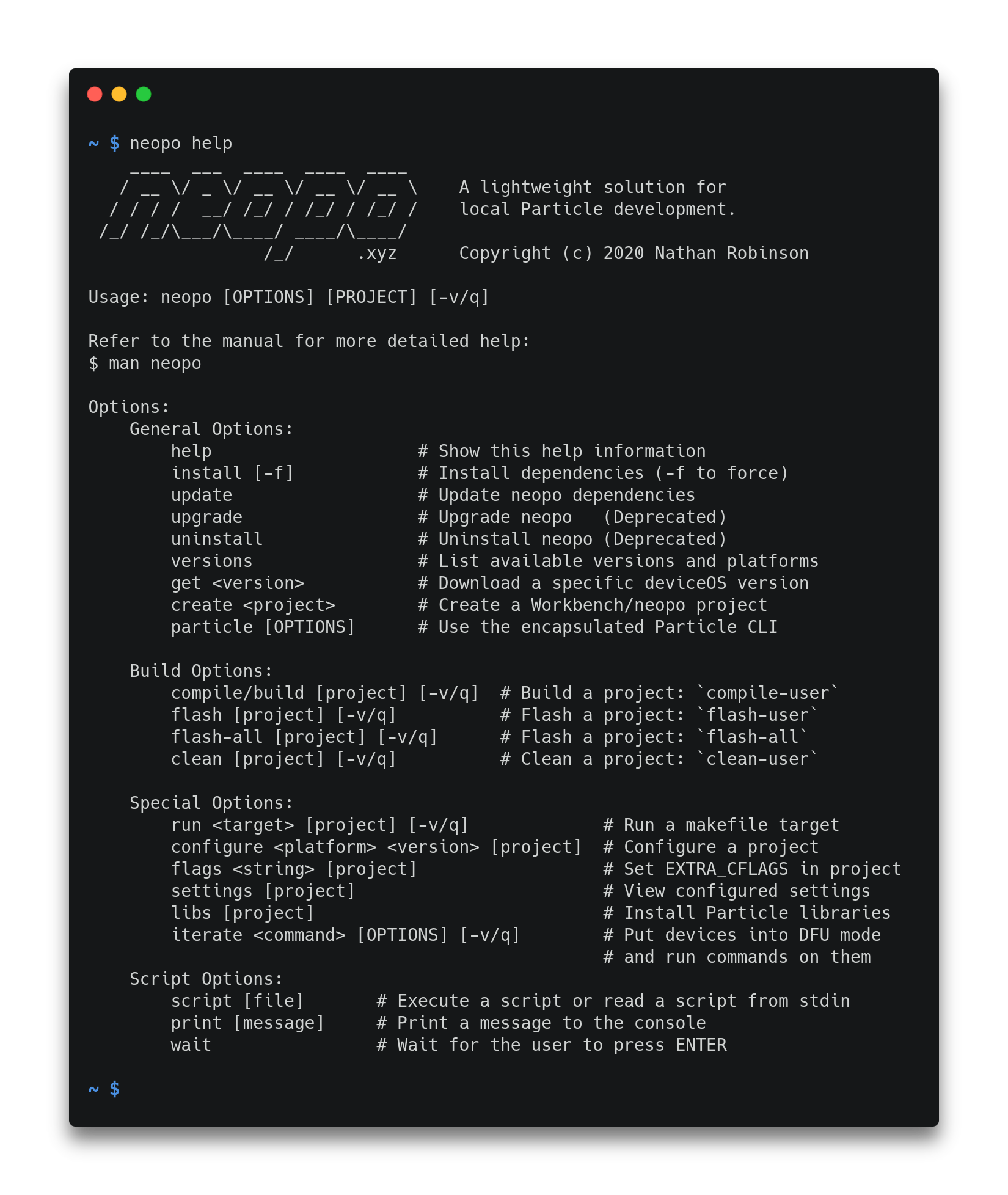
A lightweight solution for local Particle development.

Overview

GitHub Actions Status Build Status Docker Cloud Build Status AUR package Particle Community

neopo

A lightweight solution for local Particle development.

Neopo Screenshot

Features

  • Builds Particle projects locally without any overhead.
  • Compatible with Particle Workbench and Particle CLI.
  • Installs and manages necessary Particle dependencies.
  • Built with Python using only the standard library.
  • Supports Linux, macOS, Windows, and Raspberry Pi.
  • Supports tab completion to assist development.

Installation

Universal Installer (Linux/macOS):

$ bash <(curl -sL neopo.xyz/install)

Install from AUR:

$ yay -S neopo-git
$ neopo install

Install from source (pip):

$ git clone https://github.com/nrobinson2000/neopo
$ cd neopo
$ sudo python3 -m pip install .
$ neopo install

Docker container:

$ docker pull nrobinson2000/neopo
$ docker run -it nrobinson2000/neopo

For more installation information, please refer to the Installation tutorial.

Usage

To get started with neopo, please refer to the Quick Reference.

For descriptions of all available commands, please refer to the Complete Reference.

Comments
  • [BUG] Neopo Broken in Debian 10.8 WSL

    [BUG] Neopo Broken in Debian 10.8 WSL

    Describe the bug Neopo commands not working.

    Error Output

    $ neopo build Traceback (most recent call last): File "/usr/local/sbin/neopo", line 1026, in main commandsargs[1] File "/usr/local/sbin/neopo", line 741, in compile_command buildCommand("compile-user", 2, args) File "/usr/local/sbin/neopo", line 656, in buildCommand build(project, command, False, verbosity) File "/usr/local/sbin/neopo", line 589, in build devicePlatform, firmwareVersion = getSettings(projectPath) File "/usr/local/sbin/neopo", line 503, in getSettings data = json.loads(settings.read()) File "/usr/lib/python3.7/json/init.py", line 348, in loads return _default_decoder.decode(s) File "/usr/lib/python3.7/json/decoder.py", line 337, in decode obj, end = self.raw_decode(s, idx=_w(s, 0).end()) File "/usr/lib/python3.7/json/decoder.py", line 353, in raw_decode obj, end = self.scan_once(s, idx) json.decoder.JSONDecodeError: Expecting property name enclosed in double quotes: line 10 column 1 (char 271) An unexpected error occurred! To report this error on GitHub, please open an issue: https://github.com/nrobinson2000/neopo/issues

    $ neopo install Installing neopo... Finding Workbench extension URL... Downloading Workbench extension... Traceback (most recent call last): File "/usr/local/sbin/neopo", line 1026, in main commandsargs[1] File "/usr/local/sbin/neopo", line 753, in install_command installOrUpdate(True, force) File "/usr/local/sbin/neopo", line 313, in installOrUpdate data = getDeps() File "/usr/local/sbin/neopo", line 185, in getDeps manifest = getFile(extension, extensionFiles["manifest"]) File "/usr/local/sbin/neopo", line 131, in getFile return file.read(path) File "/usr/lib/python3.7/zipfile.py", line 1428, in read with self.open(name, "r", pwd) as fp: File "/usr/lib/python3.7/zipfile.py", line 1467, in open zinfo = self.getinfo(name) File "/usr/lib/python3.7/zipfile.py", line 1395, in getinfo 'There is no item named %r in the archive' % name) KeyError: "There is no item named 'extension/src/compiler/manifest.json' in the archive" An unexpected error occurred! To report this error on GitHub, please open an issue: https://github.com/nrobinson2000/neopo/issues

    Desktop:

    • OS: Debian 10.8 running under WSL

    Additional context Neopo was working for me fine around a week ago, but I started experiencing this issue when I tried using it yesterday.

    bug 
    opened by TrikkStar 13
  • Add

    Add "legacy" commands for serial & DFU mode management w/ baud-switcher

    Adds appropriate wrapper fns for serial open/close and dfu open/close as subcommands for the "legacy" command. Also adds docs / help strings.

    tested and working on linux

    only thing that may need to still be added is an update to "completion.py" to account for the new fns but it was unclear if the overall format would need to be changed to support doing so, so this was left off this commit

    opened by justicefreed 8
  • [BUG] No such file or directory: '~/.neopo/cache/manifest.json'

    [BUG] No such file or directory: '~/.neopo/cache/manifest.json'

    Describe the bug Script throws python error

    To Reproduce Steps to reproduce the behavior:

    1. python3 <(curl -SL https://raw.githubusercontent.com/nrobinson2000/neopo/master/bin/install.py)
    2. neopo create blink-led
    Initializing project in directory /mnt/data/particle/blink-led...
    > A new project has been initialized in directory /mnt/data/particle/blink-led
    Initialized empty Git repository in /mnt/data/particle/blink-led/.git/
    Traceback (most recent call last):
      File "/home/tom/bin/neopo", line 947, in main
        commands[args[1]](args)
      File "/home/tom/bin/neopo", line 666, in create_command
        create(os.path.dirname(projectPath), os.path.basename(projectPath))
      File "/home/tom/bin/neopo", line 423, in create
        version = loadManifest(False)["deviceOS"]
      File "/home/tom/bin/neopo", line 220, in loadManifest
        with open(jsonFiles["manifest"], "r") as file:
    FileNotFoundError: [Errno 2] No such file or directory: '/home/tom/.neopo/cache/manifest.json'
    An unexpected error occurred!
    To report this error on GitHub, please open an issue:
    https://github.com/nrobinson2000/neopo/issues
    

    Expected behavior It works

    Desktop (please complete the following information):

    • OS: Void Linux
    bug 
    opened by toluschr 7
  • [BUG] Error building on Linux

    [BUG] Error building on Linux

    Describe the bug I am unable to build an existing Particle project. It looks like this is because of missing gcc-arm

    $ neopo build
    Traceback (most recent call last):
      File "/usr/local/sbin/neopo", line 943, in main
        commands[args[1]](args)
      File "/usr/local/sbin/neopo", line 677, in compile_command
        buildCommand("compile-user", 2, args)
      File "/usr/local/sbin/neopo", line 606, in buildCommand
        build(project, command, False, verbosity)
      File "/usr/local/sbin/neopo", line 523, in build
        compilerVersion, scriptVersion, toolsVersion, firmwareVersion = loadManifest(True)
      File "/usr/local/sbin/neopo", line 227, in loadManifest
        data["gcc-arm"],
    KeyError: 'gcc-arm'
    An unexpected error occurred!
    

    Desktop (please complete the following information):

    • OS: Ubuntu 18.04 LTS
    bug 
    opened by pierrep 7
  • Error on link, missing libfl.so

    Error on link, missing libfl.so

    Describe the bug While compiling my project I get the error described below.

    To Reproduce In my project I do "neopo compile" and the following error occurs. A compile using the cloud particle-cli does not produce any problems. If you require all my code to observe this yourself, I will provided.

    Screenshots

    image

    Desktop (please complete the following information):

    • OS: raspberrypi 4
    bug 
    opened by rvnash 5
  • Errors while installing on MacOS

    Errors while installing on MacOS

    Thx for that project. I've been working a long while with po-util and really loved it; seems that there is an Issue with Apple SIP (...?)

    Describe the bug installation on MacOS is terminated with error

    copying man/neopo.1 -> /usr/share/man/man1 error: could not create '/usr/share/man/man1/neopo.1': Operation not permitted

    To Reproduce bash <(curl -sL neopo.xyz/install)

    same problem with installation via pip...

    Expected behavior clear installation

    Screenshots

    Desktop (please complete the following information): MacOS 11.4 Big Sur

    Additional context M1 Chip Python 3.9 installed, latest Version (via brew) local Particle CLI for maintaining local Particle Server

    bug 
    opened by mf42 4
  • Debuggable Builds [FEATURE]

    Debuggable Builds [FEATURE]

    ~~Problem~~ ~~I cannot use neopo to build debuggable builds for use with the vscode particle debugger~~ ~~Neopo is much faster than the built-in vscode compile / flash commands from the Particle Workbench~~ ~~Neopo is readily usable in CI/CD environments (thank you so much)~~ ~~I use a gitlab job to automate and archive builds with neopo, but I have no way of automating builds for debuggable versions. Currently debug builds are not available from the neopo build /path/to/project command~~

    Problem

    When I read the neopo docs, I thought it was not possible to build debug builds. The "flags" examples show how to do this, but they do not explain that the result of neopo flags "-D DEBUG_BUILD" will be that the build will work with the VSCode Particle Workbench Debugger. My initial reaction to this, as someone only becoming familiar with the particle ecosystem, was that it was a custom flag with only relevance to some specific project.

    Suggested Solution

    neopo build -d /path/to/project Use a neopo cli flag like -d to request a debug build

    Alternatives

    • edit the docs https://neopo.xyz/docs/full-docs to indicate that neopo flags "-D DEBUG_BUILD" will enable compatibility with the VSCode Particle Workbench Debugger. Add this line of text beneath that example: Note: the 'DEBUG_ENABLED' flag will enable compatibility with the VSCode Particle Workbench Debugger
    enhancement 
    opened by briveramelo 4
  • Invalid Firmware Version - neopo Docker

    Invalid Firmware Version - neopo Docker

    Specifically within docker neopo, Im getting the following error on all of my builds lately

    Invalid deviceOS version 5.1.0! Firmware related error! Invalid firmware version!

    I've literally reran successful bitbucket pipeline builds with exact configuration as before but now it fails.

    bug 
    opened by ajowsey 3
  • [BUG] deviceOS 3.1.0 not supported

    [BUG] deviceOS 3.1.0 not supported

    Describe the bug deviceOS 3.1.0 not supported

    To Reproduce Steps to reproduce the behavior:

    1. enter neopo get 3.1.0 into the cli and receive an error "Invalid firmware version!"

    Expected behavior Neopo will retrieve and operate commands with the deviceOS 3.1.0 firmware

    Desktop (please complete the following information):

    • OS: Ubuntu, macOS

    Additional context I am able to get this working locally by adding the missing config objects to some ~/.neopo/cache json files.

    compilers.json

    windowsx64
    {
                    "name": "gcc-arm",
                    "version": "10.2.1",
                    "main": "./bin",
                    "url": "https://binaries.particle.io/gcc-arm/windows/x64/gcc-arm-v10.2.1.tar.gz",
                    "sha256": "81d51a85dae99dd64012f620306ff14b55b38b66e4af1697b9f71cc08b63e6f8"
                },
    ...
    darwinx64
    {
                    "name": "gcc-arm",
                    "version": "10.2.1",
                    "main": "./bin",
                    "url": "https://binaries.particle.io/gcc-arm/darwin/x64/gcc-arm-v10.2.1.tar.gz",
                    "sha256": "c340f722c06f5768320bb02a1e9cb654b6f824649c17554cbff82b337b0b43af"
                },
    ...
    linuxx64
    {
                    "name": "gcc-arm",
                    "version": "10.2.1",
                    "main": "./bin",
                    "url": "https://binaries.particle.io/gcc-arm/linux/x64/gcc-arm-v10.2.1.tar.gz",
                    "sha256": "b6ce735c36c79caa02a95aaefc6d829e7d265c68eda73ac6e5afcd6cd6ba68a1"
                },
    

    firmware.json

    {
            "name": "deviceOS",
            "version": "3.1.0",
            "main": ".",
            "url": "https://binaries.particle.io/device-os/v3.1.0.tar.gz",
            "sha256": "704a908ab4a72942c0e89952ace93ac4a51a27790421b7515019ede40284d66e"
        },
    

    scripts.json

    windowsx64
    {
                    "name": "buildscripts",
                    "version": "1.10.0",
                    "main": ".",
                    "url": "https://binaries.particle.io/buildscripts/windows/x64/buildscripts-v1.10.0.tar.gz",
                    "sha256": "66a78bcd13e7cf08e9a8cab09a7ad3a1b179183b9391adbf0b39424c939f433b"
                },
    ...
    darwinx64
    {
                    "name": "buildscripts",
                    "version": "1.10.0",
                    "main": ".",
                    "url": "https://binaries.particle.io/buildscripts/darwin/x64/buildscripts-v1.10.0.tar.gz",
                    "sha256": "66a78bcd13e7cf08e9a8cab09a7ad3a1b179183b9391adbf0b39424c939f433b"
                },
    ...
    linuxx64
    {
                    "name": "buildscripts",
                    "version": "1.10.0",
                    "main": ".",
                    "url": "https://binaries.particle.io/buildscripts/linux/x64/buildscripts-v1.10.0.tar.gz",
                    "sha256": "66a78bcd13e7cf08e9a8cab09a7ad3a1b179183b9391adbf0b39424c939f433b"
                },
    

    toolchains.json

    {
            "platforms": [
                6,
                8,
                10,
                12,
                13,
                23,
                25,
                26
            ],
            "firmware": "[email protected]",
            "compilers": "[email protected]",
            "tools": "[email protected]",
            "scripts": "[email protected]",
            "debuggers": "[email protected]"
        },
    

    I also received this error after making these additions: ~/.particle/toolchains/deviceOS/3.1.0/build/arm-tools.mk:73: *** "ARM gcc version 10.2.1 or later required, but found 9.3.1". Stop. This was strange because I had uninstalled all other toolchains and their gcc versions with the vscode particle workbench. Still, I was able to resolve this by editing the .particle/toolchains/deviceOS/3.1.0/build/common-tools.mk file by adding this line: GCC_ARM_PATH = ~/.particle/toolchains/gcc-arm/10.2.1/bin/

    bug 

    opened by briveramelo 1
  • Windows testing/support: Help wanted

    Windows testing/support: Help wanted

    One of the many shortcomings of my previous Particle utilities was that they lacked Windows support. This is mainly because I don't use Windows and I don't have a Windows machine to test with. Since one of my goals when creating neopo was to make local Particle development as accommodating as possible, I think Windows support would be of great utility.

    Installing neopo inside WSL should be straightforward and installing neopo inside Cygwin should also be feasible since I believe this is how Particle Workbench manages its dependencies on Windows.

    If anyone in the community is interested in developing Windows support for neopo I'm sure many other developers would appreciate it.

    enhancement help wanted good first issue 
    opened by nrobinson2000 1
  • CVE-2007-4559 Patch

    CVE-2007-4559 Patch

    Patching CVE-2007-4559

    Hi, we are security researchers from the Advanced Research Center at Trellix. We have began a campaign to patch a widespread bug named CVE-2007-4559. CVE-2007-4559 is a 15 year old bug in the Python tarfile package. By using extract() or extractall() on a tarfile object without sanitizing input, a maliciously crafted .tar file could perform a directory path traversal attack. We found at least one unsantized extractall() in your codebase and are providing a patch for you via pull request. The patch essentially checks to see if all tarfile members will be extracted safely and throws an exception otherwise. We encourage you to use this patch or your own solution to secure against CVE-2007-4559. Further technical information about the vulnerability can be found in this blog.

    If you have further questions you may contact us through this projects lead researcher Kasimir Schulz.

    opened by TrellixVulnTeam 0
Releases(0.0.3)
Owner
Nathan Robinson
Undergraduate Computer Science student studying at Wentworth Institute of Technology
Nathan Robinson
Job Guy Backend

جاب‌گای چیست؟ اونجا وضعیت چطوریه؟ یه سوال به همین کلیت و ابهام معمولا وقتی برای یه شرکت رزومه می‌فرستیم این سوال کلی و بزرگ برای همه پیش میاد.اونجا وض

Jobguy.work 217 Dec 25, 2022
apysc is the Python frontend library to create html and js file, that has ActionScript 3 (as3)-like interface.

apysc apysc is the Python frontend library to create HTML and js files, that has ActionScript 3 (as3)-like interface. Notes: Currently developing and

simonritchie 17 Dec 14, 2022
Python tools for experimenting with differentiable intonation cost measures

Differentiable Intonation Tools The Differentiable Intonation Tools (dit) are a collection of Python functions to analyze the intonation in multitrack

Simon Schwär 2 Mar 27, 2022
Pomodoro timer by the Algodrip team!

PomoDrip 🍅 Pomodoro timer by the Algo Drip team! To-do: Create the script for the pomodoro timer Design the front-end of the program (Flask or Javasc

Algodrip 3 Sep 12, 2021
Blender-miHoYo-Shaders - Shaders for Blender attempting to replicate the shading of games developed by miHoYo

Blender-miHoYo-Shaders - Shaders for Blender attempting to replicate the shading of games developed by miHoYo

Matsuri 449 Jan 07, 2023
Notes on the Deep Learning book from Ian Goodfellow, Yoshua Bengio and Aaron Courville (2016)

The Deep Learning Book - Goodfellow, I., Bengio, Y., and Courville, A. (2016) This content is part of a series following the chapter 2 on linear algeb

hadrienj 1.7k Jan 07, 2023
SEH-Helper - Binary Ninja plugin for exploring Structured Exception Handlers

SEH Helper Author: EliseZeroTwo A Binary Ninja helper for exploring structured e

Elise 74 Dec 26, 2022
Multiperiod Reports by Month/Quarter/Year in Beancount.

Multiperiod Reports by Month/Quarter/Year in Beancount. Plotting income and expenses over time. Treemap plot of expenses.

Altynbek Isabekov 16 Aug 13, 2022
Data Structures and Algorithms Python - Practice data structures and algorithms in python with few small projects

Data Structures and Algorithms All the essential resources and template code nee

Hesham 13 Dec 01, 2022
Data on Free Food at MIT

MIT Free Food Timing Procrastinating research by plotting data on how long it takes emails on the free-food at mit edu mailing list to go through. Dat

Peter Sharpe 2 Nov 01, 2021
A replacement of qsreplace, accepts URLs as standard input, replaces all query string values with user-supplied values and stdout.

Bhedak A replacement of qsreplace, accepts URLs as standard input, replaces all query string values with user-supplied values and stdout. Works on eve

Eshan Singh 84 Dec 31, 2022
LINUX-AOS (Automatic Optimization System)

LINUX-AOS (Automatic Optimization System)

1 Jul 12, 2022
Python framework to build apps with the GASP metaphor

Gaspium Python framework to build apps with the GASP metaphor This project is part of the Pyrustic Open Ecosystem. Installation | Documentation | Late

5 Jan 01, 2023
With the initiation of the COVID vaccination drive across India for all individuals above the age of 18, I wrote a python script which alerts the user regarding open slots in the vicinity!

cowin_notifier With the initiation of the COVID vaccination drive across India for all individuals above the age of 18, I wrote a python script which

13 Aug 01, 2021
Open-source library for analyzing the results produced by ABINIT

Package Continuous Integration Documentation About AbiPy is a python library to analyze the results produced by Abinit, an open-source program for the

ABINIT 91 Dec 09, 2022
Geodesic Dome Math

dome Geodesic Dome Math Python dome tool dome.py calculates an icosahedron or 2v geodesic dome and creates 3d printable hubs as OpenSCAD sources. usag

Brian Olson 2 Feb 09, 2022
Built with Python programming language and QT library and Guess the number in three easy, medium and hard rolls

guess-the-numbers Built with Python programming language and QT library and Guess the number in three easy, medium and hard rolls Number guessing game

Amir Hussein Sharifnezhad 5 Oct 09, 2021
Monitor the New World login queue and notify when it is about to finish

nwwatch - Monitor the New World queue and notify when it is about to finish Getting Started install python 3.7+ navigate to the directory where you un

14 Jan 10, 2022
HiQ - A Modern Observability System

🦉 A Modern Observability System HiQ is a declarative, non-intrusive, dynamic and transparent tracking system for both monolithic application and dist

Oracle Sample Code 40 Aug 21, 2022
Desenvolvendo as habilidades básicas de programação visando a construção de aplicativos por meio de bibliotecas apropriadas à Ciência de Dados.

Algoritmos e Introdução à Computação Ementa: Conceitos básicos sobre algoritmos e métodos para sua construção. Tipos de dados e variáveis. Estruturas

Dyanna Cruz 1 Jan 06, 2022