Clustergram - Visualization and diagnostics for cluster analysis in Python

Overview

Clustergram

logo clustergram

Visualization and diagnostics for cluster analysis

DOI

Clustergram is a diagram proposed by Matthias Schonlau in his paper The clustergram: A graph for visualizing hierarchical and nonhierarchical cluster analyses.

In hierarchical cluster analysis, dendrograms are used to visualize how clusters are formed. I propose an alternative graph called a “clustergram” to examine how cluster members are assigned to clusters as the number of clusters increases. This graph is useful in exploratory analysis for nonhierarchical clustering algorithms such as k-means and for hierarchical cluster algorithms when the number of observations is large enough to make dendrograms impractical.

The clustergram was later implemented in R by Tal Galili, who also gives a thorough explanation of the concept.

This is a Python translation of Tal's script written for scikit-learn and RAPIDS cuML implementations of K-Means, Mini Batch K-Means and Gaussian Mixture Model (scikit-learn only) clustering, plus hierarchical/agglomerative clustering using SciPy. Alternatively, you can create clustergram using from_* constructors based on alternative clustering algorithms.

Getting started

You can install clustergram from conda or pip:

conda install clustergram -c conda-forge
pip install clustergram

In any case, you still need to install your selected backend (scikit-learn and scipy or cuML).

The example of clustergram on Palmer penguins dataset:

import seaborn
df = seaborn.load_dataset('penguins')

First we have to select numerical data and scale them.

from sklearn.preprocessing import scale
data = scale(df.drop(columns=['species', 'island', 'sex']).dropna())

And then we can simply pass the data to clustergram.

from clustergram import Clustergram

cgram = Clustergram(range(1, 8))
cgram.fit(data)
cgram.plot()
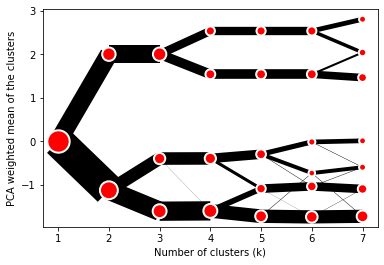
Default clustergram

Styling

Clustergram.plot() returns matplotlib axis and can be fully customised as any other matplotlib plot.

seaborn.set(style='whitegrid')

cgram.plot(
    ax=ax,
    size=0.5,
    linewidth=0.5,
    cluster_style={"color": "lightblue", "edgecolor": "black"},
    line_style={"color": "red", "linestyle": "-."},
    figsize=(12, 8)
)
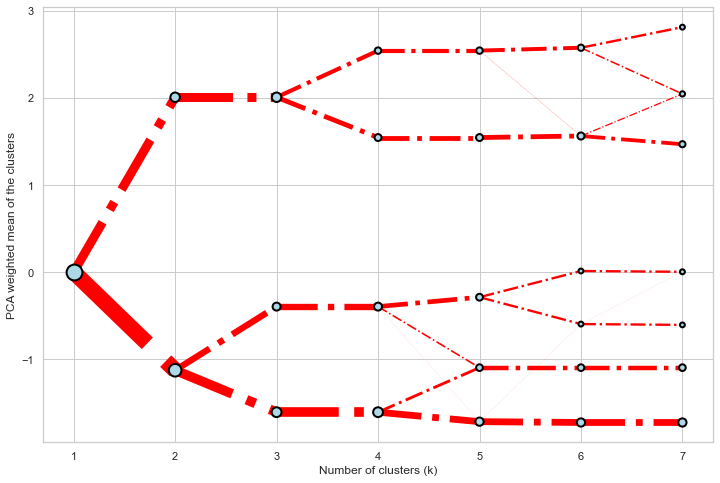
Colored clustergram

Mean options

On the y axis, a clustergram can use mean values as in the original paper by Matthias Schonlau or PCA weighted mean values as in the implementation by Tal Galili.

cgram = Clustergram(range(1, 8))
cgram.fit(data)
cgram.plot(figsize=(12, 8), pca_weighted=True)
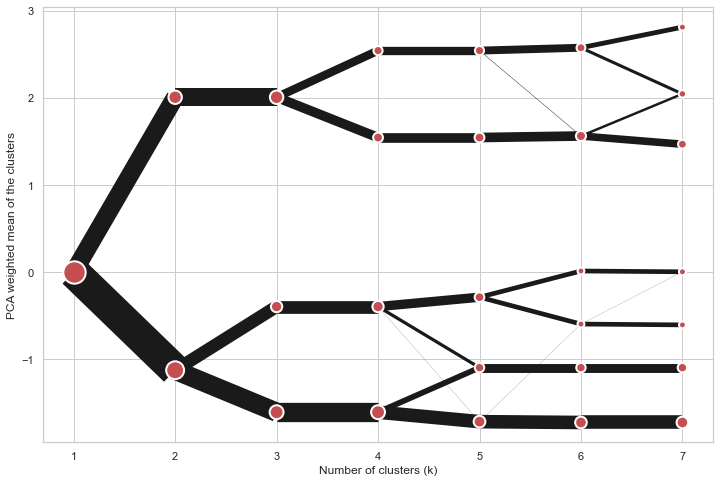
Default clustergram

cgram = Clustergram(range(1, 8))
cgram.fit(data)
cgram.plot(figsize=(12, 8), pca_weighted=False)
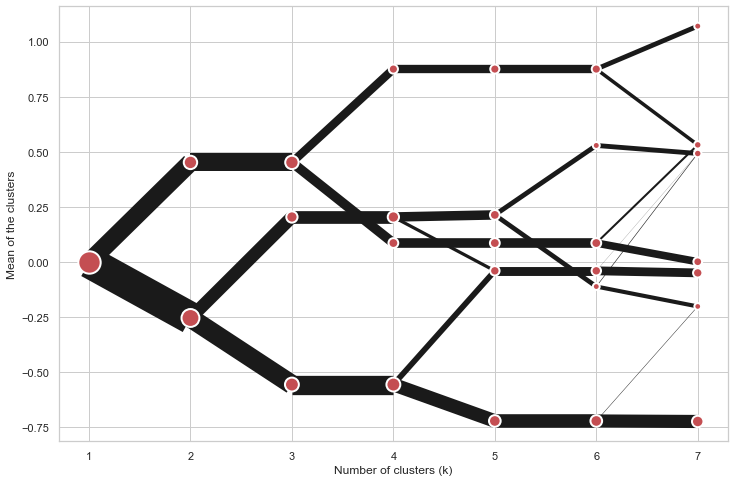
Default clustergram

Scikit-learn, SciPy and RAPIDS cuML backends

Clustergram offers three backends for the computation - scikit-learn and scipy which use CPU and RAPIDS.AI cuML, which uses GPU. Note that all are optional dependencies but you will need at least one of them to generate clustergram.

Using scikit-learn (default):

cgram = Clustergram(range(1, 8), backend='sklearn')
cgram.fit(data)
cgram.plot()

Using cuML:

cgram = Clustergram(range(1, 8), backend='cuML')
cgram.fit(data)
cgram.plot()

data can be all data types supported by the selected backend (including cudf.DataFrame with cuML backend).

Supported methods

Clustergram currently supports K-Means, Mini Batch K-Means, Gaussian Mixture Model and SciPy's hierarchical clustering methods. Note tha GMM and Mini Batch K-Means are supported only for scikit-learn backend and hierarchical methods are supported only for scipy backend.

Using K-Means (default):

cgram = Clustergram(range(1, 8), method='kmeans')
cgram.fit(data)
cgram.plot()

Using Mini Batch K-Means, which can provide significant speedup over K-Means:

cgram = Clustergram(range(1, 8), method='minibatchkmeans', batch_size=100)
cgram.fit(data)
cgram.plot()

Using Gaussian Mixture Model:

cgram = Clustergram(range(1, 8), method='gmm')
cgram.fit(data)
cgram.plot()

Using Ward's hierarchical clustering:

cgram = Clustergram(range(1, 8), method='hierarchical', linkage='ward')
cgram.fit(data)
cgram.plot()

Manual input

Alternatively, you can create clustergram using from_data or from_centers methods based on alternative clustering algorithms.

Using Clustergram.from_data which creates cluster centers as mean or median values:

data = numpy.array([[-1, -1, 0, 10], [1, 1, 10, 2], [0, 0, 20, 4]])
labels = pandas.DataFrame({1: [0, 0, 0], 2: [0, 0, 1], 3: [0, 2, 1]})

cgram = Clustergram.from_data(data, labels)
cgram.plot()

Using Clustergram.from_centers based on explicit cluster centers.:

labels = pandas.DataFrame({1: [0, 0, 0], 2: [0, 0, 1], 3: [0, 2, 1]})
centers = {
            1: np.array([[0, 0]]),
            2: np.array([[-1, -1], [1, 1]]),
            3: np.array([[-1, -1], [1, 1], [0, 0]]),
        }
cgram = Clustergram.from_centers(centers, labels)
cgram.plot(pca_weighted=False)

To support PCA weighted plots you also need to pass data:

cgram = Clustergram.from_centers(centers, labels, data=data)
cgram.plot()

Partial plot

Clustergram.plot() can also plot only a part of the diagram, if you want to focus on a limited range of k.

cgram = Clustergram(range(1, 20))
cgram.fit(data)
cgram.plot(figsize=(12, 8))
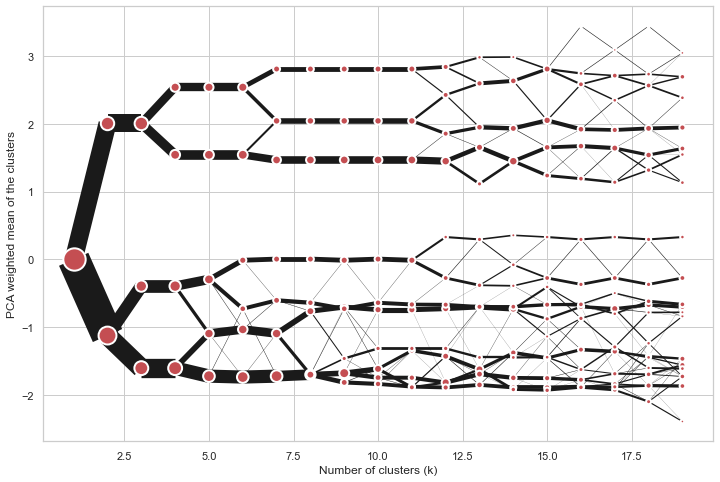
Long clustergram

cgram.plot(k_range=range(3, 10), figsize=(12, 8))
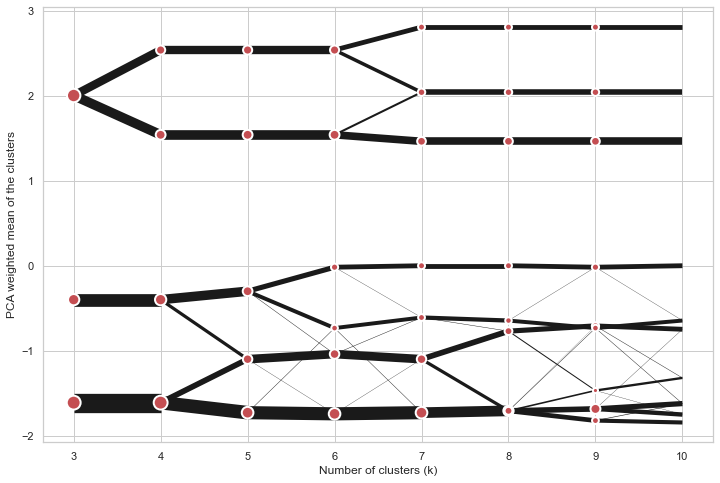
Limited clustergram

Additional clustering performance evaluation

Clustergam includes handy wrappers around a selection of clustering performance metrics offered by scikit-learn. Data which were originally computed on GPU are converted to numpy on the fly.

Silhouette score

Compute the mean Silhouette Coefficient of all samples. See scikit-learn documentation for details.

>>> cgram.silhouette_score()
2    0.531540
3    0.447219
4    0.400154
5    0.377720
6    0.372128
7    0.331575
Name: silhouette_score, dtype: float64

Once computed, resulting Series is available as cgram.silhouette. Calling the original method will recompute the score.

Calinski and Harabasz score

Compute the Calinski and Harabasz score, also known as the Variance Ratio Criterion. See scikit-learn documentation for details.

>>> cgram.calinski_harabasz_score()
2    482.191469
3    441.677075
4    400.392131
5    411.175066
6    382.731416
7    352.447569
Name: calinski_harabasz_score, dtype: float64

Once computed, resulting Series is available as cgram.calinski_harabasz. Calling the original method will recompute the score.

Davies-Bouldin score

Compute the Davies-Bouldin score. See scikit-learn documentation for details.

>>> cgram.davies_bouldin_score()
2    0.714064
3    0.943553
4    0.943320
5    0.973248
6    0.950910
7    1.074937
Name: davies_bouldin_score, dtype: float64

Once computed, resulting Series is available as cgram.davies_bouldin. Calling the original method will recompute the score.

Acessing labels

Clustergram stores resulting labels for each of the tested options, which can be accessed as:

>>> cgram.labels
     1  2  3  4  5  6  7
0    0  0  2  2  3  2  1
1    0  0  2  2  3  2  1
2    0  0  2  2  3  2  1
3    0  0  2  2  3  2  1
4    0  0  2  2  0  0  3
..  .. .. .. .. .. .. ..
337  0  1  1  3  2  5  0
338  0  1  1  3  2  5  0
339  0  1  1  1  1  1  4
340  0  1  1  3  2  5  5
341  0  1  1  1  1  1  5

Saving clustergram

You can save both plot and clustergram.Clustergram to a disk.

Saving plot

Clustergram.plot() returns matplotlib axis object and as such can be saved as any other plot:

import matplotlib.pyplot as plt

cgram.plot()
plt.savefig('clustergram.svg')

Saving object

If you want to save your computed clustergram.Clustergram object to a disk, you can use pickle library:

import pickle

with open('clustergram.pickle','wb') as f:
    pickle.dump(cgram, f)

Then loading is equally simple:

with open('clustergram.pickle','rb') as f:
    loaded = pickle.load(f)

References

Schonlau M. The clustergram: a graph for visualizing hierarchical and non-hierarchical cluster analyses. The Stata Journal, 2002; 2 (4):391-402.

Schonlau M. Visualizing Hierarchical and Non-Hierarchical Cluster Analyses with Clustergrams. Computational Statistics: 2004; 19(1):95-111.

https://www.r-statistics.com/2010/06/clustergram-visualization-and-diagnostics-for-cluster-analysis-r-code/

Comments
  • ENH: support interactive bokeh plots

    ENH: support interactive bokeh plots

    Adds Clustergram.bokeh() method which generates clustergram in a form of internactive bokeh plot. On top of an ability to zoom to specific sections shows the count of observations and cluster label (linked to Clustergram.labels).

    To-do:

    • [ ] documentation
    • [x] check RAPIDS compatibility

    I think I'll need to split docs into muliple pages at this point.

    opened by martinfleis 1
  • ENH: from_data and from_centers methods

    ENH: from_data and from_centers methods

    Addind the ability to create clustergram using custom data, without the need to run any cluster algorithm within clustergram itself.

    from_data gets labels and data and creates cluster centers as mean or median values.

    from_centers utilises custom centers when mean/median is not the optimal solution (like in case of GMM for example).

    Closes #10

    opened by martinfleis 1
  • skip k=1 for K-Means

    skip k=1 for K-Means

    k=1 does not need to be modelled, cluster centre is a pure mean of an input array. All the other options require k=1 e.g to fit gaussian.

    Skip k=1 in all k-means implementations to get avoid unnecessary computation.

    opened by martinfleis 0
  • ENH: add bokeh plotting backend

    ENH: add bokeh plotting backend

    With some larger clustergrams it may be quite useful to have the ability to zoom to certain places interactively. I think that bokeh plotting backend would be good for that.

    opened by martinfleis 0
  • ENH: expose labels, refactor plot computation internals, add additional metrics

    ENH: expose labels, refactor plot computation internals, add additional metrics

    Closes #7

    This refactors internals a bit, which in turn allows exposing the actual clustering labels for each tested iteration.

    Aso adding a few additional methods to assess clustering performance on top of clustergram.

    opened by martinfleis 0
  • Support multiple PCAs

    Support multiple PCAs

    The current way of weighting by PCA is hard-coded to use the first one. But it could be useful to see clustergrams weighted by other PCAs as well.

    And it would be super cool to get a 3d version with the first component on one axis and a second one on the other (not sure how useful though :D).

    opened by martinfleis 0
  • Can this work with cluster made by top2vec ?

    Can this work with cluster made by top2vec ?

    Thanks for your interesting package.

    Do you think Clustergram could work with top2vec ? https://github.com/ddangelov/Top2Vec

    I saw that there is the option to create a clustergram from a DataFrame.

    In top2vec, each "document" to cluster is represented as a embedding of a certain dimension, 256 , for example.

    So I could indeed generate a data frame, like this:

    | x0 | x1| ... | x255 | topic | | -----|----|---- | -------| -- | | 0.5| 0.2 | ....| -0.2 | 2 | | 0.7| 0.2 | ....| -0.1 | 2 | | 0.5| 0.2 | ....| -0.2 | 3 |

    Does Clustergram assume anything on the rows of this data frame ? I saw that the from_data method either takes "mean" or "medium" as method to calculate the cluster centers.

    In word vector, we use typically the cosine distance to calculate distances between the vectors. Does this have any influence ?

    top2vec calculates as well the "topic vectors" as a mean of the "document vectors", I believe.

    opened by behrica 17
Releases(v0.6.0)
Owner
Martin Fleischmann
Researcher in geographic data science. Member of @geopandas and @pysal development teams.
Martin Fleischmann
PyTorch code to run synthetic experiments.

Code repository for Invariant Risk Minimization Source code for the paper: @article{InvariantRiskMinimization, title={Invariant Risk Minimization}

Facebook Research 345 Dec 12, 2022
PySLM Python Library for Selective Laser Melting and Additive Manufacturing

PySLM Python Library for Selective Laser Melting and Additive Manufacturing PySLM is a Python library for supporting development of input files used i

Dr Luke Parry 35 Dec 27, 2022
This repo is for segmentation of T2 hyp regions in gliomas.

T2-Hyp-Segmentor This repo is for segmentation of T2 hyp regions in gliomas. By downloading the model from here you can use it to segment your T2w ima

1 Jan 18, 2022
An introduction to bioimage analysis - http://bioimagebook.github.io

Introduction to Bioimage Analysis This book tries explain the main ideas of image analysis in a practical and engaging way. It's written primarily for

Bioimage Book 20 Nov 28, 2022
Mask2Former: Masked-attention Mask Transformer for Universal Image Segmentation in TensorFlow 2

Mask2Former: Masked-attention Mask Transformer for Universal Image Segmentation in TensorFlow 2 Bowen Cheng, Ishan Misra, Alexander G. Schwing, Alexan

Phan Nguyen 1 Dec 16, 2021
利用Tensorflow实现基于CNN的中文短文本分类

Text Classification with CNN 使用卷积神经网络进行中文文本分类 CNN做句子分类的论文可以参看: Convolutional Neural Networks for Sentence Classification 还可以去读dennybritz大牛的博客:Implemen

Jeremiah 4 Nov 08, 2022
Exploring whether attention is necessary for vision transformers

Do You Even Need Attention? A Stack of Feed-Forward Layers Does Surprisingly Well on ImageNet Paper/Report TL;DR We replace the attention layer in a v

Luke Melas-Kyriazi 461 Jan 07, 2023
Callable PyTrees and filtered JIT/grad transformations => neural networks in JAX.

Equinox Callable PyTrees and filtered JIT/grad transformations = neural networks in JAX Equinox brings more power to your model building in JAX. Repr

Patrick Kidger 909 Dec 30, 2022
DeepStochlog Package For Python

DeepStochLog Installation Installing SWI Prolog DeepStochLog requires SWI Prolog to run. Run the following commands to install: sudo apt-add-repositor

KU Leuven Machine Learning Research Group 17 Dec 23, 2022
Denoising Diffusion Probabilistic Models

Denoising Diffusion Probabilistic Models This repo contains code for DDPM training. Based on Denoising Diffusion Probabilistic Models, Improved Denois

Alexander Markov 7 Dec 15, 2022
Point detection through multi-instance deep heatmap regression for sutures in endoscopy

Suture detection PyTorch This repo contains the reference implementation of suture detection model in PyTorch for the paper Point detection through mu

artificial intelligence in the area of cardiovascular healthcare 3 Jul 16, 2022
A Python library created to assist programmers with complex mathematical functions

libmaths libmaths was created not only as a learning experience for me, but as a way to make mathematical models in seconds for Python users using mat

Simple 73 Oct 02, 2022
[BMVC'21] Official PyTorch Implementation of Grounded Situation Recognition with Transformers

Grounded Situation Recognition with Transformers Paper | Model Checkpoint This is the official PyTorch implementation of Grounded Situation Recognitio

Junhyeong Cho 18 Jul 19, 2022
This is the winning solution of the Endocv-2021 grand challange.

Endocv2021-winner [Paper] This is the winning solution of the Endocv-2021 grand challange. Dependencies pytorch # tested with 1.7 and 1.8 torchvision

Vajira Thambawita 14 Dec 03, 2022
This repository is related to an Arabic tutorial, within the tutorial we discuss the common data structure and algorithms and their worst and best case for each, then implement the code using Python.

Data Structure and Algorithms with Python This repository is related to the Arabic tutorial here, within the tutorial we discuss the common data struc

Mohamed Ayman 33 Dec 02, 2022
PyTorch code for ICLR 2021 paper Unbiased Teacher for Semi-Supervised Object Detection

Unbiased Teacher for Semi-Supervised Object Detection This is the PyTorch implementation of our paper: Unbiased Teacher for Semi-Supervised Object Detection

Facebook Research 366 Dec 28, 2022
Introduction to CPM

CPM CPM is an open-source program on large-scale pre-trained models, which is conducted by Beijing Academy of Artificial Intelligence and Tsinghua Uni

Tsinghua AI 136 Dec 23, 2022
A flexible ML framework built to simplify medical image reconstruction and analysis experimentation.

meddlr Getting Started Meddlr is a config-driven ML framework built to simplify medical image reconstruction and analysis problems. Installation To av

Arjun Desai 36 Dec 16, 2022
OpenMMLab Image and Video Editing Toolbox

Introduction MMEditing is an open source image and video editing toolbox based on PyTorch. It is a part of the OpenMMLab project. The master branch wo

OpenMMLab 3.9k Jan 04, 2023
TensorFlow (Python) implementation of DeepTCN model for multivariate time series forecasting.

DeepTCN TensorFlow TensorFlow (Python) implementation of multivariate time series forecasting model introduced in Chen, Y., Kang, Y., Chen, Y., & Wang

Flavia Giammarino 21 Dec 19, 2022