Magma
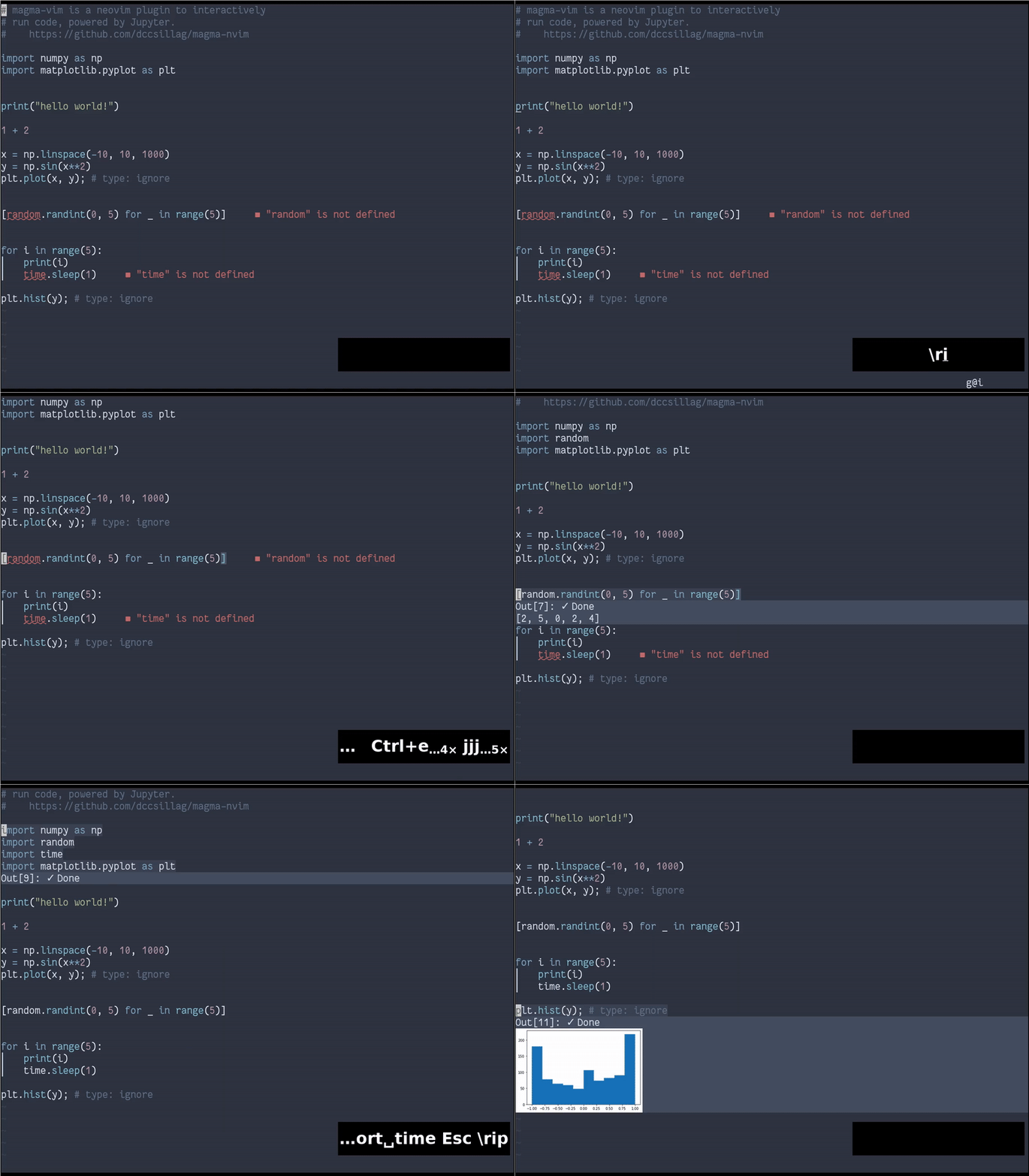
Magma is a NeoVim plugin for running code interactively with Jupyter.
Requirements
- NeoVim 0.5+
- Python 3.8+
- Required Python packages:
pynvim(for the Remote Plugin API)jupyter_client(for interacting with Jupyter)ueberzug(for displaying images)Pillow(also for displaying images, should be installed withueberzug)cairosvg(for displaying SVG images)pnglatex(for displaying TeX formulas)plotlyandkaleido(for displaying Plotly figures)
You can do a :checkhealth to see if you are ready to go.
Note: Python packages which are used only for the display of some specific kind of output are only imported when that output actually appears.
Installation
Use your favourite package/plugin manager.
If you use packer.nvim,
use { 'dccsillag/magma-nvim', run = ':UpdateRemotePlugins' }
If you use vim-plug,
Plug 'dccsillag/magma-nvim', { 'do': ':UpdateRemotePlugins' }
Note that you will still need to configure keymappings -- see Keybindings.
Suggested settings
If you want a quickstart, these are the author's suggestions of mappings and options (beware of potential conflicts of these mappings with your own!):
nnoremap
Note: Key mappings are not defined by default because of potential conflicts -- the user should decide which keys they want to use (if at all).
Note: The options that are altered here don't have these as their default values in order to provide a simpler (albeit perhaps a bit more inconvenient) UI for someone who just added the plugin without properly reading the README.
Usage
The plugin provides a bunch of commands to enable interaction. It is recommended to map most of them to keys, as explained in Keybindings. However, this section will refer to the commands by their names (so as to not depend on some specific mappings).
Interface
When you execute some code, it will create a cell. You can recognize a cell because it will be highlighted when your cursor is in it.
A cell is delimited using two extmarks (see :help api-extended-marks), so it will adjust to you editing the text within it.
When your cursor is in a cell (i.e., you have an active cell), a floating window may be shown below the cell, reporting output. This is the display window, or output window. (To see more about whether a window is shown or not, see :MagmaShowOutput and g:magma_automatically_open_output). When you cursor is not in any cell, no cell is active.
Also, the active cell is searched for from newest to oldest. That means that you can have a cell within another cell, and if the one within is newer, then that one will be selected. (Same goes for merely overlapping cells).
The output window has a header, containing the execution count and execution state (i.e., whether the cell is waiting to be run, running, has finished successfully or has finished with an error). Below the header are shown the outputs.
Jupyter provides a rich set of outputs. To see what we can currently handle, see Output Chunks.
Commands
MagmaInit
This command initializes a runtime for the current buffer.
It can take a single argument, the Jupyter kernel's name. For example,
:MagmaInit python3
will initialize the current buffer with a python3 kernel.
It can also be called with no arguments, as such:
:MagmaInit
This will prompt you for which kernel you want to launch (from the list of available kernels).
MagmaDeinit
This command deinitializes the current buffer's runtime and magma instance.
:MagmaDeinit
Note You don't need to run this, as deinitialization will happen automatically upon closing Vim or the buffer being unloaded. This command exists in case you just want to make Magma stop running.
MagmaEvaluateLine
Evaluate the current line.
Example usage:
:MagmaEvaluateLine
MagmaEvaluateVisual
Evaluate the selected text.
Example usage (after having selected some text):
:MagmaEvaluateVisual
MagmaEvaluateOperator
Evaluate the text given by some operator.
This won't do much outside of an
nnoremap
Upon using this mapping, you will enter operator mode, with which you will be able to select text you want to execute. You can, of course, hit ESC to cancel, as usual with operator mode.
MagmaReevaluateCell
Reevaluate the currently selected cell.
:MagmaReevaluateCell
MagmaDelete
Delete the currently selected cell. (If there is no selected cell, do nothing.)
Example usage:
:MagmaDelete
MagmaShowOutput
This only makes sense when you have g:magma_automatically_open_output = v:false. See Customization.
Running this command with some active cell will open the output window.
Example usage:
:MagmaShowOutput
MagmaSave
Save the current cells and evaluated outputs into a JSON file, which can then be loaded back with :MagmaLoad.
It has two forms; first, receiving a parameter, specifying where to save to:
:MagmaSave file_to_save.json
If that parameter is omitted, then one will be automatically generated using the g:magma_save_path option.
:MagmaSave
MagmaLoad
Load the cells and evaluated outputs stored in a given JSON file, which should have been generated with :MagmaSave.
Like MagmaSave, It has two forms; first, receiving a parameter, specifying where to save to:
:MagmaLoad file_to_load.json
If that parameter is omitted, then one will be automatically generated using the g:magma_save_path option.
Keybindings
It is recommended to map all the evaluate commands to the same mapping (in different modes). For example, if we wanted to bind evaluation to
nnoremap
This way, y and d.
You can, of course, also map other commands:
nnoremap
Customization
Customization is done via variables.
g:magma_automatically_open_output
Defaults to v:true.
If this is true, then whenever you have an active cell its output window will be automatically shown.
If this is false, then the output window will only be automatically shown when you've just evaluated the code. So, if you take your cursor out of the cell, and then come back, the output window won't be opened (but the cell will be highlighted). This means that there will be nothing covering your code. You can then open the output window at will using :MagmaShowOutput.
g:magma_cell_highlight_group
Defaults to "CursorLine".
The highlight group to be used for highlighting cells.
g:magma_save_path
Defaults to stdpath("data") .. "/magma".
Where to save/load with :MagmaSave and :MagmaLoad (with no parameters).
The generated file is placed in this directory, with the filename itself being the buffer's name, with % replaced by %% and / replaced by %, and postfixed with the extension .json.
[DEBUG] g:magma_show_mimetype_debug
Defaults to v:false.
If this is true, then before any non-iostream output chunk, Magma shows the mimetypes it received for it.
This is meant for debugging and adding new mimetypes.
Extras
Output Chunks
In the Jupyter protocol, most output-related messages provide a dictionary of mimetypes which can be used to display the data. Theoretically, a text/plain field (i.e., plain text) is always present, so we (theoretically) always have that fallback.
Here is a list of the currently handled mimetypes:
text/plain: Plain text. Shown as text in the output window's buffer.image/png: A PNG image. Shown with Ueberzug.image/svg+xml: A SVG image. Rendered into a PNG with CairoSVG and shown with Ueberzug.application/vnd.plotly.v1+json: A Plotly figure. Rendered into a PNG with Plotly + Kaleido and shown with Ueberzug.text/latex: A LaTeX formula. Rendered into a PNG with pnglatex and shown with Ueberzug.
This already provides quite a bit of basic functionality. As development continues, more mimetypes will be added.
Notifications
We use the vim.notify API. This means that you can use plugins such as rcarriga/nvim-notify for pretty notifications.
License
This code is licensed under the GPLv3 (due to Ueberzug using it).

 38 May 26, 2022
 1.7k Jan 02, 2023
 5 Jan 04, 2022
 3.2k Jan 04, 2023
 23 Jun 10, 2022
 1 Oct 24, 2021
 18 Nov 21, 2022
 144 Jan 05, 2023
 1 Oct 26, 2022
 4 Sep 04, 2021
 502 Dec 30, 2022
 1 Nov 13, 2021
 2 Jan 26, 2022
 5 Dec 29, 2022
 102 Dec 14, 2022
 2 Jan 31, 2022
 194 Dec 29, 2022
 2 Dec 10, 2021
 150 Dec 14, 2022
 21 Oct 03, 2022