Backyard Birdbot
Introduction
This is a silly hobby project to use existing ML models to:
- Detect any birds sighted by a webcam
- Identify which species they belongs to
- Post images and descriptions of the detected birds to twitter (@BackyardBirdbot)
This project is my first Python project, so my main goal was to learn more about Python through experience. The entire program is run through bird_detect.py. Please excuse my messy code! The current code may differ slightly than the documented version below.
Methods
As stated, the aim of the project is to use existing ML models to first detect birds then classify what species it belongs to. We won't be training any new models here. For object detection, we use the SSD Openimages v4 model published as part of TensorFlow Object Detection API (https://tfhub.dev/google/openimages_v4/ssd/mobilenet_v2/1). For classifying bird species, we fortunately have a lightweight bird species classification model also by TensorFlow/Google (https://tfhub.dev/google/aiy/vision/classifier/birds_V1/1). We use OpenCV to capture our image and feed it to the models. We'll attempt to describe the code below, please skip this section if you're not interested.
We first import some libraries and some simple helper functions (the rest can be seen in the actual file: bird_detect.py):
#  Importing libraries
import numpy as np
import tensorflow as tf
import tensorflow_hub as hub
import cv2 as cv
import matplotlib
import matplotlib.pyplot as plt
import pandas as pd
import tweepy
import config
import os

from PIL import Image
from PIL import ImageColor
from PIL import ImageDraw
from PIL import ImageFont
from PIL import ImageOps

#  Helper functions (Not all are used, this section could be cleaned up)

def im_box_crop(img,box):
    # a function to crop an image using the normalized coordinates indicated by box output from the object detection model.
    im_height, im_width = img.shape[0], img.shape[1]
    ymin  = box[0]
    xmin  = box[1]
    ymax  = box[2]
    xmax  = box[3]
    (left, right, top, bottom) = (xmin * im_width, xmax * im_width, ymin * im_height, ymax * im_height)
    a,b,c,d = int(left) , int(right) , int(top) ,int(bottom)
    img_crop = img[c:d,a:b]
    return img_crop

def an_or_a(string):
    # a function to determine if the bird name should be prefaced with "a" or "an". Inspired by MIT course 6.0001 material (https://ocw.mit.edu/courses/electrical-engineering-and-computer-science/6-0001-introduction-to-computer-science-and-programming-in-python-fall-2016/)
    an_letters="aefhilmnorsxAEFHILMNORSX"
    char=string[0]
    if char in an_letters:
        output="an"
    else:
        output="a"
    return output
.
.
.
We then need to load the actual models themselves, and initialize the Twitter API through tweepy so that we can post
#  Load models
print('Loading detection/classification models...')
# for the main image detection model
#module_handle = "https://tfhub.dev/google/faster_rcnn/openimages_v4/inception_resnet_v2/1"
module_handle = "https://tfhub.dev/google/openimages_v4/ssd/mobilenet_v2/1"

detector = hub.load(module_handle).signatures['default']

# for the secondary bird classification model
module_b_handle="https://tfhub.dev/google/aiy/vision/classifier/birds_V1/1"
detector_b=hub.load(module_b_handle).signatures['default']

# we also need to load the labelmap that will correlate the output to the actual
# species name.
df_bird=pd.read_csv('aiy_birds_V1_labelmap_amended.csv')
print('Models loaded!')

#  setup twitter api

auth = tweepy.OAuthHandler(
        config.twitter_auth_keys['consumer_key'],
        config.twitter_auth_keys['consumer_secret']
        )
auth.set_access_token(
        config.twitter_auth_keys['access_token'],
        config.twitter_auth_keys['access_token_secret']
        )
api = tweepy.API(auth)
This is where we take our first detour. The bird specie classification model outputs a simple probably vector (965 elements long) corresponding to a background and 964 bird species. the labelmap provided by TF Hub looks like this: 
where the id matches up to the species. However, names like "Haemorhous cassinii" and "Aramus guarauna" are not useful to someone uneducated in ornithology as me. However, looking up 964 species would not be a very fun task! So we use a separate script to scrape wikipedia for the "common" names of these bird species. bird_name_wiki_scrape.py is shown below:
import wikipedia as wiki
import pandas as pd

# read the labelmap (downloaded from: https://tfhub.dev/google/aiy/vision/classifier/birds_V1/1)
df = pd.read_csv('aiy_birds_V1_labelmap.csv')
# background is background
df.at[0,'common_name']='background'

# for all the other scientific names in the labelmap,
for index in range(1,len(df)):
    # search for the bird in Wikipedia, the first result is the common name.
    search_out=wiki.search(df.name[index],results=1)
    # amend the dataframe with the common name
    df.at[index,'common_name']=search_out[0]
    # just a progress update
    if index%10 == 0:
        print(index,'/',len(df))

# save the results as a .csv file.
df.to_csv('aiy_birds_V1_labelmap_amended.csv',index=False)
This script simply searches Wikipedia using the scientific name (ex: Haemorhous cassinii) and the first result returns the "common" name (Cassin's finch). These names are then stored in a pandas dataset and saved as a separate .csv file. The amended .csv file looks like: 
Hence why you can see the loaded label map is the amended file. Back to the main script:
#  Image acquisition
# Wait a millisecond
key=cv.waitKey(1)
# Use the front webcam
webcam = cv.VideoCapture(1)
webcam.set(cv.CAP_PROP_FRAME_WIDTH, 1920)
webcam.set(cv.CAP_PROP_FRAME_HEIGHT, 1080)
# minimum score for the model to register it as a bird
minThresh=0.15
minIdentThresh=0.15
while True:
    try:
        .
        .
        .
webcam.release()
This cell is where everything happens. The content inside the while loop will be explanined further below, but first we initialize our webcam and set the resolution via cv2. cv.VideoCapture() has an index of 1 instead of 0, because the laptop has two cameras and we need the front-facing one.
The first part within that while loop is for acquiring and preparing the image input:
        #Acquire the image from the webcam
        check, frame = webcam.read()

        #get the webcam size
        height, width, channels = frame.shape
        scale=25
        #prepare the crop
        centerX,centerY=int(height/2),int(width/2)
        radiusX,radiusY= int(scale*height/100),int(scale*width/100)

        minX,maxX=centerX-radiusX,centerX+radiusX
        minY,maxY=centerY-radiusY,centerY+radiusY

        cropped = frame[minY:maxY, minX:maxX]
        frame = cv.cvtColor(cropped, cv.COLOR_BGR2RGB)
        # Convert the frame into a format tensorflow likes
        converted_img  = tf.image.convert_image_dtype(frame, tf.float32)[tf.newaxis, ...]
We first use .read to get an image from the webcam and crop the image (so that only the birdfeeder is in view). For some reason, cv2 uses BGR instead of RGB, so the color channels are reversed as well. It is then converted into an input format that TensorFlow models use.
        # Run the image through the model
        result = detector(converted_img)

        # create empty dict
        result_bird={"names":[],"scores":[],"boxes":[]}
        # Loop through the results and see if any are "Birds"
        # and if there are, store them in to the empty dictionary
        for name, score, box in zip(result['detection_class_entities'], result['detection_scores'], result['detection_boxes']):
            if name=='Bird':
                if score>=minThresh:
                    result_bird["names"].append(name)
                    result_bird["scores"].append(score)
                    result_bird["boxes"].append(box)

        # create empty lists that will contain the name and the score for bird species identification
        ident_l=[]
        score_l=[]
        # if any birds were found
        num_bird=np.size(result_bird["names"])
The converted image is first run through the object detection model. If any of the identified objects are "Bird" and have a score above the set threshold, it gets added into an empty dict object. I'm positive there is a more efficient and cleaner way to do this via filtering the result dict, but this works.
        if num_bird>0:
            # squish the dictionary to a more useful format
            result_bird={"names":tf.concat(axis=0,values=result_bird["names"]),\
                             "scores":tf.concat(axis=0,values=result_bird["scores"]),\
                             "boxes":tf.stack(result_bird["boxes"],axis=0.5)}

            # indices that will be used for image cropping (essentially an array of zeros)
            box_indices=tf.zeros(shape=(num_bird,),dtype=tf.int32)

            # crop the image into the different boxes where birds were detected
            cropped_img=tf.image.crop_and_resize(converted_img,result_bird["boxes"],box_indices,[224,224])
If any birds are detected (num_bird>0), we crop the acquired image into boxes where the object detection model thinks "Bird"s are. These cropped images (which need to be 224x224) are then used as inputs to the bird species model.
          img_crop=[]
            # for each cropped box,
            for image_index in range(num_bird):
                # reshape the image into the input format the classification model wants
                input_img=tf.reshape(cropped_img[image_index],[1,224,224,3])
                # put the image into the classication model
                det_out=detector_b(input_img)
                # which ID # does the model think is most likely?
                out_idx=np.argmax(det_out["default"].numpy())
                # and how confident is the model?
                out_score=np.round(100*np.max(det_out["default"].numpy()),1)
                # if the score is greater than the minimum thershold:
                if out_score>=minIdentThresh*100:
                    # recrop the image here
                    box_crop=result_bird["boxes"][image_index].numpy()
                    bird_crop_img=(im_box_crop(frame,box_crop))
                    # convert it back to cv2 format (BGR)
                    bird_crop_img = cv.cvtColor(bird_crop_img, cv.COLOR_RGB2BGR)
                    # save the recropped image for posting
                    bird_crop_img_filename="Cropped_Bird_{}.jpg".format(image_index)
                    cv.imwrite(bird_crop_img_filename,bird_crop_img)
                    # get the bird's common name
                    temp_df=df_bird[df_bird.id==out_idx]
                    out_string=temp_df["common_name"].values[0]
                    # append the name and score to the empty lists
                    ident_l.append(out_string)
                    score_l.append(out_score)
For each detected "Bird", the cropped image is put through the species identifier. Then the model's most likely answer is chosen if its probability exceeds the threshold set earlier. We also crop a new image of the bird (not resized to 224x224) so that we can add it to our post.
            if len(ident_l)>1:
                # save the captured frame first
                bird_img_filename="captured_frame.jpg"
                frame_bgr=cv.cvtColor(frame,cv.COLOR_RGB2BGR)
                cv.imwrite(bird_img_filename,frame_bgr)

                # if a single bird was found
                if num_bird==1:
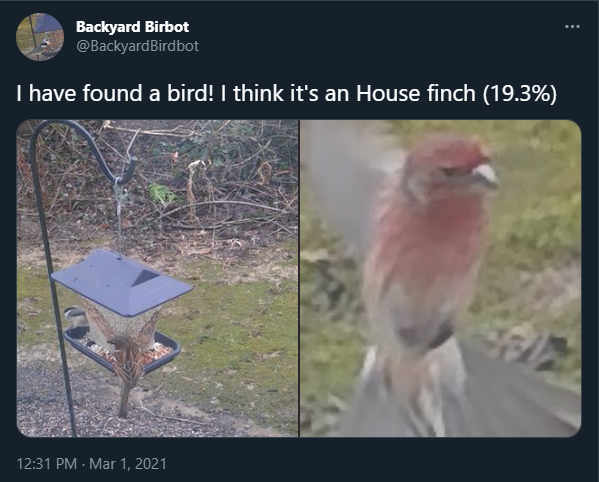
                    str_1="I have found a bird! I think it's "
                    str_2=an_or_a(ident_l[0])
                    combined_str="{} {} {} ({})%".format(str_1,str_2,*ident_l,str(*score_l))

                # if multiple birds were found
                else:
                    str_1="I have found"
                    str_2=str(num_bird)
                    str_3="birds! I think they are:"
                    bird_out_string=[]
                    for bird_index in range(num_bird):
                        bird_species_str=ident_l[bird_index]
                        bird_score_str=str(score_l[bird_index])
                        out_string="{} ({}%)".format(bird_species_str,bird_score_str)
                        bird_out_string.append(out_string)
                    separator=", "
                    combined_str="{} {} {} {}".format(str_1,str_2,str_3,separator.join(bird_out_string))

                img_upload_paths=[bird_img_filename]
                img_upload_paths.extend(["Cropped_Bird_{}.jpg".format(i) for i in range(num_bird)])
                img_ids=[api.media_upload(i).media_id_string for i in img_upload_paths]
                api.update_status(status=combined_str,media_ids=img_ids)

                for i in range(len(img_upload_paths)):
                    os.remove(img_upload_paths[i])

                print("Tweet posted! Waiting for 1 minute")
                key=cv.waitKey(60000)
            else:
                print("Bird detected but no species identification.")


        # wait 0.1 seconds and loop again
        key=cv.waitKey(10)

    except(KeyboardInterrupt):
        print("Turning off camera.")
        print("Camera off.")
        print("Program ended.")
        break
If any species were successfully identified, the text of the tweet is prepared depending on if a single bird or multiple birds were detected. The images (the entire frame captured by the webcam, and individual crops of where birds are) uploaded and sent to Twitter. If a post is made, it waits one minute to look again, otherwise, it waits 0.01 seconds and goes through the while loop looking for birds.
Results
After some tinkering, the code works:


It has a really hard time seeing sparrows (mostly brown) against the backdrop of seeds, which I think is expected. It sometimes has really bad misses for birds during flight, but sometimes it suprises me by presenting results like this:
Good job, bot!
The biggest challenge has been pointing the laptop in the right direction and cropping out everything but the bird feeder. An obvious solution would be to install a separate webcam and it can be secured and set to point at the feeder. Another problem seems to be that it can sometimes identify the same bird as multiple birds, resulting in what you can see in the above image, where a single chickadee was identified as two. I belive non-max supression would be the fix here, but that is yet to be implemented.
The bot is excellent at identifying birds from field guides: 

So I'm hopeful that the code's weakness is only with the image acquisition and hardware.

 40 Dec 23, 2022
 142 Jan 01, 2023
 81 Oct 06, 2022
 992 Dec 30, 2022
 13 Jan 07, 2023
 28 Feb 20, 2022
 2k Jan 01, 2023
 148 Dec 30, 2022
 60 Nov 18, 2022
 61 Dec 27, 2022
 3 Sep 07, 2022
 32 Dec 22, 2022
 176 Jan 06, 2023
 29 Dec 06, 2022
 2 Feb 10, 2022
 44 Oct 05, 2022
 7.7k Jan 05, 2023
 50 Dec 29, 2022
 4 Nov 30, 2022
 46 Dec 24, 2022