
⚠️
Warning
I am not responsible for any penalties incurred by those who use the bot, use it at your own risk.
📄
Documentation
| - | Language |
|---|---|
 |
Portuguese |
📌
Glossary
📋
About
This bot contains code from other developers, this bot was just refactored, to facilitate new implementations and maintenance.
Developers (Base code):
- https://github.com/mpcabete/
- https://github.com/vin350/ (Telegram integration)
- https://github.com/newerton/ (Initial base code)
This bot is free and open source.
Features:
- Refactored code
- Add 3 captchas
- Themes
- Multi account with many windows side-by-side or many windows maximized
- Run the Bot, without interrupting errors in the code
- Console colorful
- Bot speed, gain a few seconds on the move
- Update the configuration file required
- Auto-update files (requires Git installed)
- Bcoins report after finalizing the map
- New map estimation added
- Telegram new commands (workall, restall, refresh, stop)
🎁
Donation
BCOIN/BNB: 0x318863E8f42F4471C1c3FEc59DF2Dd9447F39241 PIX: 46fad16d-a076-4bd0-8b84-00c508332d75
🤖
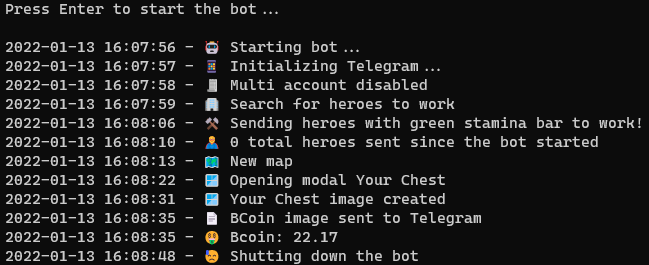
Robot - Preview
🪟
Installation
Python
Git (To use auto-update)
Windows: https://gitforwindows.org/
Linux (Ubuntu): sudo apt -y update && sudo apt -y install git
git version
Commands
Install the dependencies by running the command below into the project folder:
pip install -r requirements.txt
Ready! Now just start the bot with the command, inside the project folder
python index.py
| commands | OS | description |
|---|---|---|
| ./cmd/update_files.sh | Linux | Updates all project files except config.yaml and telegram.yaml and Python requirements.txt |
| ./cmd/update.sh | Linux | Updates only the Python requirements.txt |
| .\cmd\update_files.bat | Windows | Updates all project files except config.yaml and telegram.yaml and Python requirements.txt |
| .\cmd\update.bat | Windows | Updates only the Python requirements.txt |
How to works?
The bot doesn't change any of the game's source code, it just takes a screenshot of the game's screen to find the buttons and simulates mouse movements.
⚠️
Some settings can be changed in the /config/config.yaml file, don't forget to restart the bot if you change the settings, some changes in the /config/config.yaml file may cause the bot to stop, such as activating the telegram when the bot is running.
🧪
Tests
Desktop Medium Profile
Intel i5-3570k @ 3.4Ghz, 24GB RAM
Windows 11, [email protected]
Python 3.9.9
Laptop Low Profile
Laptop Samsumg RV411, Pentium P6200 @ 2.13Ghz, 2GB RAM
Windows 7, [email protected]
Python 3.8.10
🎨
Themes
| theme | toolbar image preview |
|---|---|
| default |  |
| lunar_newyear |  |
⚒️
Configs
| code | type | description |
|---|---|---|
| app | - | - |
| theme | string | Current game theme, to recognize bug titles and hero list. Values in the Themes table |
| verify_version | bollean - true/false | Check app version every 1h, recommended to keep up to date |
| emoji | bollean - true/false | Enable/Disable show emoji in console messages |
| terminal_colorful | bollean - true/false | Enable/Disable show colored messages on terminal |
| run_time_app | int | Bot loop execution time |
| monitor_to_use | int | Monitor that the bot uses as a reference |
| captcha | bollean - true/false | Enable/Disable in-game captcha recognition |
| speed | string - normal/fast | Two bot speed modes, fast mode is between 1~3 minutes faster |
| multi_account | - | - |
| enable | bollean - true/false | Enable/Disable Multi Account functionality |
| window_title | string | Window title, for identification of the active game by the bot |
| window_fullscreen | bollean - true/false | Enable/Disable Fullscreen mode, recommended for small monitors |
| time_intervals | - | - |
| send_heroes_for_work | array - [int, int] | Start and end time for bot to search for heroes to work |
| refresh_heroes_positions | array - [int, int] | Start and end interval for bot to update map |
| chests | - | - |
| values | - | - |
| chest_01 | decimal | Brown chest reward value |
| chest_02 | decimal | Purple chest reward value |
| chest_03 | decimal | Golden chest reward value |
| chest_04 | decimal | Blue chest reward value |
| threshold | - | - |
| default | decimal | Confidence default value |
| error_message | decimal | Confidence Value of Error Window Title |
| back_button | decimal | Confidence value of map back button |
| heroes_green_bar | decimal | Hero's partial energy bar confidence value |
| heroes_full_bar | decimal | Hero's full energy bar confidence value |
| heroes_send_all | decimal | Trust value of the send all button to work |
| chest | decimal | Confidence value of the chests to calculate the total BCOINS of the map |
| jail | decimal | Confidence value of the chests to calculate the total jail of the map |
| heroes | - | - |
| mode | string - all, green, full | How to send heroes to work. all - Sends all heroes without criteria. green - Sends heroes with partially green energy full - Sends heroes with full energy |
| list | - | - |
| scroll_attempts | int | Total scroll the bot will make in the hero list |
| offsets | - | - |
| work_button_green | array - [int, int] | Offset for mouse click on WORK button |
| work_button_full | array - [int, int] | Offset for mouse click on WORK button |
| metamask | - | - |
| enable_login_metamask | bollean - true/false | Enable/Disable Metamask Auto Login |
| password | string | Password to unlock Metamask to login to the game |
| services | - | - |
| telegram | bollean - true/false | Enable/Disable the message sending service for Telegram |
| log | ||
| save_to_file | bollean - true/false | Enable/Disable save console log to logger.log file |
| debug | bollean - true/false | Enable/Disable debugging of some bot information |
⚠️
Adjusting the bot
Why some adjustments might be necessary?
The bot uses image recognition to make decisions and move the mouse and click in the right places.
It accomplishes this by comparing an example image with a screenshot of the computer/laptop screen.
This method is subject to inconsistencies due to differences in your screen resolution and how the game is rendered on your computer.
It's likely that the bot doesn't work 100% on the first run, and you need to make some adjustments to the config file.
What are the problems?
-
False negative - The bot was supposed to recognize an image, for example the push to work button, but it didn't recognize the image in the screenshot.
-
False Positive - The bot thinks it has recognized the image it is looking for in a place where this image does not appear.
To solve these problems there are two possibilities, adjusting the "threshold" parameter in the config.yaml file or replacing the example image in the "targets" folder with one taken on your own computer:
Threshold in config file
The "threshold" parameter regulates how confident the bot needs to be to consider that it has found the image it is looking for.
This value is from 0 to 1 (0% to 100%).
Ex:
A threshold of 0.1 is too low, it will assume that it has found the image it is looking for in places it is not showing (false positive). The most common behavior for this problem is the bot clicking random places around the screen.
A threshold of 0.99 or 1 is too high, it won't find the image it's looking for, even when it's showing up on the screen. The most common behavior is that it simply doesn't move the cursor anywhere, or crashes in the middle of a process such as login.
Image Replacement
The example images are stored in the "images/themes/default" folder. These images were taken on my computer with a resolution of 1920x1080. To replace some image that is not being recognized properly, simply find the corresponding image in the folder "images/themes/default", take a screenshot of the same area and replace the previous image. It is important that the replacement has the same name, including the .png extension.
Some behaviors that may indicate a false positive or negative
False positive:
-
Repeatedly sending a hero who is already working to work on a infinite loop.
- False positive on "work_button.png" image, bot thinks it sees the dark button on a hero with the light button.
-
Clicking random places (usually white) on the screen
- False positive on image "metamask_sign_button.png"
False negative:
-
Not doing anything
- Maybe the bot is having problems with its resolution and is not recognizing any of the images, try changing the browser setting to 100%.
-
Not sending the heroes to work
- It may be a false negative on the image "bar_green_stamina.png" if the option "heroes.mode" is set to "green".

 14 Nov 26, 2022
 212 Dec 24, 2022
 19 Nov 18, 2022
 7 Dec 26, 2021
 1 Nov 27, 2021
 135 Dec 31, 2022
 3 Feb 21, 2022
 1 Jan 10, 2022
 1.3k Dec 31, 2022
 2 Nov 12, 2021
 2 Oct 05, 2022
 5 Dec 03, 2022
 2 Oct 31, 2022
 29 Dec 16, 2022
 12 Nov 09, 2022
 16 Dec 08, 2022
 2 Dec 12, 2021
 148 Dec 22, 2022
 2 Feb 14, 2022
 109 Dec 28, 2022