🚀Clone a voice in 5 seconds to generate arbitrary speech in real-time

Overview

mockingbird

MIT License

English | 中文

Features

🌍 Chinese supported mandarin and tested with multiple datasets: aidatatang_200zh, magicdata, aishell3, data_aishell, and etc.

🤩 PyTorch worked for pytorch, tested in version of 1.9.0(latest in August 2021), with GPU Tesla T4 and GTX 2060

🌍 Windows + Linux run in both Windows OS and linux OS (even in M1 MACOS)

🤩 Easy & Awesome effect with only newly-trained synthesizer, by reusing the pretrained encoder/vocoder

🌍 Webserver Ready to serve your result with remote calling

DEMO VIDEO

Quick Start

1. Install Requirements

Follow the original repo to test if you got all environment ready. **Python 3.7 or higher ** is needed to run the toolbox.

If you get an ERROR: Could not find a version that satisfies the requirement torch==1.9.0+cu102 (from versions: 0.1.2, 0.1.2.post1, 0.1.2.post2 ) This error is probably due to a low version of python, try using 3.9 and it will install successfully

  • Install ffmpeg.
  • Run pip install -r requirements.txt to install the remaining necessary packages.
  • Install webrtcvad pip install webrtcvad-wheels(If you need)

Note that we are using the pretrained encoder/vocoder but synthesizer, since the original model is incompatible with the Chinese sympols. It means the demo_cli is not working at this moment.

2. Prepare your models

You can either train your models or use existing ones:

2.1 Train encoder with your dataset (Optional)

  • Preprocess with the audios and the mel spectrograms: python encoder_preprocess.py Allowing parameter --dataset {dataset} to support the datasets you want to preprocess. Only the train set of these datasets will be used. Possible names: librispeech_other, voxceleb1, voxceleb2. Use comma to sperate multiple datasets.

  • Train the encoder: python encoder_train.py my_run /SV2TTS/encoder

For training, the encoder uses visdom. You can disable it with --no_visdom, but it's nice to have. Run "visdom" in a separate CLI/process to start your visdom server.

2.2 Train synthesizer with your dataset

  • Download dataset and unzip: make sure you can access all .wav in folder

  • Preprocess with the audios and the mel spectrograms: python pre.py Allowing parameter --dataset {dataset} to support aidatatang_200zh, magicdata, aishell3, data_aishell, etc.If this parameter is not passed, the default dataset will be aidatatang_200zh.

  • Train the synthesizer: python synthesizer_train.py mandarin /SV2TTS/synthesizer

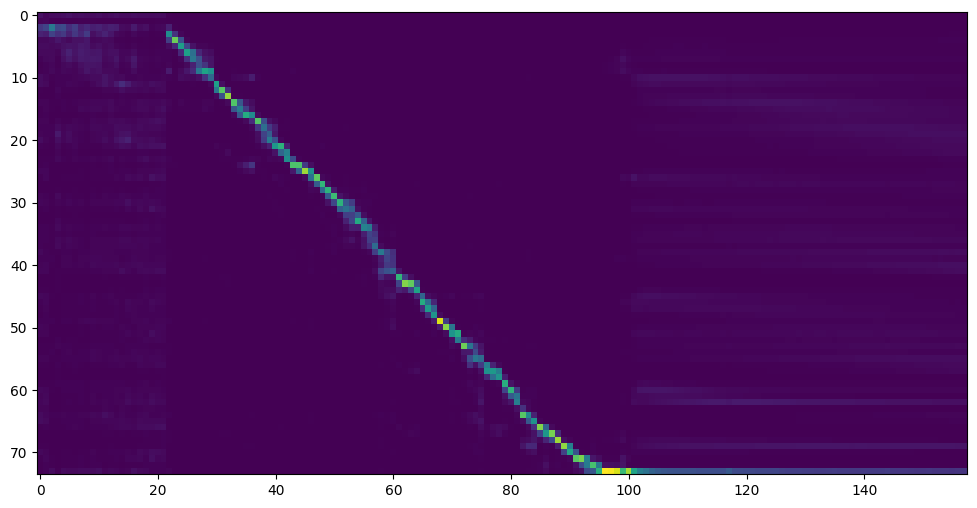
  • Go to next step when you see attention line show and loss meet your need in training folder synthesizer/saved_models/.

2.3 Use pretrained model of synthesizer

Thanks to the community, some models will be shared:

author Download link Preview Video Info
@author https://pan.baidu.com/s/1iONvRxmkI-t1nHqxKytY3g Baidu 4j5d 75k steps trained by multiple datasets
@author https://pan.baidu.com/s/1fMh9IlgKJlL2PIiRTYDUvw Baidu code:om7f 25k steps trained by multiple datasets, only works under version 0.0.1
@FawenYo https://drive.google.com/file/d/1H-YGOUHpmqKxJ9FRc6vAjPuqQki24UbC/view?usp=sharing https://u.teknik.io/AYxWf.pt input output 200k steps with local accent of Taiwan, only works under version 0.0.1
@miven https://pan.baidu.com/s/1PI-hM3sn5wbeChRryX-RCQ code:2021 https://www.bilibili.com/video/BV1uh411B7AD/ only works under version 0.0.1

2.4 Train vocoder (Optional)

note: vocoder has little difference in effect, so you may not need to train a new one.

  • Preprocess the data: python vocoder_preprocess.py -m

replace with your dataset root, replace with directory of your best trained models of sythensizer, e.g. sythensizer\saved_mode\xxx

  • Train the wavernn vocoder: python vocoder_train.py mandarin

  • Train the hifigan vocoder python vocoder_train.py mandarin hifigan

3. Launch

3.1 Using the web server

You can then try to run:python web.py and open it in browser, default as http://localhost:8080

3.2 Using the Toolbox

You can then try the toolbox: python demo_toolbox.py -d

Reference

This repository is forked from Real-Time-Voice-Cloning which only support English.

URL Designation Title Implementation source
1803.09017 GlobalStyleToken (synthesizer) Style Tokens: Unsupervised Style Modeling, Control and Transfer in End-to-End Speech Synthesis This repo
2010.05646 HiFi-GAN (vocoder) Generative Adversarial Networks for Efficient and High Fidelity Speech Synthesis This repo
1806.04558 SV2TTS Transfer Learning from Speaker Verification to Multispeaker Text-To-Speech Synthesis This repo
1802.08435 WaveRNN (vocoder) Efficient Neural Audio Synthesis fatchord/WaveRNN
1703.10135 Tacotron (synthesizer) Tacotron: Towards End-to-End Speech Synthesis fatchord/WaveRNN
1710.10467 GE2E (encoder) Generalized End-To-End Loss for Speaker Verification This repo

F Q&A

1.Where can I download the dataset?

Dataset Original Source Alternative Sources
aidatatang_200zh OpenSLR Google Drive
magicdata OpenSLR Google Drive (Dev set)
aishell3 OpenSLR Google Drive
data_aishell OpenSLR

After unzip aidatatang_200zh, you need to unzip all the files under aidatatang_200zh\corpus\train

2.What is ?

If the dataset path is D:\data\aidatatang_200zh,then isD:\data

3.Not enough VRAM

Train the synthesizer:adjust the batch_size in synthesizer/hparams.py

//Before
tts_schedule = [(2,  1e-3,  20_000,  12),   # Progressive training schedule
                (2,  5e-4,  40_000,  12),   # (r, lr, step, batch_size)
                (2,  2e-4,  80_000,  12),   #
                (2,  1e-4, 160_000,  12),   # r = reduction factor (# of mel frames
                (2,  3e-5, 320_000,  12),   #     synthesized for each decoder iteration)
                (2,  1e-5, 640_000,  12)],  # lr = learning rate
//After
tts_schedule = [(2,  1e-3,  20_000,  8),   # Progressive training schedule
                (2,  5e-4,  40_000,  8),   # (r, lr, step, batch_size)
                (2,  2e-4,  80_000,  8),   #
                (2,  1e-4, 160_000,  8),   # r = reduction factor (# of mel frames
                (2,  3e-5, 320_000,  8),   #     synthesized for each decoder iteration)
                (2,  1e-5, 640_000,  8)],  # lr = learning rate

Train Vocoder-Preprocess the data:adjust the batch_size in synthesizer/hparams.py

//Before
### Data Preprocessing
        max_mel_frames = 900,
        rescale = True,
        rescaling_max = 0.9,
        synthesis_batch_size = 16,                  # For vocoder preprocessing and inference.
//After
### Data Preprocessing
        max_mel_frames = 900,
        rescale = True,
        rescaling_max = 0.9,
        synthesis_batch_size = 8,                  # For vocoder preprocessing and inference.

Train Vocoder-Train the vocoder:adjust the batch_size in vocoder/wavernn/hparams.py

//Before
# Training
voc_batch_size = 100
voc_lr = 1e-4
voc_gen_at_checkpoint = 5
voc_pad = 2

//After
# Training
voc_batch_size = 6
voc_lr = 1e-4
voc_gen_at_checkpoint = 5
voc_pad =2

4.If it happens RuntimeError: Error(s) in loading state_dict for Tacotron: size mismatch for encoder.embedding.weight: copying a param with shape torch.Size([70, 512]) from checkpoint, the shape in current model is torch.Size([75, 512]).

Please refer to issue #37

5. How to improve CPU and GPU occupancy rate?

Adjust the batch_size as appropriate to improve

6. What if it happens the page file is too small to complete the operation

Please refer to this video and change the virtual memory to 100G (102400), for example : When the file is placed in the D disk, the virtual memory of the D disk is changed.

7. When should I stop during training?

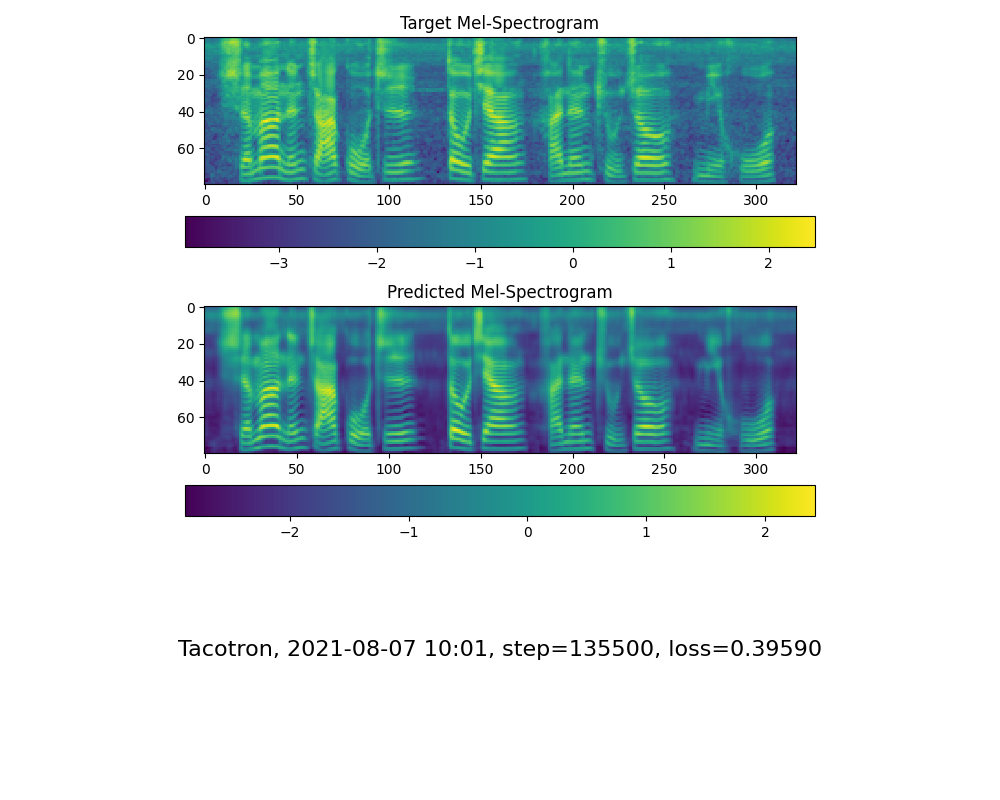
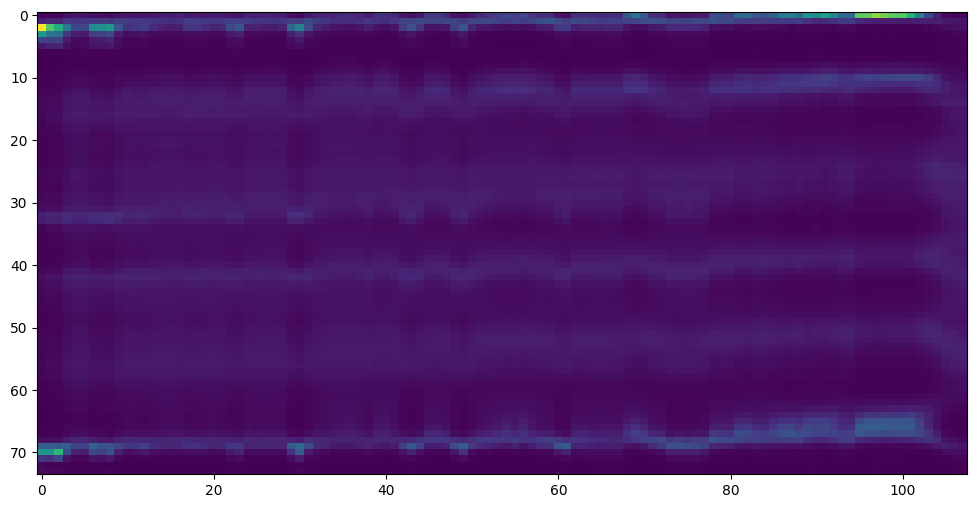
FYI, my attention came after 18k steps and loss became lower than 0.4 after 50k steps. attention_step_20500_sample_1 step-135500-mel-spectrogram_sample_1
Comments
  • 求助执行requirements.txt时报No module named 'pyworld'是什么问题??

    求助执行requirements.txt时报No module named 'pyworld'是什么问题??

    已是最新代码 E:\MockingBird\MockingBird>python demo_toolbox.py Traceback (most recent call last): File "E:\MockingBird\MockingBird\demo_toolbox.py", line 2, in from toolbox import Toolbox File "E:\MockingBird\MockingBird\toolbox_init_.py", line 9, in from utils.f0_utils import compute_f0, f02lf0, compute_mean_std, get_converted_lf0uv File "E:\MockingBird\MockingBird\utils\f0_utils.py", line 3, in import pyworld ModuleNotFoundError: No module named 'pyworld'

    bug 
    opened by bricklayers 14
  • 训练合成器时无法收敛

    训练合成器时无法收敛

    问题简述 使用自己的数据集训练合成器模型的时候的时候,在预处理之后训练合成器并将合成器替换成既有model后产生的图并没有收敛。

    复现与环境

    参照www.bilibili.com/video/BV1dq4y137pH 进行的复现。代码版本为main branch,首先进行数据预处理之后参考视频里的首先进行合成器训练,然后用pretrained-11-7-21 替换掉当前mode 继续进行训练。发现图并没有收敛。 截图 qX67L9.png qX6bZR.png

    opened by akiaki1996 13
  • 關於 Train synthesizer 的問題,求指導 !

    關於 Train synthesizer 的問題,求指導 !

    你好 我已經下載了aidatatang_200zh這個數據集,並且把 aidatatang_200zh\corpus\train 底下的檔案都解壓縮完畢 但是當我要開始執行 python synthesizer_preprocess_audio.py D:\google download(我把檔案放在 D:\google download 這個路徑下 ) 卻發生以下狀況: D:\python_demo\Realtime-Voice-Clone-Chinese>python synthesizer_preprocess_audio.py D:\google download\ D:\python_demo\Realtime-Voice-Clone-Chinese\encoder\audio.py:13: UserWarning: Unable to import 'webrtcvad'. This package enables noise removal and is recommended. warn("Unable to import 'webrtcvad'. This package enables noise removal and is recommended.") usage: synthesizer_preprocess_audio.py [-h] [-o OUT_DIR] [-n N_PROCESSES] [-s] [--hparams HPARAMS] [--no_trim] [--no_alignments] [--dataset DATASET] datasets_root synthesizer_preprocess_audio.py: error: unrecognized arguments: download\

    請問我可以怎麼解決問題呢? 我有查看之前 issues 的討論並沒有發現有類似問題,以下是我想到可能有問題的地方,還請作者為我解答,謝謝!

    1.我只有解壓縮 aidatatang_200zh\corpus\train 底下的檔案,是否其他資料夾下的檔案也要解壓縮? 2.是不是只需要將所有 wav 檔單獨拉出來放在 aidatatang_200zh\corpus\train 底下然後再執行python synthesizer_preprocess_audio.py D:\google download ? 3. 輸入的指令不對 4. wav 檔 與 txt 檔是不是要預先處理,而我沒有進行處理?

    opened by XiuChen-Liu 13
  • 用社区分享的模型训练报错 不知道原因

    用社区分享的模型训练报错 不知道原因

    用社区分享的模型训练报错 不知道原因 而且不知道咋保存模型 是不是必须要每500步才会自动保存 求各位大佬解惑 感谢! RuntimeError: The size of tensor a (1024) must match the size of tensor b (3) at non-singleton dimension 3 屏幕截图 2021-11-28 021942

    opened by johnwestin 12
  • 训练模型时显存爆了

    训练模型时显存爆了

    Variable._execution_engine.run_backward(RuntimeError: CUDA out of memory. Tried to allocate 88.00 MiB (GPU 0; 4.00 GiB totalcapacity; 2.68 GiB already allocated; 0 bytes free; 2.85 GiB reserved in total by PyTorch)

    能不能提供一个调batch_size的参数? 我目前用的显卡显存只有4G(GTX1050Ti),默认参数正常训练时经常爆掉显存....

    opened by cronfox 11
  • 如何解决运行python synthesizer_preprocess_audio.py时报错 DLL load failed:页面文件太小,无法完成操作

    如何解决运行python synthesizer_preprocess_audio.py时报错 DLL load failed:页面文件太小,无法完成操作

    我在运行 python synthesizer_preprocess_audio.py时遇到如上错误 ,在CSDN上找到解决方法:1.如果python 运行环境不在C盘 查看高级系统设置->高级->性能 设置->高级->虚拟内存->更改 ->取消自动管理所有驱动器的分页文件大小-> 自定义大小 ->初始大小和最大值设为10240 2. 更改DateLoade 中的参数num_worker 改为0 但我现在不清楚具体怎样把参数设为0

    opened by 9527-567 11
  • capturable=False,报错

    capturable=False,报错

    Win11 GPU:3060laptop
    Python 3.9.13

    +----------------+------------+---------------+------------------+ | Steps with r=2 | Batch Size | Learning Rate | Outputs/Step (r) | +----------------+------------+---------------+------------------+ | 101k Steps | 16 | 3e-06 | 2 | +----------------+------------+---------------+------------------+

    Could not load symbol cublasGetSmCountTarget from cublas64_11.dll. Error code 127 Traceback (most recent call last): File "G:\AIvioce\MockingBird\synthesizer_train.py", line 37, in train(**vars(args)) File "G:\AIvioce\MockingBird\synthesizer\train.py", line 216, in train optimizer.step() File "C:\Users\Mark\AppData\Local\Programs\Python\Python39\lib\site-packages\torch\optim\optimizer.py", line 109, in wrapper return func(*args, **kwargs) File "C:\Users\Mark\AppData\Local\Programs\Python\Python39\lib\site-packages\torch\autograd\grad_mode.py", line 27, in decorate_context return func(*args, **kwargs) File "C:\Users\Mark\AppData\Local\Programs\Python\Python39\lib\site-packages\torch\optim\adam.py", line 157, in step adam(params_with_grad, File "C:\Users\Mark\AppData\Local\Programs\Python\Python39\lib\site-packages\torch\optim\adam.py", line 213, in adam func(params, File "C:\Users\Mark\AppData\Local\Programs\Python\Python39\lib\site-packages\torch\optim\adam.py", line 255, in _single_tensor_adam assert not step_t.is_cuda, "If capturable=False, state_steps should not be CUDA tensors." AssertionError: If capturable=False, state_steps should not be CUDA tensors.

    opened by MarkIzhao 10
  • 求助!!!在下载剩余的包 pip install -r requirements.txt 报错了 大佬知道咋解决吗

    求助!!!在下载剩余的包 pip install -r requirements.txt 报错了 大佬知道咋解决吗

    以下是报错代码: Building wheels for collected packages: ctc-segmentation, pyworld Building wheel for ctc-segmentation (setup.py) ... error error: subprocess-exited-with-error

    × python setup.py bdist_wheel did not run successfully. │ exit code: 1 ╰─> [12 lines of output] running bdist_wheel running build running build_py creating build creating build\lib.win-amd64-3.7 creating build\lib.win-amd64-3.7\ctc_segmentation copying ctc_segmentation\ctc_segmentation.py -> build\lib.win-amd64-3.7\ctc_segmentation copying ctc_segmentation\partitioning.py -> build\lib.win-amd64-3.7\ctc_segmentation copying ctc_segmentation_init_.py -> build\lib.win-amd64-3.7\ctc_segmentation running build_ext building 'ctc_segmentation.ctc_segmentation_dyn' extension error: Microsoft Visual C++ 14.0 is required. Get it with "Build Tools for Visual Studio": https://visualstudio.microsoft.com/downloads/ [end of output]

    note: This error originates from a subprocess, and is likely not a problem with pip. ERROR: Failed building wheel for ctc-segmentation Running setup.py clean for ctc-segmentation Building wheel for pyworld (pyproject.toml) ... error error: subprocess-exited-with-error

    × Building wheel for pyworld (pyproject.toml) did not run successfully. │ exit code: 1 ╰─> [13 lines of output] running bdist_wheel running build running build_py creating build creating build\lib.win-amd64-3.7 creating build\lib.win-amd64-3.7\pyworld copying pyworld_init_.py -> build\lib.win-amd64-3.7\pyworld running build_ext skipping 'pyworld\pyworld.cpp' Cython extension (up-to-date) building 'pyworld.pyworld' extension C:\Users\ADMINI~1\AppData\Local\Temp\pip-build-env-_y7fbfzj\overlay\Lib\site-packages\setuptools\dist.py:741: UserWarning: Usage of dash-separated 'description-file' will not be supported in future versions. Please use the underscore name 'description_file' instead % (opt, underscore_opt) error: Microsoft Visual C++ 14.0 or greater is required. Get it with "Microsoft C++ Build Tools": https://visualstudio.microsoft.com/visual-cpp-build-tools/ [end of output]

    note: This error originates from a subprocess, and is likely not a problem with pip. ERROR: Failed building wheel for pyworld Failed to build ctc-segmentation pyworld ERROR: Could not build wheels for pyworld, which is required to install pyproject.toml-based projects

    opened by frankl07 10
  • 训练模型时这个问题怎么办??疑似N卡内存不够。 CUDA out of memory. Tried to allocate 122.00 MiB (GPU 0; 4.00 GiB total capacity; 3.15 GiB already allocated; 0 bytes free; 3.45 GiB reserved in total by PyTorch

    训练模型时这个问题怎么办??疑似N卡内存不够。 CUDA out of memory. Tried to allocate 122.00 MiB (GPU 0; 4.00 GiB total capacity; 3.15 GiB already allocated; 0 bytes free; 3.45 GiB reserved in total by PyTorch

    Summary[问题简述(一句话)] 训练模型时这个问题怎么办??疑似N卡内存不够。 CUDA out of memory. Tried to allocate 122.00 MiB (GPU 0; 4.00 GiB total capacity; 3.15 GiB already allocated; 0 bytes free; 3.45 GiB reserved in total by PyTorch

    Env & To Reproduce[复现与环境] python3.9、NVIDIA GeForce GTX 1050Ti(4GB)

    Screenshots[截图(如有)] image image

    opened by pzhyyd 9
  • AttributeError: module 'setuptools._distutils' has no attribute 'version'

    AttributeError: module 'setuptools._distutils' has no attribute 'version'

    F:\VideoCentTools\MockingBird-main>python synthesizer_train.py offhen F:\VideoCentTools/SV2TTS/synthesizer Traceback (most recent call last): File "F:\VideoCentTools\MockingBird-main\synthesizer_train.py", line 2, in from synthesizer.train import train File "F:\VideoCentTools\MockingBird-main\synthesizer\train.py", line 5, in from torch.utils.tensorboard import SummaryWriter File "C:\Users\Administrator\AppData\Local\Programs\Python\Python39\lib\site-packages\torch\utils\tensorboard_init_.py", line 4, in LooseVersion = distutils.version.LooseVersion AttributeError: module 'setuptools._distutils' has no attribute 'version'

    opened by Dustwinddd 9
  • FileNotFoundError: [Errno 2] No such file or directory: 'encoder\\saved_models\\pretrained.pt'

    FileNotFoundError: [Errno 2] No such file or directory: 'encoder\\saved_models\\pretrained.pt'

    我把已经下载好的模型,放到了文件D:\声音克隆\MockingBird-main\synthesizer\saved_models下 并且还在D:\声音克隆\MockingBird-main\encoder\saved_models里也放了一个把模型my_run,py改名为pretrained.pt的文件 然后运行web.py文件

    (base) C:\Users\13549>python D:\声音克隆\MockingBird-main\web.py Loaded synthesizer models: 0 Traceback (most recent call last): File "D:\声音克隆\MockingBird-main\web.py", line 6, in app = webApp() File "D:\声音克隆\MockingBird-main\web_init_.py", line 33, in webApp encoder.load_model(Path("encoder/saved_models/pretrained.pt")) File "D:\声音克隆\MockingBird-main\encoder\inference.py", line 33, in load_model checkpoint = torch.load(weights_fpath, _device) File "D:\anaconda\lib\site-packages\torch\serialization.py", line 525, in load with _open_file_like(f, 'rb') as opened_file: File "D:\anaconda\lib\site-packages\torch\serialization.py", line 212, in _open_file_like return _open_file(name_or_buffer, mode) File "D:\anaconda\lib\site-packages\torch\serialization.py", line 193, in init super(_open_file, self).init(open(name, mode)) FileNotFoundError: [Errno 2] No such file or directory: 'encoder\saved_models\pretrained.pt'

    请问一下该怎么办呢,即使我把模型文件名修改成pretrained仍然会报同样的错误

    opened by qinan-nlx 9
  • pyworld版本过高导致报错ValueError: numpy.ndarray size changed...

    pyworld版本过高导致报错ValueError: numpy.ndarray size changed...

    今天刚搭建的环境,使用VC拟音时遇到 ValueError: numpy.ndarray size changed, may indicate binary incompatibility. Expected 88 from C header, got 80 from PyObject 此时python=3.9.15, numpy=1.19.3, pyworld=0.3.2 查看报错信息发现和pyworld有关,将pyworld版本降低到0.3.0后不再报错。可能需要在requirements.txt限制pyworld版本?

    opened by carseny 0
  • 训练到18K,attention图不显示

    训练到18K,attention图不显示

    Summary[问题简述(一句话)] A clear and concise description of what the issue is.

    训练到18K,attention图不显示

    Env & To Reproduce[复现与环境] 描述你用的环境、代码版本、模型

    win10,anaconda虚拟环境python=3.9.7,代码版本是在2022年12月20日下载的,数据集是aidatatang_200zh。

    电脑是MacBook Pro 2019

    CPU: Intel(R) Core(TM) i9-9880H @2.3GHz

    Screenshots[截图(如有)] If applicable, add screenshots to help attention_step_18500_sample_1

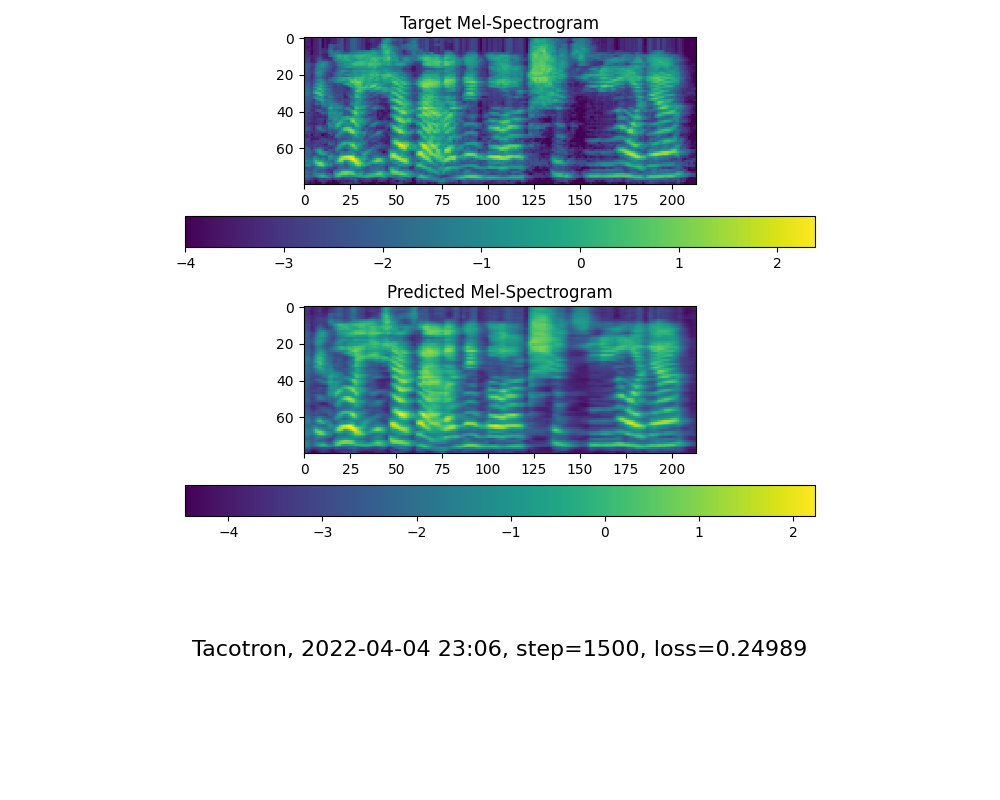
    step-18500-mel-spectrogram_sample_1

    opened by zijubk 0
  • 求助:AttributeError: module 'umap' has no attribute 'UMAP'

    求助:AttributeError: module 'umap' has no attribute 'UMAP'

    Summary[问题简述(一句话)] 在Windows上运行出现问题:module 'umap' has no attribute 'UMAP' 在训练声码器和启动demo时都出现了这个问题

    Env & To Reproduce[复现与环境]

    Traceback (most recent call last):
      File "D:\MockingBird\encoder_train.py", line 46, in <module>
        train(**vars(args))
      File "D:\MockingBird\encoder\train.py", line 100, in train
        vis.draw_projections(embeds, utterances_per_speaker, step, projection_fpath)
      File "D:\MockingBird\encoder\visualizations.py", line 164, in draw_projections
        reducer = umap.UMAP()
    AttributeError: module 'umap' has no attribute 'UMAP'
    
    opened by heziyu2025 0
  • 小白求教:运行工具箱时报错“AttributeError: 'Toolbox' object has no attribute 'selected_source_utterance'”

    小白求教:运行工具箱时报错“AttributeError: 'Toolbox' object has no attribute 'selected_source_utterance'”

    微信截图_20221215215700 微信截图_20221215215735

    加载数据集运行工具箱时报错: AttributeError: 'Toolbox' object has no attribute 'selected_source_utterance'

    工具箱右上边,输入框下边的Vocode only按钮也是灰色的,只能合成没有声音输出

    工具箱左下角 Toolbox outpup 也是无法加载选项

    opened by love530love 0
  • 请更新依赖 requirements.txt ,web.py 所需的一些包并未涵盖在其中

    请更新依赖 requirements.txt ,web.py 所需的一些包并未涵盖在其中

    当前版本:@main-b402f9d 时间:2022-12-15

    当前 requirements.txt 中所缺失的包:

    fastapi==0.88.0
      pydantic==1.10.2
        typing_extensions==4.4.0
      starlette==0.22.0
        anyio==3.6.2
          idna==3.4
          sniffio==1.3.0
        typing_extensions==4.4.0
    loguru==0.6.0
      colorama==0.4.6
      win32-setctime==1.1.0
    typer==0.7.0
      click==8.0.0
        colorama==0.4.6
    

    注:其中倒数第二行, click 版本应注明保持在 8.0.0 ,新版本会导致 "get_os_args" 的报错。其他包最新版本仍可用

    opened by Golevka2001 0
Releases(v0.0.1)
Owner
Vega
ex-Facebook Engineer. Focusing on cutting-edge SaaS/IaaS/ Cloud Service, expertise in Distributed System, AI.
Vega
Pytorch NLP library based on FastAI

Quick NLP Quick NLP is a deep learning nlp library inspired by the fast.ai library It follows the same api as fastai and extends it allowing for quick

Agis pof 283 Nov 21, 2022
Composed Image Retrieval using Pretrained LANguage Transformers (CIRPLANT)

CIRPLANT This repository contains the code and pre-trained models for Composed Image Retrieval using Pretrained LANguage Transformers (CIRPLANT) For d

Zheyuan (David) Liu 29 Nov 17, 2022
State of the art faster Natural Language Processing in Tensorflow 2.0 .

tf-transformers: faster and easier state-of-the-art NLP in TensorFlow 2.0 ****************************************************************************

74 Dec 05, 2022
KoBERTopic은 BERTopic을 한국어 데이터에 적용할 수 있도록 토크나이저와 BERT를 수정한 코드입니다.

KoBERTopic 모델 소개 KoBERTopic은 BERTopic을 한국어 데이터에 적용할 수 있도록 토크나이저와 BERT를 수정했습니다. 기존 BERTopic : https://github.com/MaartenGr/BERTopic/tree/05a6790b21009d

Won Joon Yoo 26 Jan 03, 2023
Spam filtering made easy for you

spammy Author: Tasdik Rahman Latest version: 1.0.3 Contents 1 Overview 2 Features 3 Example 3.1 Accuracy of the classifier 4 Installation 4.1 Upgradin

Tasdik Rahman 137 Dec 18, 2022
Code for Discovering Topics in Long-tailed Corpora with Causal Intervention.

Code for Discovering Topics in Long-tailed Corpora with Causal Intervention ACL2021 Findings Usage 0. Prepare environment Requirements: python==3.6 te

Xiaobao Wu 8 Dec 16, 2022
Blazing fast language detection using fastText model

Luga A blazing fast language detection using fastText's language models Luga is a Swahili word for language. fastText provides a blazing fast language

Prayson Wilfred Daniel 18 Dec 20, 2022
translate using your voice

speech-to-text-translator Usage translate using your voice description this project makes translating a word easy, all you have to do is speak and...

1 Oct 18, 2021
Crie tokens de autenticação íntegros e seguros com UToken.

UToken - Tokens seguros. UToken (ou Unhandleable Token) é uma bilioteca criada para ser utilizada na geração de tokens seguros e íntegros, ou seja, nã

Jaedson Silva 0 Nov 29, 2022
A simple recipe for training and inferencing Transformer architecture for Multi-Task Learning on custom datasets. You can find two approaches for achieving this in this repo.

multitask-learning-transformers A simple recipe for training and inferencing Transformer architecture for Multi-Task Learning on custom datasets. You

Shahrukh Khan 48 Jan 02, 2023
Japanese synonym library

chikkarpy chikkarpyはchikkarのPython版です。 chikkarpy is a Python version of chikkar. chikkarpy は Sudachi 同義語辞書を利用し、SudachiPyの出力に同義語展開を追加するために開発されたライブラリです。

Works Applications 48 Dec 14, 2022
vits chinese, tts chinese, tts mandarin

vits chinese, tts chinese, tts mandarin 史上训练最简单,音质最好的语音合成系统

AmorTX 12 Dec 14, 2022
Bidirectional LSTM-CRF and ELMo for Named-Entity Recognition, Part-of-Speech Tagging and so on.

anaGo anaGo is a Python library for sequence labeling(NER, PoS Tagging,...), implemented in Keras. anaGo can solve sequence labeling tasks such as nam

Hiroki Nakayama 1.5k Dec 05, 2022
Question answering app is used to answer for a user given question from user given text.

Question answering app is used to answer for a user given question from user given text.It is created using HuggingFace's transformer pipeline and streamlit python packages.

Siva Prakash 3 Apr 05, 2022
Search with BERT vectors in Solr and Elasticsearch

Search with BERT vectors in Solr and Elasticsearch

Dmitry Kan 123 Dec 29, 2022
This is the writeup of all the challenges from Advent-of-cyber-2019 of TryHackMe

Advent-of-cyber-2019-writeup This is the writeup of all the challenges from Advent-of-cyber-2019 of TryHackMe https://tryhackme.com/shivam007/badges/c

shivam danawale 5 Jul 17, 2022
pyupbit 라이브러리를 활용하여 upbit에서 비트코인을 자동매매하는 코드입니다. 조코딩 유튜브 채널에서 자세한 강의 영상을 보실 수 있습니다.

파이썬 비트코인 투자 자동화 강의 코드 by 유튜브 조코딩 채널 pyupbit 라이브러리를 활용하여 upbit 거래소에서 비트코인 자동매매를 하는 코드입니다. 파일 구성 test.py : 잔고 조회 (1강) backtest.py : 백테스팅 코드 (2강) bestK.p

조코딩 JoCoding 186 Dec 29, 2022
Pangu-Alpha for Transformers

Pangu-Alpha for Transformers Usage Download MindSpore FP32 weights for GPU from here to data/Pangu-alpha_2.6B.ckpt Activate MindSpore environment and

One 5 Oct 01, 2022
Searching keywords in PDF file folders

keyword_searching Steps to use this Python scripts: (1)Paste this script into the file folder containing the PDF files you need to search from; (2)Thi

1 Nov 08, 2021
translate using your voice

speech-to-text-translator Usage translate using your voice description this project makes translating a word easy, all you have to do is speak and...

1 Oct 18, 2021