A package, and script, to perform imaging transcriptomics on a neuroimaging scan.

Overview

Imaging Transcriptomics

DOI License: GPL v3 Maintainer Generic badge Documentation Status

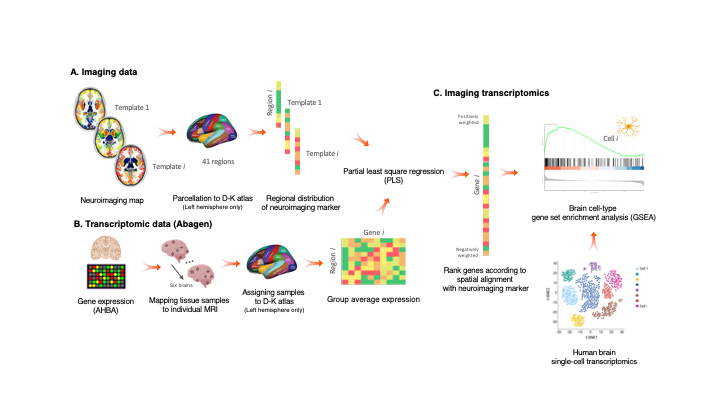
Imaging-transcriptomics_overwiew

Imaging transcriptomics is a methodology that allows to identify patterns of correlation between gene expression and some property of brain structure or function as measured by neuroimaging (e.g., MRI, fMRI, PET).


The imaging-transcriptomics package allows performing imaging transcriptomics analysis on a neuroimaging scan (e.g., PET, MRI, fMRI...).

The software is implemented in Python3 (v.3.7), its source code is available on GitHub, it can be installed via Pypi and is released under the GPL v3 license.

NOTE Versions from v1.0.0 are or will be maintained. The original script linked by the BioRxiv preprint (v0.0) is still available on GitHub but no changes will be made to that code. If you have downloaded or used that script please update to the newer version by installing this new version.

Installation

NOTE We recommend to install the package in a dedicated environment of your choice (e.g., venv or anaconda). Once you have created your environment and you have activated it, you can follow the below guide to install the package and dependencies. This process will avoid clashes between conflicting packages that could happen during/after the installation.

To install the imaging-transcriptomics Python package, first you will need to install a packages that can't be installed directly from PyPi, but require to be downloaded from GitHub. The package to install is pypyls. To install this package you can follow the installation on the documentation for the package or simply run the command

pip install -e git+https://github.com/netneurolab/pypyls.git/#egg=pyls

to download the package, and its dependencies directly from GitHub by using pip.

Once this package is installed you can install the imaging-transcriptomics package by running

pip install imaging-transcriptomics

Usage

Once installed the software can be used in two ways:

  • as standalone script
  • as part of some python script

WARNING Before running the script make sure the Pyhton environment where you have installed the package is activated.

Standalone script


To run the standalone script from the terminal use the command:

imagingtranscriptomics options

The options available are:

  • -i (--input): Path to the imaging file to analise. The path should be given to the program as an absolute path (e.g., /Users/myusername/Documents/my_scan.nii, since a relative path could raise permission errors and crashes. The script only accepts imaging files in the NIfTI format (.nii, .nii.gz).
  • -v (--variance): Amount of variance that the PLS components must explain. This MUST be in the range 0-100.

    NOTE: if the variance given as input is in the range 0-1 the script will treat this as 30% the same way as if the number was in the range 10-100 (e.g., the script treats the inputs -v 30 and -v 0.3 in the exact same way and the resulting components will explain 30% of the variance).

  • -n (--ncomp): Number of components to be used in the PLS regression. The number MUST be in the range 1-15.
  • --corr: Run the analysis using Spearman correlation instead of PLS.

    NOTE: if you run with the --corr command no other input is required, apart from the input scan (-i).

  • -o (--output) (optional): Path where to save the results. If none is provided the results will be saved in the same directory as the input scan.

WARNING: The -i flag is MANDATORY to run the script, and so is one, and only one, of the -n or -v flags. These last two are mutually exclusive, meaning that ONLY one of the two has to be given as input.

Part of Python script


When used as part of a Python script the library can be imported as:

import imaging_transcriptomics as imt

The core class of the package is the ImagingTranscriptomics class which gives access to the methods used in the standalone script. To use the analysis in your scripts you can initialise the class and then simply call the ImagingTranscriptomics().run() method.

import numpy as np
import imaging_transcriptomics as imt
my_data = np.ones(41)  # MUST be of size 41 
                       # (corresponds to the regions in left hemisphere of the DK atlas)

analysis = imt.ImagingTranscriptomics(my_data, n_components=1)
analysis.run()
# If instead of running PLS you want to analysze the data with correlation you can run the analysis with:
analysis.run(method="corr")

Once completed the results will be part of the analysis object and can be accessed with analysis.gene_results.

The import of the imaging_transcriptomics package will import other helpful functions for input and reporting. For a complete explanation of this please refer to the official documentation of the package.

Documentation

The documentation of the script is available at imaging-transcriptomics.rtfd.io/.

Troubleshooting

For any problems with the software you can open an issue in GitHub or contact the maintainer) of the package.

Citing

If you publish work using imaging-transcriptomics as part of your analysis please cite:

Imaging transcriptomics: Convergent cellular, transcriptomic, and molecular neuroimaging signatures in the healthy adult human brain. Daniel Martins, Alessio Giacomel, Steven CR Williams, Federico Turkheimer, Ottavia Dipasquale, Mattia Veronese, PET templates working group. bioRxiv 2021.06.18.448872; doi: https://doi.org/10.1101/2021.06.18.448872

Imaging-transcriptomics: Second release update (v1.0.2).Alessio Giacomel, & Daniel Martins. (2021). Zenodo. https://doi.org/10.5281/zenodo.5726839

Comments
  • pip installation can not resolve enigmatoolbox dependencies

    pip installation can not resolve enigmatoolbox dependencies

    After pip install -e git+https://github.com/netneurolab/pypyls.git/#egg=pyls and pip install imaging-transcriptomics in a new conda environment with Python=3.8, an error was occurred when import imaging-transcriptomics package that it can't find the module named enigmatoolbox. I figured out that the enigmatoolbox package seems can not be resolve by pip installation automatically, so I have to install the enigmatoolbox package from Github manually, with the code bellow according to the document of enigmatoolbox:

    git clone https://github.com/MICA-MNI/ENIGMA.git
    cd ENIGMA
    python setup.py install
    
    opened by YCHuang0610 4
  • DK atlas regions

    DK atlas regions

    Dear alegiac95,

    thanks for providing the scripts! I have just gone through the paper and description of this GitHub repo and I want to adapt your software to my project. However, I use the typical implementation of the DK from Freesurfer with 34 cortical DK ROIs instead of the 41 ROIs that you have used and, if I'm not mistaken, 41 ROIs are required to implement the script as ist is. Is it possible to change the input to other cortical parcellations as well (i.e., DK-34)?

    Cheers, Melissa

    enhancement 
    opened by Melissa1909 3
  • Script not calling the correct python version

    Script not calling the correct python version

    The script in version v1.0.0 is invoking the #!/usr/bin/env python interpreter, which could generate some issue if you default python is python2 (e.g., in older MacOS versions).

    bug 
    opened by alegiac95 1
  • Version 1.1.0

    Version 1.1.0

    Updated the scripts with:

    • support for both full brain analysis and cortical regions only
    • GSEA analysis (both during the analysis and as a separate script)
    • pdf report of the analysis
    opened by alegiac95 0
  • clean code and fix test

    clean code and fix test

    This commit does an extensive code cleaning following the PEP8 standard. It also fixes a test that was most probably intended for previous unstable versions of the software.

    Still to do:

    • Remove logging
    opened by matteofrigo 0
  • Add mathematical background on PLS

    Add mathematical background on PLS

    A more detailed explanation on PLS model and regression is required in the docs.

    • [ ] Add a general mathematical formulation of PLS
    • [ ] Use of PLS in neuroimaging applications
    • [ ] Description of the SIMPLS algorithm used by pypls

    In addition provide some background on correlation, since it is now added to the methods available in the python package/script

    documentation 
    opened by alegiac95 0
Releases(v.1.1.8)
NAS-HPO-Bench-II is the first benchmark dataset for joint optimization of CNN and training HPs.

NAS-HPO-Bench-II API Overview NAS-HPO-Bench-II is the first benchmark dataset for joint optimization of CNN and training HPs. It helps a fair and low-

yoichi hirose 8 Nov 21, 2022
Mercer Gaussian Process (MGP) and Fourier Gaussian Process (FGP) Regression

Mercer Gaussian Process (MGP) and Fourier Gaussian Process (FGP) Regression We provide the code used in our paper "How Good are Low-Rank Approximation

Aristeidis (Ares) Panos 0 Dec 13, 2021
Official code for 'Weakly-supervised Video Anomaly Detection with Robust Temporal Feature Magnitude Learning' [ICCV 2021]

RTFM This repo contains the Pytorch implementation of our paper: Weakly-supervised Video Anomaly Detection with Robust Temporal Feature Magnitude Lear

Yu Tian 242 Jan 08, 2023
WeakVRD-Captioning - Implementation of paper Improving Image Captioning with Better Use of Caption

WeakVRD-Captioning - Implementation of paper Improving Image Captioning with Better Use of Caption

30 Oct 28, 2022
Beancount-mercury - Beancount importer for Mercury Startup Checking

beancount-mercury beancount-mercury provides an Importer for converting CSV expo

Michael Lynch 4 Oct 31, 2022
Improving 3D Object Detection with Channel-wise Transformer

"Improving 3D Object Detection with Channel-wise Transformer" Thanks for the OpenPCDet, this implementation of the CT3D is mainly based on the pcdet v

Hualian Sheng 107 Dec 20, 2022
Efficient Training of Audio Transformers with Patchout

PaSST: Efficient Training of Audio Transformers with Patchout This is the implementation for Efficient Training of Audio Transformers with Patchout Pa

165 Dec 26, 2022
Stochastic Downsampling for Cost-Adjustable Inference and Improved Regularization in Convolutional Networks

Stochastic Downsampling for Cost-Adjustable Inference and Improved Regularization in Convolutional Networks (SDPoint) This repository contains the cod

Jason Kuen 17 Jul 04, 2022
Unofficial PyTorch implementation of the Adaptive Convolution architecture for image style transfer

AdaConv Unofficial PyTorch implementation of the Adaptive Convolution architecture for image style transfer from "Adaptive Convolutions for Structure-

65 Dec 22, 2022
The DL Streamer Pipeline Zoo is a catalog of optimized media and media analytics pipelines.

The DL Streamer Pipeline Zoo is a catalog of optimized media and media analytics pipelines. It includes tools for downloading pipelines and their dependencies and tools for measuring their performace

8 Dec 04, 2022
VM3000 Microphones

VM3000-Microphones This project was completed by Ricky Leman under the supervision of Dr Ben Travaglione and Professor Melinda Hodkiewicz as part of t

UWA System Health Lab 0 Jun 04, 2021
NAACL2021 - COIL Contextualized Lexical Retriever

COIL Repo for our NAACL paper, COIL: Revisit Exact Lexical Match in Information Retrieval with Contextualized Inverted List. The code covers learning

Luyu Gao 108 Dec 31, 2022
Amazon Forest Computer Vision: Satellite Image tagging code using PyTorch / Keras with lots of PyTorch tricks

Amazon Forest Computer Vision Satellite Image tagging code using PyTorch / Keras Here is a sample of images we had to work with Source: https://www.ka

Mamy Ratsimbazafy 359 Jan 05, 2023
A curated list of awesome papers for Semantic Retrieval (TOIS Accepted: Semantic Models for the First-stage Retrieval: A Comprehensive Review).

A curated list of awesome papers for Semantic Retrieval (TOIS Accepted: Semantic Models for the First-stage Retrieval: A Comprehensive Review).

Yinqiong Cai 189 Dec 28, 2022
天勤量化开发包, 期货量化, 实时行情/历史数据/实盘交易

TqSdk 天勤量化交易策略程序开发包 TqSdk 是一个由信易科技发起并贡献主要代码的开源 python 库. 依托快期多年积累成熟的交易及行情服务器体系, TqSdk 支持用户使用极少的代码量构建各种类型的量化交易策略程序, 并提供包含期货、期权、股票的 历史数据-实时数据-开发调试-策略回测-

信易科技 2.8k Dec 30, 2022
Unofficial implementation of the paper: PonderNet: Learning to Ponder in TensorFlow

PonderNet-TensorFlow This is an Unofficial Implementation of the paper: PonderNet: Learning to Ponder in TensorFlow. Official PyTorch Implementation:

1 Oct 23, 2022
Official code of our work, Unified Pre-training for Program Understanding and Generation [NAACL 2021].

PLBART Code pre-release of our work, Unified Pre-training for Program Understanding and Generation accepted at NAACL 2021. Note. A detailed documentat

Wasi Ahmad 138 Dec 30, 2022
Model Quantization Benchmark

Introduction MQBench is an open-source model quantization toolkit based on PyTorch fx. The envision of MQBench is to provide: SOTA Algorithms. With MQ

500 Jan 06, 2023
A PoC Corporation Relationship Knowledge Graph System on top of Nebula Graph.

Corp-Rel is a PoC of Corpartion Relationship Knowledge Graph System. It's built on top of the Open Source Graph Database: Nebula Graph with a dataset

Wey Gu 20 Dec 11, 2022
Differential rendering based motion capture blender project.

TraceArmature Summary TraceArmature is currently a set of python scripts that allow for high fidelity motion capture through the use of AI pose estima

William Rodriguez 4 May 27, 2022