Comprehensive Markdown plugin built for Django

Overview

Django MarkdownX

PyPi_Version PyPi_Status Build_Status Format Supported_versions_of_Python Supported_versions_of_Django License

Django MarkdownX is a comprehensive Markdown plugin built for Django, the renowned high-level Python web framework, with flexibility, extensibility, and ease-of-use at its core.

Documentation

https://neutronx.github.io/django-markdownx/

Key features

  • Raw editing.
  • Live preview.
  • Drag & drop image uploads (automatically stored in the designated location in the Media directory).
  • Customizable image insertion tag.
  • Definition of maximum size for an image.
  • Definition of acceptable image formats (PNG, JPEG, SVG).
  • Image manipulations (compression, size reduction, cropping, upscaling).
  • Pre- and post- text modification.
  • Easy template customization, layout modification, and personalization.
  • Multiple editors per page.
  • Django Admin support.

Preview

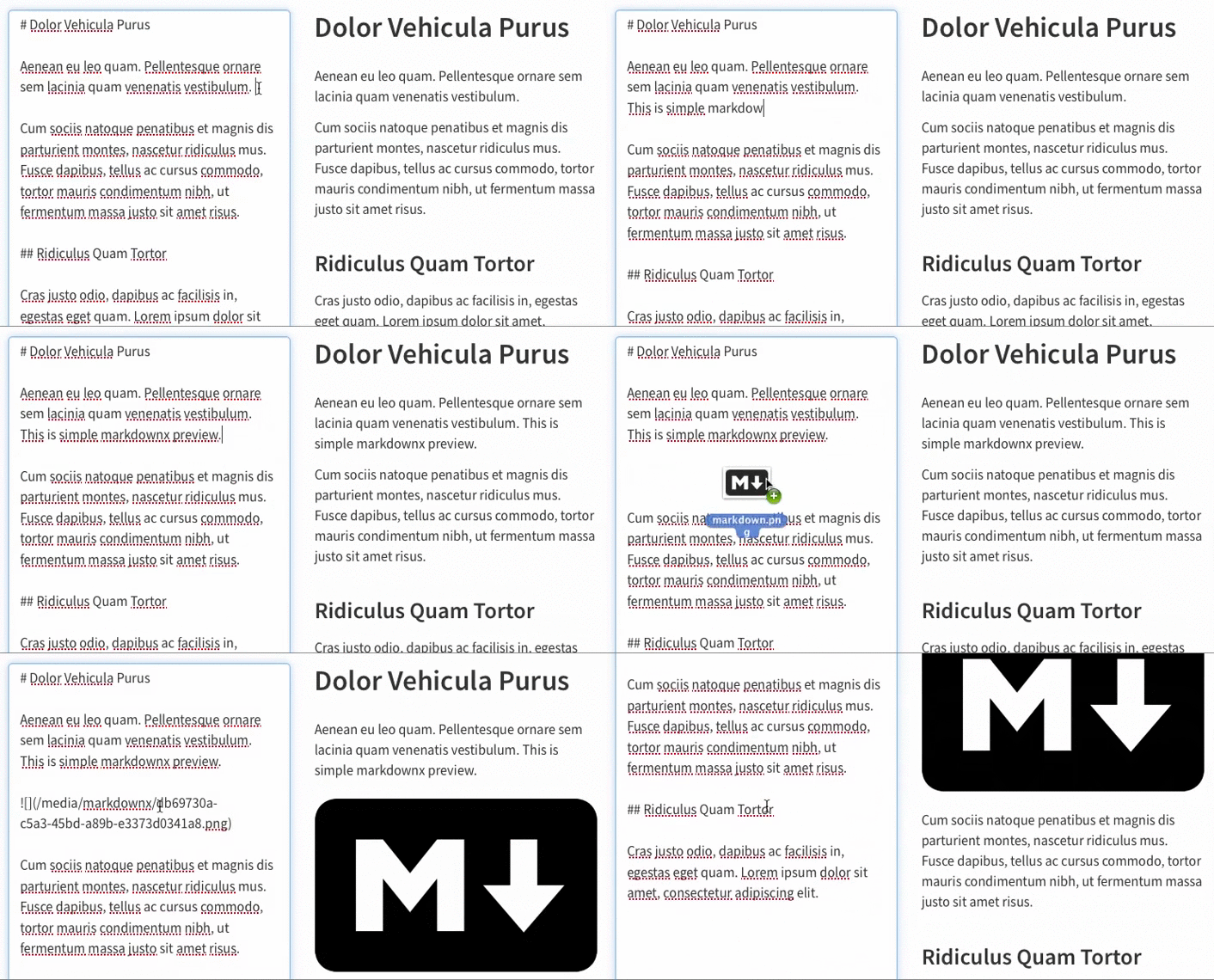
django-markdownx preview

(using Bootstrap for layout and styling – not included in package)

Comments
  • Disable TAB key if CTRL was down

    Disable TAB key if CTRL was down

    This stops the editor receiving a TAB event if using CTRL-TAB to cycle browser tabs. Otherwise the tab works as it should.

    Related to #66.

    ~~One problem though, not entirely sure how to deal with it. While the tab does get ignored when doing CTRL+TAB, for some reason the cursor jumps to the end of the text area. I'm not sure what to do about that.~~

    enhancement 
    opened by jaywink 16
  • [SOLVED] Render markdown to HTML in template

    [SOLVED] Render markdown to HTML in template

    Hi there

    I'm new here, and I'm having an issue rendering markdownx to HTML. I use this tag :

    {{ post.content|safe }}
    

    But it's not working. And I cannot find in the docs (Maybe I missed it?)

    Thank you!

    duplicate 
    opened by alzearafat 11
  • Make it possible to customize image insertion code.

    Make it possible to customize image insertion code.

    It can be useful to insert more that just a markdown image tag, for example to provide additional control on the layout of images. Since there's no convenient way to handle this on the JavaScript side, we generate the code to insert in Python. Then it can be overridden with the existing extensibility mechanism, that is, with a custom view.

    opened by aaugustin 11
  • Handle csrf stored in sessions

    Handle csrf stored in sessions

    This allow to use CSRF_USE_SESSIONS = True which store crsf token in session instead of cookies. It checks if csrf token found in cookies otherwise try to get csrf token in session.

    opened by Intestinall 10
  • self.attrs problem

    self.attrs problem

    I have a problem to develop using this package.

    class MyModelForm(forms.ModelForm):
      class Meta:
        model = MyModel
        field_classes = {'content': MarkdownxFormField,}
        widgets = {'content': MarkdowxWidget(attrs={'class':'form-control'})}
    

    So I override your function 'render' and merge attrs and self.attrs and it works. Also, I think it will handle this problem.

    class MarkdownxWidgetImproved(MarkdownxWidget):
      def render(self, name, value, attrs=None):
        allAttrs = {**attrs, **self.attrs}
        return super(MarkdownxWidgetImproved, self).render(name, value, allAttrs)
    

    I request pull, but canceled because I expect that that code doesn't work when attrs is None.

    opened by sh0416 10
  • Preview not working on outside admin (on frontend)

    Preview not working on outside admin (on frontend)

    Hi.

    I have successfully configured markdown field and it works fine in the admin:

    image

    I also use it in my custom form on frontend, but unfortunately, the preview does not work. I can see the requests in the "Network" tab in the Google Chrome Developer Tools and I see the response is correctly returned:

    image

    I debugged markdown.js file at line 477:

    xhr.success = function (response) {
        console.log('success');
        console.log(response);
        properties.preview.innerHTML = response;
        properties.editor = updateHeight(properties.editor);
        utils_1.triggerCustomEvent('markdownx.update', properties.parent, [response]);
    };
    

    and the result is, that "response" variable is always null:

    image

    Any idea what can cause the issue?

    pip:

    Django==2.0.2
    django-markdownx==2.0.22
    
    opened by eriktelepovsky 9
  • Security issue - Vulnerable to XSS attack

    Security issue - Vulnerable to XSS attack

    Description

    A security problem exists when markdownx.js dynamically interprets the content of the form without first checking the content. The application is vulnerable to XSS attack.

    Versions

    • django 1.11.13 and 2.2.5,
    • python 2.7.16 and 3.7.4.
    • django-markdownx 2.0.28.

    Preview

    POC_XSS_Markdownx_v2 0 28

    opened by LzOggar 8
  • Line breaks in code blocks

    Line breaks in code blocks

    Hello,

    I would expect line breaks to be parsed in code blocks.

    For example, the markdown

    ```javascript var x = 1; var y = 2; ``` should render, much like it does on Github, as

    var x = 1;
    var y = 2;
    

    Instead, markdownx renders it as

    var x = 1; var y = 2;
    

    Is that intentional or am I missing something?

    Thank you for building markdownx! -- Niko

    question 
    opened by nstahl 8
  • Size settings for non-svg images and inclusion of xml+svg in Settings

    Size settings for non-svg images and inclusion of xml+svg in Settings

    • Rectified the error causing image size alteration for non-svg images being ignored.
    • Additionally, broke down pieces of code into task-specific functions inline with functional/OOP programming best practices, but also to make them easier to read and debug.
    • image/xml+svg is now included in the default settings.
    • Also tested on Python 3.6 - works perfectly fine.

    Reminder: This would require a minor version change + pipy update as the error I found was preventing the application from performing one of the preceding features.

    opened by xenatisch 8
  • Template

    Template

    Hello, can you help me ? :smile: I don`t know how to show my markdown data on template. I have something like

    <h1>{{ post.title }}</h1>
    <p>{{ post.text }}</p>
    <p>{{ post.markdown }}</p>
    

    and i see only

    title
    text
    #text1 ![](/media/markdownx/ab3bfac7-7509-411a-96c8-11aebc20b873.jpg)
    

    but i want compiled version (with image) Could you explain how templates with markdownx work ? Or create some exaple with that ? :smile:

    opened by StudentDawid 8
  • View opacity reset after invalid image upload

    View opacity reset after invalid image upload

    When working on https://github.com/neutronX/django-markdownx/issues/143 i noticed the view opacity is not reset after uploading an invalid image. Proposal: remove return null on this line, so the properties.editor.style.opacity = NORMAL_OPACITY; is called correctly. https://github.com/neutronX/django-markdownx/blob/master/markdownx/static/markdownx/js/markdownx.js#L457

    What is the reason to return null here?

    opened by JeroenvO 7
  • Bump actions/checkout from 2.3.2 to 3.2.0

    Bump actions/checkout from 2.3.2 to 3.2.0

    Bumps actions/checkout from 2.3.2 to 3.2.0.

    Release notes

    Sourced from actions/checkout's releases.

    v3.2.0

    What's Changed

    New Contributors

    Full Changelog: https://github.com/actions/checkout/compare/v3...v3.2.0

    v3.1.0

    What's Changed

    New Contributors

    Full Changelog: https://github.com/actions/checkout/compare/v3.0.2...v3.1.0

    v3.0.2

    What's Changed

    Full Changelog: https://github.com/actions/checkout/compare/v3...v3.0.2

    v3.0.1

    v3.0.0

    • Updated to the node16 runtime by default
      • This requires a minimum Actions Runner version of v2.285.0 to run, which is by default available in GHES 3.4 or later.

    v2.5.0

    What's Changed

    Full Changelog: https://github.com/actions/checkout/compare/v2...v2.5.0

    ... (truncated)

    Changelog

    Sourced from actions/checkout's changelog.

    Changelog

    v3.1.0

    v3.0.2

    v3.0.1

    v3.0.0

    v2.3.1

    v2.3.0

    v2.2.0

    v2.1.1

    • Changes to support GHES (here and here)

    v2.1.0

    v2.0.0

    ... (truncated)

    Commits

    Dependabot compatibility score

    Dependabot will resolve any conflicts with this PR as long as you don't alter it yourself. You can also trigger a rebase manually by commenting @dependabot rebase.


    Dependabot commands and options

    You can trigger Dependabot actions by commenting on this PR:

    • @dependabot rebase will rebase this PR
    • @dependabot recreate will recreate this PR, overwriting any edits that have been made to it
    • @dependabot merge will merge this PR after your CI passes on it
    • @dependabot squash and merge will squash and merge this PR after your CI passes on it
    • @dependabot cancel merge will cancel a previously requested merge and block automerging
    • @dependabot reopen will reopen this PR if it is closed
    • @dependabot close will close this PR and stop Dependabot recreating it. You can achieve the same result by closing it manually
    • @dependabot ignore this major version will close this PR and stop Dependabot creating any more for this major version (unless you reopen the PR or upgrade to it yourself)
    • @dependabot ignore this minor version will close this PR and stop Dependabot creating any more for this minor version (unless you reopen the PR or upgrade to it yourself)
    • @dependabot ignore this dependency will close this PR and stop Dependabot creating any more for this dependency (unless you reopen the PR or upgrade to it yourself)
    dependencies github_actions 
    opened by dependabot[bot] 0
  • Simple optimization inside views.py

    Simple optimization inside views.py

    Instead of importing the markdownify function every time the view's POST method is called, instead import it at global scope.

    Example:

    markdownify_func = import_string(MARKDOWNX_MARKDOWNIFY_FUNCTION)
    
    class MarkdownifyView(View):
        """
        Conversion of Markdown to HTML.
        """
    
        def post(self, request, *args, **kwargs):
            """
            Handling of the conversion from Markdown to HTML using the conversion
            function in settings under ``MARKDOWNX_MARKDOWNIFY_FUNCTION``.
    
            :param request: HTTP request.
            :param args: Default Django POST arguments.
            :param kwargs: Default Django POST keyword arguments.
            :return: HTTP response
            :rtype: django.http.HttpResponse
            """
            # Function used to be imported every POST request. 
            return HttpResponse(markdownify_func(request.POST['content']))
    
    
    opened by Nigel2392 0
  • Bump actions/setup-python from 2 to 4

    Bump actions/setup-python from 2 to 4

    Bumps actions/setup-python from 2 to 4.

    Release notes

    Sourced from actions/setup-python's releases.

    v4.0.0

    What's Changed

    • Support for python-version-file input: #336

    Example of usage:

    - uses: actions/[email protected]
      with:
        python-version-file: '.python-version' # Read python version from a file
    - run: python my_script.py
    

    There is no default python version for this setup-python major version, the action requires to specify either python-version input or python-version-file input. If the python-version input is not specified the action will try to read required version from file from python-version-file input.

    • Use pypyX.Y for PyPy python-version input: #349

    Example of usage:

    - uses: actions/[email protected]
      with:
        python-version: 'pypy3.9' # pypy-X.Y kept for backward compatibility
    - run: python my_script.py
    
    • RUNNER_TOOL_CACHE environment variable is equal AGENT_TOOLSDIRECTORY: #338

    • Bugfix: create missing pypyX.Y symlinks: #347

    • PKG_CONFIG_PATH environment variable: #400

    • Added python-path output: #405 python-path output contains Python executable path.

    • Updated zeit/ncc to vercel/ncc package: #393

    • Bugfix: fixed output for prerelease version of poetry: #409

    • Made pythonLocation environment variable consistent for Python and PyPy: #418

    • Bugfix for 3.x-dev syntax: #417

    • Other improvements: #318 #396 #384 #387 #388

    Update actions/cache version to 2.0.2

    In scope of this release we updated actions/cache package as the new version contains fixes related to GHES 3.5 (actions/setup-python#382)

    Add "cache-hit" output and fix "python-version" output for PyPy

    This release introduces new output cache-hit (actions/setup-python#373) and fix python-version output for PyPy (actions/setup-python#365)

    The cache-hit output contains boolean value indicating that an exact match was found for the key. It shows that the action uses already existing cache or not. The output is available only if cache is enabled.

    ... (truncated)

    Commits
    • d09bd5e fix: 3.x-dev can install a 3.y version (#417)
    • f72db17 Made env.var pythonLocation consistent for Python and PyPy (#418)
    • 53e1529 add support for python-version-file (#336)
    • 3f82819 Fix output for prerelease version of poetry (#409)
    • 397252c Update zeit/ncc to vercel/ncc (#393)
    • de977ad Merge pull request #412 from vsafonkin/v-vsafonkin/fix-poetry-cache-test
    • 22c6af9 Change PyPy version to rebuild cache
    • 081a3cf Merge pull request #405 from mayeut/interpreter-path
    • ff70656 feature: add a python-path output
    • fff15a2 Use pypyX.Y for PyPy python-version input (#349)
    • Additional commits viewable in compare view

    Dependabot compatibility score

    Dependabot will resolve any conflicts with this PR as long as you don't alter it yourself. You can also trigger a rebase manually by commenting @dependabot rebase.


    Dependabot commands and options

    You can trigger Dependabot actions by commenting on this PR:

    • @dependabot rebase will rebase this PR
    • @dependabot recreate will recreate this PR, overwriting any edits that have been made to it
    • @dependabot merge will merge this PR after your CI passes on it
    • @dependabot squash and merge will squash and merge this PR after your CI passes on it
    • @dependabot cancel merge will cancel a previously requested merge and block automerging
    • @dependabot reopen will reopen this PR if it is closed
    • @dependabot close will close this PR and stop Dependabot recreating it. You can achieve the same result by closing it manually
    • @dependabot ignore this major version will close this PR and stop Dependabot creating any more for this major version (unless you reopen the PR or upgrade to it yourself)
    • @dependabot ignore this minor version will close this PR and stop Dependabot creating any more for this minor version (unless you reopen the PR or upgrade to it yourself)
    • @dependabot ignore this dependency will close this PR and stop Dependabot creating any more for this dependency (unless you reopen the PR or upgrade to it yourself)
    dependencies github_actions 
    opened by dependabot[bot] 0
  • getCookie() bug?

    getCookie() bug?

            var cookies = document.cookie
                .split(';')
                .filter(function (cookie) { return cookie.indexOf(name + "=") === 0; })[0];
    

    code works when cookie is csrftoken=xyz; abc=def but fails on abc=def; csrftoken=xyz

    opened by alphatownsman 0
  • Release for Django 4.0

    Release for Django 4.0

    The last release on PyPI can't work with Django 4.0 because of the API shift in Django.

    The current code does work, and we're putting it in production.

    It's mildly inconvenient to have to pin our requirements to a Git commit ID, though. Would it be possible to get a PyPI-uploaded version for Django 4.0?

    opened by joelburton 0
Releases(v4.0.0-beta.1)
pytest-django allows you to test your Django project/applications with the pytest testing tool.

pytest-django allows you to test your Django project/applications with the pytest testing tool.

pytest-dev 1.1k Dec 14, 2022
RestApi With Django 3.2 And Django Rest Framework

RestApi-With-Django-3.2-And-Django-Rest-Framework Description This repository is a Software of Development with Python. Virtual Using pipenv, virtuale

Daniel Arturo Alejo Alvarez 6 Aug 02, 2022
Exemplo de biblioteca com Django

Bookstore Exemplo de biblioteca feito com Django. Este projeto foi feito com: Python 3.9.7 Django 3.2.8 Django Rest Framework 3.12.4 Bootstrap 4.0 Vue

Regis Santos 1 Oct 28, 2021
User Authentication In Django/Ajax/Jquery

User Authentication In Django/Ajax/Jquery Demo: Authentication System Using Django/Ajax/Jquery Demo: Authentication System Using Django Overview The D

Suman Raj Khanal 10 Mar 26, 2022
Django Rest Framework + React application.

Django Rest Framework + React application.

2 Dec 19, 2022
Django-shared-app-isolated-databases-example - Django - Shared App & Isolated Databases

Django - Shared App & Isolated Databases An app that demonstrates the implementa

Ajai Danial 5 Jun 27, 2022
Wagtail - Vue - Django : The initial environment of full-stack local dev web app with wagtail and vue

Wagtail - Vue - Django : The initial environment of full-stack local dev web app with wagtail and vue. A demo to show how to use .vue files inside django app.

Quang PHAM 2 Oct 20, 2022
scaffold django rest apis like a champion 🚀

dr_scaffold Scaffold django rest apis like a champion ⚡ . said no one before Overview This library will help you to scaffold full Restful API Resource

Abdenasser Elidrissi 133 Jan 05, 2023
A simple polling app made in Django and Bootstrap

DjangoPolls A Simple Polling app made with Django Instructions Make sure you have Python installed Step 1. Open a terminal Step 2. Paste the given cod

Aditya Priyadarshi 1 Nov 10, 2021
Inject an ID into every log message from a Django request. ASGI compatible, integrates with Sentry, and works with Celery

Django GUID Now with ASGI support! Django GUID attaches a unique correlation ID/request ID to all your log outputs for every request. In other words,

snok 300 Dec 29, 2022
Media-Management with Grappelli

Django FileBrowser Media-Management with Grappelli. The FileBrowser is an extension to the Django administration interface in order to: browse directo

Patrick Kranzlmueller 913 Dec 28, 2022
Django admin CKEditor integration.

Django CKEditor NOTICE: django-ckeditor 5 has backward incompatible code moves against 4.5.1. File upload support has been moved to ckeditor_uploader.

2.2k Dec 31, 2022
Serve files with Django.

django-downloadview django-downloadview makes it easy to serve files with Django: you manage files with Django (permissions, filters, generation, ...)

Jazzband 328 Dec 07, 2022
A clone of https://virgool.io written in django

Virgool clone A clone of virgool blog written in django Installation first rename the .env.sample to .env and fill it. with docker docker-compose up -

Danial Selmipoor 7 Dec 23, 2022
Django Serverless Cron - Run cron jobs easily in a serverless environment

Django Serverless Cron - Run cron jobs easily in a serverless environment

Paul Onteri 41 Dec 16, 2022
This is raw connection between redis server and django python app

Django_Redis This repository contains the code for this blogpost. Running the Application Clone the repository git clone https://github.com/xxl4tomxu9

Tom Xu 1 Sep 15, 2022
A CTF leaderboard for the submission of flags during a CTF challenge. Built using Django.

🚩 CTF Leaderboard The goal of this project is to provide a simple web page to allow the participants of an CTF to enter their found flags. Also the l

Maurice Bauer 2 Jan 17, 2022
django-compat-lint

django_compat_lint -- check Django compatibility of your code Django's API stability policy is nice, but there are still things that change from one v

James Bennett 40 Sep 30, 2021
This is a simple Todo web application built Django (back-end) and React JS (front-end)

Django REST Todo app This is a simple Todo web application built with Django (back-end) and React JS (front-end). The project enables you to systemati

Maxim Mukhin 5 May 06, 2022
django-dashing is a customisable, modular dashboard application framework for Django to visualize interesting data about your project. Inspired in the dashboard framework Dashing

django-dashing django-dashing is a customisable, modular dashboard application framework for Django to visualize interesting data about your project.

talPor Solutions 703 Dec 22, 2022