StarterCode for VALUE Benchmark
This is the starter code for VALUE Benchmark [website], [paper].
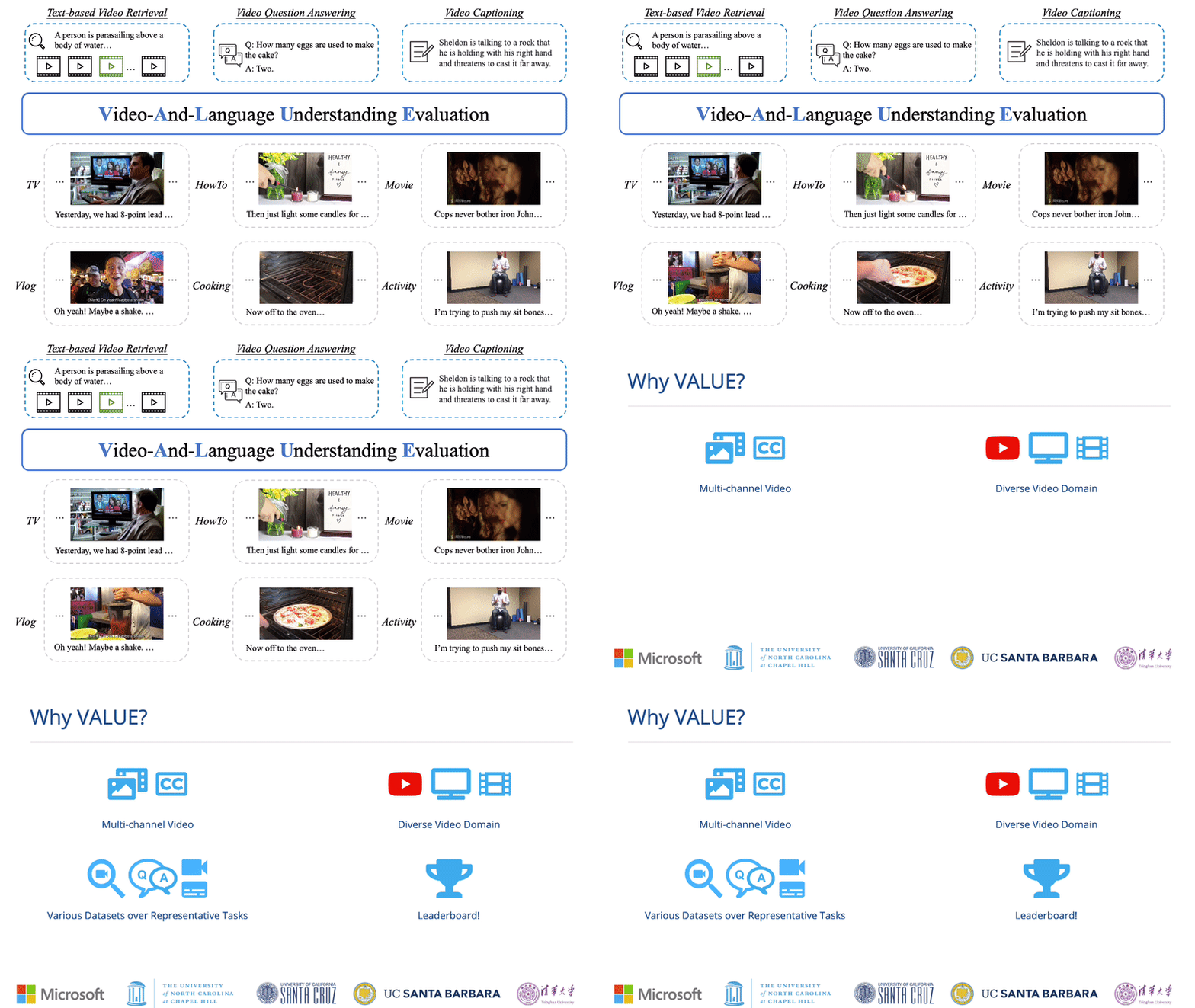
This repository currently supports all baseline models in VALUE paper, including training with different video-subtitle fusion methods, different input channels, different visual representations and multi-task training. You can also perform transfer evaluation between different tasks with our evaluation code.
Before dive into the baseline models mentioned above, please make yourself familiar with the codebase by going through the examples in Quick Start and Single Task Finetuning.
The code in this repo are copied/modified from open-source implementations made available by HERO.
Updates
- [7/27/2021] Please re-download
violin_test_private.dbat this link if you downloaded via script/download_violin.sh prior to 7/27/2021. The previous version is not consistent with our release, sorry for your inconvenience.
Requirements
We use the provided Docker image in HERO for easier reproduction. Please follow Requirements in HERO to set up the environment.
Quick Start
NOTE: Please run bash scripts/download_pretrained.sh $PATH_TO_STORAGE to get the latest pretrained checkpoints from HERO.
We use TVR as an end-to-end example for single-task finetuning.
-
Download processed data and pretrained models with the following command.
bash scripts/download_tvr.sh $PATH_TO_STORAGEAfter downloading you should see the following folder structure:
├── video_db │ ├── tv ├── pretrained │ └── hero-tv-ht100.pt └── txt_db ├── tv_subtitles.db ├── tvr_train.db ├── tvr_val.db └── tvr_test.db -
Launch the Docker container for running the experiments.
# docker image should be automatically pulled
source launch_container.sh $PATH_TO_STORAGE/txt_db $PATH_TO_STORAGE/video_db \
    $PATH_TO_STORAGE/finetune $PATH_TO_STORAGE/pretrained
The launch script respects $CUDA_VISIBLE_DEVICES environment variable. Note that the source code is mounted into the container under
/srcinstead of built into the image so that user modification will be reflected without re-building the image. (Data folders are mounted into the container separately for flexibility on folder structures.) -
Run finetuning for the TVR task.
# inside the container
horovodrun -np 8 python train_retrieval.py --config config/train-tvr-8gpu.json \
    --output_dir $YOUR_TVR_OUTPUT_DIR

# for single gpu
python train_retrieval.py --config $YOUR_CONFIG_JSON
-
Run inference for the TVR task.
# inference, inside the container
python eval_vcmr.py --query_txt_db /txt/tvr_val.db/ --split val \
    --vfeat_db /video/tv/ --sub_txt_db /txt/tv_subtitles.db/ \
    --output_dir $YOUR_TVR_OUTPUT_DIR --checkpoint $BEST_CKPT_STEP \
    --task tvr
The result file will be written at
${YOUR_TVR_OUTPUT_DIR}/results_val/results_${BEST_CKPT_STEP}_all.json. Change to--query_txt_db /txt/tvr_test.db/ --split testfor inference on test split. Please format the result file as requested in VALUE Evaluation Tools for submission, this repository does not include formatting. -
Misc. In case you would like to reproduce the whole preprocessing pipeline.
-
Text annotation and subtitle preprocessing
# outside of the container
# make sure you have downloaded/constructed the video dbs for TV dataset
# the prepro of tv_subtitles.db requires information from video_db/tv
bash scripts/create_txtdb.sh $PATH_TO_STORAGE/txt_db \
    $PATH_TO_STORAGE/ann $PATH_TO_STORAGE/video_db
-
Video feature extraction
We follow feature extraction code at HERO_Video_Feature_Extractor. Please follow the link for instructions to extract video features from ResNet, SlowFast, S3D in Mil-NCE and CLIP-ViT models. These features are saved as separate .npz files per video.
-
Video feature preprocessing and saved to lmdb
# inside of the container

# Use resnet_slowfast as an example
# Gather slowfast/resnet feature paths
python scripts/collect_video_feature_paths.py  \
    --feature_dir $PATH_TO_STORAGE/vis_feat_dir\
    --output $PATH_TO_STORAGE/video_db --dataset $DATASET_NAME \
    --feat_version resnet_slowfast

# Convert to lmdb
python scripts/convert_videodb.py \
    --vfeat_info_file $PATH_TO_STORAGE/video_db/$DATASET_NAME/resnet_slowfast_info.pkl \
    --output $PATH_TO_STORAGE/video_db --dataset $DATASET_NAME --frame_length 1.5 \
    --feat_version resnet_slowfast
--frame_length: 1 feature per "frame_length" seconds, we use 1.5 in our implementation. set it to be consistent with the one used in feature extraction.--compress: enable compression of lmdb--feat_version: choose fromresnet_slowfast,resnet_mil-nce(ResNet+S3D in paper),clip-vit_slowfast,clip-vit_mil-nce(CLIP-ViT+S3D in paper).
VALUE Single Task Finetuning
Video Retrieval Tasks
All video retrieval tasks can be finetuned with train_retrieval.py. We use YC2R as an additional example to show how to perform single-task finetuning on video retrieval tasks.
- download data
# outside of the container
bash scripts/download_yc2.sh $PATH_TO_STORAGE
- train
# inside the container
horovodrun -np 4 python train_retrieval.py --config config/train-yc2r-4gpu.json \
    --output_dir $YC2R_EXP
- inference
The result file will be written at
# inside the container
python eval_vr.py --query_txt_db /txt/yc2r_test.db/ --split test \
    --vfeat_db /video/yc2/ --sub_txt_db /txt/yc2_subtitles.db/ \
    --output_dir $YC2R_EXP --checkpoint $ckpt --task yc2r
$YC2R_EXP/results_test/results_$ckpt_all.json, which can be submitted to the evaluation server. Please format the result file as requested in VALUE Evaluation Tools for submission.
Video QA Tasks
All video question answering models can be finetuned with train_qa.py. We use TVQA to demonstrate how to perform single-task finetuning on video question answering tasks.
-
download data
# outside of the container
bash scripts/download_tvqa.sh $PATH_TO_STORAGE
-
train
# inside the container
horovodrun -np 8 python train_qa.py --config config/train-tvqa-8gpu.json \
    --output_dir $TVQA_EXP
-
inference
# inside the container
horovodrun -np 8 python eval_videoQA.py --query_txt_db /txt/tvqa_test.db/ --split test \
    --vfeat_db /video/tv/ --sub_txt_db /txt/tv_subtitles.db/ \
    --output_dir $TVQA_EXP --checkpoint $ckpt --task tvqa
The result file will be written at
$TVQA_EXP/results_test/results_$ckpt_all.json, which can be submitted to the evaluation server. Please format the result file as requested in VALUE Evaluation Tools for submission.Use
eval_violin.pyfor inference on VIOLIN task.
Captioning tasks
All video captioning models can be finetuned with train_captioning.py. We use TVC to demonstrate how to perform single-task finetuning on video captioning tasks.
-
download data
# outside of the container
bash scripts/download_tvc.sh $PATH_TO_STORAGE
-
train
# inside the container
horovodrun -np 8 python train_captioning.py --config config/train-tvc-8gpu.json \
    --output_dir $TVC_EXP
-
inference
# inside the container
python inf_tvc.py --model_dir $TVC_EXP --ckpt_step $ckpt \
    --target_clip /txt/tvc_val_release.jsonl --output tvc_val_output.jsonl
- The result file will be written at
$TVC_EXP/tvc_val_output.jsonl - change to
--target_clip /txt/tvc_test_release.jsonlfor test results. - see
scripts/prepro_tvc.shfor LMDB preprocessing.
Use
inf_vatex_en_c.py/inf_yc2c.pyfor inference on VATEX_EN_C / YC2C task. - The result file will be written at
VALUE Multi-Task Finetuning
-
download data
# outside of the container
bash scripts/download_all.sh $PATH_TO_STORAGE
-
train
# inside the container
horovodrun -np 8 python train_all_multitask.py \
    --config config/train-all-multitask-8gpu.json \
    --output_dir $AT_PT_FT_EXP
--config: change config file for different multi-task settings.- MT by domain group:
config/train-tv_domain-multitask-8gpu.json/config/train-youtube_domain-multitask-8gpu.json - MT by task type:
config/train-retrieval-multitask-8gpu.json/config/train-qa-multitask-8gpu.json/config/train-caption-multitask-8gpu.json - AT:
config/train-all-multitask-8gpu.json
- MT by domain group:
- For multi-task baselines without pre-training, refer to configs under
config/FT_only_configs
-
inference
Follow the inference instructions above for each task.
Training with Different Input Channels
To reproduce our experiments with different input channels, change the training config via --config. Take TVR as an example:
- Video-only
# inside the container
horovodrun -np 8 python train_retrieval.py \
    --config config/FT_only_configs/train-tvr_video_only-8gpu.json \
    --output_dir $TVR_V_only_EXP
- Subtitle-only
# inside the container

horovodrun -np 8 python train_retrieval.py \
    --config config/FT_only_configs/train-tvr_sub_only-8gpu.json \
    --output_dir $TVR_S_only_EXP
- Video + Subtitle
# inside the container

horovodrun -np 8 python train_retrieval.py \
    --config config/FT_only_configs/train-tvr-8gpu.json \
    --output_dir $TVR_EXP
Training with Different Video-Subtitle Fusion Methods
To reproduce our experiments with different video-subtitle fusion methods, change the fusion methods via --model_config for training. Take TVR as an example:
# Training, inside the container
horovodrun -np 8 python train_retrieval.py --config config/FT_only_configs/train-tvr-8gpu.json \
    --output_dir $TVR_EXP --model_config config/model_config/hero_finetune.json
config/model_config/hero_finetune.json: default temporal align + cross-modal transformerconfig/model_config/video_sub_sequence_finetune.json: sequence concatenationconfig/model_config/video_sub_feature_add_finetune.json: temporal align + summationconfig/model_config/video_sub_feature_concat_finetune.json: temporal align + concatenation
For two-stream experiments in our paper, please train video-only and subtitle-only models following Training with Video-only and Subtitle-only and use evaluation scripts in two_stream_eval. Take TVR as an example,
# Evaluation, inside the container
python eval_vcmr.py --query_txt_db /txt/tvr_val.db/ --split val \
    --vfeat_db /video/tv/ --sub_txt_db /txt/tv_subtitles.db/ \
    --video_only_model_dir $TVR_V_only_EXP --video_only_checkpoint $BEST_V_only_CKPT_STEP \
    --sub_only_model_dir $TVR_S_only_EXP --sub_only_checkpoint $BEST_S_only_CKPT_STEP \
    --task tvr
Training with Different Visual Representations
To reproduce our experiments with different visual representations, change the visual representations via --vfeat_version for training. Take TVR as an example:
# inside the container
horovodrun -np 8 python train_retrieval.py --config config/FT_only_configs/train-tvr-8gpu.json \
    --output_dir $TVR_EXP --vfeat_version resnet
We provide all feature variations used in the paper, including:
- 2D features:
resnetandclip-vit - 3D features:
mil-nce(S3D in paper) andslowfast - 2D+3D features:
resnet_slowfast,resnet_mil-nce(ResNet+S3D in paper),clip-vit_mil-nce(CLIP-ViT+S3D in paper),clip-vit_slowfast --vfeat_version: default is set to beresnet_slowfast
Task Transferability Evaluation
To reproduce our experiments about task transferability, you will need to first have a trained model on source task and run evaluation on target task. Take TVR->How2R as an example:
- Train on TVR task
# inside the container
horovodrun -np 8 python train_retrieval.py --config config/FT_only_configs/train-tvr-8gpu.json \
    --output_dir $TVR_EXP
- Evaluate the trained model on How2R task:
# inside the container
python eval_vcmr.py --query_txt_db /txt/how2r_val_1k.db/ --split val \
    --vfeat_db /video/how2/ --sub_txt_db /txt/how2_subtitles.db/ \
    --output_dir $TVR_EXP --checkpoint $BEST_TVR_CKPT_STEP \
    --task how2r
Pre-training
All VALUE baselines are based on the pre-trained checkpoint released in HERO. The pre-training experiments are not tested in this codebase.
If you wish to perform pre-training, please refer to instructions in HERO.
Citation
If you find this code useful for your research, please consider citing:
@inproceedings{li2021value,
  title={VALUE: A Multi-Task Benchmark for Video-and-Language Understanding Evaluation},
  author={Li, Linjie and Lei, Jie and Gan, Zhe and Yu, Licheng and Chen, Yen-Chun and Pillai, Rohit and Cheng, Yu and Zhou, Luowei and Wang, Xin Eric and Wang, William Yang and others},
  booktitle={35th Conference on Neural Information Processing Systems (NeurIPS 2021) Track on Datasets and Benchmarks},
  year={2021}
}

@inproceedings{li2020hero,
  title={HERO: Hierarchical Encoder for Video+ Language Omni-representation Pre-training},
  author={Li, Linjie and Chen, Yen-Chun and Cheng, Yu and Gan, Zhe and Yu, Licheng and Liu, Jingjing},
  booktitle={EMNLP},
  year={2020}
}
License
MIT

 20 Dec 19, 2022
 156 Dec 23, 2022
 229 Jan 02, 2023
 195 Dec 30, 2022
 21.1k Jan 08, 2023
 6.2k Jan 07, 2023
 39 Dec 25, 2022
 248 Dec 13, 2022
 456 Jan 08, 2023
 320 Jan 02, 2023
 498 Dec 24, 2022
 50 Oct 08, 2021
 53 Nov 22, 2022
 174 Dec 19, 2022
 883 Dec 31, 2022
 413 Nov 30, 2022
 34.7k Jan 04, 2023
 417 Dec 20, 2022
 47 Jul 26, 2022
 175 Dec 23, 2022