Suricata Language Server is an implementation of the Language Server Protocol for Suricata signatures

Overview

Suricata Language Server

Suricata Language Server is an implementation of the Language Server Protocol for Suricata signatures. It adds syntax check and hints as well as auto-completion to your preferred editor once it is configured.
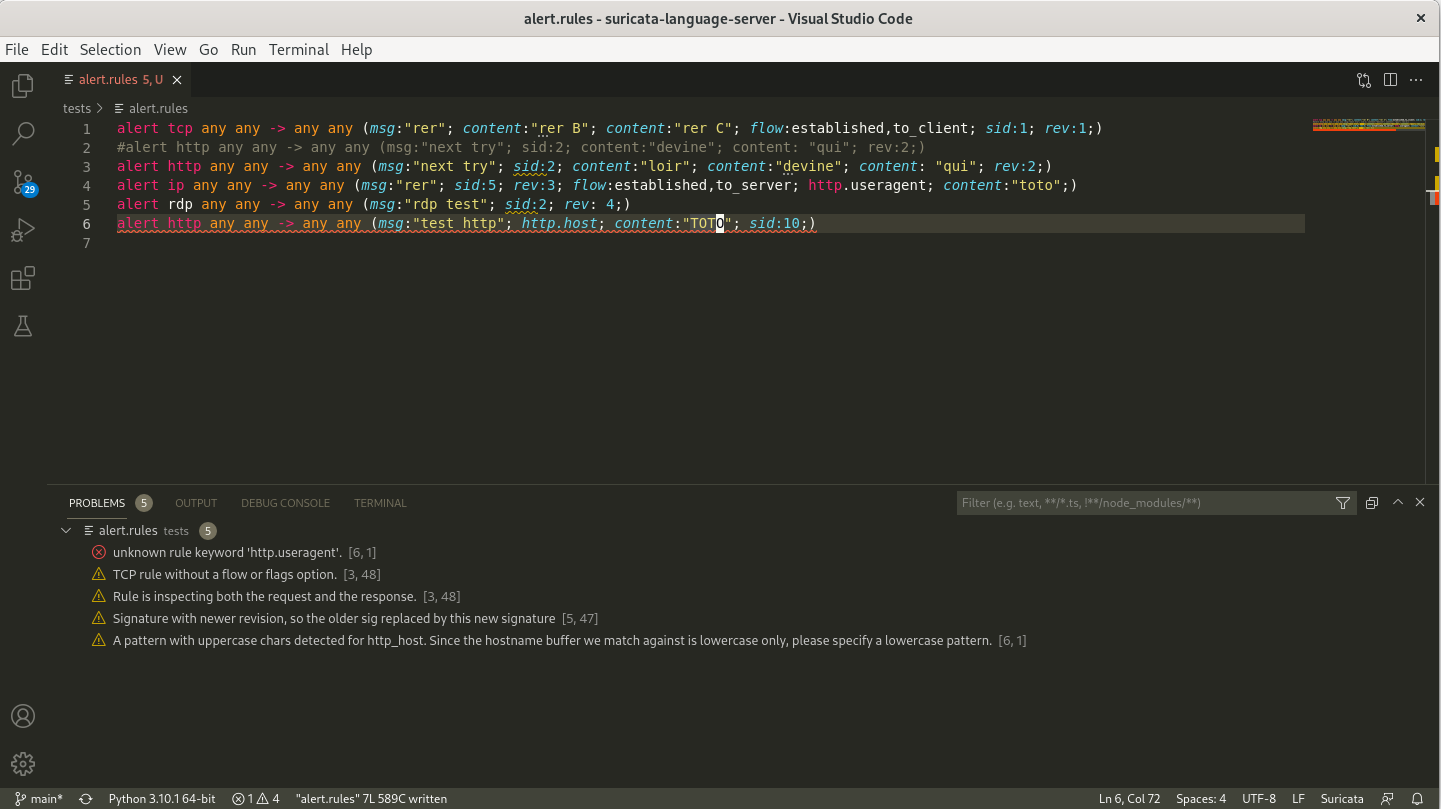
https://raw.githubusercontent.com/StamusNetworks/suricata-language-server/main/images/vscode-sample.png

Suricata Language Server requires Python and a Suricata binary.

The code is based on Chris Hansen's fortran language server and incorporate code from Stamus Networks' scirius.

Installation

You can use pip to install the Suricata language server

pip install suricata-language-server

Run this command with sudo if you want to install it globally.

Manual Installation

After cloning the repository, you need to install first the server by running in the root directory of the project

pip install .

This will add a suricata-language-server command to the system that will be invoked transparently by the editors that are configured to use it. You can use sudo pip install . to install it system wide if needed.

Server options

See suricata-language-server -h for complete and up-to-date help.

  • --suricata-binary: path to the suricata binary used for signatures testing
  • --max-lines: don't run suricata tests if file is bigger then this limit (auto-completion only)

Editors Configuration

Neovim

https://raw.githubusercontent.com/StamusNetworks/suricata-language-server/main/images/nvim-completion.png

One simple way tis to use nvim-lspconfig and add the following snippet to your configuration

local lspconfig = require 'lspconfig'
local configs = require 'lspconfig.configs'
-- Check if the config is already defined (useful when reloading this file)
if not configs.suricata_language_server then
  configs.suricata_language_server = {
    default_config = {
      cmd = {'suricata-language-server'};
      filetypes = {'suricata', 'hog'};
      root_dir = function(fname)
        return lspconfig.util.find_git_ancestor(fname)
      end;
      single_file_support = true;
      settings = {};
    };
  }
end

If you want to setup a custom suricata binary, you can use the following trick:

local suricata_ls_cmd = {'suricata-language-server', '--suricata-binary=/my/own/suricata'}
require'lspconfig'.suricata_language_server.setup{
  cmd = suricata_ls_cmd,
  on_attach = on_attach,
}

Visual Studio code

Download the Suricata IntelliSense extension (suricata-ls-x.x.x.vsix) published by Stamus Networks from the marketplace and install it into your Visual Studio Code instance.

Then you can configure it via the settings. Main settings are the path to the Suricata Language Server binary and the path to the Suricata binary.

Sublime Text 3

You can use the LSP Package to provide support for LSP to Sublime Text 3.

To acticate Suricata Language Server on .rules file, you need to create a new syntax for Suricata file by using the content of Suricata Sublime syntax from justjamesnow

To do so you can click on Tools > Developer > New Syntax then paste the content of the file and modify the text text.suricata to source.suricata. This will provide syntax highlighting as well as a source.suricata Sublime selector that can be used to trigger the Suricata Language Server activation.

To do that, you can setup the Suricata Language Server by following the documentation for the LSP package on client configuration. You will need to open Preferences > Package Settings > LSP > Settings and edit the configuration to add the Suricata Language Server.

The following configuration is known to work

{
  "clients": {
    "suricatals": {
      "enabled": true,
      "command": ["/path/to/suricata-language-server", "--suricata-binary=/path/to/suricata"],
      "selector": "source.suricata",
    },
  },
}
You might also like...
Local server for IDA Lumina feature

About POC of an offline server for IDA Lumina feature.

SonicWALL SSL-VPN Web Server Vulnerable Exploit

SonicWALL SSL-VPN Web Server Vulnerable Exploit

CVE-2021-26855 SSRF Exchange Server

CVE-2021-26855 Brute Force EMail Exchange Server Timeline: Monday, March 8, 2021: Update Dumping content...(I'm not done, can u guy help me done this

Microsoft Exchange Server SSRF漏洞(CVE-2021-26855)

Microsoft_Exchange_Server_SSRF_CVE-2021-26855 zoomeye dork:app:"Microsoft Exchange Server" 使用Seebug工具箱及pocsuite3编写的脚本Microsoft_Exchange_Server_SSRF_CV

:closed_lock_with_key: multi factor authentication system (2FA, MFA, OTP Server)

privacyIDEA privacyIDEA is an open solution for strong two-factor authentication like OTP tokens, SMS, smartphones or SSH keys. Using privacyIDEA you

Transparent proxy server that works as a poor man's VPN. Forwards over ssh. Doesn't require admin. Works with Linux and MacOS. Supports DNS tunneling.

sshuttle: where transparent proxy meets VPN meets ssh As far as I know, sshuttle is the only program that solves the following common case: Your clien

ProxyLogon(CVE-2021-26855+CVE-2021-27065) Exchange Server RCE(SSRF->GetWebShell)
ProxyLogon(CVE-2021-26855+CVE-2021-27065) Exchange Server RCE(SSRF-GetWebShell)

ProxyLogon For Python3 ProxyLogon(CVE-2021-26855+CVE-2021-27065) Exchange Server RCE(SSRF-GetWebShell) usage: python ProxyLogon.py --host=exchang

ProxyShell POC Exploit : Exchange Server RCE (ACL Bypass + EoP + Arbitrary File Write)

ProxyShell Install git clone https://github.com/ktecv2000/ProxyShell cd ProxyShell virtualenv -p $(which python3) venv source venv/bin/activate pip3 i

Small python script to look for common vulnerabilities on SMTP server.

BrokenSMTP BrokenSMTP is a python3 BugBounty/Pentesting tool to look for common vulnerabilities on SMTP server. Supported Vulnerability : Spoofing - T

Comments
  • Windows 10, VSCode, not enough values to unpack error in latest release with UNC path

    Windows 10, VSCode, not enough values to unpack error in latest release with UNC path

    Hi Eric,

    Works great in Linux, however running into this error in Windows 10, VSCode below when using a UNC path (ie \server\share\rule.rules). From what I can tell, I think it's an issue with jsonrpc specifically (I can put in an issue over there if that makes sense to you).

    I will put a PR in shortly to note this in the README.

    Basically, any UNC paths get treated as file:///server/share/rule.rules.

    The workaround is to use a mapped drive letter reference to open the file (or folder with rules in it). X:\Rules\rule.rules, instead of the UNC path. This works as expected.

    Screenshot: image

    Traceback: Traceback (most recent call last): File "C:\Python310\lib\site-packages\suricatals\langserver.py", line 99, in handle handler(request) File "C:\Python310\lib\site-packages\suricatals\langserver.py", line 322, in serve_onSave filepath = path_from_uri(uri) File "C:\Python310\lib\site-packages\suricatals\jsonrpc.py", line 24, in path_from_uri _, path = uri.split("file:///", 1) ValueError: not enough values to unpack (expected 2, got 1)

    bug 
    opened by JSkier21 3
Releases(v0.5.1)
  • v0.5.1(Jan 15, 2022)

    This release mostly adds support for UNC path under Microsoft Windows and fix a problem with Suricata version inferior to 6.0.4 (invalid JSON created) that was breaking Suricata Language Server 0.4.0.

    Source code(tar.gz)
    Source code(zip)
  • v0.2.0(Jan 5, 2022)

    This release mostly adds support for multi lines signatures and a build system via GitHub actions. The Visual Studio Code Extension is now in its own repository.

    Source code(tar.gz)
    Source code(zip)
Owner
Stamus Networks
Stamus Networks
'Our Drowsinessdetector detects drivers eyes if they are closed for more than 2 seconds and alerts driver'

Data analysis Document here the project: DriverDrowsinessDetector Description: Project Description Data Source: Type of analysis: Please document the

3 Jul 03, 2022
Security offerings for AWS Control Tower

Caylent Security Catalyst Reference Architecture Examples This repository contains solutions for Caylent's Security Catalyst. The Security Catalyst is

Steven Connolly 1 Oct 22, 2021
A brute force tool for password-protected zip file

Bzip A brute force tool for password-protected zip file/folder(s). Note that this tool can only crack .zip files. Please DO not misuse. Installation g

3 Nov 13, 2021
Example for the NFT 3D Collectibles using Blender Scripting (Python).

NFT Collectibles using Blender Python What is this? This project is to demonstrate for generating NFT Collectible Avatar-Styled images. For details, p

hideckies 48 Nov 26, 2022
Polkit - Local Privilege Escalation (CVE-2021-3560)

CVE-2021-3560 Polkit - Local Privilege Escalation Original discovery by kevin_backhouse from GitHub Security Lab References https://github.blog/2021-0

Salman Asad 1 Nov 12, 2021
Providing DevOps and security teams script to identify cloud workloads that may be vulnerable to the Log4j vulnerability(CVE-2021-44228) in their AWS account.

We are providing DevOps and security teams script to identify cloud workloads that may be vulnerable to the Log4j vulnerability(CVE-2021-44228) in their AWS account. The script enables security teams

Mitiga 13 Jan 04, 2022
An All-In-One Pure Python PoC for CVE-2021-44228

Python Log4RCE An all-in-one pure Python3 PoC for CVE-2021-44228. Configure Replace the global variables at the top of the script to your configuratio

Alexandre Lavoie 178 Nov 09, 2022
Apache OFBiz rmi反序列化EXP(CVE-2021-26295)

Apache OFBiz rmi反序列化EXP(CVE-2021-26295) 目前仅支持nc弹shell 将ysoserial.jar放置在同目录下,py3运行,根据提示输入漏洞url,你的vps地址和端口 第二次使用建议删除exp.ot 本工具仅用于安全测试,禁止未授权非法攻击站点,否则后果自负

15 Nov 09, 2022
SSL / TLS Checking Tool written in Python3

ssts-chk SSL / TLS Checking Tool written in Python3. This tool will perform the following functions: Connect the target given Analyze the secure conne

Douglas Berdeaux 2 Feb 12, 2022
I hacked my own webcam from a Kali Linux VM in my local network, using Ettercap to do the MiTM ARP poisoning attack, sniffing with Wireshark, and using metasploit

plan I - Linux Fundamentals Les utilisateurs et les droits Installer des programmes avec apt-get Surveiller l'activité du système Exécuter des program

148 Dec 22, 2022
Add a Web Server based on Rogue Mysql Server to allow remote user get

介绍 对于需要使用 Rogue Mysql Server 的漏洞来说,若想批量检测这种漏洞的话需要自备一个服务器。并且我常用的Rogue Mysql Server 脚本 不支持动态更改读取文件名、不支持远程用户访问读取结果、不支持批量化检测网站。于是乎萌生了这个小脚本的想法 Rogue-MySql-

6 May 17, 2022
NS-LOOKUP - A python script for scanning website for getting ip address of a website

NS-LOOKUP A python script for scanning website for getting ip address of a websi

Spider Anongreyhat 5 Aug 02, 2022
A tool to find good RCE From my series: A powerful Burp extension to make bounties rain

A tool to find good RCE From my series: A powerful Burp extension to make bounties rain

52 Dec 16, 2022
Obfuscate your Python scripts better, faster.

⚜️ Berserker ⚜️ An unique Python3 obfuscator using Kyrie Eleison's encryption protocol, written in Python3. 📋 Examples 📋 Unobfuscated: input("Hello

Billy 81 Dec 07, 2022
Yara Based Detection Engine for web browsers

Yobi Yara Based Detection for web browsers System Requirements Yobi requires python3 and and right now supports only firefox and other Gecko-based bro

imp0rtp3 44 Nov 20, 2022
test application for the licence key web app.

licence_software_test_app Make sure you set your database values in a .env file to the folder. Install MYSQL connector: pip install mysql-connector-py

Carl Beattie 1 Oct 28, 2021
Cracker - Tools CRACK FACEBOOK DAN INSTAGRAM DENGAN FITUR BANYAK

CLOME TO TOOLS ME 😁 FITUR TOOLS RESULTS INSTALASI ____/-- INSTALLASI /+/+/+/ t

Jeeck X Nano 3 Jan 08, 2022
PyPasser is a Python library for bypassing reCaptchaV3 only by sending 2 requests.

PyPasser is a Python library for bypassing reCaptchaV3 only by sending 2 requests. In 1st request, gets token of captcha and in 2nd request,

253 Jan 05, 2023
A tool that detects the expensive Carbon Black watchlists.

A tool that detects the "expensive" Carbon Black watchlists.

Oğuzcan Pamuk 8 Aug 04, 2022
Utility for Extracting all passwords from ConnectWise Automate

CWA Password Extractor Utility for Extracting all passwords from ConnectWise Automate (E.g. while migrating to a new system). Outputs a csv file with

Matthew Kyles 1 Dec 09, 2021