This is RFA-Toolbox, a simple and easy-to-use library that allows you to optimize your neural network architectures using receptive field analysis (RFA) and create graph visualizations of your architecture.

Overview

ReceptiveFieldAnalysisToolbox


CI Status Documentation Status

Poetry black pre-commit

PyPI Version Supported Python versions License

This is RFA-Toolbox, a simple and easy-to-use library that allows you to optimize your neural network architectures using receptive field analysis (RFA) and create graph visualizations of your architecture.

Installation

Install this via pip:

pip install rfa_toolbox

What is Receptive Field Analysis?

Receptive Field Analysis (RFA) is a simple yet effective way to optimize the efficiency of any neural architecture without training it.

Usage

This library allows you to look for certain inefficiencies withing your convolutional neural network setup without ever training the model. You can do this simply by importing your architecture into the format of RFA-Toolbox and then use the in-build functions to visualize your architecture using GraphViz. The visualization will automatically mark layers predicted to be unproductive red and critical layers, that are potentially unproductive orange. In edge case scenarios, where the receptive field expands of the boundaries of the image on some but not all tensor-axis, the layer will be marked yellow, since such a layer is probably not operating and maximum efficiency. Being able to detect these types of inefficiencies is especially useful if you plan to train your model on resolutions that are substantially lower than the design-resolution of most models. As an alternative, you can also use the graph from RFA-Toolbox to hook RFA-toolbox more directly into your program.

Examples

There are multiple ways to import your model into RFA-Toolbox for analysis, with additional ways being added in future releases.

PyTorch

The simplest way of importing a model is by directly extracting the compute-graph from the PyTorch-implementation of your model. Here is a simple example:

import torchvision
from rfa_toolbox import create_graph_from_pytorch_model, visualize_architecture
model = torchvision.models.alexnet()
graph = create_graph_from_pytorch_model(model)
visualize_architecture(
    graph, f"alexnet_32_pixel", input_res=32
).view()

This will create a graph of your model and visualize it using GraphViz and color all layers that are predicted to be unproductive for an input resolution of 32x32 pixels: rf_stides.PNG

Keep in mind that the Graph is reverse-engineerd from the PyTorch JIT-compiler, therefore no looping-logic is allowed within the forward pass of the model.

Custom

If you are not able to automatically import your model from PyTorch or you just want some visualization, you can also directly implement the model with the propriatary-Graph-format of RFA-Toolbox. This is similar to coding a compute-graph in a declarative style like in TensorFlow 1.x.

from rfa_toolbox import visualize_architecture
from rfa_toolbox.graphs import EnrichedNetworkNode, LayerDefinition


conv1 = EnrichedNetworkNode(
    name="Conv1",
    layer_info=LayerDefinition(
        name="Conv3x3",
        kernel_size=3, stride_size=1,
        filters=64
    ),
    predecessors=[]
)
conv2 = EnrichedNetworkNode(
    name="Conv2",
    layer_info=LayerDefinition(
        name="Conv3x3",
        kernel_size=3, stride_size=1,
        filters=128
    ),
    predecessors=[conv1]
)

conv3 = EnrichedNetworkNode(
    name="Conv3",
    layer_info=LayerDefinition(
        name="Conv3x3",
        kernel_size=3, stride_size=1,
        filters=256
    ),
    predecessors=[conv1]
)

conv4 = EnrichedNetworkNode(
    name="Conv4",
    layer_info=LayerDefinition(
        name="Conv3x3",
        kernel_size=3, stride_size=1,
        filters=256
    ),
    predecessors=[conv2, conv3]
)

out = EnrichedNetworkNode(
    name="Softmax",
    layer_info=LayerDefinition(
        name="Fully Connected",
        units=1000
    ),
    predecessors=[conv4]
)
visualize_architecture(
    out, f"example_model", input_res=32
).view()

This will produce the following graph:
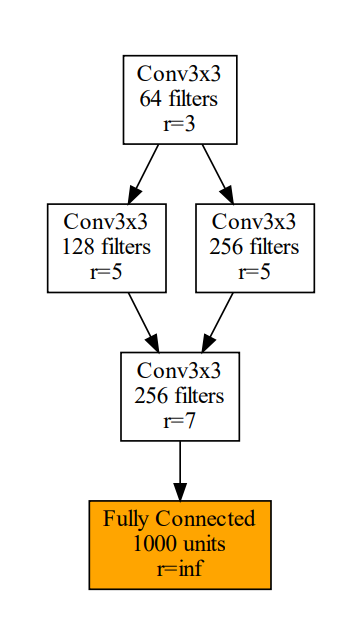
simple_conv.png

A quick primer on the Receptive Field

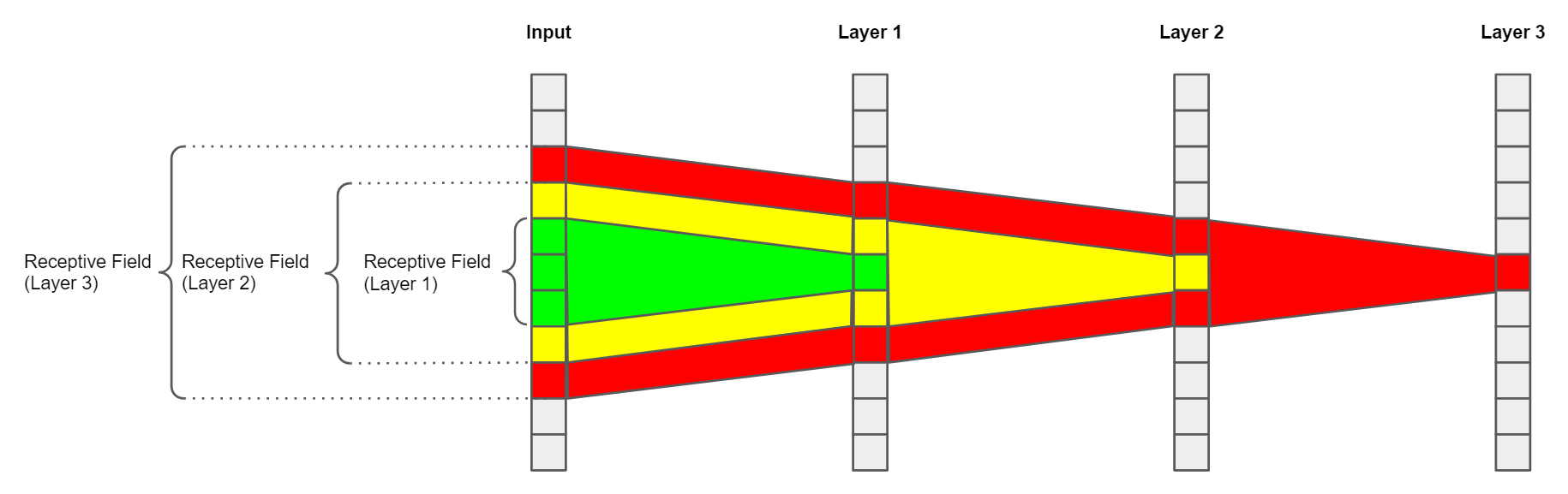
To understand how RFA works, we first need to understand what a receptive field is, and it's effect on what the network is learning to detect. Every layer in a (convolutional) neural network has a receptive field. It can be considered the "field of view" of this layer. In more precise terms, we define a receptive field as the area influencing the output of a single position of the convolutional kernel. Here is a simple, 1-dimensional example: rf.PNG The first layer of this simple architecture can only ever "see" the information the input pixels directly under it's kernel, in this scenario 3 pixels. Another observation we can make from this example is that the receptive field size is expanding from layer to layer. This is happening, because the consecutive layers also have kernel sizes greater than 1 pixel, which means that they combine multiple adjacent positions on the feature map into a single position in their output. In other words, every consecutive layer adds additional context to each feature map position by expanding the receptive field. This ultimately allows networks to go from detecting small and simple patterns to big and very complicated ones.
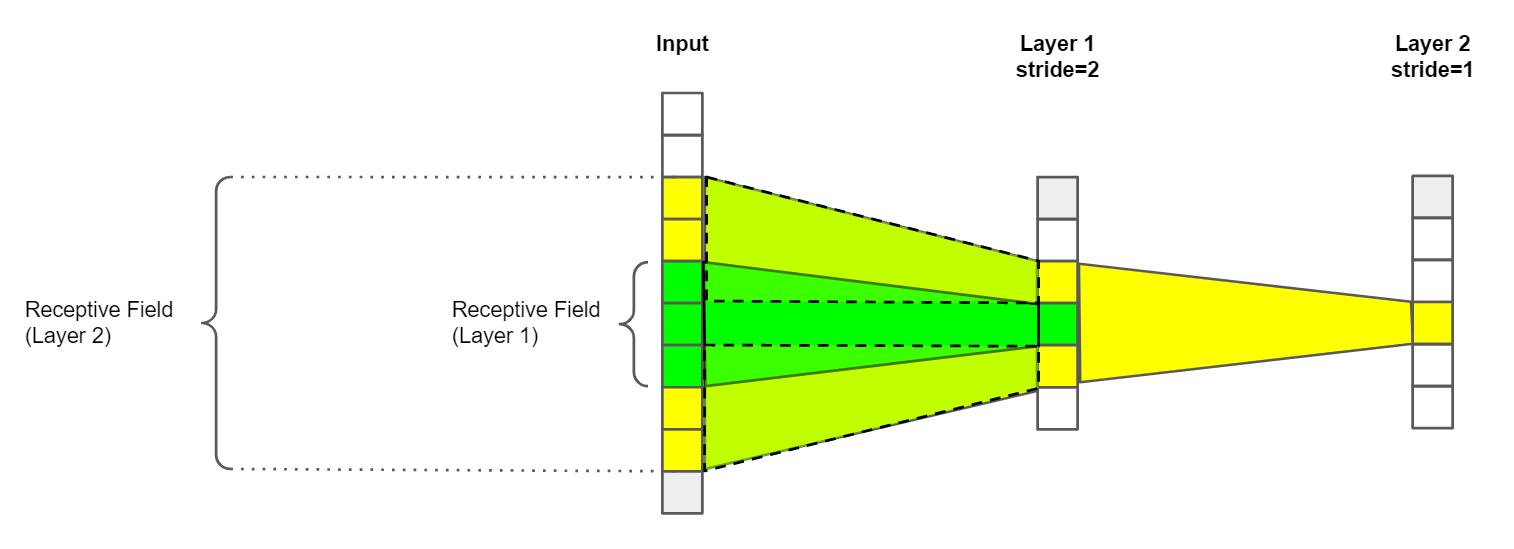
The effective size of the kernel is not the only factor influence the growth of the receptive field size. Another important factor is the stride size: rf_stides.PNG The stride size is the size of the step between the individual kernel positions. Commonly, every possible position is evaluated, which is not affecting the receptive field size in any way. When the stride size is greater than one however valid positions of the kernel are skipped, which reduces the size of the feature map. Since now information on the feature map is now condensed on fewer feature map positions, the growth of the receptive field is multiplied for future layers. In real-world architectures, this is typically the case when downsampling layers like convolutions with a stride size of 2 are used.
Why does the Receptive Field Matter?

At this point you may be wondering why the receptive field of all things is useful for optimizing an architecture. The short answer to this is: because it influences where the network can process patterns of a certain size. Simply speaking each convolutional layer is only able to detect patterns of a certain size because of its receptive field. Interestingly this also means that there is an upper limit to the usefulness of expanding the receptive field. At the latest, this is the case when the receptive field of a layer is BIGGER than the input image, since no novel context can be added at this point. For convolutional layers this is a problem, because layers past this "Border Layer" now lack the primary mechenism convolutional layers use to improve the intermediate representation of the data, making these layers unproductive. If you are interested in the details of this phenomenon I recommend that you read these:

Optimizing Architectures using Receptive Field Analysis

So far, we learned that the expansion of the receptive field is the primary mechanism for improving the intermediate solution utilized by convolutional layers. At the point where this is no longer possible, layers are not able to contribute to the quality of the output of the model and become unproductive. We refer to these layers as unproductive layers. Layers who advance the receptive field sizes beyond the input resolution are referred to as critical layers. Critical layers are not necessarily unproductive, since they are still able to incorporate some novel context into the data, depending on how large the receptive field size of the input is.

Of course, being able to predict why and which layer will become dead weight during training is highly useful, since we can now adjust the design of the architecture to fit our input resolution better without spending time on training models. Depending on the requirements, we may choose to emphasize efficiency by primarily removing unproductive layers. Another option is to focus on predictive performance by making the unproductive layers productive again.

We now illustrate how you may choose to optimize an architecture on a simple example:

Let's take the ResNet architecture, which is a very popular CNN-model. We want to train ResNet18 on ResizedImageNet16, which has a 16 pixel input resolution. When we apply Receptive Field Analysis, we can see that most convolutional layers will in fact not contribute to the inference process (unproductive layers marked red, probable unproductive layers marked orange):

resnet18.PNG

We can clearly see that most of the network's layers will not contribute anything useful to the quality of the output, since their receptive field sizes are too large.

From here on we have multiple ways of optimizing the setup. Of course, we can simply increase the resolution, to involve more layers in the inference process, but that is usually very expensive from a computational point of view. In the first scenario, we are not interested in increasing the predictive performance of the model, we simply want to save computational resources. We reduce the kernel size of the first layer to 3x3 from 7x7. This change allows the first three building blocks to contribute more to the quality of the prediction, since no layer is predicted to be unproductive. We then simply replace the remaining building blocks with a simple output head. This new architecture then looks like this:
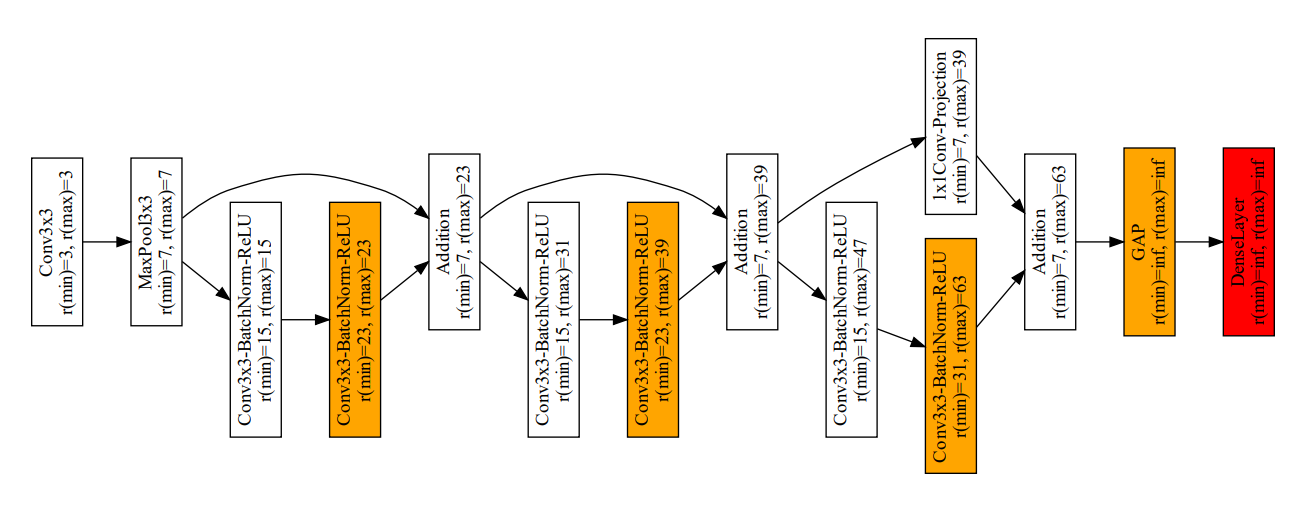
resnet18eff.PNG

Note that all previously unproductive layers are now either removed or only marked as "critical", which is generally not a big problem, since the receptive field size is "reset" by the receptive field size after each building block. Also note that fully connected layers are always marked as critical or unproductive, since they technically have an infinite receptive field size.

The resulting architecture achieves slightly better predictive performance as the original architecture, but with substantially lower computational cost. In this case we save approx. 80% of the computational cost and improve the predictive performance slightly from 17% to 18%.

In another scenario we may not be satisfied with the predictive performance. In other words, we want to make use of the underutilized parameters of the network by turning all unproductive layers into productive layers. We achieve this by changing their receptive field sizes. The biggest lever when it comes to changing the receptive field size is always the quantity of downsampling layers. Downsampling layers have a multiplicative effect on the growth of the receptive field for all consecutive layers. We can exploit this by simply removing the MaxPooling layer, which is the second layer of the original architecture. We also reduce the kernel size of the first layer to 3x3 from 7x7, and it's stride size to 1. This drastically reduces the receptive field sizes of the entire architecture, making most layers productive again. We address the remaining unproductive layers to by removing the final downsampling layer and distributing the building blocks as evenly as possible among the three stages between the remaining downsampling layers.

The resulting architecture now looks like this:

resnet18perf.PNG

The architecture now no longer has unproductive layers in their building blocks and only 2 critical layers. This improved architecture also achieves 34% Top1-Accuracy in ResizedImageNet16 instead of the 17% of the original architecture. However, this improvement comes at a price, since the removed downsampling layers have a negative impact on the computations required to process an image, which increases by roughly a factor of 8.

In any way, RFAToolbox allows you to optimize your convolutional neural network architectures for efficiency, performance or a sweetspot between the two without the need for long-running trial-and-error sessions.

Credits

This package was created with Cookiecutter and the browniebroke/cookiecutter-pypackage project template.

Comments
  • required keyword attribute 'name' is undefined

    required keyword attribute 'name' is undefined

    This layer uses a custom function in forward and yields

        graph = create_graph_from_pytorch_model(m, input_res=in_shape)
    
      File "D:\Anaconda\envs\pyt\lib\site-packages\rfa_toolbox\encodings\pytorch\ingest_architecture.py", line 291, in create_graph_from_model
        return make_graph(tm, ref_mod=model).to_graph()
    
      File "D:\Anaconda\envs\pyt\lib\site-packages\rfa_toolbox\encodings\pytorch\ingest_architecture.py", line 172, in make_graph
        make_graph(
    
      File "D:\Anaconda\envs\pyt\lib\site-packages\rfa_toolbox\encodings\pytorch\ingest_architecture.py", line 172, in make_graph
        make_graph(
    
      File "D:\Anaconda\envs\pyt\lib\site-packages\rfa_toolbox\encodings\pytorch\ingest_architecture.py", line 172, in make_graph
        make_graph(
    
      File "D:\Anaconda\envs\pyt\lib\site-packages\rfa_toolbox\encodings\pytorch\ingest_architecture.py", line 132, in make_graph
        submodule_name = find_name(list(n.inputs())[0], self_input)
    
      File "D:\Anaconda\envs\pyt\lib\site-packages\rfa_toolbox\encodings\pytorch\ingest_architecture.py", line 34, in find_name
        cur = i.node().s("name")
    
    RuntimeError: required keyword attribute 'name' is undefined
    

    Perhaps default to a generic name if it can't be extracted

    bug 
    opened by OverLordGoldDragon 11
  • Is GraphViz an essential program of rfa_toolbox?

    Is GraphViz an essential program of rfa_toolbox?

    Describe the bug I met this error as,

    Traceback (most recent call last): ... File "...\lib\site-packages\graphviz_tools.py", line 172, in wrapper return func(*args, **kwargs) File "...\lib\site-packages\graphviz\backend[rendering.py](http://rendering.py)", line 317, in render execute.run_check(cmd, File "...\lib\site-packages\graphviz\backend[execute.py](http://execute.py)", line 88, in run_check raise ExecutableNotFound(cmd) from e graphviz.backend.execute.ExecutableNotFound: failed to execute WindowsPath('dot'), make sure the Graphviz executables are on your systems' PATH

    To Reproduce Steps to reproduce the behavior:

    Additional context I am wondering whether GraphViz is an essential program of rfa_toolbox.

    Your answer and guide will be appreciated!

    bug 
    opened by songyuc 5
  • Support for loading tensorflow model

    Support for loading tensorflow model

    Hi Team,

    Great work, It would be great if its possible to load tensorflow models as well. Hoping to see the feature soon.

    Thanks and Regards, Ramson Jehu K

    enhancement 
    opened by Ramsonjehu 4
  • Sizes of tensors must match except in dimension 1. Expected size 26 but got size 25 for tensor number 1 in the list.

    Sizes of tensors must match except in dimension 1. Expected size 26 but got size 25 for tensor number 1 in the list.

    When loading a model from torch.hub I am getting the following error: Sizes of tensors must match except in dimension 1. Expected size 26 but got size 25 for tensor number 1 in the list

    Minimal working example:

    import torch
    from rfa_toolbox import create_graph_from_pytorch_model, visualize_architecture
    
    model = torch.hub.load('ultralytics/yolov5', 'yolov5s')
    graph = create_graph_from_pytorch_model(model)
    

    Please see for more info: issues/6455

    bug 
    opened by Michelvl92 3
  • `width != height` support [FR]

    `width != height` support [FR]

    Thanks for your work.

    It'd be helpful for r to take on input's dimensionality - i.e. measure receptive field of height and width separately, in case strides and kernel sizes aren't equal throughout the network. The current workaround is to move the dimension of interest to be the first - so if (width, height) = (100, 200), we do (200, 100) and swap all network parameters.

    enhancement 
    opened by OverLordGoldDragon 3
  • Update pre-commit hook asottile/pyupgrade to v2.38.0

    Update pre-commit hook asottile/pyupgrade to v2.38.0

    Mend Renovate

    This PR contains the following updates:

    | Package | Type | Update | Change | |---|---|---|---| | asottile/pyupgrade | repository | minor | v2.31.1 -> v2.38.0 |

    Note: The pre-commit manager in Renovate is not supported by the pre-commit maintainers or community. Please do not report any problems there, instead create a Discussion in the Renovate repository if you have any questions.


    Release Notes

    asottile/pyupgrade

    v2.38.0

    Compare Source

    v2.37.3

    Compare Source

    v2.37.2

    Compare Source

    v2.37.1

    Compare Source

    v2.37.0

    Compare Source

    v2.36.0

    Compare Source

    v2.35.0

    Compare Source

    v2.34.0

    Compare Source

    v2.33.0

    Compare Source

    v2.32.1

    Compare Source

    v2.32.0

    Compare Source


    Configuration

    📅 Schedule: Branch creation - At any time (no schedule defined), Automerge - At any time (no schedule defined).

    🚦 Automerge: Enabled.

    â™» Rebasing: Whenever PR becomes conflicted, or you tick the rebase/retry checkbox.

    🔕 Ignore: Close this PR and you won't be reminded about this update again.


    • [ ] If you want to rebase/retry this PR, click this checkbox.

    This PR has been generated by Mend Renovate. View repository job log here.

    dependencies 
    opened by renovate[bot] 2
  • Pooling Layer of PyTorch functional result in wrong graph

    Pooling Layer of PyTorch functional result in wrong graph

    Describe the bug

    The issue arises in complex architectures like InceptionV3, when functional pooling layers are used in a module that has multiple layer processed in parallel. In this case, the graph representation is incorrect.

    To Reproduce Steps to reproduce the behavior:

    import torchvision
    from rfa_toolbox import create_graph_from_pytorch_model, toggle_coerce_torch_functional
    
    # disable the raise condition and treat all functional layers as convolutional layers with kernel_size=3 and stride_size=2
    toggle_coerce_torch_functional(True, kernel_size=3, stride_size=2)
    model = torchvision.models.inceptionv3()
    graph = create_graph_from_pytorch_model(model)
    visualize_architecture(graph, "inceptionv3", input_res=32).view()
    

    Additional context To avoid people making false assumption due to this bug, this is currently classified as a raise-Condition and will crash the graph-creation if not actively disabled, like in the example code.

    This bug can be avoided easily by not using pooling-layers from torch.functional and instead use the object-equivalents in torch.nn

    bug 
    opened by MLRichter 2
  • Update relekang/python-semantic-release action to v7.32.0

    Update relekang/python-semantic-release action to v7.32.0

    Mend Renovate

    This PR contains the following updates:

    | Package | Type | Update | Change | |---|---|---|---| | relekang/python-semantic-release | action | minor | v7.31.4 -> v7.32.0 |


    Release Notes

    relekang/python-semantic-release

    v7.32.0

    Compare Source

    Feature
    Documentation

    Configuration

    📅 Schedule: Branch creation - At any time (no schedule defined), Automerge - At any time (no schedule defined).

    🚦 Automerge: Enabled.

    â™» Rebasing: Whenever PR becomes conflicted, or you tick the rebase/retry checkbox.

    🔕 Ignore: Close this PR and you won't be reminded about this update again.


    • [ ] If you want to rebase/retry this PR, click this checkbox.

    This PR has been generated by Mend Renovate. View repository job log here.

    dependencies 
    opened by renovate[bot] 1
  • Update pre-commit hook commitizen-tools/commitizen to v2.35.0

    Update pre-commit hook commitizen-tools/commitizen to v2.35.0

    Mend Renovate

    This PR contains the following updates:

    | Package | Type | Update | Change | |---|---|---|---| | commitizen-tools/commitizen | repository | minor | v2.34.0 -> v2.35.0 |

    Note: The pre-commit manager in Renovate is not supported by the pre-commit maintainers or community. Please do not report any problems there, instead create a Discussion in the Renovate repository if you have any questions.


    Release Notes

    commitizen-tools/commitizen

    v2.35.0

    Compare Source

    Feat
    • allow fixup! and squash! in commit messages

    Configuration

    📅 Schedule: Branch creation - At any time (no schedule defined), Automerge - At any time (no schedule defined).

    🚦 Automerge: Enabled.

    â™» Rebasing: Whenever PR becomes conflicted, or you tick the rebase/retry checkbox.

    🔕 Ignore: Close this PR and you won't be reminded about this update again.


    • [ ] If you want to rebase/retry this PR, click this checkbox.

    This PR has been generated by Mend Renovate. View repository job log here.

    dependencies 
    opened by renovate[bot] 1
  • Update pre-commit/action action to v3

    Update pre-commit/action action to v3

    Mend Renovate

    This PR contains the following updates:

    | Package | Type | Update | Change | |---|---|---|---| | pre-commit/action | action | major | v2.0.3 -> v3.0.0 |


    Release Notes

    pre-commit/action

    v3.0.0

    Compare Source

    Breaking

    see README for alternatives


    Configuration

    📅 Schedule: Branch creation - At any time (no schedule defined), Automerge - At any time (no schedule defined).

    🚦 Automerge: Disabled by config. Please merge this manually once you are satisfied.

    â™» Rebasing: Whenever PR becomes conflicted, or you tick the rebase/retry checkbox.

    🔕 Ignore: Close this PR and you won't be reminded about this update again.


    • [ ] If you want to rebase/retry this PR, click this checkbox.

    This PR has been generated by Mend Renovate. View repository job log here.

    dependencies 
    opened by renovate[bot] 1
  • Update pre-commit hook PyCQA/flake8 to v5 - autoclosed

    Update pre-commit hook PyCQA/flake8 to v5 - autoclosed

    Mend Renovate

    This PR contains the following updates:

    | Package | Type | Update | Change | |---|---|---|---| | PyCQA/flake8 | repository | major | 4.0.1 -> 5.0.4 |

    Note: The pre-commit manager in Renovate is not supported by the pre-commit maintainers or community. Please do not report any problems there, instead create a Discussion in the Renovate repository if you have any questions.


    Release Notes

    PyCQA/flake8

    v5.0.4

    Compare Source

    v5.0.3

    Compare Source

    v5.0.2

    Compare Source

    v5.0.1

    Compare Source

    v5.0.0

    Compare Source


    Configuration

    📅 Schedule: Branch creation - At any time (no schedule defined), Automerge - At any time (no schedule defined).

    🚦 Automerge: Disabled by config. Please merge this manually once you are satisfied.

    â™» Rebasing: Whenever PR becomes conflicted, or you tick the rebase/retry checkbox.

    🔕 Ignore: Close this PR and you won't be reminded about this update again.


    • [ ] If you want to rebase/retry this PR, check this box

    This PR has been generated by Mend Renovate. View repository job log here.

    dependencies 
    opened by renovate[bot] 1
  • Update pre-commit hook PyCQA/flake8 to v6

    Update pre-commit hook PyCQA/flake8 to v6

    Mend Renovate

    This PR contains the following updates:

    | Package | Type | Update | Change | |---|---|---|---| | PyCQA/flake8 | repository | major | 4.0.1 -> 6.0.0 |

    Note: The pre-commit manager in Renovate is not supported by the pre-commit maintainers or community. Please do not report any problems there, instead create a Discussion in the Renovate repository if you have any questions.


    Release Notes

    PyCQA/flake8

    v6.0.0

    Compare Source

    v5.0.4

    Compare Source

    v5.0.3

    Compare Source

    v5.0.2

    Compare Source

    v5.0.1

    Compare Source

    v5.0.0

    Compare Source


    Configuration

    📅 Schedule: Branch creation - At any time (no schedule defined), Automerge - At any time (no schedule defined).

    🚦 Automerge: Disabled by config. Please merge this manually once you are satisfied.

    â™» Rebasing: Whenever PR becomes conflicted, or you tick the rebase/retry checkbox.

    🔕 Ignore: Close this PR and you won't be reminded about this update again.


    • [ ] If you want to rebase/retry this PR, check this box

    This PR has been generated by Mend Renovate. View repository job log here.

    dependencies 
    opened by renovate[bot] 1
  • Update dependency flake8 to v6

    Update dependency flake8 to v6

    Mend Renovate

    This PR contains the following updates:

    | Package | Change | Age | Adoption | Passing | Confidence | |---|---|---|---|---|---| | flake8 (changelog) | ^5.0.0 -> ^6.0.0 | age | adoption | passing | confidence |


    Release Notes

    pycqa/flake8

    v6.0.0

    Compare Source


    Configuration

    📅 Schedule: Branch creation - At any time (no schedule defined), Automerge - At any time (no schedule defined).

    🚦 Automerge: Disabled by config. Please merge this manually once you are satisfied.

    â™» Rebasing: Whenever PR becomes conflicted, or you tick the rebase/retry checkbox.

    🔕 Ignore: Close this PR and you won't be reminded about this update again.


    • [ ] If you want to rebase/retry this PR, check this box

    This PR has been generated by Mend Renovate. View repository job log here.

    dependencies 
    opened by renovate[bot] 0
  • Update pre-commit hook pre-commit/pre-commit-hooks to v4.4.0

    Update pre-commit hook pre-commit/pre-commit-hooks to v4.4.0

    Mend Renovate

    This PR contains the following updates:

    | Package | Type | Update | Change | |---|---|---|---| | pre-commit/pre-commit-hooks | repository | minor | v4.3.0 -> v4.4.0 |

    Note: The pre-commit manager in Renovate is not supported by the pre-commit maintainers or community. Please do not report any problems there, instead create a Discussion in the Renovate repository if you have any questions.


    Release Notes

    pre-commit/pre-commit-hooks

    v4.4.0

    Compare Source


    Configuration

    📅 Schedule: Branch creation - At any time (no schedule defined), Automerge - At any time (no schedule defined).

    🚦 Automerge: Enabled.

    â™» Rebasing: Whenever PR becomes conflicted, or you tick the rebase/retry checkbox.

    🔕 Ignore: Close this PR and you won't be reminded about this update again.


    • [ ] If you want to rebase/retry this PR, check this box

    This PR has been generated by Mend Renovate. View repository job log here.

    dependencies 
    opened by renovate[bot] 0
  • Update pre-commit hook commitizen-tools/commitizen to v2.37.1

    Update pre-commit hook commitizen-tools/commitizen to v2.37.1

    Mend Renovate

    This PR contains the following updates:

    | Package | Type | Update | Change | |---|---|---|---| | commitizen-tools/commitizen | repository | minor | v2.35.0 -> v2.37.1 |

    Note: The pre-commit manager in Renovate is not supported by the pre-commit maintainers or community. Please do not report any problems there, instead create a Discussion in the Renovate repository if you have any questions.


    Release Notes

    commitizen-tools/commitizen

    v2.37.1

    Compare Source

    Fix
    • changelog: allow rev range lookups without a tag format

    v2.37.0

    Compare Source

    Feat
    • add major-version-zero option to support initial package development

    v2.36.0

    Compare Source

    Feat
    • scripts: remove venv/bin/
    • scripts: add error message to test
    Fix
    • scripts/test: MinGW64 workaround
    • scripts/test: use double-quotes
    • scripts: pydocstyle and cz
    • bump.py: use sys.stdin.isatty()
    • scripts: use cross-platform POSIX
    • scripts: use portable shebang
    • pythonpackage.yml: undo indent reformatting
    • pythonpackage.yml: use bash

    Configuration

    📅 Schedule: Branch creation - At any time (no schedule defined), Automerge - At any time (no schedule defined).

    🚦 Automerge: Enabled.

    â™» Rebasing: Whenever PR becomes conflicted, or you tick the rebase/retry checkbox.

    🔕 Ignore: Close this PR and you won't be reminded about this update again.


    • [ ] If you want to rebase/retry this PR, check this box

    This PR has been generated by Mend Renovate. View repository job log here.

    dependencies 
    opened by renovate[bot] 1
  • Update relekang/python-semantic-release action to v7.32.2

    Update relekang/python-semantic-release action to v7.32.2

    Mend Renovate

    This PR contains the following updates:

    | Package | Type | Update | Change | |---|---|---|---| | relekang/python-semantic-release | action | patch | v7.32.0 -> v7.32.2 |


    Release Notes

    relekang/python-semantic-release

    v7.32.2

    Compare Source

    Fix
    Documentation

    v7.32.1

    Compare Source

    Fix
    Documentation

    Configuration

    📅 Schedule: Branch creation - At any time (no schedule defined), Automerge - At any time (no schedule defined).

    🚦 Automerge: Enabled.

    â™» Rebasing: Whenever PR becomes conflicted, or you tick the rebase/retry checkbox.

    🔕 Ignore: Close this PR and you won't be reminded about this update again.


    • [ ] If you want to rebase/retry this PR, check this box

    This PR has been generated by Mend Renovate. View repository job log here.

    dependencies 
    opened by renovate[bot] 1
  • Update pre-commit hook asottile/pyupgrade to v3

    Update pre-commit hook asottile/pyupgrade to v3

    Mend Renovate

    This PR contains the following updates:

    | Package | Type | Update | Change | |---|---|---|---| | asottile/pyupgrade | repository | major | v2.31.1 -> v3.3.1 |

    Note: The pre-commit manager in Renovate is not supported by the pre-commit maintainers or community. Please do not report any problems there, instead create a Discussion in the Renovate repository if you have any questions.


    Release Notes

    asottile/pyupgrade

    v3.3.1

    Compare Source

    v3.3.0

    Compare Source

    v3.2.3

    Compare Source

    v3.2.2

    Compare Source

    v3.2.1

    Compare Source

    v3.2.0

    Compare Source

    v3.1.0

    Compare Source

    v3.0.0

    Compare Source

    v2.38.4

    Compare Source

    v2.38.3

    Compare Source

    v2.38.2

    Compare Source

    v2.38.1

    Compare Source

    v2.38.0

    Compare Source

    v2.37.3

    Compare Source

    v2.37.2

    Compare Source

    v2.37.1

    Compare Source

    v2.37.0

    Compare Source

    v2.36.0

    Compare Source

    v2.35.0

    Compare Source

    v2.34.0

    Compare Source

    v2.33.0

    Compare Source

    v2.32.1

    Compare Source

    v2.32.0

    Compare Source


    Configuration

    📅 Schedule: Branch creation - At any time (no schedule defined), Automerge - At any time (no schedule defined).

    🚦 Automerge: Disabled by config. Please merge this manually once you are satisfied.

    â™» Rebasing: Whenever PR becomes conflicted, or you tick the rebase/retry checkbox.

    🔕 Ignore: Close this PR and you won't be reminded about this update again.


    • [ ] If you want to rebase/retry this PR, check this box

    This PR has been generated by Mend Renovate. View repository job log here.

    dependencies 
    opened by renovate[bot] 1
Releases(v1.7.0)
Using Convolutional Neural Networks (CNN) for Semantic Segmentation of Breast Cancer Lesions (BRCA)

Using Convolutional Neural Networks (CNN) for Semantic Segmentation of Breast Cancer Lesions (BRCA). Master's thesis documents. Bibliography, experiments and reports.

Erick Cobos 73 Dec 04, 2022
BookMyShowPC - Movie Ticket Reservation App made with Tkinter

Book My Show PC What is this? Movie Ticket Reservation App made with Tkinter. Tk

The Nithin Balaji 3 Dec 09, 2022
A Genetic Programming platform for Python with TensorFlow for wicked-fast CPU and GPU support.

Karoo GP Karoo GP is an evolutionary algorithm, a genetic programming application suite written in Python which supports both symbolic regression and

Kai Staats 149 Jan 09, 2023
Generic template to bootstrap your PyTorch project with PyTorch Lightning, Hydra, W&B, and DVC.

NN Template Generic template to bootstrap your PyTorch project. Click on Use this Template and avoid writing boilerplate code for: PyTorch Lightning,

Luca Moschella 520 Dec 30, 2022
The fastest way to visualize GradCAM with your Keras models.

VizGradCAM VizGradCam is the fastest way to visualize GradCAM in Keras models. GradCAM helps with providing visual explainability of trained models an

58 Nov 19, 2022
Python scripts for performing lane detection using the LSTR model in ONNX

ONNX LSTR Lane Detection Python scripts for performing lane detection using the Lane Shape Prediction with Transformers (LSTR) model in ONNX. Requirem

Ibai Gorordo 29 Aug 30, 2022
City Surfaces: City-scale Semantic Segmentation of Sidewalk Surfaces

City Surfaces: City-scale Semantic Segmentation of Sidewalk Surfaces Paper Temporary GitHub page for City Surfaces paper. More soon! While designing s

14 Nov 10, 2022
A PyTorch Extension: Tools for easy mixed precision and distributed training in Pytorch

Introduction This is a Python package available on PyPI for NVIDIA-maintained utilities to streamline mixed precision and distributed training in Pyto

Artit 'Art' Wangperawong 5 Sep 29, 2021
Distributed Asynchronous Hyperparameter Optimization better than HyperOpt.

UltraOpt : Distributed Asynchronous Hyperparameter Optimization better than HyperOpt. UltraOpt is a simple and efficient library to minimize expensive

98 Aug 16, 2022
Experiments for Fake News explainability project

fake-news-explainability Experiments for fake news explainability project This repository only contains the notebooks used to train the models and eva

Lorenzo Flores (Lj) 1 Dec 03, 2022
Code for Domain Adaptive Video Segmentation via Temporal Consistency Regularization in ICCV 2021

Domain Adaptive Video Segmentation via Temporal Consistency Regularization Updates 08/2021: check out our domain adaptation for sematic segmentation p

36 Dec 12, 2022
Code to run experiments in SLOE: A Faster Method for Statistical Inference in High-Dimensional Logistic Regression.

Code to run experiments in SLOE: A Faster Method for Statistical Inference in High-Dimensional Logistic Regression. Not an official Google product. Me

Google Research 27 Dec 12, 2022
Train CPPNs as a Generative Model, using Generative Adversarial Networks and Variational Autoencoder techniques to produce high resolution images.

cppn-gan-vae tensorflow Train Compositional Pattern Producing Network as a Generative Model, using Generative Adversarial Networks and Variational Aut

hardmaru 343 Dec 29, 2022
Survival analysis (SA) is a well-known statistical technique for the study of temporal events.

DAGSurv Survival analysis (SA) is a well-known statistical technique for the study of temporal events. In SA, time-to-an-event data is modeled using a

Rahul Kukreja 1 Sep 05, 2022
Ladder Variational Autoencoders (LVAE) in PyTorch

Ladder Variational Autoencoders (LVAE) PyTorch implementation of Ladder Variational Autoencoders (LVAE) [1]: where the variational distributions q at

Andrea Dittadi 63 Dec 22, 2022
Code accompanying the paper Shared Independent Component Analysis for Multi-subject Neuroimaging

ShICA Code accompanying the paper Shared Independent Component Analysis for Multi-subject Neuroimaging Install Move into the ShICA directory cd ShICA

8 Nov 07, 2022
CR-FIQA: Face Image Quality Assessment by Learning Sample Relative Classifiability

This is the official repository of the paper: CR-FIQA: Face Image Quality Assessment by Learning Sample Relative Classifiability A private copy of the

Fadi Boutros 33 Dec 31, 2022
Official implementation for Multi-Modal Interaction Graph Convolutional Network for Temporal Language Localization in Videos

Multi-modal Interaction Graph Convolutioal Network for Temporal Language Localization in Videos Official implementation for Multi-Modal Interaction Gr

Zongmeng Zhang 15 Oct 18, 2022
Read number plates with https://platerecognizer.com/

HASS-plate-recognizer Read vehicle license plates with https://platerecognizer.com/ which offers free processing of 2500 images per month. You will ne

Robin 69 Dec 30, 2022
The lightweight PyTorch wrapper for high-performance AI research. Scale your models, not the boilerplate.

The lightweight PyTorch wrapper for high-performance AI research. Scale your models, not the boilerplate. Website • Key Features • How To Use • Docs •

Pytorch Lightning 21.1k Dec 29, 2022





