wdb - Web Debugger


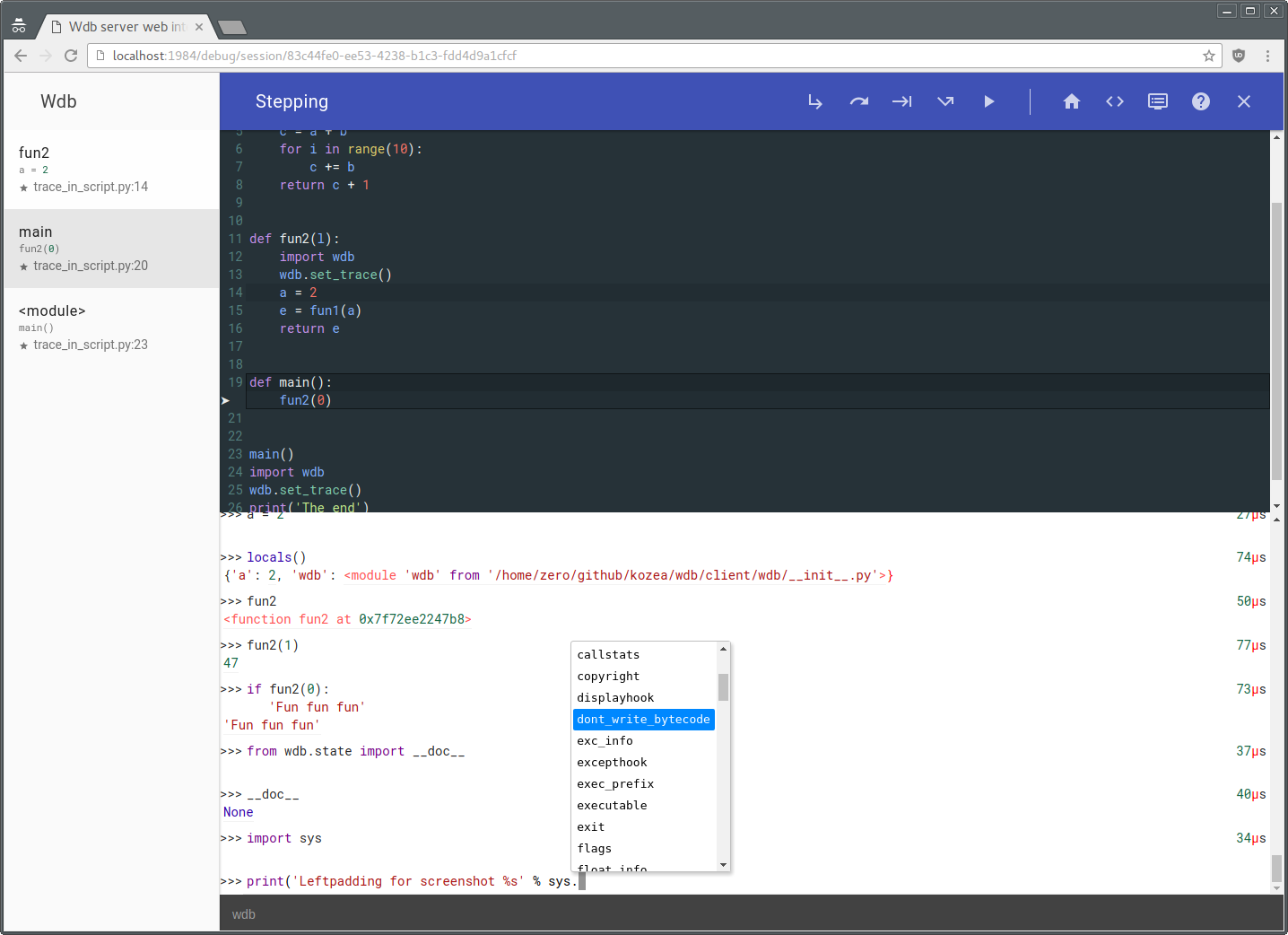
Description
wdb is a full featured web debugger based on a client-server architecture.
The wdb server which is responsible of managing debugging instances along with browser connections (through websockets) is based on Tornado. The wdb clients allow step by step debugging, in-program python code execution, code edition (based on CodeMirror) setting breakpoints...
Due to this architecture, all of this is fully compatible with multithread and multiprocess programs.
wdb works with python 2 (2.6, 2.7), python 3 (3.2, 3.3, 3.4, 3.5) and pypy. Even better, it is possible to debug a python 2 program with a wdb server running on python 3 and vice-versa or debug a program running on a computer with a debugging server running on another computer inside a web page on a third computer!
Even betterer, it is now possible to pause a currently running python process/thread using code injection from the web interface. (This requires gdb and ptrace enabled)
In other words it's a very enhanced version of pdb directly in your browser with nice features.
Installation:
Global installation:
$ pip install wdb.server
In virtualenv or with a different python installation:
$ pip install wdb
(You must have the server installed and running)
Quick test
To try wdb, first you have to start the wdb server:
$ wdb.server.py &
Optionally, you can automatically activate daemons with systemd (socket activation):
    $ cd /etc/systemd/system
    # curl -O https://raw.githubusercontent.com/Kozea/wdb/master/server/wdb.server.service
    # curl -O https://raw.githubusercontent.com/Kozea/wdb/master/server/wdb.server.socket
    # systemctl enable wdb.server.socket
    # systemctl start wdb.server.socket
Next run:
$ python -m wdb your_file.py
Wdb will open a debugging window right in your browser, paused at the beginning of your program.
You can access to http://localhost:1984/ to have an overview of the server.
NB: You have to start the server only once. Multiple Debugging sessions can be run simultaneously without problem.
This is not the only way to debug a program, see below.
Usage
Setting trace
To debug any program, with the server on, just add:
    import wdb
    wdb.set_trace()
anywhere in your code. Your program will stop at the set_trace line. (Just like pdb)
Tracing code
To inspect your code on exception, you can do the following:
    from wdb import trace
    with trace():
        wrong_code()
Any exception during wrong_code will launch a debugging session.
You can also use the start_trace() and stop_trace methods. (It's better to put the stop_trace in a finally block to avoid tracing all your program after an exception.)
Debugging web servers
wdb provides some tools to make it work nicely with different webservers:
Wsgi servers
For wsgi servers you can use the WdbMiddleware:
    from wdb.ext import WdbMiddleware
    wsgi_app = Whathever_wsgi_server_lib()
    my_app = WdbMiddleware(wsgi_app)
    my_app.serve_forever()
Flask
or using Flask:
    from flask import Flask
    from wdb.ext import WdbMiddleware
    app = Flask(__name__)
    app.debug = True
    app.wsgi_app = WdbMiddleware(app.wsgi_app)
    app.run(use_debugger=False) # Disable builtin Werkzeug debugger
you can also use the Flask-Wdb extension
    from flask import Flask
    from flask_wdb import Wdb

    app = Flask(__name__)
    app.debug = True
    Wdb(app)

    app.run()
Django
or using django:
Add the middleware in your wsgi.py:
After:
    from django.core.wsgi import get_wsgi_application
    application = get_wsgi_application()
Add this:
    from wdb.ext import WdbMiddleware
    application = WdbMiddleware(application)
And in your settings.py, activate exception propagation:
    DEBUG = True
    DEBUG_PROPAGATE_EXCEPTIONS = True
CherryPy
or using CherryPy:
import cherrypy
from wdb.ext import WdbMiddleware

class HelloWorld(object):
    @cherrypy.expose
    def index(self):
        undefined_method() # This will fail
        return "Hello World!"

cherrypy.config.update({'global':{'request.throw_errors': True}})
app = cherrypy.Application(HelloWorld())
app.wsgiapp.pipeline.append(('debugger', WdbMiddleware))

cherrypy.quickstart(app)
Tornado
In tornado, which is not a wsgi server, you can use the wdb_tornado function which will monkey patch the execute method on RequestHandlers:
    from wdb.ext import wdb_tornado
    from tornado.web import Application
    my_app = Application([(r"/", MainHandler)])
    if options.debug:
        wdb_tornado(my_app)
    my_app.listen(8888)
Page loading time become slow
If wdb slows down too much of your application (tracing all the things takes time), you can start it disabled with:
    my_app = WdbMiddleware(wsgi_app, start_disabled=True)  # or
    wdb_tornado(my_app, start_disabled=True)
Then when you get an exception just click on the on/off button.
Remote debugging
You can easily do remote debugging with wdb:
Let's say you want to run a program p.py on computer A and you want to debug it on computer B.
Start wdb server on computer A and launch this:
WDB_NO_BROWSER_AUTO_OPEN=True python -m wdb p.py
And open a browser on computer B at the url given by wdb log.
Now you can also run wdb server on a computer C and run on computer A:
WDB_NO_BROWSER_AUTO_OPEN=True WDB_SOCKET_SERVER=computerC.addr WDB_SOCKET_PORT=19840 python -m wdb p.py
And go with computer B to http://computerC/debug/session/[uuid in log] there you can step into p.py running in computer A. Yay !
You can use different configurations:
See wdb.server.py --help for changing ports on server and these environnement vars for wdb instances:
WDB_SOCKET_SERVER         # WDB server host
WDB_SOCKET_PORT           # WDB server socket port
WDB_WEB_SERVER            # WDB server host for browser openning
WDB_WEB_PORT              # WDB server http port
WDB_NO_BROWSER_AUTO_OPEN  # To disable the automagic browser openning (which can't be done if the browser is not on the same machine)
Docker
If you are developing locally with Docker, you can also use wdb to debug a code running inside a container. The basic setup looks like this:
- Start
wdb.server.pyrunning in a container and expose port1984to your host computer, this will server the debugging web server. - Start debugging in your app container, making sure to set
WDB_SOCKET_SERVERto the address of the server container, and point it to the expoed port19840on that server. - When a trace is reached, open up
http://<your-docker-hostname>:1984
I will walk through this process in detail, using Docker Compose to set up the containers.
Let's say your docker-compose.yml looks like their example for using with Django:
db:
  image: postgres
web:
  build: .
  command: python manage.py runserver 0.0.0.0:8000
  volumes:
    - .:/code
  ports:
    - "8000:8000"
  links:
    - db
Next lets add the wdb server part now and tell the web to link to it:
db:
  image: postgres
web:
  build: .
  command: python manage.py runserver 0.0.0.0:8000
  volumes:
    - .:/code
  ports:
    - "8000:8000"
  links:
    - db
    - wdb
  environment:
    WDB_SOCKET_SERVER: wdb
    WDB_NO_BROWSER_AUTO_OPEN: True
wdb:
  image: kozea/wdb
  ports:
    - "1984:1984"
And add wdb to your requirements.txt in your web app:
$ echo 'wdb' >> requirements.txt
Now we can use wdb.set_trace() in our python app.
# ... some code
import wdb
wdb.set_trace()
Then you have to rebuild your web application and start everything up again
$ docker-compose stop
$ docker-compose build web
$ docker-compose up
Now you can access http://<local docker server>:1984, to see the traces as they come up in your app.
In browser usage
Once you are in a breakpoint or in an exception, you can eval all you want in the prompt under the code. Multi-lines are partially supported using [Shift] + [Enter]. There is now help available by clicking on the top help button.
As of now the following special commands are supported during breakpoint:
* .s or [Ctrl] + [↓] or [F11]    : Step into
* .n or [Ctrl] + [→] or [F10]    : Step over (Next)
* .r or [Ctrl] + [↑] or [F9]     : Step out (Return)
* .c or [Ctrl] + [←] or [F8]     : Continue
* .u or [F7]                     : Until (Next over loops)
* .j lineno                      : Jump to lineno (Must be at bottom frame and in the same function)
* .b arg                         : Set a session breakpoint, see below for what arg can be*
* .t arg                         : Set a temporary breakpoint, arg follow the same syntax as .b
* .z arg                         : Delete existing breakpoint
* .l                             : List active breakpoints
* .f                             : Echo all typed commands in the current debugging session
* .d expression                  : Dump the result of expression in a table
* .w expression                  : Watch expression in current file (Click on the name to remove)
* .q                             : Quit
* .h                             : Get some help
* .e                             : Toggle file edition mode
* .g                             : Clear prompt
* .i [mime/type;]expression      : Display the result in an embed, mime type is auto detected on linux and defaults to "text/html" otherwise
* iterable!sthg                  : If cutter is installed, executes cut(iterable).sthg
* expr >! file                   : Write the result of expr in file
* !< file                        : Eval the content of file
* [Enter]                        : Eval the current selected text in page, useful to eval code in the source
*
* * arg is using the following syntax:
*   [file/module][:lineno][#function][,condition]
* which means:
*   - [file]                    : Break if any line of `file` is executed
*   - [file]:lineno             : Break on `file` at `lineno`
*   - [file][:lineno],condition : Break on `file` at `lineno` if `condition` is True (ie: i == 10)
*   - [file]#function           : Break when inside `function` function
*
* File is always current file by default and you can also specify a module like `logging.config`.
You can also eval a variable in the source by middle clicking on it. You can add/remove a breakpoint by clicking on the line number.
NB: Hotkeys with arrows are purposely not triggered in the eval prompt to avoid conflicts when typing.
Wdb Server
To see which debugging session are currently open, open your browser at http://localhost:1984/. You can also close crashed session.
From there you should also see all python process and their threads running and you can try to pause them during their execution to do step by step debugging and current variable inspection. This is highly experimental and requires gdb and a kernel with ptrace enabled to inject python code into a running python process. If you get ptrace: Operation not permitted. you will have to enable it.
Depending on your system it might work with:
echo 0 | sudo tee /proc/sys/kernel/yama/ptrace_scope
Make sure that wdb is installed for the python version running the program too.
Importing wdb each time is exhausting
Yes to avoid that, you can add a w builtin at the beggining of your application:
    from wdb.ext import add_w_builtin
    add_w_builtin()
you can now use the w object any where in your code:
    my_code()
    w.tf  # Stop next line
    doubtful_code()
    my_code()
    with w.trace():
        doubtful_code()
Code completion
Wdb has dynamic code completion in eval prompt thanks to jedi.
FAQ
In Firefox opened debugging pages are not closed when done
It's a firefox config flag, visit about:config and set: dom.allow_scripts_to_close_windows to true
The logs are spammed with 'parsing Python module'
If your logging configuration is set to display DEBUG logs, you may see a log for every imported file in your project any time WDB is active, like so:
DEBUG 2017-07-16 13:15:03,772 index 49835 123145573191680 parsing Python module /project/.virtualenv/python-3.6.1/lib/python3.6/site-packages/package/file.py for indexing
To silence only this message, add a config for the importmagic module. For example:
LOGGING = {
    ...
    'loggers': {
        ...
        'importmagic.index': {
            'level': 'ERROR',
            'propagate': False,
        },
    },
}
Contribute
All contributions are more than welcomed, use the fork luke !
Or you still can use your money =)


Test
Wdb is now partially tested, so if you want to contribute be sure to run the test suite:
    $ pip install pytest
    $ pip install -e client -e server
    $ cd test
    $ py.test
Feel free to add tests !
Author
Licence
This library is licensed under GPLv3
wdb - An improbable web debugger through WebSockets
wdb Copyright (c) 2012-2016  Florian Mounier, Kozea

This program is free software: you can redistribute it and/or modify
it under the terms of the GNU General Public License as published by
the Free Software Foundation, either version 3 of the License, or
(at your option) any later version.

This program is distributed in the hope that it will be useful,
but WITHOUT ANY WARRANTY; without even the implied warranty of
MERCHANTABILITY or FITNESS FOR A PARTICULAR PURPOSE.  See the
GNU General Public License for more details.

You should have received a copy of the GNU General Public License
along with this program.  If not, see <http://www.gnu.org/licenses/>.

 222 Jan 04, 2023
 3.5k Dec 30, 2022
 12 Dec 26, 2022
 4 Mar 30, 2022
 492 Jan 03, 2023
 1 Nov 22, 2021
 8 Nov 01, 2022
 39 Nov 18, 2022
 3.1k Jan 04, 2023
 73 Nov 06, 2022
 909 Dec 15, 2022
 1.6k Jan 06, 2023
 74 Dec 31, 2022
 1 Nov 29, 2021
 4k Jan 05, 2023
 4.1k Nov 30, 2022
 2 Mar 09, 2022
 139 Sep 21, 2022
 756 Dec 22, 2022
 575 Jan 02, 2023