Add-In for Blender to automatically save files when rendering

Overview

Autosave - Render: Automatically save .blend, .png and readme.txt files when rendering with Blender

Purpose

This Blender Add-On provides an easy way to document & preserve a project's progress over time and to jump back to an arbitrary previous state, if required.

It saves the .blend, .png (render image, optional) and a readme.txt (optional infos) -file in a new, dedicated subdirectory on every rendering.

The new sub-directories are named YYMMDD-hhmmss + an optional short note, located in a base-directory of your choice.

Creating images/animations with Blender is usually a highly iterative trial-and-error process, that can lead into dead ends when using wrong techniques or taking bad artistic choices.

When trying to resume at a former version, it can be difficult to find the matching .blend file for that state of the project.

This add-on can be understood as a basic but efficient source control system for the poor artist.

Installation

  • download the .py file to a location of your choice
  • in Blender: Edit -> Preferences-> Add-on -> Install... and pick the .py file
  • don't forget to activate it by setting the checkmark

Developed & tested under Windows 10 on Blender V2.90.1, 2.93 and 3.0 Alpha. It should work on other OSes and/or in older Blender versions too.

Usage

The user interface appears in the Properties Area -> Output Properties -> Autosave on Render:
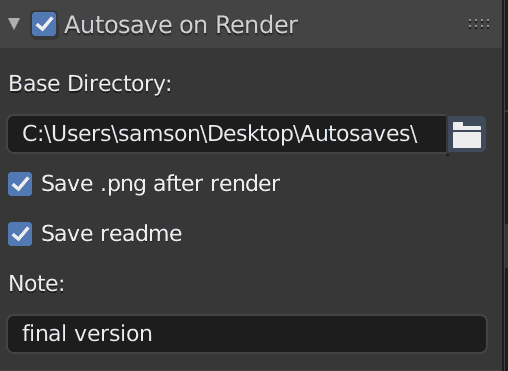
UI

  • set the "Autosave on Render" checkmark to save the .blend file before rendering

  • define/create the base-directory that will contain the new subdirectories

  • optionally save a .png file after rendering

  • optionally create a readme.txt. It can be previewed using the OS' file browser, its keywords will be indexed by the OS' search function.

    The content of readme.txt looks like:

    ---- Blender Generated Readme 211007_200350 myproject.blend
    -- Scene Infos:
         Blender V: 2.93.4
             Built: 2021-08-31 23:48:04
        Scene Name: Assets               
     Current Frame: 1
      Resolution %: 100
    View Transform: Filmic
              Look: None
          Exposure: 0.0
             Gamma: 1.0
            Engine: CYCLES
             Samples: 128
         Feature Set: EXPERIMENTAL
              Device: CPU
    -- Metadata Note:
     note from the output properties
    -- Readme Text:
    This is a text from the readme text. 
    It can contain a history of the project or longer annotations.
    ---
    

    The first section contains general infos about the Blender version and parameters used.

    The 2nd section contains the metadata note entered under Output Properties -> Metadata, if any.

    The 3rd section is the content of a document named "readme" from Blender's built-in texteditor, if a text with this name exists. It can contain information concerning this project, its history, keywords etc.

  • optionally enter a short note to be appended to the new directory's name. Free shorthand reminder like "eevee only", "applied" or "!" when used in production etc. Use only characters allowed in your filesystem (Windows: no ":<>" etc).

    This leads to folder names like "211007-145010-with geometry nodes, final version", intended as a quick reminder when revisiting the folder after a while

  • finally start the renderprocess hitting and browse the new subdirectory

Hints

  • the dimensions of the .png file are determined by the output properties
  • this add-on doesn't affect other settings like output paths etc
  • it doesn't make much sense when active while creating animations ( - )
  • manually delete directories if they are not needed
  • -Click on the folder icon opens the base-directory in your OS' file system browser
  • because the .blend file is saved before and the .png file after rendering, rendertime is documented too
  • choose your base-directory on an external or network drive. This may save your live if your SSD dies

Advanced usage

Shift your base-directory into the new sub-directory once you think you achieved significant progress with that render. This transforms the otherwise linear folder structure into a tree, having elaborated versions in its branches.

Optionally rename the parent folder with a speaking name for better orientation when browsing the filesystem later on. The latest and/or best version should then be in the latest & deepest leaf folder.

...unless you give up an idea too soon.

Enjoy!


You might also like...
Addon for Blender 2.8+ that automatically creates NLA tracks for all animations. Useful for GLTF export.

PushDownAll An addon for Blender 2.8+ that runs Push Down on all animations, creating NLA tracks for each. This is useful if you have an object with m

This an Anki add on that automatically converts Notion notes into Anki flash cards. Currently in development!

NotionFlash This is an Anki add on in development that will allow automatically convert your Notion study notes into Anki flash cards. The Anki deck c

This is a library which aiming to save all my code about cpp. It will help me to code conveniently.

This is a library which aiming to save all my code about cpp. It will help me to code conveniently.

A "multiclipboards" script for an efficient way to improve the original clipboards which are only able to save one string at a time

A "multiclipboards" script for an efficient way to improve the original clipboards which are only able to save one string at a time. Works on both Windows and Linux.

carrier.py is a Python package/module that's used to save time when programming

carrier.py is a Python package/module that's used to save time when programming, it helps with functions such as 24 and 12 hour time, Discord webhooks, etc

Synthetik Python Mod - A save editor tool for the game Synthetik written in python

Synthetik_Python_Mod A save editor tool for the game Synthetik written in python

addon for blender to import mocap data from tools like easymocap, frankmocap and Vibe

b3d_mocap_import addon for blender to import mocap data from tools like easymocap, frankmocap and Vibe ==================VIBE================== To use

 A small Blender addon for changing an object's local orientation while in edit mode
A small Blender addon for changing an object's local orientation while in edit mode

A small Blender addon for changing an object's local orientation while in edit mode.

A simple armature retargeting tool for Blender

Simple-Retarget-Tool-Blender A simple armature retargeting tool for Blender Update V2: Set Rest Pose to easily apply rest pose. Preset Import/Export.

Comments
  • render_auto_save.py

    render_auto_save.py

    Sorry not an issue ... just if you know about render_auto_save.py addon bundled with any experimental build https://developer.blender.org/diffusion/BAC/browse/master/render_auto_save.py;10ebd1e553b16e599b51b8f1afcfee764365be26

    not a bug 
    opened by mond-cz 5
Releases(v1.3.8)
Owner
Volker
Oh well.
Volker
Euler 021 Py - Euler Problem 021 solved in Python

Euler_021_Py Euler Problem 021 solved in Python Let d(n) be defined as the sum o

Ariel Tynan 1 Jan 24, 2022
Konomi: Kind and Optimized Next brOadcast watching systeM Infrastructure

Konomi 備考・注意事項 現在 α 版で、まだ実験的なプロダクトです。通常利用には耐えないでしょうし、サポートもできません。 安定しているとは到底言いがたい品質ですが、それでも構わない方のみ導入してください。 使い方などの説明も用意できていないため、自力でトラブルに対処できるエンジニアの方以外に

tsukumi 243 Dec 30, 2022
Team collaborative evaluation tracker.

Team collaborative evaluation tracker.

2 Dec 19, 2021
NExT-Ford-aula4 - NExT Ford aula4

Questão 1: vocês deveram fazer o passo a passo de como ficará as pilhas(Stack) e

Gerson 1 Jan 06, 2022
CaskDB is a disk-based, embedded, persistent, key-value store based on the Riak's bitcask paper, written in Python.

CaskDB - Disk based Log Structured Hash Table Store CaskDB is a disk-based, embedded, persistent, key-value store based on the Riak's bitcask paper, w

886 Dec 27, 2022
Airbrake Python

airbrake-python Note. Python 3.4+ are advised to use new Airbrake Python notifier which supports async API and code hunks. Python 2.7 users should con

Airbrake 51 Dec 22, 2022
Python code to control laboratory hardware and perform Bayesian reaction optimization on the MIT Make-It system for chemical synthesis

Description This repository contains code accompanying the following paper on the Make-It robotic flow chemistry platform developed by the Jensen Rese

Anirudh Nambiar 11 Dec 10, 2022
A tool to guide you for team selection based on mana and ruleset using your owned cards.

Splinterlands_Teams_Guide A tool to guide you for team selection based on mana and ruleset using your owned cards. Built With This project is built wi

Ruzaini Subri 3 Jul 30, 2022
Ronin - Create Fud Meterpreter Payload To Hack Windows 11

Ronin - Create Fud Meterpreter Payload To Hack Windows 11

Dj4w3d H4mm4di 6 May 09, 2022
Functional interface for concurrent futures, including asynchronous I/O.

Futured provides a consistent interface for concurrent functional programming in Python. It wraps any callable to return a concurrent.futures.Future,

A. Coady 11 Nov 27, 2022
Check is a integer is even

Is Even Check if interger is even using isevenapi. https://isevenapi.xyz/ Main features: cache memoization api retry handler hide ads Install pip inst

Rosiney Gomes Pereira 45 Dec 19, 2022
Print 'text color' and 'text format' on Term with Python

term-printer Print 'text color' and 'text format' on Term with Python ※ It may not work depending on the OS and shell used. PIP $ pip install term-pri

ななといつ 10 Nov 12, 2022
Simple control of Thorlabs Elliptec devices from Python.

Elliptec Simple control of Thorlabs Elliptec devices. No docs yet » Get started · Report a bug · Request a feature About The Project ThorLabs Elliptec

David Roesel 8 Sep 22, 2022
A small Blender addon for changing an object's local orientation while in edit mode

A small Blender addon for changing an object's local orientation while in edit mode.

Jonathan Lampel 50 Jan 06, 2023
flake8 plugin which forbids match statements (PEP 634)

flake8-match flake8 plugin which forbids match statements (PEP 634)

Anthony Sottile 25 Nov 01, 2022
Parser for RISC OS Font control characters in Python

RISC OS Font control parsing in Python This repository contains a class (FontControlParser) for parsing font control codes from a byte squence, in Pyt

Charles Ferguson 1 Nov 02, 2021
A carrot-based color palette you didn't know you needed.

A package to produce a carrot-inspired color palette for python/matplotlib. Install: pip install carrotColors Update: pip install --upgrade carrotColo

10 Sep 28, 2021
Compiler Final Project - Lisp Interpreter

Compiler Final Project - Lisp Interpreter

2 Jan 23, 2022
Class XII computer science project.

Computer Science Project — Class XII Kshitij Srivastava (XI – A) Introduction The aim of this project is to create a fully operational system for a me

Kshitij Srivastava 2 Jul 21, 2022
This alerts you when the avalanche score a goal

This alerts you when the avalanche score a goal

Davis Burrill 1 Jan 15, 2022