
Latex code for making neural networks diagrams

Overview

PlotNeuralNet

DOI

Latex code for drawing neural networks for reports and presentation. Have a look into examples to see how they are made. Additionally, lets consolidate any improvements that you make and fix any bugs to help more people with this code.

Examples

Following are some network representations:
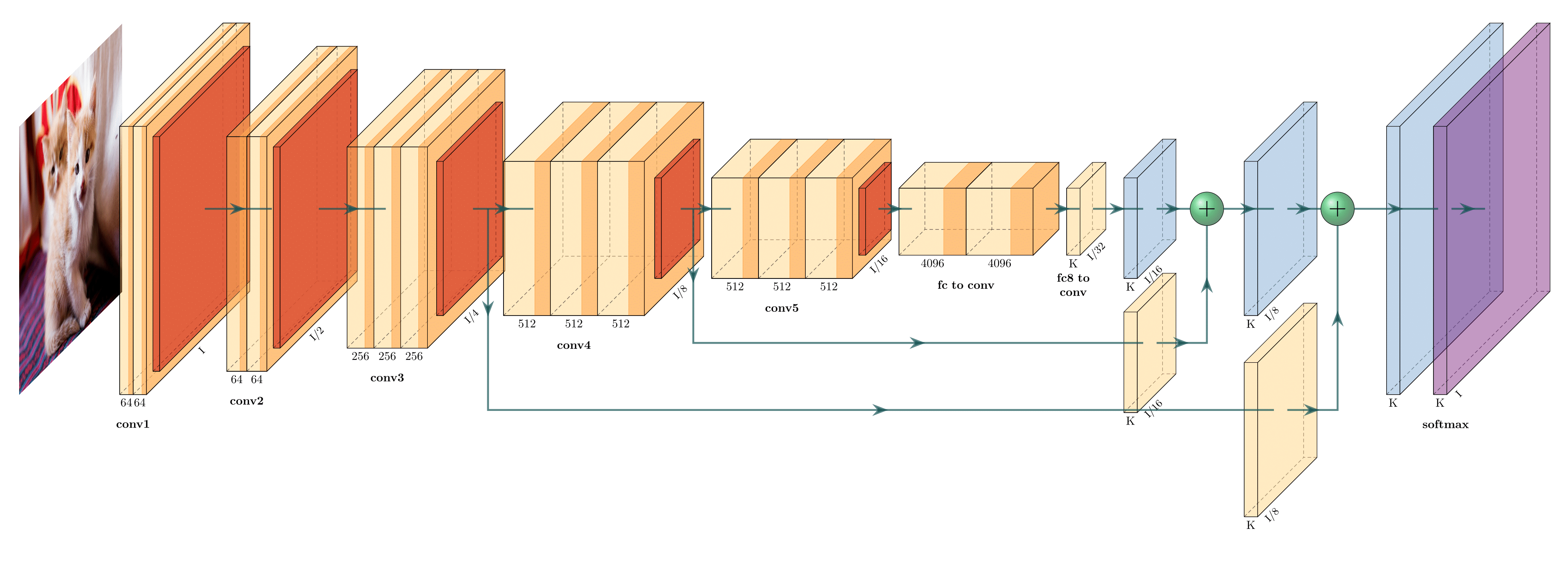
FCN-8 (view on Overleaf)
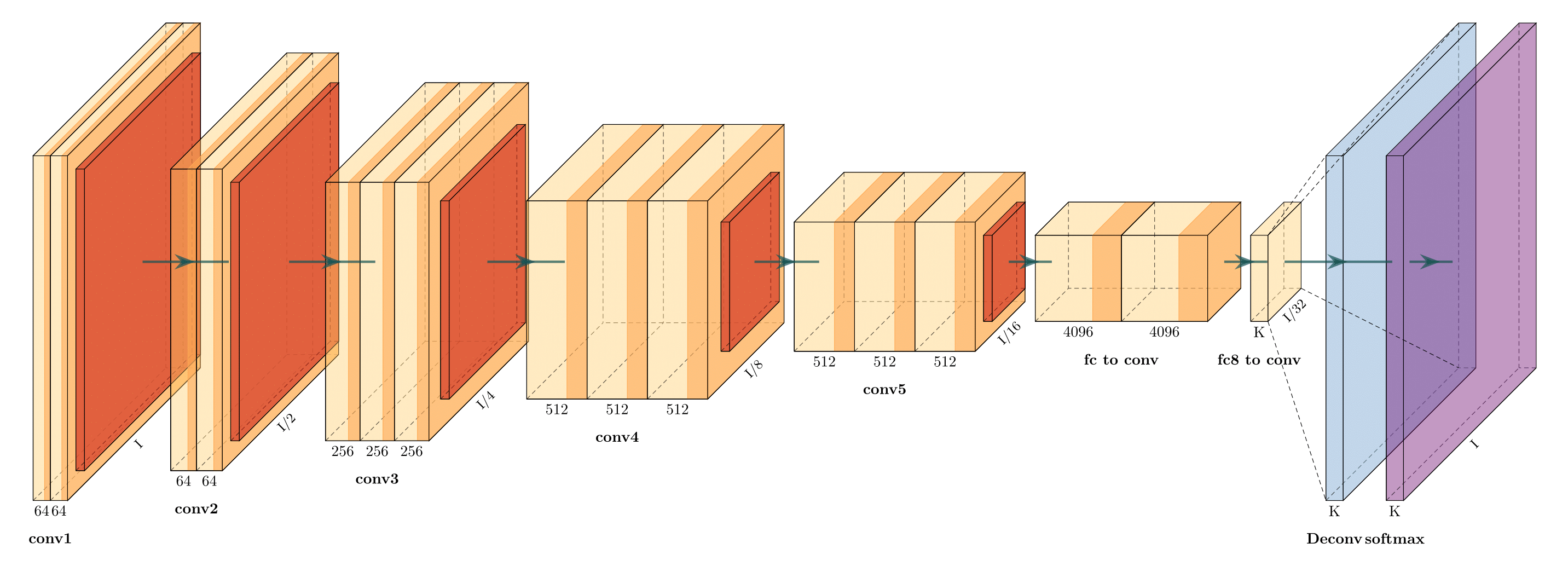
FCN-32 (view on Overleaf)

Holistically-Nested Edge Detection (view on Overleaf)

Getting Started

  1. Install the following packages on Ubuntu.

    • Ubuntu 16.04

      sudo apt-get install texlive-latex-extra
      
    • Ubuntu 18.04.2 Base on this website, please install the following packages.

      sudo apt-get install texlive-latex-base
      sudo apt-get install texlive-fonts-recommended
      sudo apt-get install texlive-fonts-extra
      sudo apt-get install texlive-latex-extra
      
    • Windows

    1. Download and install MikTeX.
    2. Download and install bash runner on Windows, recommends Git bash or Cygwin(https://www.cygwin.com/)
  2. Execute the example as followed.

    cd pyexamples/
    bash ../tikzmake.sh test_simple
    

TODO

  • Python interface
  • Add easy legend functionality
  • Add more layer shapes like TruncatedPyramid, 2DSheet etc
  • Add examples for RNN and likes.

Latex usage

See examples directory for usage.

Python usage

First, create a new directory and a new Python file:

$ mkdir my_project
$ cd my_project
vim my_arch.py

Add the following code to your new file:

import sys
sys.path.append('../')
from pycore.tikzeng import *

# defined your arch
arch = [
    to_head( '..' ),
    to_cor(),
    to_begin(),
    to_Conv("conv1", 512, 64, offset="(0,0,0)", to="(0,0,0)", height=64, depth=64, width=2 ),
    to_Pool("pool1", offset="(0,0,0)", to="(conv1-east)"),
    to_Conv("conv2", 128, 64, offset="(1,0,0)", to="(pool1-east)", height=32, depth=32, width=2 ),
    to_connection( "pool1", "conv2"),
    to_Pool("pool2", offset="(0,0,0)", to="(conv2-east)", height=28, depth=28, width=1),
    to_SoftMax("soft1", 10 ,"(3,0,0)", "(pool1-east)", caption="SOFT"  ),
    to_connection("pool2", "soft1"),
    to_end()
    ]

def main():
    namefile = str(sys.argv[0]).split('.')[0]
    to_generate(arch, namefile + '.tex' )

if __name__ == '__main__':
    main()

Now, run the program as follows:

bash ../tikzmake.sh my_arch
Comments
  • Error when running readme example: `I can't find file `tikzlibraryquotes.code.tex'`

    Error when running readme example: `I can't find file `tikzlibraryquotes.code.tex'`

    python my_arch.py works fine, producing the output included below. However, when I run pdflatex, I get error:

    ! I can't find file `tikzlibraryquotes.code.tex'.
    <argument> ...nput tikzlibrary\[email protected] .code.tex 
                                                      \catcode `\@ =\csname tikz...
    l.2 \usetikzlibrary{quotes,arrows.meta}
    

    I presume this is a simple fix requiring an install. Please may you help me diagnose what I need installed on my system for this to run? I am able to run tikz fine and create examples e.g. this one.

    LaTeX info

    $ pdflatex --version
    pdfTeX 3.1415926-2.5-1.40.14 (TeX Live 2013/Debian)
    kpathsea version 6.1.1
    Copyright 2013 Peter Breitenlohner (eTeX)/Han The Thanh (pdfTeX).
    There is NO warranty.  Redistribution of this software is
    covered by the terms of both the pdfTeX copyright and
    the Lesser GNU General Public License.
    For more information about these matters, see the file
    named COPYING and the pdfTeX source.
    Primary author of pdfTeX: Peter Breitenlohner (eTeX)/Han The Thanh (pdfTeX).
    Compiled with libpng 1.2.50; using libpng 1.2.50
    Compiled with zlib 1.2.8; using zlib 1.2.8
    Compiled with poppler version 0.24.5
    

    Python output:

    \documentclass[border=8pt, multi, tikz]{standalone} 
    \usepackage{import}
    \subimport{../layers/}{init}
    \usetikzlibrary{positioning}
    \usetikzlibrary{3d} %for including external image 
    
    
    \def\ConvColor{rgb:yellow,5;red,2.5;white,5}
    \def\ConvReluColor{rgb:yellow,5;red,5;white,5}
    \def\PoolColor{rgb:red,1;black,0.3}
    \def\UnpoolColor{rgb:blue,2;green,1;black,0.3}
    \def\FcColor{rgb:blue,5;red,2.5;white,5}
    \def\FcReluColor{rgb:blue,5;red,5;white,4}
    \def\SoftmaxColor{rgb:magenta,5;black,7}   
    
    
    \newcommand{\copymidarrow}{\tikz \draw[-Stealth,line width=0.8mm,draw={rgb:blue,4;red,1;green,1;black,3}] (-0.3,0) -- ++(0.3,0);}
    
    \begin{document}
    \begin{tikzpicture}
    \tikzstyle{connection}=[ultra thick,every node/.style={sloped,allow upside down},draw=\edgecolor,opacity=0.7]
    \tikzstyle{copyconnection}=[ultra thick,every node/.style={sloped,allow upside down},draw={rgb:blue,4;red,1;green,1;black,3},opacity=0.7]
    
    
    \pic[shift={(0,0,0)}] at (0,0,0) 
        {Box={
            name=conv1,
            caption= ,
            xlabel={{64, }},
            zlabel=512,
            fill=\ConvColor,
            height=64,
            width=2,
            depth=64
            }
        };
    
    
    \pic[shift={ (0,0,0) }] at (conv1-east) 
        {Box={
            name=pool1,
            caption= ,
            fill=\PoolColor,
            opacity=0.5,
            height=32,
            width=1,
            depth=32
            }
        };
    
    
    \pic[shift={(1,0,0)}] at (pool1-east) 
        {Box={
            name=conv2,
            caption= ,
            xlabel={{64, }},
            zlabel=128,
            fill=\ConvColor,
            height=32,
            width=2,
            depth=32
            }
        };
    
    
    \draw [connection]  (pool1-east)    -- node {\midarrow} (conv2-west);
    
    
    \pic[shift={ (0,0,0) }] at (conv2-east) 
        {Box={
            name=pool2,
            caption= ,
            fill=\PoolColor,
            opacity=0.5,
            height=28,
            width=1,
            depth=28
            }
        };
    
    
    \pic[shift={(3,0,0)}] at (pool1-east) 
        {Box={
            name=soft1,
            caption=SOFT,
            xlabel={{" ","dummy"}},
            zlabel=10,
            fill=\SoftmaxColor,
            opacity=0.8,
            height=3,
            width=1.5,
            depth=25
            }
        };
    
    
    \draw [connection]  (pool2-east)    -- node {\midarrow} (soft1-west);
    
    
    \end{tikzpicture}
    \end{document}
    
    opened by JamesOwers 8
  • Importing Standalone output to tex document

    Importing Standalone output to tex document

    Hey, Thanks for the tool, the graphics look awesome. I'm having some difficulty importing the outputted standalone tex file into a technical report of mine and was wondering if someone tried to do something similar and can help :) Thanks!

    opened by aklyussef 5
  • Fully Connected layer box

    Fully Connected layer box

    Below is the code that implements a fully connected layer box since I wasn't able to find it in the code. I used to_SoftMax function and modified it.

    The code should be put inside pycore/tikzeng.py file.

    def to_FullyConnected( name, s_filer=" ", n_filer=" ", offset="(0,0,0)", to="(0,0,0)", width=1.5, height=3, depth=25, opacity=0.8, caption=" " , zlabelposition='midway'):
        return r"""
    \pic[shift={"""+ offset +"""}] at """+ to +""" 
        {Box={
            name=""" + name +""",
            caption=""" +caption + """,
            xlabel={{ """+ '"'+str(n_filer) +'", "dummy"'+ """ }},
            zlabel="""+ str(s_filer) +""",
            zlabelposition="""+zlabelposition+""",
            fill=\FcColor,
            bandfill=\FcReluColor,
            opacity="""+ str(opacity) +""",
            height="""+ str(height) +""",
            width="""+ str(width) +""",
            depth="""+ str(depth) +"""
            }
        };
    """
    

    Cheers.

    opened by chrismaliszewski 5
  • to_input(...) doesn't have east, west... properties

    to_input(...) doesn't have east, west... properties

    I would like to connect the input image to conv blocks and other blocks, but it is not possible since to_input(...) doesn't have east, west, northeast, etc... properties. How to solve this? Maybe wrap to_input(...) in a box or something?

    opened by dougsouza 5
  • Unet to DenseNets

    Unet to DenseNets

    I am trying to modify Unet tex code to create DenseNets block. f838717a-6ad1-11e6-9391-f0906c80bc1d

    I am wondering how to modify the connection lines that then look like densenets style? Thank you for your time!

    opened by zuxfoucault 4
  • ModuleNotFoundError: No module named 'pycore.tikzeng'

    ModuleNotFoundError: No module named 'pycore.tikzeng'

    After running pip install pycore when I try to run in python: from pycore.tikzeng import * I got: ModuleNotFoundError: No module named 'pycore.tikzeng'

    Version: pycore==17.4.17

    opened by amirubin87 4
  • I want to know how to add legend

    I want to know how to add legend

    Hi, I wonder if there is a way of adding legend to the figure (identifying which color corresponds to which type of layer).

    A example default

    And how to eliminate cube number?

    opened by quinwu 4
  • Font size in the graph

    Font size in the graph

    Does anyone know how to change the font size in the graph? I tried to simply add to the documentclass

    \documentclass[border=15pt, multi, tikz]{standalone}

    but it doesn't work and returns some errors with positioning.

    opened by wufeim 3
  • unet error

    unet error

    pyexamples|master⚡ ⇒ bash ../tikzmake.sh unet

    File "unet.py", line 19 block_2ConvPool( name='b2', botton='pool_b1', top='pool_b2', s_filer=256, n_filer=128, offset="(1,0,0)", size=(32,32,3.5), opacity=0.5 ), ^ SyntaxError: invalid syntax This is pdfTeX, Version 3.14159265-2.6-1.40.19 (TeX Live 2018) (preloaded format=pdflatex) restricted \write18 enabled. entering extended mode ! I can't find file `unet.tex'. <> unet.tex

    (Press Enter to retry, or Control-D to exit) Please type another input file name: ^D ! Emergency stop. <*> unet.tex

    ! ==> Fatal error occurred, no output PDF file produced! Transcript written on texput.log. rm: *.aux: No such file or directory rm: *.vscodeLog: No such file or directory rm: *.tex: No such file or directory ../tikzmake.sh: line 10: xdg-open: command not found

    opened by wm901115nwpu 3
  • Labeling Blocks will create a solid line

    Labeling Blocks will create a solid line

    I tried to let the Box block's edges be invisible via fill=\fill, draw=\fill in Box.sty.

    Actually, It only let edges AH, AD, DE, CD, EF and HE invisible.

    Finally I found that \path (b) edge ["\bf\xlabel"', midway] (c); created a solid line in BC, so do AB and CF.

    I have no idea to fix this and I don't know why the solid lines emerged though no pic action acted in above code.

    Furthermore, I want customize the style of draw line, but nothing changes after I put thin into "box" style setting.

    opened by omegahh 3
  • What does the single quotation mark which follows double quotation marks mean?

    What does the single quotation mark which follows double quotation marks mean?

    Thanks for your amazing work! I am confused with the quotation mark like "\cubezlabel"'. What is the difference between "\cubezlabel".

    Looking forwarding your answer:)

    opened by omegahh 3
  • Made python interface installable via pip

    Made python interface installable via pip

    Hi, HarisIqbal88!

    My boss told me to use your package for my master thesis and I really like it, but it was bugging me, that it didn't have an installer. So I made it installable via pip. I had to rearrange your directories a little bit, but I hope you like it.

    I also added CITATION.cff, this will show how to cite your software directly in the repos sidebar.

    You might want to add your email or ORCID in pyproject.toml and check CITATION.cff for errors.

    I wish you a happy New Year!

    Kind regards, Jonas Eichhorn

    opened by AlreadyTakenJonas 1
  • Add a documentation

    Add a documentation

    Hello,

    Thank you for the good work.

    Please can you work toward doing a good documentation for this repo ? Some arguments are not clearly defined, and it's not clear what values we should use etc.. a proper documentation would be greatly appreciated !

    Cordially

    opened by NicolasNerr 0
  • Add arrow as legend (U-Net Model)

    Add arrow as legend (U-Net Model)

    How can I use an arrow as a legend of the plot? Please give me an example!

    Model architecture: U-Net (I want to plot "concatenate arrows" in U-Net as legend)

    image

    opened by mehrdad-dev 0
Releases(v1.0.0)
  • v1.0.0(Dec 25, 2018)

    This is the first release that is built on the idea to further extend the functionality with maximum backward compatibility. Layer names(e.g., Box,RightBandedBox) and their attributes(e.g., caption,xlabels) are generic. Moreover, the code is much better readable than the previous version. TO DO's:

    • Add easy legend functionality
    • Add more layer shapes like TruncatedPyramid, 2DSheet etc
    Source code(tar.gz)
    Source code(zip)
  • v0.1(Dec 25, 2018)

    This is the very first release in which layers were defined by specific names like Conv, ConvRelu,Deconv and a workable solution was created. This version is not suitable for extension because having a separate layer just because it is represented by a different colour is not clever. In future release, layers should be defined in generic terms like Box, RightBandedBox, Ball etc so that less code can make different layers with colour as a parameter. Additionally, attributes of each layer should also be changed to generic for example: from numFilters to xlabels

    Source code(tar.gz)
    Source code(zip)
Owner
Haris Iqbal
Computer Science Student at Saarland University
Haris Iqbal
Official Datasets and Implementation from our Paper "Video Class Agnostic Segmentation in Autonomous Driving".

Video Class Agnostic Segmentation [Method Paper] [Benchmark Paper] [Project] [Demo] Official Datasets and Implementation from our Paper "Video Class A

Mennatullah Siam 26 Oct 24, 2022
Image marine sea litter prediction Shiny

MARLITE Shiny app for floating marine litter detection in aerial images. This directory contains the instructions and software needed to install the S

19 Dec 22, 2022
Pytorch cuda extension of grid_sample1d

Grid Sample 1d pytorch cuda extension of grid sample 1d. Since pytorch only supports grid sample 2d/3d, I extend the 1d version for efficiency. The fo

lyricpoem 24 Dec 03, 2022
Demo project for real time anomaly detection using kafka and python

kafkaml-anomaly-detection Project for real time anomaly detection using kafka and python It's assumed that zookeeper and kafka are running in the loca

Rodrigo Arenas 36 Dec 12, 2022
A fast poisson image editing implementation that can utilize multi-core CPU or GPU to handle a high-resolution image input.

Poisson Image Editing - A Parallel Implementation Jiayi Weng (jiayiwen), Zixu Chen (zixuc) Poisson Image Editing is a technique that can fuse two imag

Jiayi Weng 110 Dec 27, 2022
Implementation of PyTorch-based multi-task pre-trained models

mtdp Library containing implementation related to the research paper "Multi-task pre-training of deep neural networks for digital pathology" (Mormont

Romain Mormont 27 Oct 14, 2022
Open AI's Python library

OpenAI Python Library The OpenAI Python library provides convenient access to the OpenAI API from applications written in the Python language. It incl

Pavan Ananth Sharma 3 Jul 10, 2022
A toolset for creating Qualtrics-based IAT experiments

Qualtrics IAT Tool A web app for generating the Implicit Association Test (IAT) running on Qualtrics Online Web App The app is hosted by Streamlit, a

0 Feb 12, 2022
Mail classification with tensorflow and MS Exchange Server (ham or spam).

Mail classification with tensorflow and MS Exchange Server (ham or spam).

Metin Karatas 1 Sep 11, 2021
Official PyTorch Implementation of paper "NeLF: Neural Light-transport Field for Single Portrait View Synthesis and Relighting", EGSR 2021.

NeLF: Neural Light-transport Field for Single Portrait View Synthesis and Relighting Official PyTorch Implementation of paper "NeLF: Neural Light-tran

Ken Lin 38 Dec 26, 2022
Pynomial - a lightweight python library for implementing the many confidence intervals for the risk parameter of a binomial model

Pynomial - a lightweight python library for implementing the many confidence intervals for the risk parameter of a binomial model

Demetri Pananos 9 Oct 04, 2022
Small utility to demangle Nim symbols in callgrind files

nim_callgrind A small utility to demangle Nim symbols from callgrind files. Usage Run your (Nim) program with something like this: valgrind --tool=cal

kraptor 3 Feb 15, 2022
Voxel Set Transformer: A Set-to-Set Approach to 3D Object Detection from Point Clouds (CVPR 2022)

Voxel Set Transformer: A Set-to-Set Approach to 3D Object Detection from Point Clouds (CVPR2022)[paper] Authors: Chenhang He, Ruihuang Li, Shuai Li, L

Billy HE 141 Dec 30, 2022
NaturalProofs: Mathematical Theorem Proving in Natural Language

NaturalProofs: Mathematical Theorem Proving in Natural Language NaturalProofs: Mathematical Theorem Proving in Natural Language Sean Welleck, Jiacheng

Sean Welleck 83 Jan 05, 2023
Multi-query Video Retreival

Multi-query Video Retreival

Princeton Visual AI Lab 17 Nov 22, 2022
A Multi-modal Perception Tracker (MPT) for speaker tracking using both audio and visual modalities

MPT A Multi-modal Perception Tracker (MPT) for speaker tracking using both audio and visual modalities. Implementation for our AAAI 2022 paper: Multi-

yidiLi 4 May 08, 2022
Quantum-enhanced transformer neural network

Example of a Quantum-enhanced transformer neural network Get the code: git clone https://github.com/rdisipio/qtransformer.git cd qtransformer Create

Riccardo Di Sipio 61 Nov 08, 2022
Ensembling Off-the-shelf Models for GAN Training

Vision-aided GAN video (3m) | website | paper Can the collective knowledge from a large bank of pretrained vision models be leveraged to improve GAN t

345 Dec 28, 2022
Data Augmentation with Variational Autoencoders

Documentation Pyraug This library provides a way to perform Data Augmentation using Variational Autoencoders in a reliable way even in challenging con

112 Nov 30, 2022
Using Machine Learning to Create High-Res Fine Art

BIG.art: Using Machine Learning to Create High-Res Fine Art How to use GLIDE and BSRGAN to create ultra-high-resolution paintings with fine details By

Robert A. Gonsalves 13 Nov 27, 2022