Automatic data visualization in atom with the nteract data-explorer

Overview

Data Explorer

Interactively explore your data directly in atom with hydrogen!

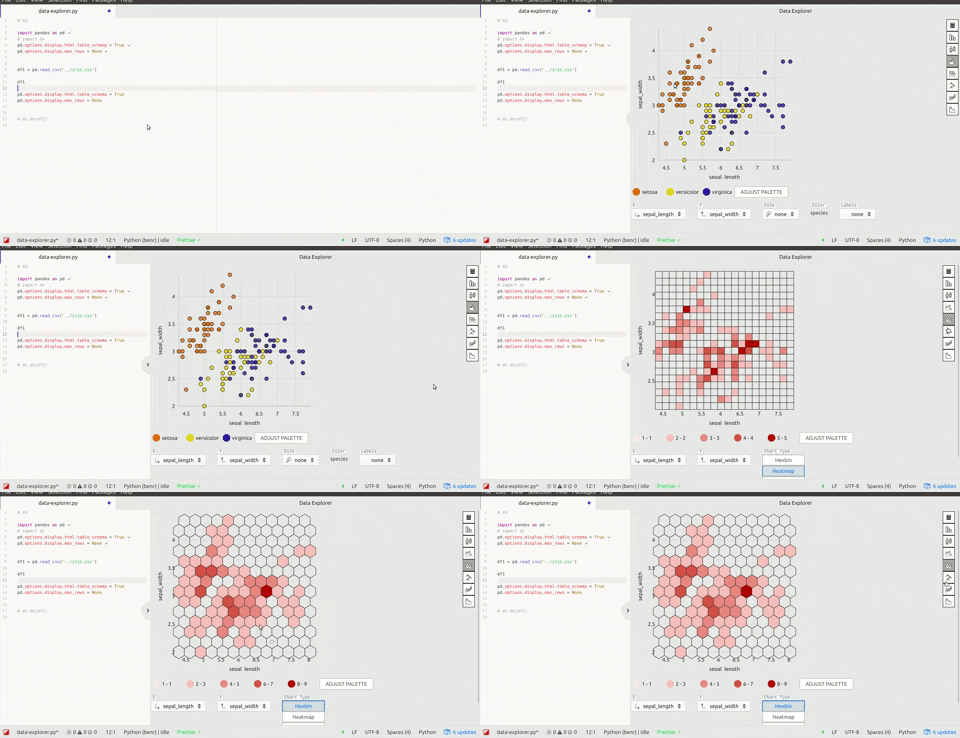
The nteract data-explorer provides automatic data visualization, so you can get a feel for your data quickly and with minimal code!

nteract data explorer in hydrogen

🚧 This is a work in progress. Please open issues and pull requests!

⚠️ As this package has some open issues with styling, the following atom themes are recommended for now:

  • 🎨 Atom One Light syntax theme
  • 🎨 Atom One Light UI theme

How to try it out:

Atom packages:

  • Install both hydrogen and the data-explorer package in atom, or in the cli:
    apm install hydrogen data-explorer

Make sure you have installed:

Then, just start a python kernel in hydrogen and run the following code:

import pandas as pd

# Enable the table_schema option in pandas, 
# data-explorer makes this snippet available with the `dx` prefix:
pd.options.display.html.table_schema = True
pd.options.display.max_rows = None

# (Your dataframe here)
iris_filename = './iris.csv'
df1 = pd.read_csv(iris_filename)

df1
Comments
  • Failed to load the data-explorer package

    Failed to load the data-explorer package

    [Enter steps to reproduce:]

    1. ...
    2. ...

    Atom: 1.32.0 x64 Electron: 2.0.9 OS: Ubuntu 16.04.5 Thrown From: data-explorer package 0.3.1

    Stack Trace

    Failed to load the data-explorer package

    At Cannot find module '@blueprintjs/select'
    
    Error: Cannot find module '@blueprintjs/select'
        at Module._resolveFilename (module.js:543:15)
        at Module._resolveFilename (/usr/share/atom/resources/electron.asar/common/reset-search-paths.js:35:12)
        at Function.get_Module._resolveFilename (/usr/share/atom/resources/app/static/<embedded>:11:154364)
        at Module.require (/app.asar/static/index.js:40:43)
        at require (/usr/share/atom/resources/app/static/<embedded>:11:145671)
        at /packages/data-explorer/node_modules/@nteract/transform-dataresource/lib/VizControls.js:20:15)
        at /packages/data-explorer/node_modules/@nteract/transform-dataresource/lib/VizControls.js:391:3)
        at Module.get_Module._compile (/usr/share/atom/resources/app/static/<embedded>:11:146381)
        at Object.value [as .js] (/usr/share/atom/resources/app/static/<embedded>:11:149928)
        at Module.load (module.js:561:32)
        at tryModuleLoad (module.js:504:12)
        at Function.Module._load (module.js:496:3)
        at Module.require (/app.asar/static/index.js:47:45)
        at require (/usr/share/atom/resources/app/static/<embedded>:11:145671)
        at /packages/data-explorer/node_modules/@nteract/transform-dataresource/lib/index.js:48:43)
        at /packages/data-explorer/node_modules/@nteract/transform-dataresource/lib/index.js:495:3)
        at Module.get_Module._compile (/usr/share/atom/resources/app/static/<embedded>:11:146381)
        at Object.value [as .js] (/usr/share/atom/resources/app/static/<embedded>:11:149928)
        at Module.load (module.js:561:32)
        at tryModuleLoad (module.js:504:12)
        at Function.Module._load (module.js:496:3)
        at Module.require (/app.asar/static/index.js:47:45)
        at require (/usr/share/atom/resources/app/static/<embedded>:11:145671)
        at /packages/data-explorer/lib/common.js:33:2)
        at /packages/data-explorer/lib/common.js:11:76)
        at Module.get_Module._compile (/usr/share/atom/resources/app/static/<embedded>:11:146381)
        at Object.value [as .js] (/usr/share/atom/resources/app/static/<embedded>:11:149928)
        at Module.load (module.js:561:32)
        at tryModuleLoad (module.js:504:12)
        at Function.Module._load (module.js:496:3)
    

    Commands

    Non-Core Packages

    data-explorer 0.3.1 
    Hydrogen 2.6.0 
    hydrogen-launcher 1.2.2 
    hydrogen-python 0.0.7 
    
    opened by cchlanger 10
  • Error compiling Less stylesheet

    Error compiling Less stylesheet

    Hi,

    When installing the data-explorer, I get this error:

    Line number: 3 '../node_modules/@blueprintjs/icons/lib/css/blueprint-icons.css' wasn't found. Tried - /home/lordflaron/.atom/packages/data-explorer/node_modules/@blueprintjs/icons/lib/css/blueprint-icons.css,/usr/lib/atom/node_modules/one-light-syntax/node_modules/@blueprintjs/icons/lib/css/blueprint-icons.css,/usr/lib/atom/node_modules/one-light-ui/node_modules/@blueprintjs/icons/lib/css/blueprint-icons.css,/usr/lib/atom/static/node_modules/@blueprintjs/icons/lib/css/blueprint-icons.css,/usr/lib/atom/node_modules/@blueprintjs/icons/lib/css/blueprint-icons.css,../node_modules/@blueprintjs/icons/lib/css/blueprint-icons.css

    Is there a missing dependency I need?

    Thank you so much!

    opened by amichuda 4
  • Unable to open

    Unable to open

    I installed it using apm command, and it can open another window with the name "data-explorer/docker-view", but nothing shows up. I just use cmd+enter to execute the current line "df".

    opened by zhangpanzhan 0
  • crash after clicking on hex plot

    crash after clicking on hex plot

    open data frame, click on hex bin plot. It shows up but then suddenly crashes.

    Atom: 1.35.1 x64 Electron: 2.0.18 OS: Microsoft Windows 10 Pro Thrown From: data-explorer package 0.6.0

    Stack Trace

    Uncaught Invariant Violation: Minified React error #31; visit https://reactjs.org/docs/error-decoder.html?invariant=31&args[]=Thu%20Dec%2013%202018%2012%3A01%3A51%20GMT-0800%20(Pacific%20Standard%20Time)&args[]= for the full message or use the non-minified dev environment for full errors and additional helpful warnings.

    At C:\Users\dominikschneider\.atom\packages\data-explorer\node_modules\react-dom\cjs\react-dom.production.min.js:248
    
    Invariant Violation: Minified React error #31; visit https://reactjs.org/docs/error-decoder.html?invariant=31&args[]=Thu%20Dec%2013%202018%2012%3A01%3A51%20GMT-0800%20(Pacific%20Standard%20Time)&args[]= for the full message or use the non-minified dev environment for full errors and additional helpful warnings. 
        at ba (/packages/data-explorer/node_modules/react-dom/cjs/react-dom.production.min.js:13:315)
        at /packages/data-explorer/node_modules/react-dom/cjs/react-dom.production.min.js:14:166)
        at Bf (/packages/data-explorer/node_modules/react-dom/cjs/react-dom.production.min.js:137:39)
        at /packages/data-explorer/node_modules/react-dom/cjs/react-dom.production.min.js:141:49)
        at /packages/data-explorer/node_modules/react-dom/cjs/react-dom.production.min.js:143:145)
        at /packages/data-explorer/node_modules/react-dom/cjs/react-dom.production.min.js:147:131
        at /packages/data-explorer/node_modules/react-dom/cjs/react-dom.production.min.js:164:72)
        at Tg (/packages/data-explorer/node_modules/react-dom/cjs/react-dom.production.min.js:181:151)
        at bi (/packages/data-explorer/node_modules/react-dom/cjs/react-dom.production.min.js:232:22)
        at ci (/packages/data-explorer/node_modules/react-dom/cjs/react-dom.production.min.js:233:284)
        at Di (/packages/data-explorer/node_modules/react-dom/cjs/react-dom.production.min.js:249:348)
        at Yh (/packages/data-explorer/node_modules/react-dom/cjs/react-dom.production.min.js:248:144)
        at Gi (/packages/data-explorer/node_modules/react-dom/cjs/react-dom.production.min.js:250:420)
        at Kb (/packages/data-explorer/node_modules/react-dom/cjs/react-dom.production.min.js:39:140)
        at Dd (/packages/data-explorer/node_modules/react-dom/cjs/react-dom.production.min.js:86:249)
    

    Commands

         -3:17 autocomplete-plus:cancel (atom-text-editor.editor.is-focused)
         -3:16.3.0 hydrogen:run-and-move-down (input.hidden-input)
         -3:16.3.0 autocomplete-plus:cancel (atom-text-editor.editor.is-focused)
         -3:14.1.0 hydrogen:run-and-move-down (input.hidden-input)
         -3:14.1.0 autocomplete-plus:cancel (atom-text-editor.editor.is-focused)
         -3:13.6.0 hydrogen:run-and-move-down (input.hidden-input)
         -3:13.6.0 autocomplete-plus:cancel (atom-text-editor.editor.is-focused)
         -3:12.2.0 hydrogen:run-and-move-down (input.hidden-input)
         -3:12.2.0 autocomplete-plus:cancel (atom-text-editor.editor.is-focused)
         -3:11.2.0 hydrogen:run-and-move-down (input.hidden-input)
         -3:11.2.0 autocomplete-plus:cancel (atom-text-editor.editor.is-focused)
      2x -3:09.4.0 core:move-up (input.hidden-input)
      3x -2:54.5.0 core:backspace (input.hidden-input)
         -2:52.5.0 hydrogen:run (input.hidden-input)
         -2:52.5.0 autocomplete-plus:cancel (atom-text-editor.editor.is-focused.autocomplete-active)
         -2:29 settings-view:open (input.hidden-input)
    

    Non-Core Packages

    autocomplete-python-jedi 1.10.3-0 
    data-explorer 0.6.0 
    file-icons 2.1.31 
    Hydrogen 2.9.0 
    hydrogen-launcher 1.2.2 
    MagicPython 1.1.1 
    platformio-ide-terminal 2.9.1 
    tablr 1.8.3 
    
    opened by dschneiderch 0
  • column resizing issue

    column resizing issue

    Thanks for this super cool extension!

    I thought I'd point out that things go a bit haywire if you try to resize the columns. image

    I'm on Windows 10, Atom 1.34, data-explorer 0.5.0

    opened by dschneiderch 6
  • [WIP] use nteract outputs component

    [WIP] use nteract outputs component

    • [x] Make a custom outputs component that only renders data-explorer output
    • [x] Write some tests
    • [ ] Refactor and simplify the rest of the package and integrate
    • [ ] useEffects to open and close atom dock, toggle user config, and other side effects, replacing that logic in other areas of the package. (bump react to 16.8)

    This should let me up with a nicer package and some learnings to take to future packages/refactors.

    opened by BenRussert 0
Releases(v0.7.0)
Owner
Ben Russert
Video Experience team @bombbomb
Ben Russert
Generate graphs with NetworkX, natively visualize with D3.js and pywebview

webview_d3 This is some PoC code to render graphs created with NetworkX natively using D3.js and pywebview. The main benifit of this approac

byt3bl33d3r 68 Aug 18, 2022
Schema validation for Xarray objects

xarray-schema Schema validation for Xarray installation This package is in the early stages of development. Install it from source: pip install git+gi

carbonplan 22 Oct 31, 2022
1900-2016 Olympic Data Analysis in Python by plotting different graphs

🔥 Olympics Data Analysis 🔥 In Data Science field, there is a big topic before creating a model for future prediction is Data Analysis. We can find o

Sayan Roy 1 Feb 06, 2022
Interactive chemical viewer for 2D structures of small molecules

👀 mols2grid mols2grid is an interactive chemical viewer for 2D structures of small molecules, based on RDKit. ➡️ Try the demo notebook on Google Cola

Cédric Bouysset 154 Dec 26, 2022
Python ts2vg package provides high-performance algorithm implementations to build visibility graphs from time series data.

ts2vg: Time series to visibility graphs The Python ts2vg package provides high-performance algorithm implementations to build visibility graphs from t

Carlos Bergillos 26 Dec 17, 2022
Homework 2: Matplotlib and Data Visualization

Homework 2: Matplotlib and Data Visualization Overview These data visualizations were created for my introductory computer science course using Python

Sophia Huang 12 Oct 20, 2022
A high performance implementation of HDBSCAN clustering. http://hdbscan.readthedocs.io/en/latest/

HDBSCAN Now a part of scikit-learn-contrib HDBSCAN - Hierarchical Density-Based Spatial Clustering of Applications with Noise. Performs DBSCAN over va

Leland McInnes 91 Dec 29, 2022
Make your BSC transaction simple.

bsc_trade_history Make your BSC transaction simple. 中文ReadMe Background: inspired by debank ,Practice my hands on this small project Blog:Crypto-BscTr

foolisheddy 7 Jul 06, 2022
Insert SVGs into matplotlib

Insert SVGs into matplotlib

Andrew White 35 Dec 29, 2022
clock_plot provides a simple way to visualize timeseries data, mapping 24 hours onto the 360 degrees of a polar plot

clock_plot clock_plot provides a simple way to visualize timeseries data mapping 24 hours onto the 360 degrees of a polar plot. For usage, please see

12 Aug 24, 2022
Rockstar - Makes you a Rockstar C++ Programmer in 2 minutes

Rockstar Rockstar is one amazing library, which will make you a Rockstar Programmer in just 2 minutes. In last decade, people learned C++ in 21 days.

4k Jan 05, 2023
Sparkling Pandas

SparklingPandas SparklingPandas aims to make it easy to use the distributed computing power of PySpark to scale your data analysis with Pandas. Sparkl

366 Oct 27, 2022
Generate SVG (dark/light) images visualizing (private/public) GitHub repo statistics for profile/website.

Generate daily updated visualizations of GitHub user and repository statistics from the GitHub API using GitHub Actions for any combination of private and public repositories, whether owned or contri

Adam Ross 2 Dec 16, 2022
JSNAPY example: Validate NAT policies

JSNAPY example: Validate NAT policies Overview This example will show how to use JSNAPy to make sure the expected NAT policy matches are taking place.

Calvin Remsburg 1 Jan 07, 2022
These data visualizations were created as homework for my CS40 class. I hope you enjoy!

Data Visualizations These data visualizations were created as homework for my CS40 class. I hope you enjoy! Nobel Laureates by their Country of Birth

9 Sep 02, 2022
CompleX Group Interactions (XGI) provides an ecosystem for the analysis and representation of complex systems with group interactions.

XGI CompleX Group Interactions (XGI) is a Python package for the representation, manipulation, and study of the structure, dynamics, and functions of

Complex Group Interactions 67 Dec 28, 2022
Minimal Ethereum fee data viewer for the terminal, contained in a single python script.

Minimal Ethereum fee data viewer for the terminal, contained in a single python script. Connects to your node and displays some metrics in real-time.

48 Dec 05, 2022
Fractals plotted on MatPlotLib in Python.

About The Project Learning more about fractals through the process of visualization. Built With Matplotlib Numpy License This project is licensed unde

Akeel Ather Medina 2 Aug 30, 2022
Automatically Visualize any dataset, any size with a single line of code. Created by Ram Seshadri. Collaborators Welcome. Permission Granted upon Request.

AutoViz Automatically Visualize any dataset, any size with a single line of code. AutoViz performs automatic visualization of any dataset with one lin

AutoViz and Auto_ViML 1k Jan 02, 2023
LabGraph is a a Python-first framework used to build sophisticated research systems with real-time streaming, graph API, and parallelism.

LabGraph is a a Python-first framework used to build sophisticated research systems with real-time streaming, graph API, and parallelism.

MLH Fellowship 7 Oct 05, 2022